- web apps
 Why Install Chrome Extension?
- Steps to Test Locally Hosted Apps
- How to Turnoff Onboading Tutorial?
- Non-Text Keys in Test Cases
- Basic Authentication for Web
- Why Bypass CAPTCHA?
- Test Case Failures Due to Link Text Capture Issues
- Why Is a Single Video for All Test Cases in a Test Plan Unavailable in Some Cases?
- How to Handle Browser-Related Permission Issues?
- Why Can’t Selenium ChromeDriver Interact With 3DS Authentication Pages?
- What Should I Do If My Browser Blocks Local Network Access?
- Why Am I Getting an Error While Registering the Agent?
- Why Does the Try Again Error Appear While Installing the Testsigma Agent in a Proxy Environment?
- How to Enable IE Mode in Microsoft Edge?
- mobile apps
- Apple Pay Automation with Testsigma
- How do I Enhance the Execution Speed for Mobile Native Apps?
- Why am I Facing Permission Error During Local Test Execution?
- How to Resolve App Launch Issues?
- Why does the iOS App Close Right After Opening in Testsigma?
- How to Execute Android/iOS Tests in Emulators/Simulators?
- Why Does Scroll to Element Fail in Mobile Native Apps and How Do I Fix It??
- FAQs on Unified Mobile
- general
- Why am I Unable to Download the XLS File from the Edge Browser?
- How to Handle Browser-Related Pop-Up Issues?
- How to Handle Text-Based CAPTCHA in Testsigma?
- Why does Test Execution Fail with the Error No Route to Host?
- Why do Errors Occur When I Try to Download Files from The Exports Page?
- How to Test Flutter Apps Using Accessibility Mode?
- How to Add Multiple Runtime Variables in Data Generator Functions?
- How to Insert Test Data in RAW Body for POST API?
- What is Chrome for Testing and How Does it Work?
- How Can I Set Up Authenticator-Based Authentication in Testsigma?
- How to Update an Excel File in Testsigma Uploads?
- What Causes Longer Automation Test Execution Times in a Test Plan?
- How Do I Retrieve the OTP When it’s Embedded within HTML Tags?
- How to Configure the OracleDB Add-on in Testsigma?
- FAQs on Classic & Modern Engines
Basic Authentication for Web Pages
Basic Authentication is a simple and effective way to secure web pages. You can perform this easily by passing the authentication details directly via the URL. This article discusses how to perform basic authentication for web pages.
Passing Authentication Details via URL
We can use the below format for Basic Authentication:
[protocol]://[username]:[password]@hostname
This format will have the protocol (HTTP or HTTPS), username, and password.
For Example:
In the NLP, Navigate to test data, replace the test data with https://admin:admin123@orangehrm.com.
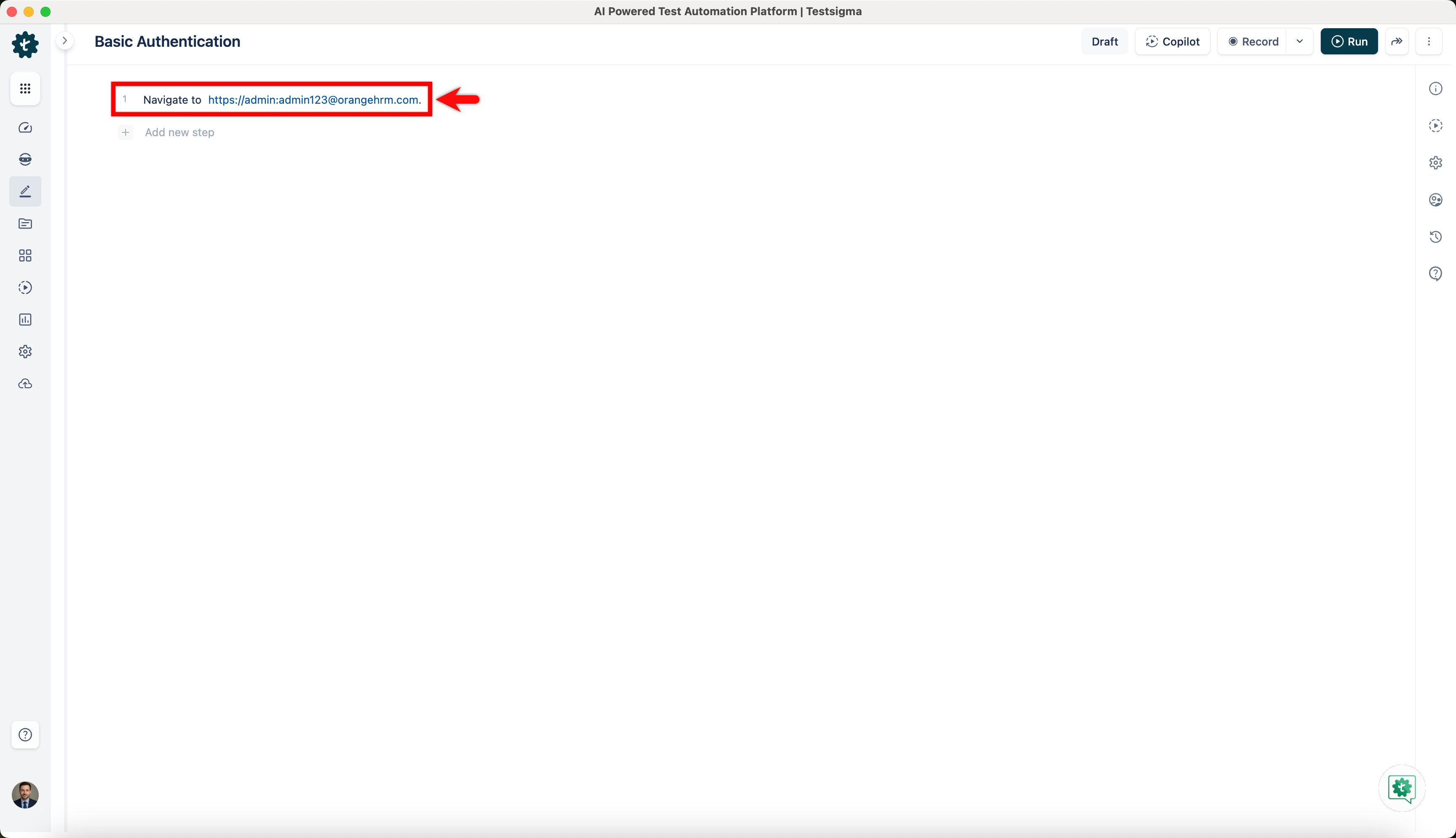
When we navigate to the host URL, the browser automatically sends the credentials for Authentication. We need to use HTTPS to secure sensitive information.
Reducing Execution Time on Safari in Mobile Web
When testing web applications on Safari or mobile browsers, passing credentials directly in the URL (for example, https://admin:admin123@orangehrm.com) may increase step execution time.
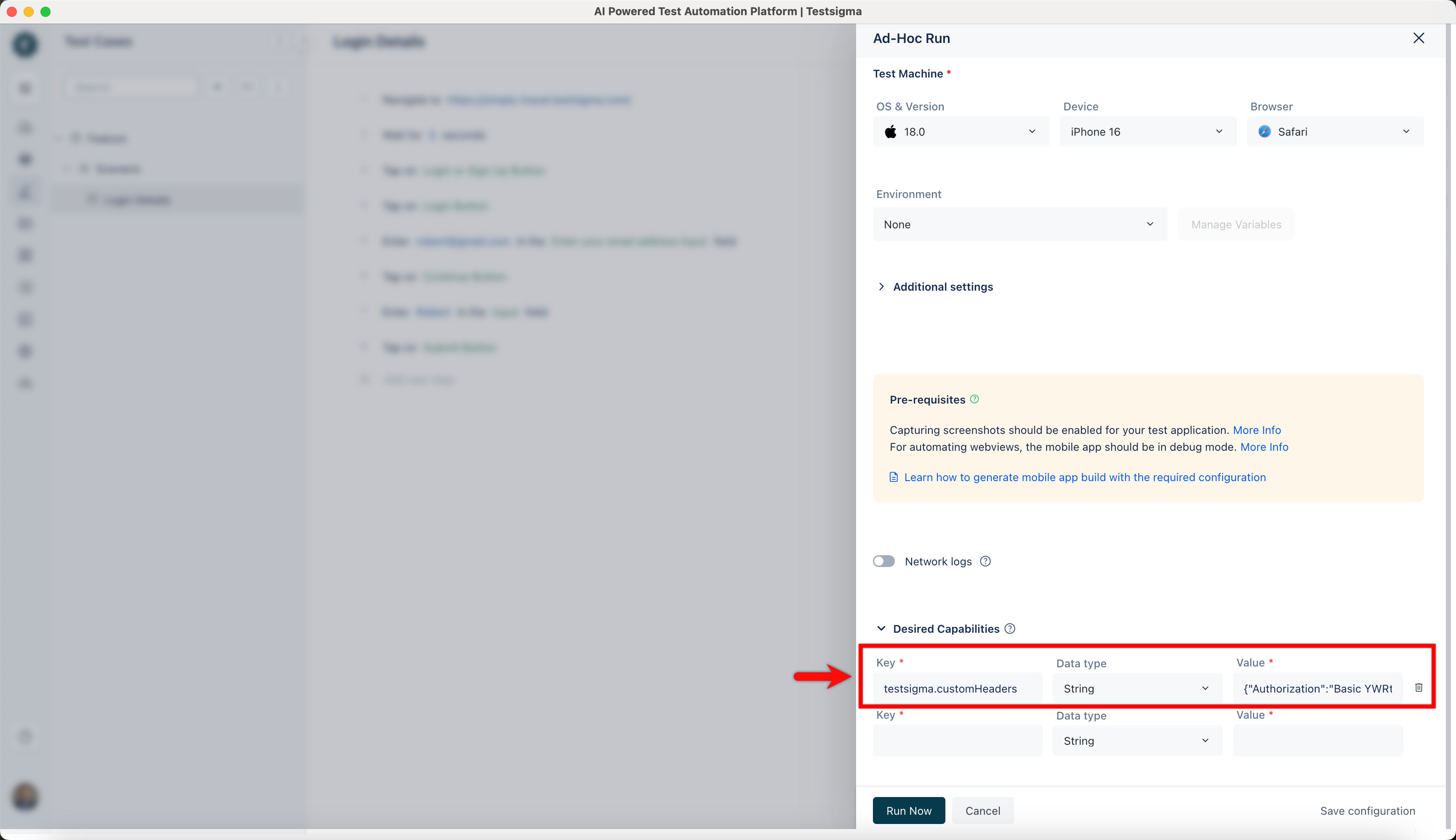
To overcome this and speed up execution, instead of passing the credentials in the URL, we can pass them as a custom header using Desired Capabilities.
Configuration
| Key | Type | Value |
|---|---|---|
| testsigma.customHeaders | String | {"Authorization":"Basic YWRtaW46YWRtaW4xMjM="} |
Steps to Generate Base64 Credentials
Combine the username and password in the format username:password, and then convert this string to Base64 encoding.
For Example:
In the URL: https://admin:admin123@orangehrm.com
Username: admin
Password: admin123
Base64 encoded value: YWRtaW46YWRtaW4xMjM=
You can generate the Base64 encoded value using any standard online Base64 encoding tool.
Once the desired capability is set, the browser authenticates through the header and prevents the additional execution delay observed in Safari.

Want to contribute or report missing content?