- Testsigma REST APIs
 Manage Environments
- Elements
- Test Plans
- Upload Files
- Get Project Wide Information
- Upload & Update Test Data Profile
- Fetch Test Results (All Levels)
- Export Test Reports Using the API
- Trigger Multiple Test Plans
- Trigger Test Plans Remotely & Wait Until Completion
- Run the Same Test Plan Multiple Times in Parallel
- Schedule, Update & Delete a Test Plan Using API
- Update Test Case Results Using API
- Create and Update Values of Test Data Profile Using REST API
- Rerun Test Cases from Run Results using API
- Salesforce Metadata Refresh Using API
- Manage Test Steps Using API
Trigger Test Plans Remotely
You can use Testsigma API to trigger test executions remotely. This is useful when you want to fully automate continuous testing within your CI/CD pipeline, and have already integrated Testsigma with a CI tool you use, such as Jenkins, TravisCI, GitLab, Codeship, and CircleCI.
Prerequisites
Before you begin, ensure that you have referred to:
- Documentationon generating API keys from Testsigma application.
- Documentation on managing test plans.
Trigger Test Plans Using API
This endpoint allows users to trigger a Test Plan execution remotely.
| Request Type | POST |
|---|---|
| Endpoint | https://app.testsigma.com/api/v1/execution_results |
| Authorization | Bearer <api_token> <api_token> is the same as the Testsigma API Key mentioned above. |
| Request Body Type | JSON |
| Request Body | { "executionId": "executionConfig" : { "name": "config 2" "id": "2" } "uploadVersions": { "<DeviceID>": "<UPLOADVERSION_ID> " } } |
| Response Body | { "id": 337, "execution": null, "executionId": 274, "startTime": 1633612675726, "endTime": null, "duration": null, "result": "QUEUED", "status": "STATUS_CREATED", "message": "Test Plan execution is initiated and waiting to be queued", "executedBy": 43, "buildNo": null, "environmentId": null, "totalCount": 0, "failedCount": 0, "passedCount": 0, "abortedCount": 0, "stoppedCount": 0, "notExecutedCount": 0, "preRequisiteFailedCount": 0, "queuedCount": 0, "isVisuallyPassed": null, "environment": null, "childResult": null, "reRunParentId": null, "reRunType": null, "triggeredType": "API", "totalRunningCount": 0, "executionDetails": { "page_timeout": 30, "element_timeout": 30, "recovery_action": "Run_Next_Testcase", "on_aborted_action": "Reuse_Session", "screenshot_option": "FAILED_STEPS", "group_prerequisite_fail": "Abort", "test_case_prerequisite_fail": "Abort", "test_step_prerequisite_fail": "Run_Next_Testcase", "global_param_name": null }, "totalQueuedCount": 0 } |
Request/Response fields
- executionId: ID of the Test Plan
- result: Result Status of the Test Plan - QUEUED, PASSED, FAILED, ABORTED, or STOPPED
- status: Current Status of the Test Plan creation - STATUS_CREATED
- executedBy: ID of the executor
- buildNo: Build Number specified in the Test Plan Trigger call
- isVisuallyPassed: Whether visual testing passed or not. True or False.
- environment: Environment parameter selected for the Test Plan
- triggeredType: Triggered type for the Test Plan whether by API or via Testsigma App
- totalRunningCount: Total number of running tests
- page_timeout: Global Page load timeout in seconds
- element_timeout: Global Element load timeout in seconds
- recovery_action: Action to be performed on test failure - "Run_Next_Testcase"
- on_aborted_action: Action to be performed on test abort - "Reuse_Session"
- screenshot_option: When to take screenshots - "FAILED_STEPS", “ALL_STEPS”, “NONE”
- group_prerequisite_fail: Action to perform on Test Suite prerequisite failure
- test_case_prerequisite_fail: Action to perform on Test Case prerequisite failure
- test_step_prerequisite_fail: Action to perform on Test Step prerequisite failure
- totalQueuedCount: Total number of queued tests
- Execution Config name and ID are the saved configurations for Partial Test Plan Runs.
- In the POST request, you can either use the name or the ID for the Execution Config.
- Get the Execution Config ID and name via this GET Request: https://testsigma.com/docs/api/test-plans/#get-test-plan-favouritesconfig
All the remaining fields are either self-explanatory or can be ignored.
For a Test Plan, you can get the Test Plan ID and the complete cURL request to trigger the execution from the Test Plan Details page:
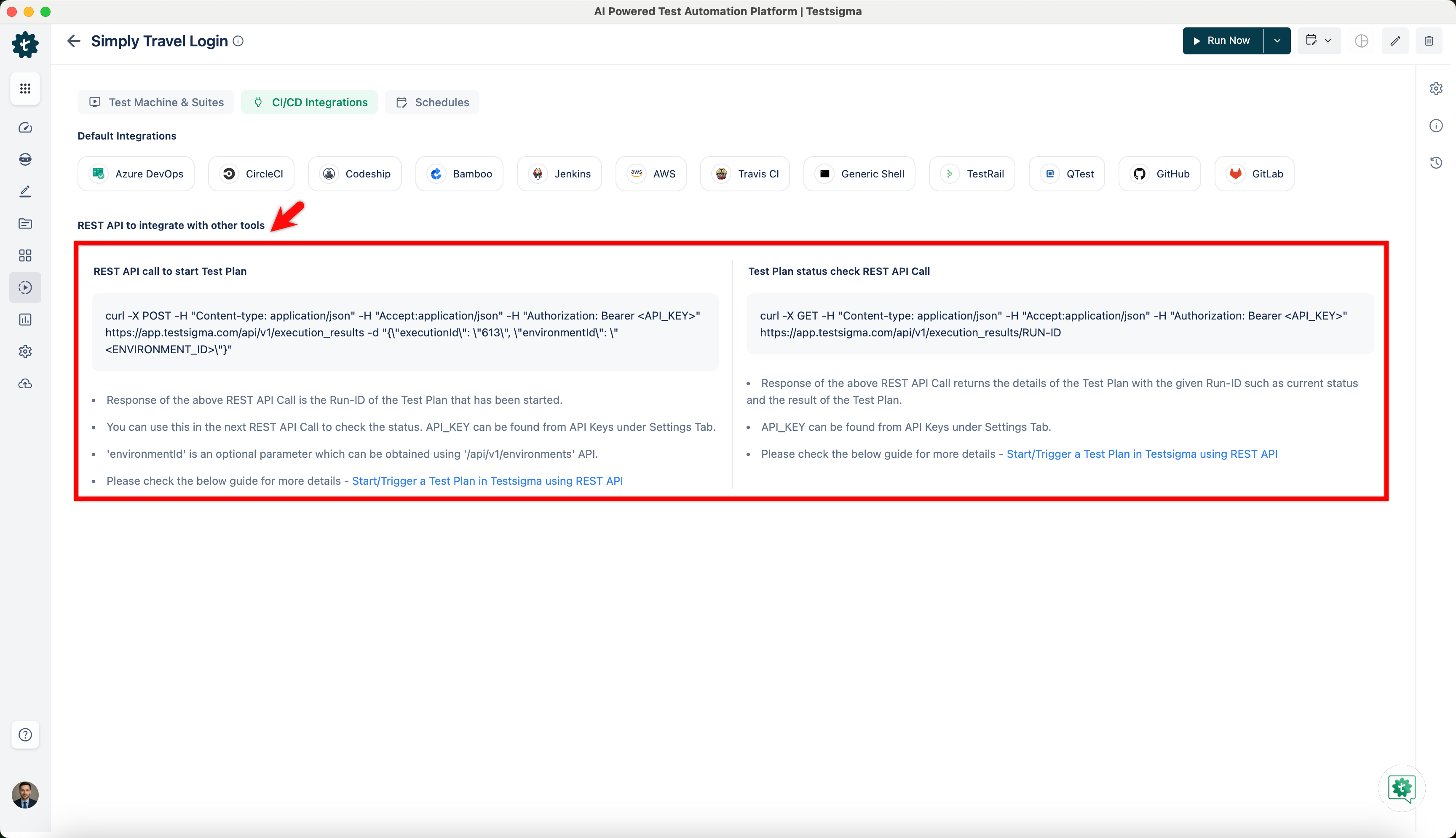
The Run ID is returned as ‘id’ in the response for the request if the execution was started successfully.
The Environment ID is optional. To know how to get an environment id, refer to the documentation on getting an environment ID
Test Plan Status
Each Test Plan Run in Testsigma has a unique Run ID. This Run ID can be used to check the live status of the Test Plan Run or Test Plan Status.
You need to authenticate these requests with your Testsigma API Key. Refer to the documentation on generating API keys
Trigger Test Plans in Different Environments
To execute a test plan with different Environments, you need to have an Environment ID. You can find the Environment ID by following the steps below.
Get Environment ID
- Navigating to Test Data > Environments, and click on an Environment.
- On the Environment page, the <ENVIRONMENT_ID> in the URL
https://app.testsigma.com/ui/td/103/environments/<ENVIRONMENT_ID>/detailsis the ID of the environment.
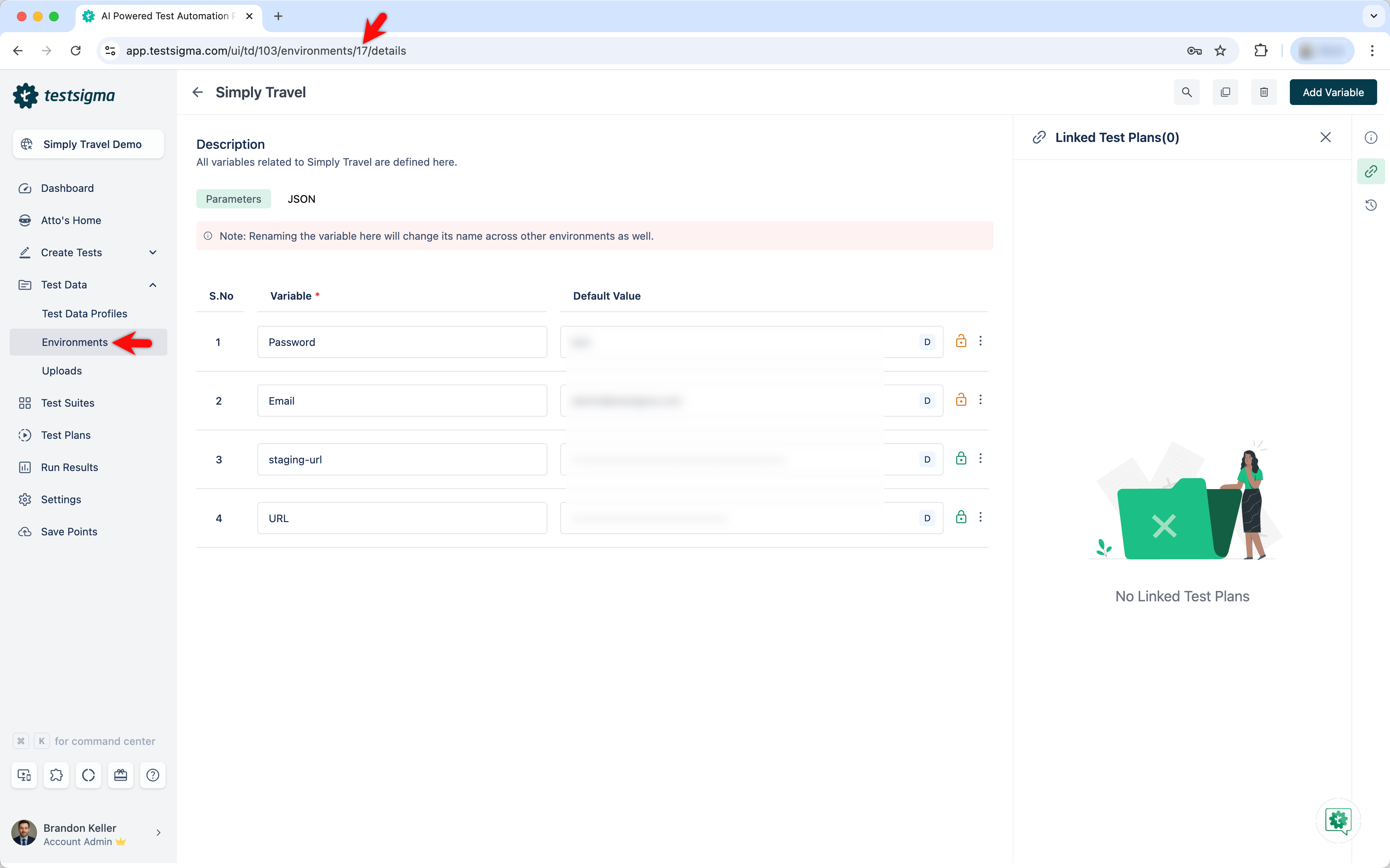
- For Example, if the URL is
https://app.testsigma.com/ui/td/88/environments/10/details, the ID is 10.
Executing Tests Plans with Different Environments
- Navigate to Test Plans > Test Plan > CI/CD Integrations, and copy CURL request under REST API to integrate with other tools > REST API call to start Test Plan.
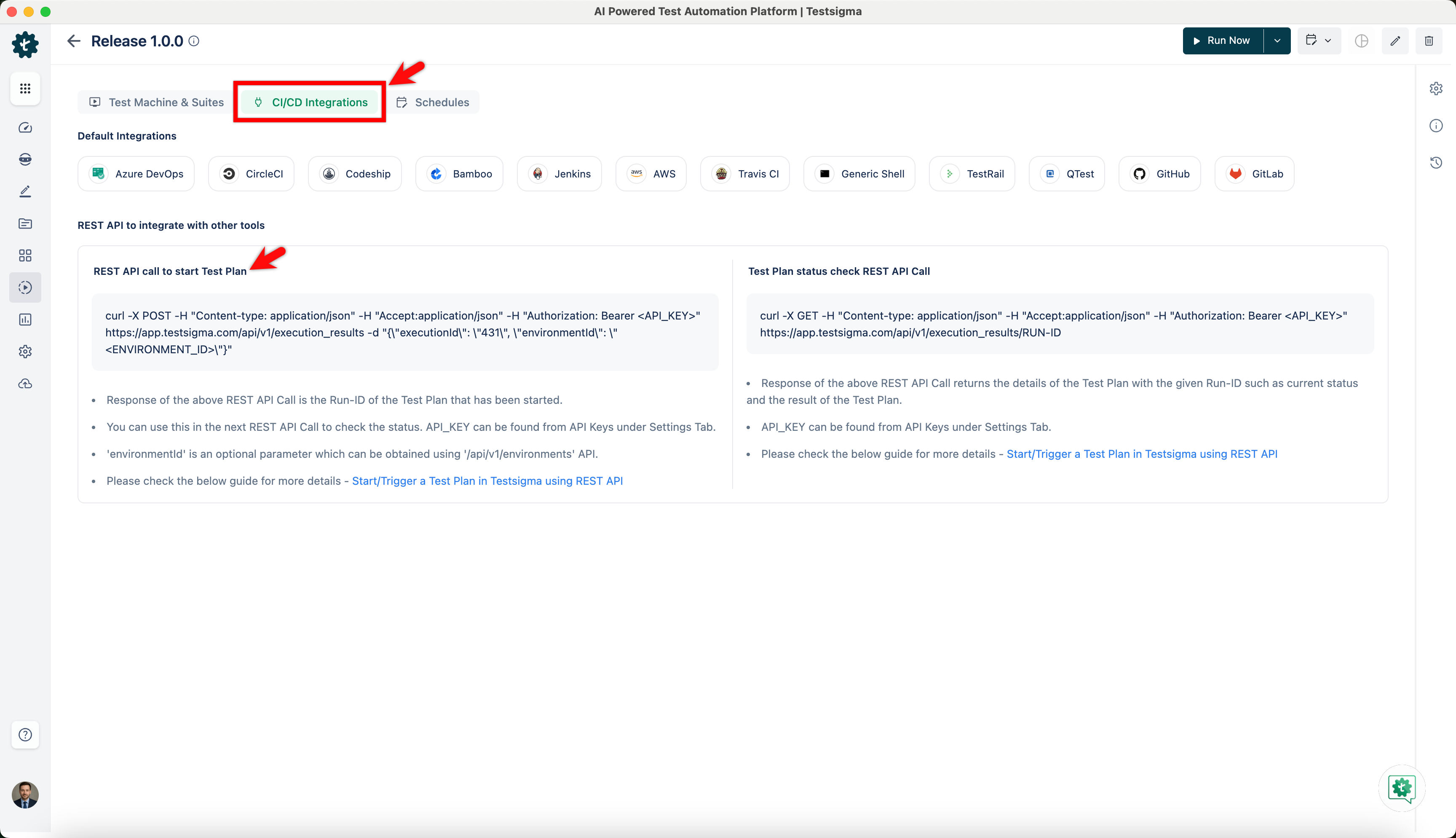
- Provide the Environment ID in the request body.
curl -X POST \
-H "Content-type: application/json" \
-H "Accept:application/json" \
-H "Authorization: Bearer <API_KEY>" \
https://app.testsigma.com/api/v1/execution_results \
-d "{\"executionId\": \"431\", \"environmentId\": \"<ENVIRONMENT_ID>\"}"
You can execute this CURL command in your computer's command-line interface (CLI) to trigger test plan with the environment specific to the given ID.
Obtaining the Run ID
If the Test Plan Run was started from within the Testsigma App, the Run ID can be found from the Run Results page as shown below:
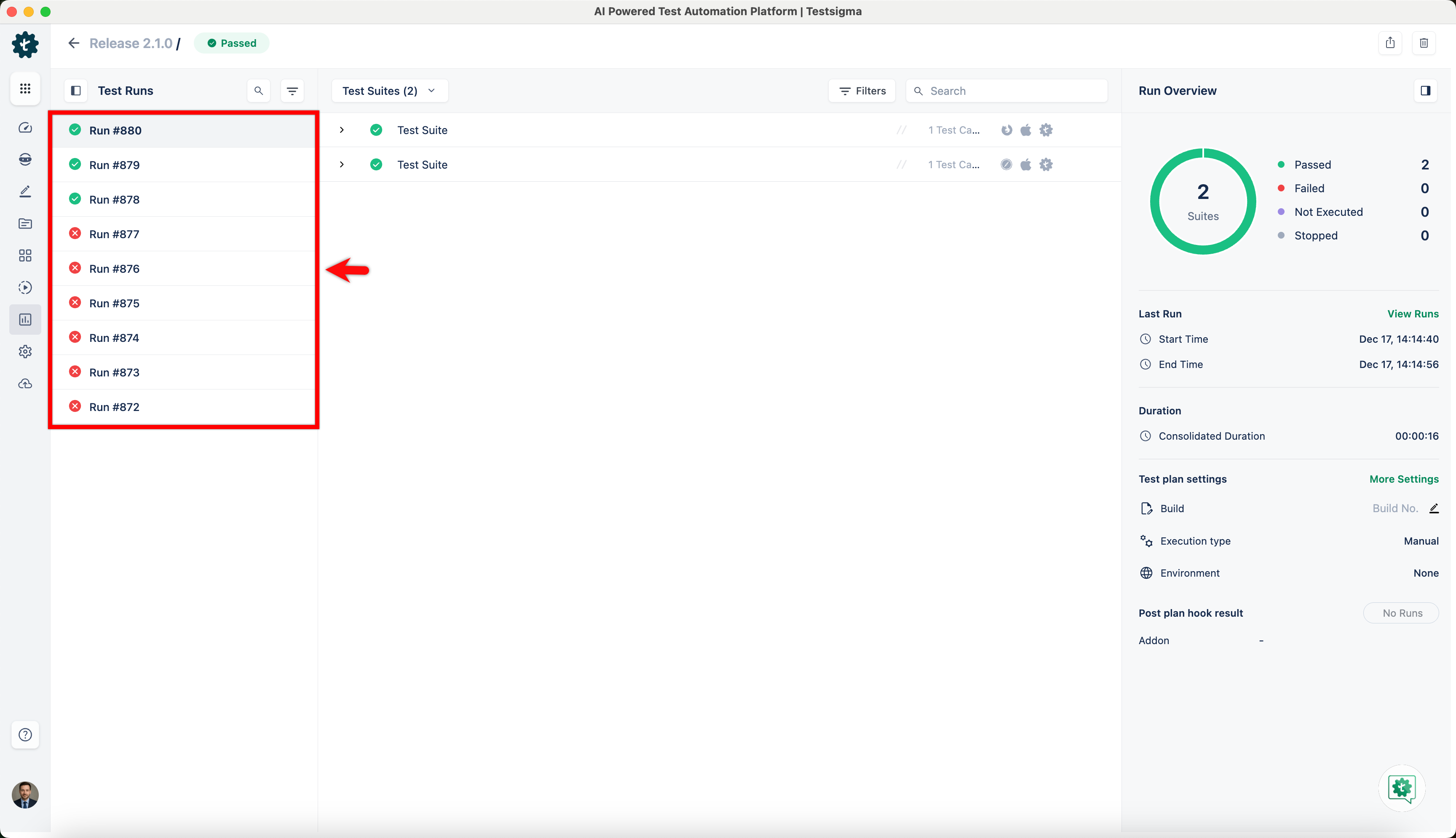
The values from 295 to 299 are Run IDs of consecutive Test Plan Runs.
If the Test Plan was started by the Test Plan Trigger API Call, the Run ID can be obtained from the API Response under the JSON key ‘id’.
Test Plan Status API
This endpoint allows users to check the status of an already triggered Test Plan Run.
| Request Type | GET |
|---|---|
| Endpoint | https://app.testsigma.com/api/v1/execution_results/<run_id> The <run_id> can be obtained from the Run Results or API Response as mentioned above. |
| Authorization | Bearer <api_token> The <api_token> is the same as the Testsigma API key mentioned above. |
| Response Body | { "id": 302, "execution": { "id": 274, "applicationVersionId": 39, "name": "Test Plan Trigger REST API", "description": null, "mailList": null, "elementTimeOut": 30, "pageTimeOut": 30, "environmentId": null, "screenshot": "FAILED_STEPS", "recoveryAction": "Run_Next_Testcase", "onAbortedAction": "Reuse_Session", "onSuitePreRequisiteFail": "Abort", "onStepPreRequisiteFail": "Run_Next_Testcase", "reRunType": "NONE", "executionLabType": "TestsigmaLab", "executionType": "CROSS_BROWSER", "isManual": false, "lastRunId": 343, "applicationVersion": { "id": 39, "applicationId": 25, "versionName": "Default Version", "description": null, "startTime": null, "customFields": null, "endTime": null, "application": { "id": 25, "name": "Simply Travel (Demo)_Web Application", "description": "", "customFields": "{}", "projectId": 11, "applicationType": "WebApplication", "project": { "id": 11, "name": "Simply Travel (Demo)", "description": "Demo application. Feel free to delete", "customFields": "{"Custom Field 1":[null,null]}", "hasMultipleApps": true, "hasMultipleVersions": true, "isDemo": true, "projectType": "WebApplication", "createdBy": 9, "updatedBy": 9, "createdDate": 1567751924000, "updatedDate": 1633635344000, "files": null }, "createdById": 9, "updatedById": 9, "createdDate": 1567751924000, "updatedDate": 1568613490000 }, "updatedDate": null, "createdById": 9, "updatedById": null, "createdDate": 1567751924000 }, "lastRun": null, "slack": { "enabled": null, "channel": null, "user_name": null }, "createdDate": 1633510913000, "updatedDate": 1633617938000, "createdById": 9, "updatedById": 9, "matchBrowserVersion": false, "visualTestingEnabled": false, "notificationStatusList": [], "msTeamsConnectorNotificationEnabled": false, "googleChatConnectorNotificationEnabled": false, "environments": [], "retrySessionCreation": false, "retrySessionCreationTimeout": null, "onTestCasePreRequisiteFail": "Abort" }, "executionId": 274, "startTime": 1633512584000, "endTime": 1633512598000, "duration": 13647, "result": "FAILURE", "status": "STATUS_COMPLETED", "message": "Test plan execution failed", "executedBy": 43, "buildNo": "1.9.26_rc1", "environmentId": null, "totalCount": 1, "failedCount": 1, "passedCount": 0, "abortedCount": 0, "stoppedCount": 0, "notExecutedCount": 0, "preRequisiteFailedCount": 0, "queuedCount": 0, "isVisuallyPassed": null, "environment": null, "childResult": null, "reRunParentId": null, "reRunType": null, "triggeredType": "API", "totalRunningCount": 0, "executionDetails": { "page_timeout": 30, "element_timeout": 30, "recovery_action": "Run_Next_Testcase", "on_aborted_action": "Reuse_Session", "screenshot_option": "FAILED_STEPS", "group_prerequisite_fail": "Abort", "test_case_prerequisite_fail": "Abort", "test_step_prerequisite_fail": "Run_Next_Testcase", "global_param_name": null }, "totalQueuedCount": 0 } |
Request/Response fields
- Id: ID of the Test Plan Result
- Execution: The Test Plan details are located within the nested Execution JSON Object including the Test Plan ID as “id”, Application Version ID as "applicationVersionId”, Test Plan name as "name", Test Plan Description as "description" and so on.
- result: Result Status of the Test Plan - QUEUED, PASSED, FAILED, ABORTED, or STOPPED
- status: Current Status of the Test Plan creation - STATUS_CREATED
- executedBy: ID of the executor
- buildNo: Build Number specified in the Test Plan Trigger call
- isVisuallyPassed: Whether visual testing passed or not. True or False.
- environment: Environment parameter selected for the Test Plan
- triggeredType: Triggered type for the Test Plan whether by API or via Testsigma App
- totalRunningCount: Total number of running tests
- page_timeout: Global Page load timeout in seconds
- element_timeout: Global Element load timeout in seconds
- recovery_action: Action to be performed on test failure - "Run_Next_Testcase"
- on_aborted_action: Action to be performed on test abort - "Reuse_Session"
- screenshot_option: When to take screenshots - "FAILED_STEPS", “ALL_STEPS”, “NONE”
- group_prerequisite_fail: Action to perform on Test Suite prerequisite failure
- test_case_prerequisite_fail: Action to perform on Test Case prerequisite failure
- test_step_prerequisite_fail: Action to perform on Test Step prerequisite failure
- totalQueuedCount: Total number of queued tests
All the remaining fields are either self-explanatory or can be ignored.
The Response contains a lot of information regarding the Test Plan Run.
You can see the result as FAILURE and the current status as STATUS_COMPLETED (along with other information).
GET Test Plan Favourites/Config
This endpoint allows users to get all the Test Plan Favourites/Config that have been set. To know more on how to create these Test Plan Favourites/Configurations refer to the documentation on executing partial test runs.
| Request Type | GET |
|---|---|
| Endpoint | https://app.testsigma.com/api/v1/saved_execution_configs |
| Authorization | Bearer <api_token> The <api_token> is the same as the Testsigma API key mentioned above. |
| Response Body | [ { "id": 2, "name": "rest conf inc 1", "query": "[{"key": "suiteId", "value": [114], "operation": "NOTIN"}]", "executionConfigType": "SAVEDCONFIG", "executionConfigCondition": "EXCLUDED", "createdByUser": null }, { "id": 3, "name": "plan o1 exclude 2", "query": "[{"key": "suiteId", "value": [132, 130], "operation": "NOTIN"}]", "executionConfigType": "SAVEDCONFIG", "executionConfigCondition": "EXCLUDED", "createdByUser": { "id": 9, "email": "bhanu@qateamtestingsprint.com", "firstName": "Bhanu", "lastName": "prakash", "userName": "bhanu", "status": "Active", "isDeleted": false, "isAdmin": true, "isSuperAdmin": true, "userType": null, "isAPIUser": false, "isCrowdUser": false, "isMasked": false, "gdpr": false, "createdDate": 1657951985000, "updatedDate": 1657951992000, "createdById": null, "updatedById": 9, "privileges": [], "authType": null, "identityServiceId": "7308" } }, { "id": 4, "name": "update inc to exc 2 suites to 3 suites", "query": "[{"key": "suiteId", "value": [132, 131, 130], "operation": "NOTIN"}, {"key": "reviewedBy", "value": [9], "operation": "NOTIN"}, {"key": "assignee", "value": [9], "operation": "NOTIN"}]", "executionConfigType": "SAVEDCONFIG", "executionConfigCondition": "EXCLUDED", "createdByUser": null } ] |
Test Case Execution details using REST API
This endpoint allows users to get details of all Test case executions using REST API.
| Request Type | GET |
|---|---|
| Endpoint | https://app.testsigma.com/api/v1/execution_results/986/test_case_results |
| Authorization | Bearer <API_Token> Same as the Testsigma API key mentioned above. |
| Request Body | { |

Want to contribute or report missing content?