- Elements (Objects)
- Web Applications
 Record Single Element
- Record Multiple Elements
- Create Elements
- Supported Locator Types
- Formulating Elements
- Shadow DOM Elements
- Verifying elements in Chrome DevTools
- Handling iframe Elements?
- Create Image Based Elements
- Dynamic Locators using Parameter
- Dynamic Locators using Runtime
- Using Environment Test Data for Dynamic Locators
- Locating Dynamic Elements in Date Widget
- Freeze & Inspect Dynamic Elements (WebPage)
- Locating Dynamic Elements in Tables
- Import/Export Elements
- Locator Precedence (Web Apps)
- Verify Elements from Test Recorder
Using Environment Test Data for Dynamic Locators
In Testsigma, one of the ways we can automate the testing of dynamic elements is by using parameterized XPath. We assume you are familiar with the different types of Test Data used in Testsigma. If not, please refer to the documentation on different test data types in Testsigma.
We can use Environment Parameters to parameterize the locator similar to how we use test data profiles. For more information on using parameter test data to create dynamic locators, refer to the documentation on using Parameter Test Data to create dynamic locators.
In this article, we will be outlining how to create dynamic locators using Environment parameters.
Using Environment Test Data to parameterize locators
Suppose we need to locate the below element with the username text i.e ‘admin’:
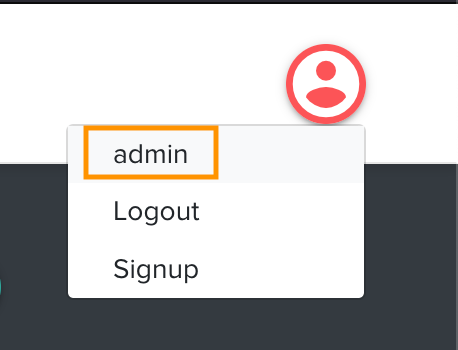
An XPath locator using the text for the element would be //div[ text()=‘admin’ ]
Let’s assume that this username would be different for different Environments as shown below:
| Environment Name | Environment Parameters |
|---|---|
| Dev | {“Username”: “dev-admin”} |
| Staging | {“Username”: “staging-admin”} |
| QA | {“Username”: “qa-admin”} |
Here, we can make the XPath dynamic by taking the username from the Environment Parameter as demonstrated below: //button[text()=’*|username|’]
With the above dynamic locator, the locator value would be dynamically updated at runtime and the environment variable would be translated to its actual value as shown below:
| Selected Environment Name | Dynamic Element locator value at Test Runtime |
|---|---|
| Dev | //button[text()=’dev-admin’] |
| Staging | //button[text()=staging-admin’] |
| QA | //button[text()=’qa-admin’] |

Want to contribute or report missing content?