- web apps
 Why Install Chrome Extension?
- Steps to Test Locally Hosted Apps
- How to Turnoff Onboading Tutorial?
- Non-Text Keys in Test Cases
- Basic Authentication for Web
- Why Bypass CAPTCHA?
- Test Case Failures Due to Link Text Capture Issues
- Why Is a Single Video for All Test Cases in a Test Plan Unavailable in Some Cases?
- How to Handle Browser-Related Permission Issues?
- Why Can’t Selenium ChromeDriver Interact With 3DS Authentication Pages?
- What Should I Do If My Browser Blocks Local Network Access?
- Why Am I Getting an Error While Registering the Agent?
- Why Does the Try Again Error Appear While Installing the Testsigma Agent in a Proxy Environment?
- How to Enable IE Mode in Microsoft Edge?
- mobile apps
- Apple Pay Automation with Testsigma
- How do I Enhance the Execution Speed for Mobile Native Apps?
- Why am I Facing Permission Error During Local Test Execution?
- How to Resolve App Launch Issues?
- Why does the iOS App Close Right After Opening in Testsigma?
- How to Execute Android/iOS Tests in Emulators/Simulators?
- Why Does Scroll to Element Fail in Mobile Native Apps and How Do I Fix It??
- FAQs on Unified Mobile
- general
- Why am I Unable to Download the XLS File from the Edge Browser?
- How to Handle Browser-Related Pop-Up Issues?
- How to Handle Text-Based CAPTCHA in Testsigma?
- Why does Test Execution Fail with the Error No Route to Host?
- Why do Errors Occur When I Try to Download Files from The Exports Page?
- How to Test Flutter Apps Using Accessibility Mode?
- How to Add Multiple Runtime Variables in Data Generator Functions?
- How to Insert Test Data in RAW Body for POST API?
- What is Chrome for Testing and How Does it Work?
- How Can I Set Up Authenticator-Based Authentication in Testsigma?
- How to Update an Excel File in Testsigma Uploads?
- What Causes Longer Automation Test Execution Times in a Test Plan?
- How Do I Retrieve the OTP When it’s Embedded within HTML Tags?
- How to Configure the OracleDB Add-on in Testsigma?
- FAQs on Classic & Modern Engines
Apple Pay Automation with Testsigma
Apple Pay Automation is a complex process that requires careful implementation due to Apple's rigorous security standards and testing challenges. This article discusses the automation process for Apple Pay, including key considerations and implementation steps.
Device Compatibility
Apple Pay automation is currently limited to a specific set of devices. Ensure you verify the exact device compatibility before proceeding.
List of compatible devices :
| Devices Supported for Apple Pay | iOS Version |
|---|---|
| iPhone 15 | 17 |
| iPhone 14 | 16 |
| iPhone 14 Pro | 16 |
| iPhone 13 Pro Max | 15 |
| iPhone 13 Pro | 15 |
| iPhone 13 Mini | 15 |
| iPhone 13 | 15 |
| iPhone 11 Pro | 15 |
| iPhone 11 | 15 |
| iPhone XR | 15 |
Implementation Process with Testsigma
Implementation with Testsigma is simple and straightforward.
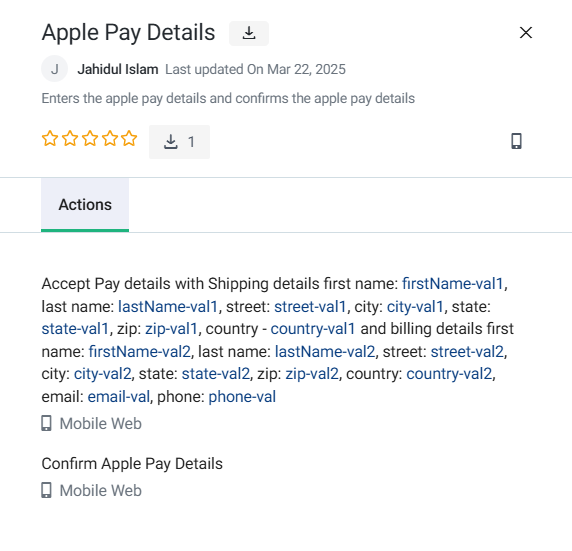
- Download the addon: Testsigma has an built-in addon to automate this flow, you can download the addon and use the addon inside your test step. The addon screenshot is added below
-
Add Desired capability: Before you execute the test case, you can add the desired capability listed below and choose the compatible devices shared in the previous list.
Key Data Type Value enableApplePay String true appiumVersion String 1.21.0 deviceName String iPhone 15 osVersion String 17.0
Key Consideration
When defining Apple Pay details, follow these best practices to ensure compatibility with the test environment:
-
Address Information:
- Only include relevant parameters for the shipping and billing addresses.
- Remove parameters that are not applicable. For instance, if your test address does not include a province value, exclude the
provinceparameter from your script.
-
Geographical Codes:
- Use the appropriate geographical code based on your address format and what the device accepts.
- Choose from one of the following:
postalCode,postCode, orzip.
-
Phone Number Format:
- Include the country code prefix with the
+character. -
Examples of valid formats include:
+1-212-456-7890+12124567890
- Include the country code prefix with the
-
Session Failures:
- If your session fails due to incorrect address parameters, adjust the geographical code accordingly.
- For instance, if your address uses the zip parameter but the device expects
postalCodeorpostCode, modify the script and re-run the test to identify the accepted format.
Regional Limitations for Apple Pay Testing
On testsigma iOS devices, testing with Apple Pay is limited to the following regions:
| Geography | Country |
|---|---|
| North America | United States, Canada |
| Europe | France, Ireland, Italy, Spain, UK, Germany |
| Asia | China Mainland, Hong Kong, Taiwan, Japan, Russia, Singapore |
| Australia | Australia, New Zealand |

Want to contribute or report missing content?