- Test Data Types
 Raw
Raw- Parameter
- Runtime
- Random
- Data Generator
- Phone Number
- Mail Box
- Environment
- Concat Test Data
- Folder Structure for Test Data Profiles
- Create Test Data Profile
- Update Test Data Profile
- Update Value in Test Data Profile
- Import Test Data Profile
- Bulk Deletion of a Test Data Profile
- Create Test Data [Environment]
- data generators
- Default Test Data Generators
- Address Function Type
- ChangeDataType Function Type
- Company Function Type
- DateFunctions Function Type
- DomainFunctions Function Type
- EmailFunctions Function Type
- File Function Type
- Friends Function Type
- IdNumber Function Type
- Internet Function Type
- MailboxAliasFunctions Function Type
- MailboxFunctions Function Type
- Name Function Type
- NameFunctions Function Type
- Number Function Type
- NumberFunctions Function Type
- Phone Number Function Type
- PhoneNumberFunctions Function Type
- Random String Function Type
- RandomText Function Type
- StringFunctions Function Type
- TestDataFromProfile Function Type
Company Function Type
Company Functions are data generator tools that create realistic company-related data elements. These functions generate company names, suffixes, industries, professions, buzzwords, catchphrases, business strategy phrases, and logo URLs. This enables you to create comprehensive company profiles for testing and development purposes.
Prerequisites
Before you begin, ensure that you have referred to:
Selecting Company as a Function Type for Data Generator
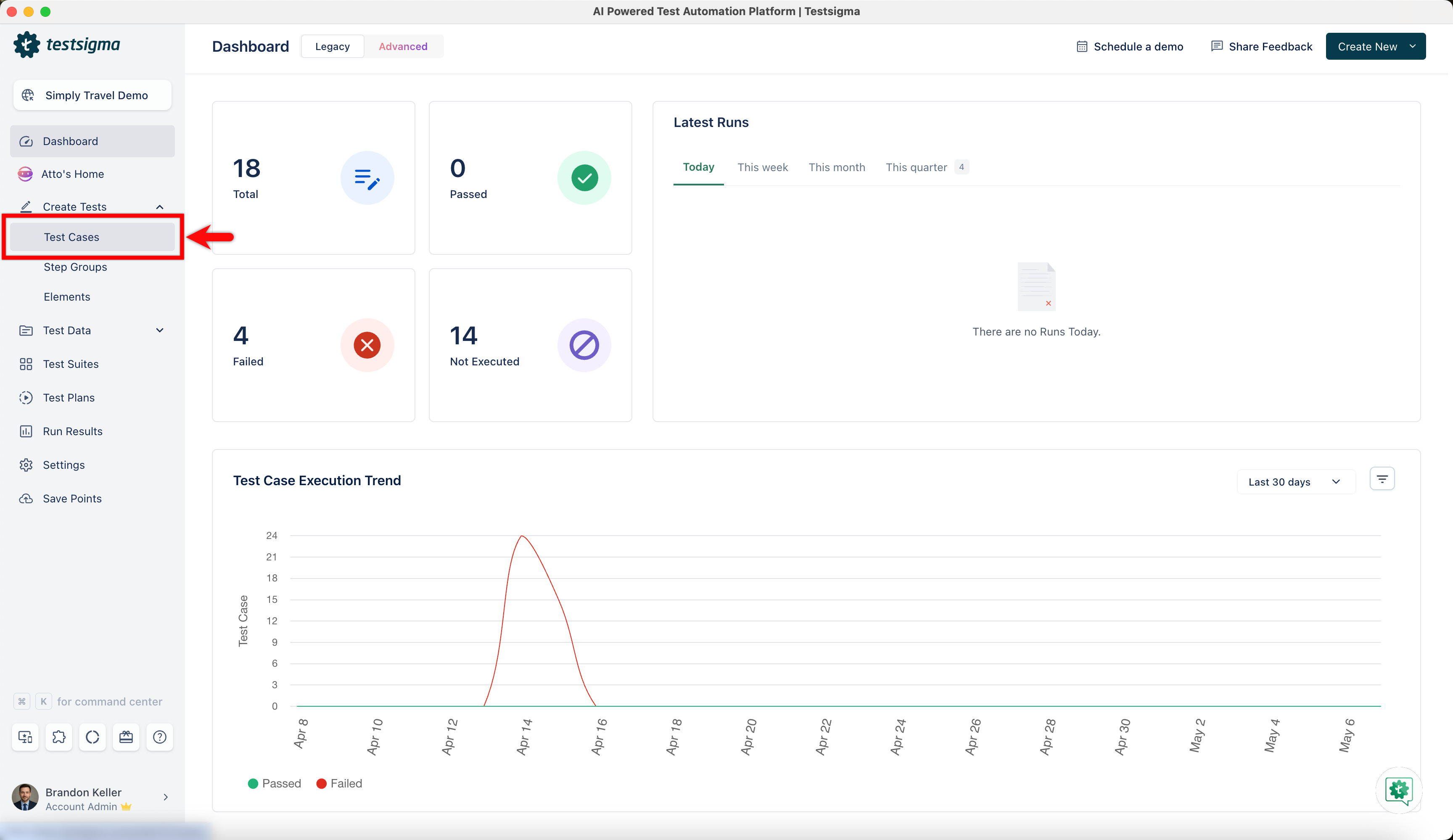
- From the left navigation bar, go to Create Tests > Test Cases and create a new test case.
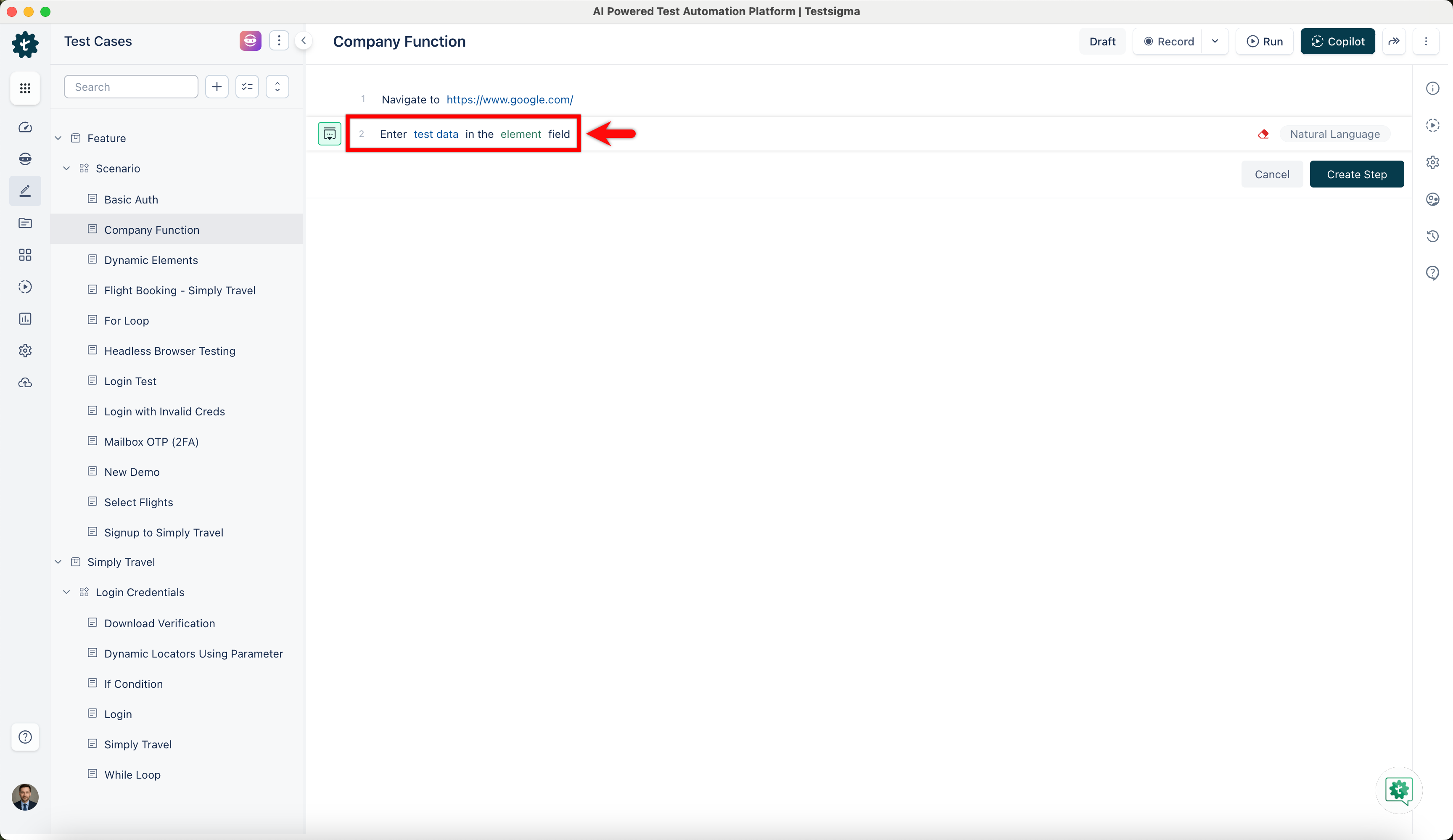
- Use NLP to create a new step in the test case and include a placeholder for test data.
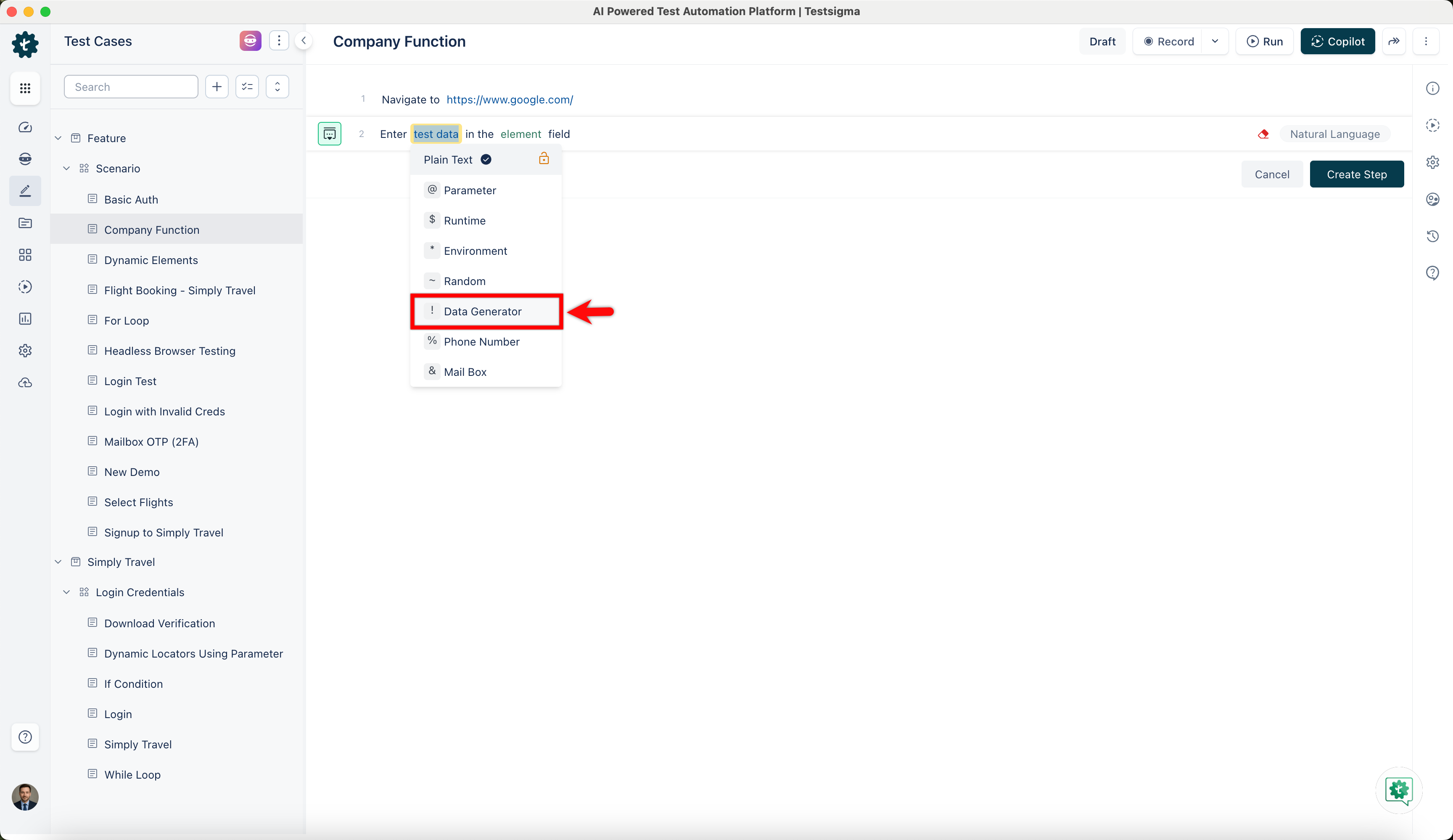
- Click on the test data placeholder. From the Test Data Types dropdown menu, select the ! Data Generator option.
- On the ! Data Generators overlay screen, select the Type to Default. This will enable you to use a collection of built-in test data generators.
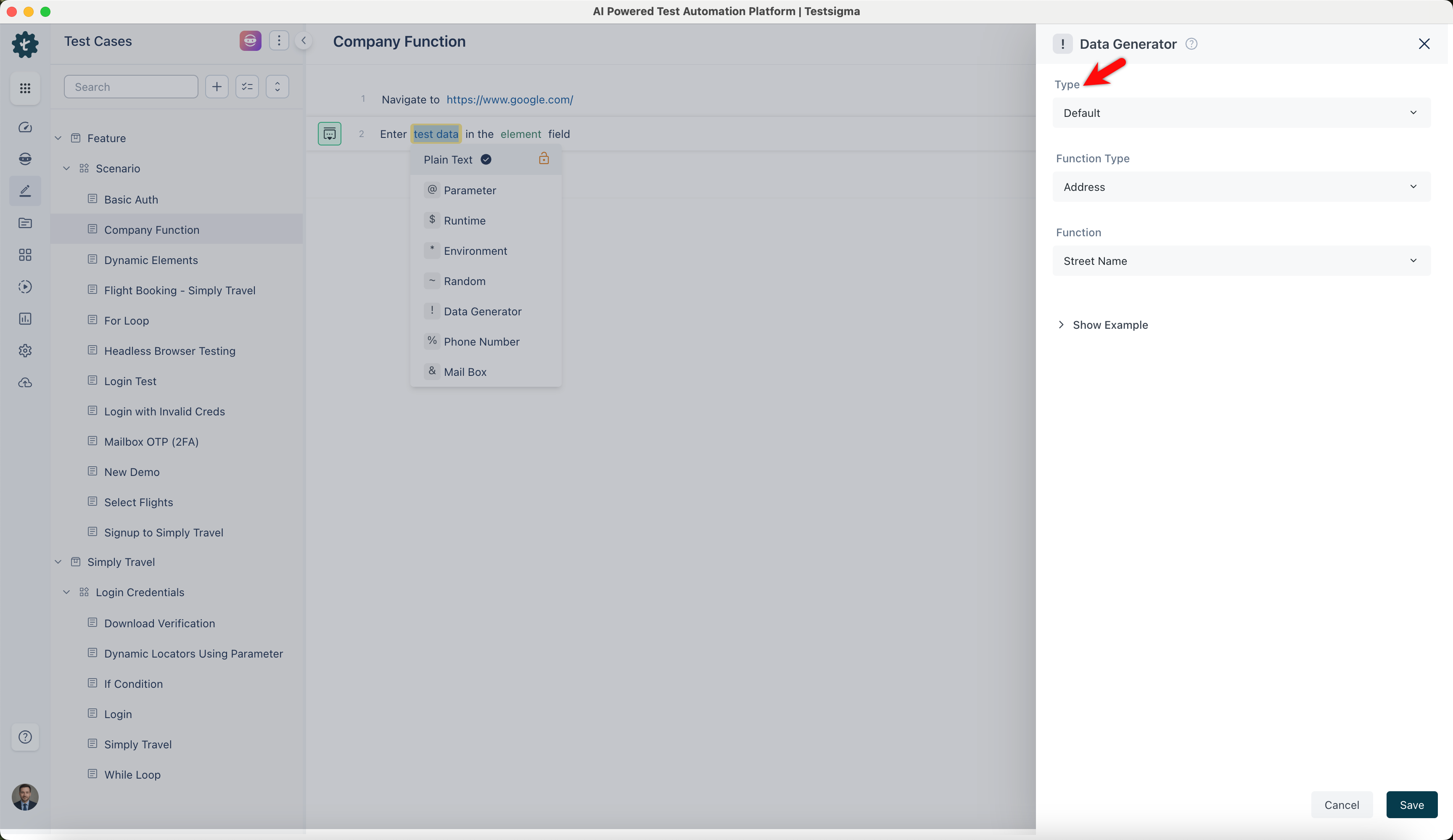
- Select Company from the Function Type dropdown list.
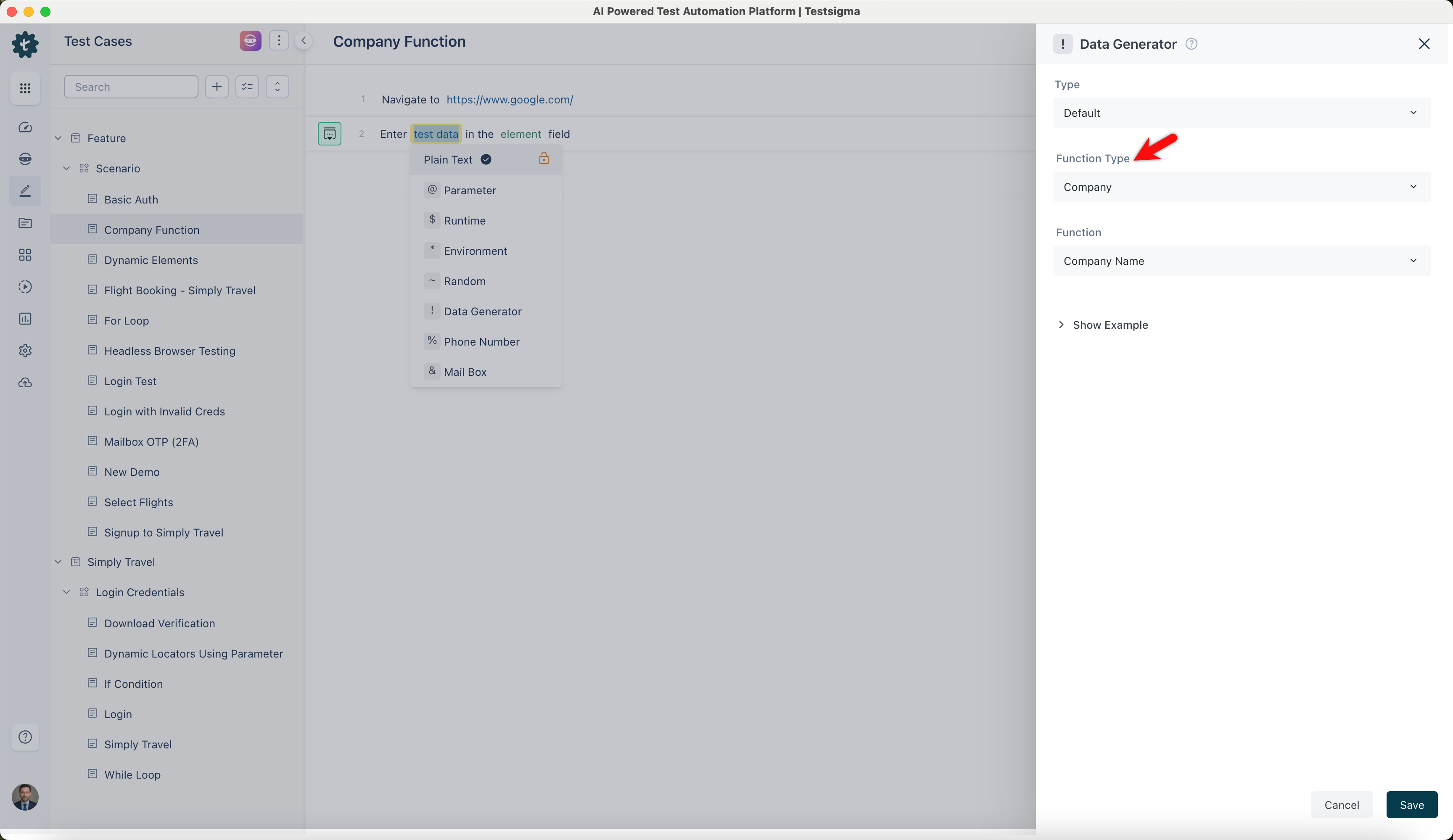
NOTE:
This action will display a list of built-in functions associated with the Company function type, enabling you to select the appropriate function based on your requirements.
Name
- Enables you to generate a random company name to provide realistic names for fictional companies. It is useful for generating sample company names in forms, applications, and databases.
ℹ️Example:
- Input: None (This function does not require any specific input)
- Output:
- Tech Innovations Inc.
- Global Healthcare Solutions
- Quantum Dynamics Group
- Innovative Financial Strategies
Suffix
- Allows you to generate a random company suffix to add common legal suffixes to company names. This is ideal for completing company names in legal documents, business forms, and official records.
ℹ️Example:
- Input: None (This function does not require any specific input)
- Output:
- LLC
- Inc.
- Corp.
- Ltd.
Industry
- Enables you to generate a random industry name. This is beneficial for filtering and categorizing companies in databases, market analysis, and business simulations.
ℹ️Example:
- Input: None (This function does not require any specific input)
- Output:
- Information Technology
- Healthcare
- Financial Services
- Manufacturing
Profession
- Allows you to generate a random profession related to the company's industry. This is useful for creating employee profiles, job listings, and role-based testing scenarios.
ℹ️Example:
- Input: None (This function does not require any specific input)
- Output:
- Software Engineer
- Financial Analyst
- Doctor
- Operations Manager
Buzzword
- Enables you to generate a random business buzzword. This is useful for to convey a concept or idea succinctly, often associated with current trends or technology.
ℹ️Example:
- Input: None (This function does not require any specific input)
- Output:
- Disruptive Innovation
- Customer-Centric Approach
- Blockchain Integration
- AI-driven Solutions
Catch Phrase
- Allows you to generate a random company catchphrase using it. It is designed to be catchy, memorable, and often used in marketing campaigns to leave a lasting impression.
ℹ️Example:
- Input: None (This function does not require any specific input)
- Output:
- Empowering Your Future
- Transforming Healthcare Delivery
- Driving Financial Success
- Leading Manufacturing Innovation
BS
- Enables you to generate a random business strategy (BS) phrase. It is useful for testing humor recognition, text processing algorithms, and generating playful business dialogues.
ℹ️Example:
- Input: None (This function does not require any specific input)
- Output:
- Leveraging Agile Methodologies
- Pioneering Data Analytics
- Optimizing Supply Chain Efficiency
- Revolutionizing Customer Experience
Logo
- Allows you to generate a random URL for a company logo. This is useful for testing image display functionality, logo uploads, and visual elements in applications and websites.
ℹ️Example:
- Input: None (This function does not require any specific input)
- Output:
- "https://dummyimage.com/100x100/000/fff&text=Logo1"
- "https://dummyimage.com/100x100/000/fff&text=Logo2"
- "https://dummyimage.com/100x100/000/fff&text=Logo3"
- "https://dummyimage.com/100x100/000/fff&text=Logo4"
Join Sample of Each List
- Enables you to generate Joins samples from multiple lists into one compound word. By combining outputs from Name, Suffix, Industry, Profession, Buzzword, CatchPhrase, BS, and Logo functions, you can rapidly generate complete company profiles.
ℹ️Example:
| Input | Output |
|---|---|
| arg0: Tech Innovations Inc., arg1: Empowering Your Future |
Tech Innovations Inc., Empowering Your Future |
| arg0: Global Healthcare Solutions, Inc., arg1: Transforming Healthcare Delivery |
Global Healthcare Solutions, Transforming Healthcare Delivery |
| arg0: Quantum Dynamics Group, arg1: Driving Financial Success |
Quantum Dynamics Group, Driving Financial Success |
| arg0: Innovative Financial Strategies, arg1: Leading Manufacturing Innovation |
Innovative Financial Strategies, Leading Manufacturing Innovation |

Want to contribute or report missing content?