

Reports
A run result leaves Testsigma 2 ways. Exporting produces a PDF, an Excel sheet, or a JUnit XML file from the application itself. Generating runs a JAR outside the application and produces Allure, JUnit XML, or a PDF built from your own template.
Export from the application
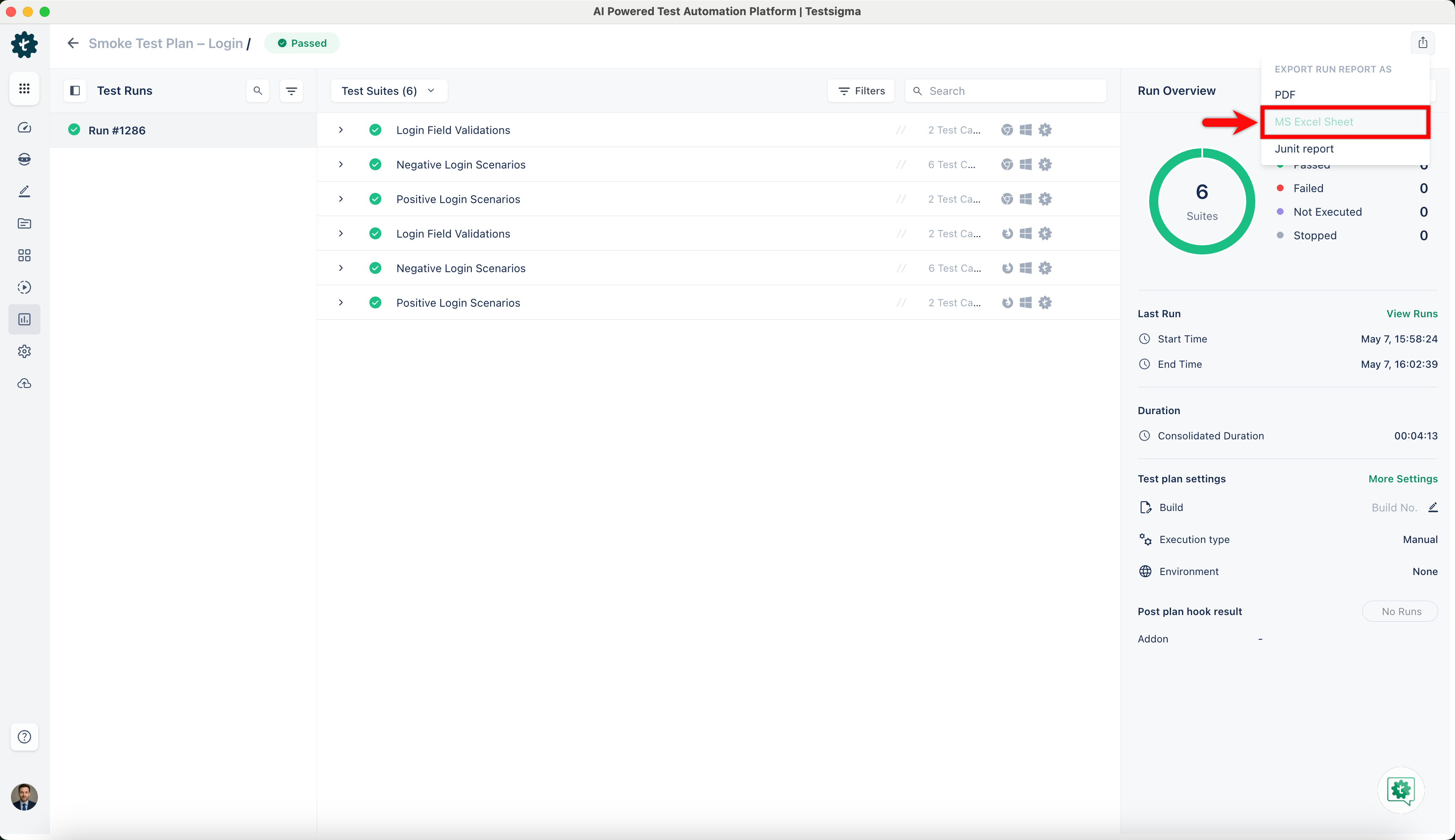
Section titled “Export from the application”Click the Export icon on a run result and select the format.
| Format | How it arrives | Notes |
|---|---|---|
| Generated and downloaded, with an email when it completes | Named (Test Plan Name with build run YYYYMMDD).pdf. Choose Failed Step Screenshots [Recommended], All Screenshots, or No Screenshots in the Export PDF dialog | |
| MS Excel Sheet | A download link sent to your account email | Named (Test Plan Name).xlsx |
| JUnit Report | Downloaded immediately as XML | No dialog |
An exported report carries the names things had when the run executed, so exporting the same run again reproduces the same document. See Results.
To put your logo on a PDF, go to Settings > Customize Reports and turn on the Customer Report toggle.
For a data-driven test case, both the PDF and the Excel report carry the Test Data Profile and the Test Data Set used for each iteration, at test case level. Test cases that use no profile omit those fields.
Exported PDF contents
Section titled “Exported PDF contents”An exported PDF has these sections, in the same order for web and mobile runs:
- Cover: Shows the report title, run number, environment, start time, and result. If you’ve set up a logo, the cover also shows it with your organization name. A QR code opens the run in Testsigma. Only people signed in to your organization’s Testsigma account can open it, and it works as long as the run exists.
- Overview: Shows the pass rate, failed count, duration, and how many planned test cases ran. It also breaks down results by status and failures by suite. The run details show who triggered the run and when it started and ended.
- Contents: Links to each section and failed test case. Click here to navigate at the top of every page returns to the contents.
- Failed test cases: Lists each failure reason, then gives each failed test case its own section. The section shows the failed step, the steps around it, and the test case’s screenshots. Expected and Actual values appear when the step recorded them.
- Passed test cases: Groups passed test cases by suite, with test data, device, duration, and screenshot count.
- Skipped and not run: Shows each test case’s status and the reason it didn’t run.
Execution steps appear only for failed test cases. Passed, skipped, and not-run test cases link to their full execution record.
Each iteration of a data-driven test case is a separate entry, labeled with its test data set and iteration number.
Download a sample web run report or a sample mobile run report.
Generate reports outside the application
Section titled “Generate reports outside the application”Allure and custom PDF reports are produced by a JAR you run yourself. All formats need a Testsigma API key, Java 21 or later, and the JAR from customer support.
Retrieve the run ID
Section titled “Retrieve the run ID”For a plan-level report, copy the run ID from the Execution ID field on the Run Result page, or from the page URL.
For a machine, suite, or case-level report, right-click the page and select Inspect, go to the Network tab, select the test case, suite, or machine in the Run Result details page, then find the response under Name, click Preview, expand Content, and copy the ID.
Choose a format
Section titled “Choose a format”A self-contained report you open in a browser, for sharing with a team. It carries execution summaries with pass and fail metrics, suite-level grouping and timing, individual step details, failure screenshots and categorization, and visual charts and timelines.
java -jar custom-report-0.0.6.jar \ --config.plan.runId=YOUR-RUN-ID \ --config.apiKey=YOUR-API-KEY \ --config.report.type=ALLURE_HTML \ --config.report.output.directory=/path/to/output/Raw data files, for CI/CD pipelines or further processing.
The command is the Allure HTML one with --config.report.type=ALLURE_JSON in place of ALLURE_HTML. Everything else, including the output directory, stays the same.
Standardized XML that Jenkins, GitHub Actions, and GitLab CI publish natively. It carries suites with an execution summary, individual test results with status and execution time, error details for failures, and properties such as linked external IDs.
JUnit needs a template and an output file rather than an output directory.
java -jar custom-report-0.0.6.jar \ --config.plan.runId=YOUR-RUN-ID \ --config.apiKey=YOUR-API-KEY \ --config.report.type=JUNIT \ --config.template.location=/path/to/junit-template.html \ --config.report.output.file=/path/to/report.xmlIn a GitHub Actions workflow the same command runs as a step:
- name: Generate JUnit Report run: | java -jar custom-report-0.0.6.jar \ --config.plan.runId=${{ env.RUN_ID }} \ --config.apiKey=${{ secrets.TESTSIGMA_API_KEY }} \ --config.report.type=JUNIT \ --config.template.location=${{ github.workspace }}/junit-template.html \ --config.report.output.file=${{ github.workspace }}/test-results/report.xmlA PDF built from an HTML template of your own, using a separate JAR.
java -jar custom_pdf_generator-0.0.1-SNAPSHOT.jar \ --config.apiKey=YOUR-API-KEY \ --config.plan.runId=YOUR-PLAN-RUN-ID \ --config.template.location=/path/to/your/template.html \ --config.pdf.directory=/path/to/save/report.pdfFor a report at machine, suite, or case level, add the ID of that item and the level it belongs to:
java -jar custom_pdf_generator-0.0.1-SNAPSHOT.jar \ --config.apiKey=YOUR-API-KEY \ --config.plan.runId=YOUR-PLAN-RUN-ID \ --config.id=YOUR-ID \ --config.preference.resultLevel=CASE \ --config.template.location=/path/to/your/template.html \ --config.pdf.directory=/path/to/save/report.pdfPreferences tailor what the PDF contains:
| Preference | Allowed values | Input |
|---|---|---|
config.preference.resultLevel | PLAN, MACHINE, SUITE, CASE | Single value |
config.preference.step | PASSED, FAILED, EXECUTED, NOT_EXECUTED, ALL, NONE | Single value |
config.preference.screenshot | PASSED, FAILED, ALL, NONE | Single value |
config.preference.visualDifference | PASSED, FAILED, ALL, NONE | Single value |
config.preference.summaryFields | name, executedBy, environment, testPlanName, testDeviceName, testSuiteName, result, buildNo, runId, screenshotCapturedFor, screenshotMode | Comma-separated |
config.preference.caseListColumns | ETF, testSuite, testMachine, assignee, reviewer | Comma-separated |
Parameter reference
Section titled “Parameter reference”Every parameter the 2 JARs accept:
| Parameter | Required | What it is |
|---|---|---|
config.plan.runId | Yes | The run ID of the test plan execution |
config.apiKey | Yes | Your Testsigma API key |
config.report.type | Yes | The output format |
config.template.location | For JUnit and PDF | Path to the template file |
config.report.output.file | For JUnit | Output path for the report |
config.report.output.directory | For Allure | Output directory for the report files |
config.baseURL | No | Your Testsigma instance URL. Defaults to https://app.testsigma.com/ |
config.id | For a custom PDF below plan level | The ID of the test case, suite, or machine |
config.pdf.directory | For a custom PDF | Where the PDF is saved |
Frequently asked questions
Section titled “Frequently asked questions”Why does my exported Excel file open in the browser instead of downloading?
Section titled “Why does my exported Excel file open in the browser instead of downloading?”Microsoft Edge redirects the emailed link to https://view.officeapps.live.com, which opens the file rather than saving it. In Edge, go to Settings > Downloads and turn off Open Office files in the browser.
Why do I get errors downloading large files from the Exports page?
Section titled “Why do I get errors downloading large files from the Exports page?”A slow or unstable connection can load a file partially, and a cached incomplete version can fail on the next attempt. Set the browser to download PDFs instead of opening them, then retry the download.
In Chrome, go to Settings, search for PDF, open Site Settings > Additional content settings > PDF documents, and select Download PDFs. In Edge, go to Settings, search for PDF, open All Permissions > PDF documents, and turn on Always download PDF files.
Was this page helpful?
Thanks for the feedback.