

Build your own addon
Building an addon follows the same shape on both engines: create it in Testsigma, download the scaffold, write your code, validate it, zip it, upload it, publish it. What differs is the language and the tooling.
Create the addon and get the scaffold
Section titled “Create the addon and get the scaffold”-
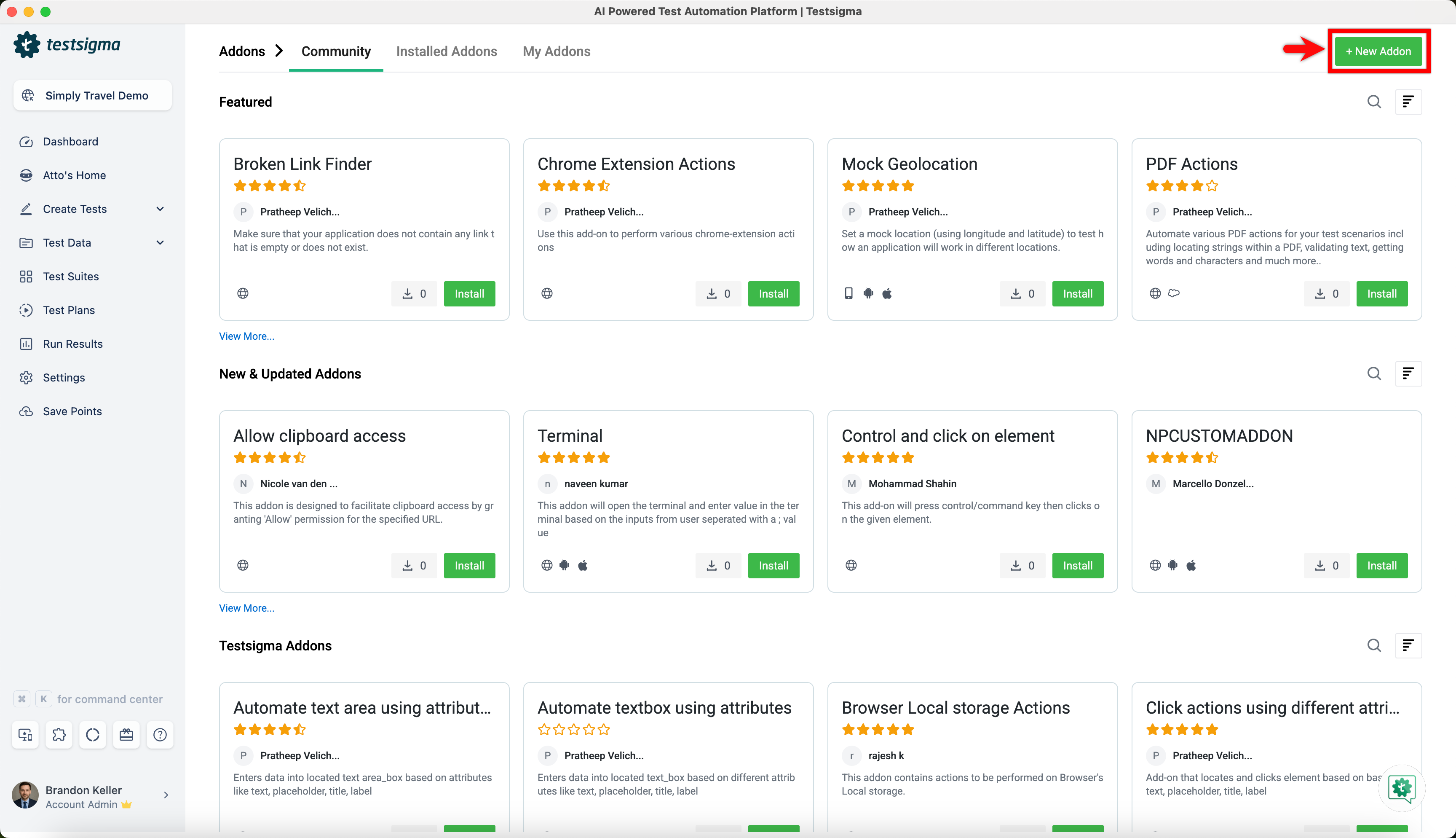
Click the Addons icon in the left navigation bar and select Addons.
-
Click + New Addon.
-
Select the engine, either Classic or Modern (TypeScript).
-
Enter a Name and a Description.
-
Click Create & Proceed.
-
Click the Download icon on the addon’s detail page to get the scaffold as a zip.
You need Core Java on OpenJDK 11, an IDE such as IntelliJ or Eclipse, Maven or Gradle, Selenium basics, Lombok annotations, and JUnit or TestNG configured as the test runner.
What the scaffold contains
Section titled “What the scaffold contains”A Java Maven project with a pom.xml and sample templates for Web, Mobile Web, Android, and iOS Application.
Write the code
Section titled “Write the code”Unzip it, open the folder in your IDE as a Java project with Maven as the build tool, and refactor the samples:
- Action text: the step grammar test authors will read
- Selenium or Java code: the logic the action performs
- Elements and locators: what the action acts on
- Test data: the values the test class passes in
Validate it
Section titled “Validate it”Right-click the test class in your IDE and run it as a JUnit or TestNG test. Confirm the addon behaves as expected before uploading.
Package it
Section titled “Package it”Save your changes and zip the project folder:
zip -r addonName.zip . -x "*"You need Node.js 22 or later, pnpm or npm, an IDE, basic TypeScript, and Modern addon features enabled for your account.
What the scaffold contains
Section titled “What the scaffold contains”my-addon/├── package.json # build scripts + SDK dependency├── tsconfig.json├── tsup.config.ts # bundler configuration├── scripts/pack.mjs # zips the build output for upload└── src/index.ts # your code, one named export per capabilityWrite every capability as a named export in src/index.ts. Default exports and arrays are not supported, and names have to be unique within the bundle.
Install dependencies
Section titled “Install dependencies”pnpm installTo use an npm package, add it with pnpm add and import it. The bundler inlines every dependency, so choose pure JavaScript packages. Native and binary modules do not load.
Validate it
Section titled “Validate it”pnpm run checkThe check flags authoring mistakes and gives a concrete fix for each. It catches an input never referenced in actionText, a ${placeholder} with no matching field, and an empty dropdown. It exits non-zero, so it works in a pre-commit hook or in CI.
Build it
Section titled “Build it”pnpm run buildThree stages run: the bundler compiles src/index.ts into dist/index.js as a self-contained ESM file with dependencies inlined, testsigma-addon manifest . reads your code and generates manifest.json, and the pack script zips both.
Write the capabilities
Section titled “Write the capabilities”An action becomes a step with a grammar you define.
import { defineAddonTemplate } from "@testsigma/addon-sdk";
export const readText = defineAddonTemplate({  name: "myaddon.readText",  description: "Read the text content of a located element.",  actionText: "Read text from ${target}",  applicationType: ["WEB"],  elements: {    target: { description: "Element to read text from" },  },  outputs: {    value: { type: "runtimeVar", description: "The element's text content" },  },  async execute(input, ctx) {    const text = (await ctx.ui.browser.locate(input.elements.target).textContent()) ?? "";    return {      message: {        success: `Read ${text.length} character(s)`,        failure: `Could not read text`,      },      outputs: { value: text },    };  },});
Every input key has to appear in actionText, and every placeholder has to match an input key. An empty applicationType is a compile error.
Handle the inputs
Section titled “Handle the inputs”input.testData holds values typed by your Zod schema and already validated, input.elements holds one opaque ElementRef per declared element to pass to locate(), and input.environment holds values read from the test environment. A .describe() text on a Zod field becomes the inline help a test author reads, so describe every field.
Typing a testData field as z.enum([...]) renders a fixed-option dropdown instead of a free-text field:
testData: z.object({ priority: z.enum(["Low", "Medium", "High"]).describe("Ticket priority"),}),The build records the options as testDataAllowedValues in the manifest, and the same enum validates the submitted value at run time.
When a test author supplies an uploaded file as test data, your addon receives a local file path staged into ctx.tmpDir. The platform downloads the file before execute() runs, and you read it with node:fs. No fs permission is needed, because ctx.tmpDir is always allowed.
Return a result
Section titled “Return a result”Both message fields are mandatory, so both outcomes get addressed up front. Make them specific: “Read 42 characters from Order total” tells a test author more than “Success”. A thrown Error fails the step and surfaces its message verbatim, and returning conditionMet: false fails it with message.failure, which is often clearer than throwing.
Target the right platforms
Section titled “Target the right platforms”The applicationType list decides which adapter ctx.ui exposes.
applicationType | ctx.ui |
|---|---|
["WEB"] | ctx.ui.browser |
["ANDROID"] or ["IOS"] | ctx.ui.mobile |
["WEB", "ANDROID"] | A union, narrowed with ctx.ui.kind |
For a cross-platform addon, branch on ctx.ui.kind rather than shipping one bundle per platform.
A condition is an action with stepActionType set, which drives an IF branch or a WHILE loop.
export const countAbove = defineAddonTemplate({ name: "cond.countAbove", description: "Loop while the count of matched elements exceeds a threshold", actionText: "While count of ${target} is greater than ${threshold}", applicationType: ["WEB", "MOBILE_WEB"], stepActionType: "WHILE_LOOP", testData: z.object({ threshold: z.string().describe("Count to compare against") }), elements: { target: { description: "Element whose match count drives the loop" } }, outputs: { count: { type: "runtimeVar", description: "Match count at the last evaluation" } }, async execute({ testData, elements }, ctx) { if (ctx.ui.kind !== "web") throw new Error("requires a web platform"); const count = await ctx.ui.browser.locate(elements.target).count(); return { message: { success: `Count of '${elements.target.name}' is ${count}`, failure: `Count is ${count}, not above ${testData.threshold}`, }, outputs: { count }, conditionMet: count > Number(testData.threshold), }; },});Declared outputs are written on every evaluation, including the final one that ends a loop, so a runtime variable bound to count holds the value that stopped it.
conditionMet also works on an action with no stepActionType. There it is an explicit pass or fail verdict, and false fails the step with message.failure.
A test data function returns a single string, and appears wherever generated data is accepted.
import { defineTestDataFunction } from "@testsigma/addon-sdk";import { z } from "zod";
export const randomEmail = defineTestDataFunction({  name: "random.email",  description: "Generate a unique email address",  parameters: z.object({    domain: z.string().default("example.com").describe("Mail domain to use"),  }),  async generate({ domain }, ctx) {    const local = `user-${Math.random().toString(36).slice(2, 10)}`;    ctx.logger.info("generated email", { domain });    return `${local}@${domain}`;  },});
The platform may cache a result within a run when the function is called with identical parameters. A loop bound, for instance, is computed once per loop rather than once per iteration. Do not rely on re-invocation for every reference with the same arguments, and vary a parameter when each call has to produce a fresh value.
A hook runs after a test plan finishes, whether the plan passed or failed.
import { defineHook } from "@testsigma/addon-sdk";
export const pushToQTest = defineHook({ name: "qtest.afterPlan", description: "Push run results to qTest after the plan finishes", hookType: "AFTER", cicdCredentials: true, permissions: { net: ["qtest.example.com"] }, async execute(_input, ctx) { const rr = ctx.runResult; const junit = await rr.junitXml(); const creds = ctx.cicdCredentials; return { message: `Pushed run ${rr.id} (${rr.result}) to qTest` }; },});A hook can declare testData and environment Zod schemas exactly as an action does, and whatever the test plan configurator fills in arrives as input.testData and input.environment. Return { message } or nothing, and the message appears in the test plan result panel. A thrown error marks the invocation failed and surfaces its message.
On Classic, a post-plan hook lives in the com.testsigma.addons.hooks package of the scaffold. A test data reference has to be wrapped in curly brackets to be recognized as a post-plan hook field, and only one hook is allowed per addon.
Write an addon that behaves well
Section titled “Write an addon that behaves well”Five habits account for most of the difference between an addon that is easy to debug and one that is not.
- Write both
message.successandmessage.failure, and make them specific - Log liberally with
ctx.logger. Logs are captured with the step result and are your main debugging tool in a cloud run. Never log secrets - Honor
ctx.signalin loops and long waits, and usectx.tmpDirfor files - Describe every field, because those strings become the inline help a test author reads
- Validate with Zod constraints rather than checks inside
execute()
Permissions and the sandbox
Section titled “Permissions and the sandbox”Addon code runs in a sandbox where everything is denied by default. You opt into each capability with an allowlist on the definition, and the build mirrors it into the manifest.
permissions: { fs: ["/data/exports/**"], // filesystem globs net: ["api.example.com"], // outbound hostnames env: ["MY_API_TOKEN"], // readable process.env keys spawn: true, // ctx.spawn, local agent only ai: true, // ctx.ai ocr: true, // ctx.ocr}| Permission | Default | Unlocks | On violation |
|---|---|---|---|
fs | tmpDir only | Reading and writing the listed globs | The filesystem call throws |
net | No network | fetch to the listed hostnames | The request is rejected |
env | No access | Reading the listed process.env keys | The key reads as undefined |
spawn | false | ctx.spawn.run() | On cloud, every call rejects |
ai | false | ctx.ai | The field is absent |
ocr | false | ctx.ocr | The field is absent |
fs, net, and env apply to actions, test data functions, and hooks alike. spawn, ai, and ocr are honored for action addons only, so hook and test data function contexts never expose them. ctx.tmpDir is always readable and writable without an fs entry.
Subprocess execution is host-brokered, running in the agent process through execFile with a command and an argument vector and no shell, which is why raw child_process imports stay blocked.
Some things no permission unlocks. Dynamic code evaluation is blocked, including eval and the raw Function constructor. So are raw child_process, worker_threads, and the raw node:http, node:https, and node:net modules, and a top-level import of one stops the bundle loading at all. Make outbound calls with the global fetch behind permissions.net, and run local commands with ctx.spawn behind permissions.spawn.
Reviewers and test authors see your declared permissions, so a tight allowlist makes an addon easier to trust and approve.
const { stdout, exitCode } = await ctx.spawn.run("node", ["-e", "console.log('hi')"]);Upload and publish
Section titled “Upload and publish”-
Open the addon’s detail page.
-
Click Upload Code on Classic, or Upload Zip File on Modern.
-
Select the zip and confirm.
Testsigma reads the package and registers the actions, test data functions, and hooks it declares. The dropdown also offers Edit Description, Manage Tags, and Deprecate.
Bundle rules on Modern
Section titled “Bundle rules on Modern”manifest.jsonsits at the root of the zip- The bundle sits at the path the manifest’s
entryfield points to - Every capability is a named export, with no default export and no arrays
- Names are unique within the bundle
- Maximum upload size is 50 MB
An upload is rejected, or the version marked Failed, when the manifest is invalid. The usual causes are an addon entry with an empty applicationType, and an entry path that does not point at the bundle inside the zip.
Where each status runs
Section titled “Where each status runs”A newly uploaded Modern addon stays in Draft, which runs on local and hybrid agents so you can iterate without publishing. Cloud executions need a published addon.
| Status | Local and hybrid agents | Cloud executions |
|---|---|---|
| Draft | Runs | Not shipped |
| Published | Runs | Runs |
Publish it
Section titled “Publish it”Select Publish from the dropdown on the addon’s detail page. On Classic, choose Public to release it to the whole Testsigma community or Private to keep it inside your organization, then click Publish. An automatic security check runs, and a failure is emailed to you.
Update an existing addon
Section titled “Update an existing addon”Modify and re-validate the code, then go to Addons, open the My Addons tab, select the addon, and upload the new package.
Use the addon in a test case
Section titled “Use the addon in a test case”Open a test case, click Add New Step, and search for the action by keyword. An addon step carries an Addon icon before it. Select it, fill in the test data and elements, and click Create Step.
Examples
Section titled “Examples”Extract text with OCR on Classic
Section titled “Extract text with OCR on Classic”Add the OCR dependencies to pom.xml, then implement the OCR interface and update 3 methods in the Java module:
extractTextFromPage()extracts text from a whole pageextractTextFromImage(OCRImage image)extracts text from anOCRImageobjectextractTextFromElement(Element element)extracts text from anElementobject
All three return a list of OCRTextPoint objects, each carrying the text’s location within the source.
Query a database without building an addon
Section titled “Query a database without building an addon”MySQL, MongoDB, PostgreSQL, and Oracle all have published addons, so a database query needs no addon of your own. Go to Addons > Add-ons, find the addon under New & Updated Addons, and click Install. Its NLPs then appear in Test Steps.
The mysql_queries addon runs MySQL over a JDBC URL of the form jdbc:mysql://<hostname>:<port>/<database>?user=<user>&password=<password>. Its NLPs cover:
- Executing a query, a create-procedure statement, a stored procedure call, an update, or a
.sqlscript file - Storing a select result into a variable
- Verifying a select result, or the affected-row count of a query
- Comparing two queries on one connection, or the same query across two connections
The MongoDB_NLPs addon takes these parameters:
| Parameter | What it holds | Example |
|---|---|---|
DBname | The MongoDB database holding the collections | e-commerce |
CollectionName | A group of MongoDB documents | users |
MongoDB_Connection | The connection to a server or cluster | MongoClient |
MongoDB_ConnectionURL | The server or cluster address, with connection options | mongodb://localhost:27017/blog |
The OracleDB_Queries addon runs a query and verifies the affected row count, through the Execute OracleDB Query on the Connection DB_Connection_URL and verify affected rows count is Row-Count NLP. Its DB_Connection_URL takes this form:
jdbc:oracle:thin:@//<host>:<port>/<service_name>?user=<username>&password=<password>The PostgreSQL_Queries addon takes these:
| Parameter | What it holds | Example |
|---|---|---|
Query | A query to execute | SELECT * FROM table_name; |
Row_Count | The number of rows in a result set | SELECT COUNT(*) FROM table_name; |
DB_ConnectionURL | A connection URL | postgresql://user:password@localhost:5432/database_name |
PG_DBConnectionURL | A connection URL, host and port form | postgresql://username:password@host:port/database_name |
Select-Query | A SELECT query returning a result set | SELECT column_name FROM table_name WHERE condition; |
Variable-Name | The variable a value is assigned to | var_name |
Expected-Value | The value a result is compared against | The value you expect the query to return |
Troubleshooting
Section titled “Troubleshooting”Build and upload failures
Section titled “Build and upload failures”| Symptom | Cause and fix |
|---|---|
| “Input X is declared but never referenced in actionText” | Every testData, elements, and environment key has to appear in actionText as ${X}. Add the placeholder, or remove the unused field |
“actionText references ${X} but no input field X is declared” | A placeholder has no matching key, usually a typo. The CLI suggests the closest match. Output keys must not appear in actionText |
| Upload rejected | The zip is over 50 MB, manifest.json is missing from the zip root, entry does not point at the bundle inside the zip, or applicationType is empty |
| The bundle fails to load after upload | A top-level import of an always-blocked module, duplicate export names, or non-ESM output |
Your step does not appear
Section titled “Your step does not appear”Check these in order:
- The application runs on the Classic engine, which offers Java addons only.
- The manifest entry is missing, or its
applicationTypeexcludes the workspace platform. - The addon is still in Draft and the run is a cloud execution.
Permission errors at run time
Section titled “Permission errors at run time”A “not in permissions.net” error means the hostname, path, or environment key is absent from your allowlist. Add it to permissions in the definition, rebuild, and re-upload. The manifest regenerates itself.
Hooks and test data functions enforce the same sandbox, so declare permissions on defineHook() and defineTestDataFunction() too.
Other run-time symptoms
Section titled “Other run-time symptoms”| Symptom | Cause and fix |
|---|---|
| An output never lands in a runtime variable | The key returned in outputs does not match the declaration, or the test author did not map a variable name |
| A mobile locator fails with a strategy error | androidUiAutomator is Android only, and iosPredicate and iosClassChain are iOS only. Branch on the platform, or use accessibilityId, id, xpath, or className |
| A hook never fires | Only AFTER hooks run today. Confirm the hook is attached to the test plan and the manifest entry has "hookType": "AFTER" |
| A Zod validation error on execute | The test author’s input does not satisfy your schema. Add clearer field descriptions and defaults, so a test author supplies valid input without guessing |
ctx.spawn.run() rejects with “local agent only” | Subprocess execution is unavailable on cloud executions. Run on a local or hybrid agent |
Was this page helpful?
Thanks for the feedback.