

On-premise prerequisites
Testsigma On-Premise runs the whole product inside your own infrastructure, as a set of Docker containers on one host server with a MySQL database behind them. This page covers what that host needs, what the network has to allow, and what to decide before installation starts.
Host machine
Section titled “Host machine”| Component | Minimum |
|---|---|
| CPU | 16 core |
| RAM | 64 GB and above |
| Storage | 512 GB to 2 TB single storage, or 256 GB plus a mounted disk of 1 TB and above |
Database
Section titled “Database”| Component | Minimum |
|---|---|
| CPU | 4 core |
| RAM | 32 GB |
| RDBMS | MySQL |
| Version | 8.0.x |
Testsigma provides a MySQL Docker container. A hosted MySQL works instead, as long as it meets these specifications.
Confirm the memory and vCPU counts with your vendor before sizing the machine, so the figures match what you will actually run.
Machine configuration
Section titled “Machine configuration”- OS: install Ubuntu at the root, on a 256 GB machine. RHEL 9.x is the recommended alternative, and RHEL 8 is supported.
- Additional storage: mount a hard disk of 2 TB or more, sized to your usage.
- Mount point: mount the external disk at
/data. - Software installation: all required software installs at the root, with storage configured to use the mounted disk.
- File system: any file system your team is comfortable with.
- Hard disk performance: a RAID configuration improves disk performance, and is optional.
Network pre-checks
Section titled “Network pre-checks”The server needs an active internet connection.
If a firewall is enabled, whitelist these domains:
*.docker.com*.amazon.com*.amazonaws.com*.maven.orgTo use Testsigma’s mail service, whitelist *.sendgrid.com as well.
Unblock these ports if they are blocked. Testsigma’s services use them for internal communication.
| Service | Ports |
|---|---|
testsigma_mysql | 3307 |
testsigma_id_server | 8084, 9095 |
testsigma_id_server_ui | 4203 |
testsigma_app_server | 8080, 9096 |
testsigma_groot_ui | 4211 |
testsigma_addon_server | 8082, 9097 |
testsigma_addon_server_ui | 4201 |
testsigma_audit_server | 9090 |
testsigma_audit_ui | 4230 |
testsigma_visual_testing_server | 7010 |
An agent uses a different set: 8383, 8484, 8100, 5037, and the range 10000 to 65535, for talking to browsers and mobile devices.
Architecture
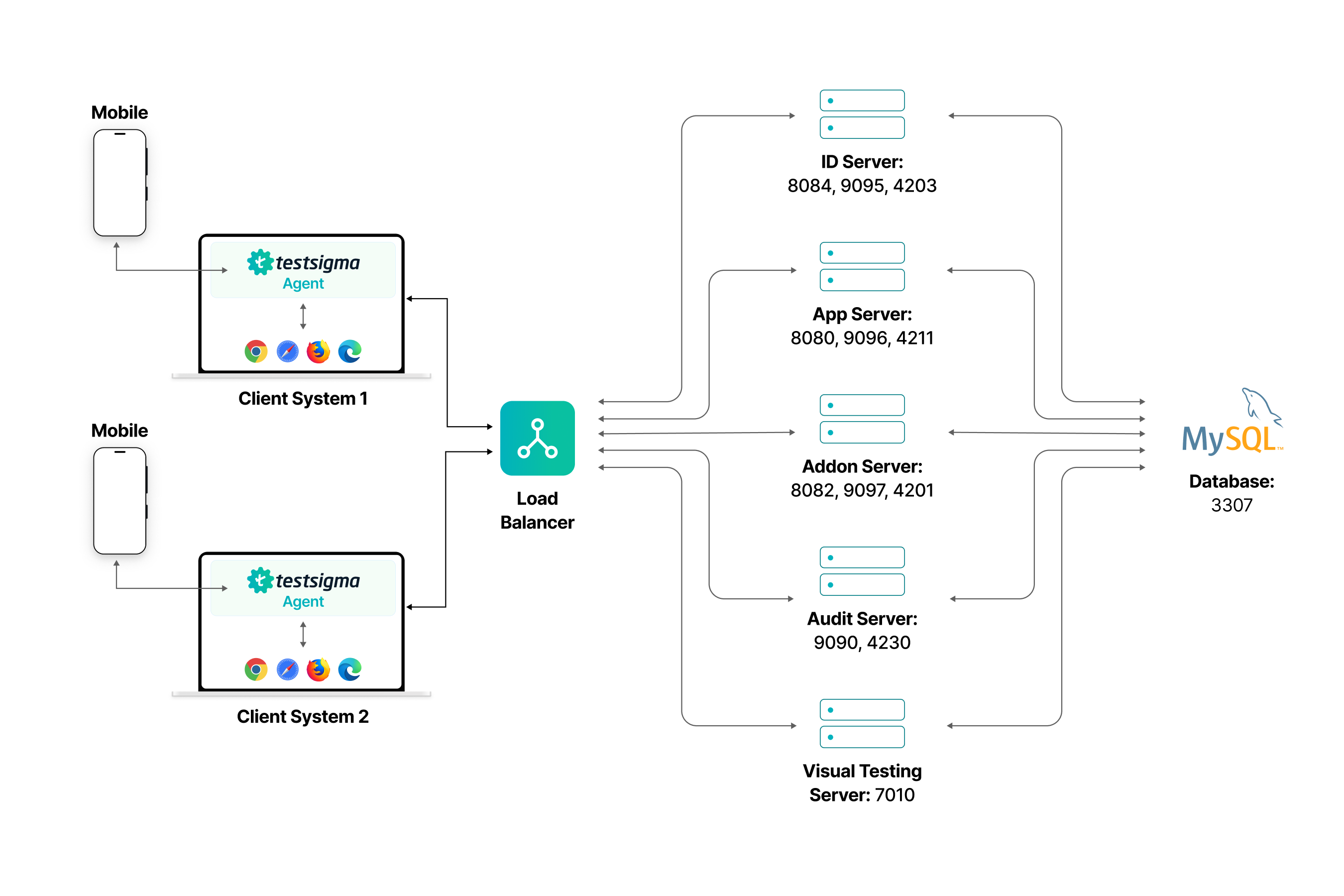
Section titled “Architecture”Three parts make up the deployment.
Client systems run the Testsigma agent, which drives the browsers and mobile devices, and sends results back. Users reach the application through a browser on the same systems.
The central server processes and stores everything the agents send, serves the web interface, and holds the screenshots, apps, and other permanent files. A load balancer sits in front of it and routes traffic to the containers by role.
The database stores test results, user data, and the rest. Every server communicates with it over TCP on port 3307.
| Container | Role | Ports |
|---|---|---|
| Load Balancer | The entry point, distributing incoming traffic across servers | |
| ID Server | User identity, authentication, and authorization | 8084, 9095, 4203 |
| App Server | The main application logic and user requests | 8080, 9096, 4211 |
| Addon Server | Add-ons that extend the application | 8082, 9097, 4201 |
| Audit Server | Logging, monitoring, and auditing of system activity | 9090, 4230 |
| Visual Testing Server | Visual testing, including UI validation and visual regression | 7010 |
| MySQL Database | All application data, accessed by every server | 3307 |
Storage and backups
Section titled “Storage and backups”The host server where the containers run is the final storage location for screenshots, apps, and other permanent files.
- Frequency: back up every 24 hours.
- Retention: keep backups for 1 week.
- Cleanup: clear old data periodically to keep disk space healthy. Longer retention may need additional hardware, which attaches to the existing mount point through LVM.
Temporary files such as screenshots also need periodic clearing, depending on usage and available disk space.
Decisions to make before installation
Section titled “Decisions to make before installation”Domain name
Section titled “Domain name”By default you receive URLs ending in testsigmaprivate.com, such as https://cx.testsigmaprivate.com. To use your own domain instead, tell Testsigma before the on-premise build is generated, and copy your SSL certificates to the installation server.
Six services need a URL and a matching .crt certificate:
| Service | Subdomain |
|---|---|
| Identity | id-testsigma.<your-domain> |
| App | app-testsigma.<your-domain> |
| Kibbutz, the addon service | kibbutz-testsigma.<your-domain> |
| Visual | visual-testsigma.<your-domain> |
| Audit | audit-testsigma.<your-domain> |
| Mobile Recorder | mobilerecorder-testsigma.<your-domain> |
A wildcard certificate covers all six. For lowcode.com, the individual subdomains would be id-testsigma.lowcode.com, app-testsigma.lowcode.com, and so on.
Testsigma’s own mail service works out of the box. To use your internal SMTP instead, have those settings ready.
Recorder installation
Section titled “Recorder installation”Installing the Testsigma Recorder on Chrome needs the ability to enable developer mode and load the recorder unpacked.
Agent operating system
Section titled “Agent operating system”The agent runs on Linux, Windows, or macOS, whichever your team prefers.
Frequently asked questions
Section titled “Frequently asked questions”Why does Testsigma need so many ports?
Section titled “Why does Testsigma need so many ports?”Each micro-service runs as its own Docker container and uses its own ports. The service-to-port mapping is in the ports table above. MySQL is the one exception worth noting: 3306 is the standard MySQL port, and Testsigma uses 3307 internally.
Which operating system should the host run?
Section titled “Which operating system should the host run?”Ubuntu is preferred. RHEL 9.x is the recommended alternative, and RHEL 8 is supported. On RHEL, follow Docker’s own installation documentation for that distribution.
Do I need Windows machines for the server?
Section titled “Do I need Windows machines for the server?”No. The server operation needs none. The agent, which is separate, runs on Linux, Windows, or macOS.
Was this page helpful?
Thanks for the feedback.