





Table Of Contents
Key Takeaways
- Cypress has limited multi-browser and Safari support, with no native mobile app testing.
- It struggles with iframes and multi-tab flows, and tests require high maintenance as suites scale.
- Heavy CPU and memory usage is a recurring pain point on long runs.
- Testsigma offers codeless, AI-driven automation across web, mobile, and APIs as a leading alternative.
- Other strong alternatives include Playwright, Testim, WebdriverIO, Puppeteer, RainforestQA, Keploy, and Nightwatch.js.
- When choosing an alternative, prioritize browser/device coverage, self-healing maintenance, CI/CD fit, and total cost of ownership.
Cypress is a popular JavaScript-based end-to-end testing framework known for its fast setup and easy debugging. But it’s not built for every use case.
As teams scale, limited browser support and performance issues on larger test suites start to slow things down. So, what works well for a small project often struggles under real-world production demands.
Let’s take a look at these challenges in detail, explore the top Cypress alternatives available in 2026, and see how to pick the right one.
Why Look for Cypress Alternatives? Common User Pain-Points
Cypress handles basic E2E testing well, but issues surface as teams scale across browsers, backends, and CI environments. Here are some common limitations that show up:
- Browser and cross-origin limits: Cypress only supports Chrome-family browsers, Firefox, and experimental WebKit. Safari, IE, and cross-domain flows are not natively supported.
- Scalability and CI slowdowns: Each test runs in a single browser process, slowing large suites. This issue also leads to random CI failures that are frustratingly difficult to debug, as Reddit users note.
- Language barrier and learning curve: Since Cypress only supports JavaScript and TypeScript, teams unfamiliar with these languages face an immediate barrier. Advanced features further bring added complexity, slowing teams down.
- Test flakiness with iFrames and Dynamic UIs: Users report challenges with iFrame interactions because Cypress has no built-in iFrame commands. Asynchronous iframe loading makes tests flaky without custom plugins.
- Surface-level testing: Cypress is a browser-only tool, so server-side code can’t be imported or connected to directly. Frontend tests may pass while backend or API issues go unnoticed.
- High resource usage: Cypress runs each test in a full browser process, which is heavy on CPU and memory. On GitHub, many users have flagged huge memory consumption as an ongoing pain point.
At a Glance: Comparison of Cypress Alternatives
| Platform name | Best fit | Key features | Limitations |
| Testsigma | Codeless AI automation for QA teams | Plain English authoring; self-healing AI agents; web, mobile, API coverage; visual and accessibility testing | Pricing is not publicly listed |
| Playwright | Developer teams needing cross-browser E2E | Auto-wait, Trace Viewer, Codegen, context isolation | Steep JS and async learning curve |
| Testim | AI stability for web and Salesforce | Smart Locators, Copilot, record-and-playback, CI/CD hooks | Pricing climbs with test volume |
| WebdriverIO | Extensible Node.js automation | BDD/TDD support, CLI wizard, Appium mobile, parallel execution | The configuration feels heavy for beginners |
| Puppeteer | Chromium automation and scraping | CDP access, headless mode, PDF and screenshots, network interception | Chromium-focused, no native mobile |
| RainforestQA | No-code SaaS regression with crowdtesting | Plain English editor, self-healing AI, parallel cloud VMs, CI/CD integrations | Limited mobile and desktop support |
| Keploy | Auto-generated API tests from real traffic | eBPF traffic capture, DB and queue mocks, language-agnostic, CI/CD hooks | Needs Docker and networking know-how |
| Nightwatch.js | All-in-one Node.js testing framework | Component testing, built-in runner, Appium mobile, and auto WebDriver management | JavaScript-only, smaller ecosystem |
8 Best Cypress Alternatives to Know about
Now that the gaps are clear, let’s look at the tools that address them and offer better support. These eight options cover a mix of codeless, developer-first, API-focused, and cross-browser approaches, so you can match one to your actual needs.
Testsigma

Best for: Teams wanting codeless, AI-driven automation across web, mobile, and APIs
Testsigma is a no-code test automation platform that offers broader coverage and lower maintenance requirements, with no setup or scaling limits.
Instead of writing and maintaining scripts, you describe what the test should do in plain English, and AI agents handle the rest in the background. It covers web, mobile, and API testing in one place, supports different browsers without workarounds, and keeps tests stable even as the UI changes.
Testsigma Vs Cypress
- Scripting approach: Testsigma uses plain English, while Cypress requires JavaScript or TypeScript.
- Platform coverage: Safari, Edge, Chrome, Firefox, iOS, and Android all run natively on Testsigma. Cypress stays web-only with experimental WebKit.
- Test maintenance: When the UI changes, Testsigma automatically self-heals locators. Cypress tests typically break and need manual fixes.
- Test authoring: Anyone on the team can write tests in Testsigma, from manual QAs to product folks. Cypress needs JavaScript fluency.
- Parallel execution: Testsigma ships with parallel runs out of the box, whereas Cypress locks this behind paid Cloud tiers.
Features
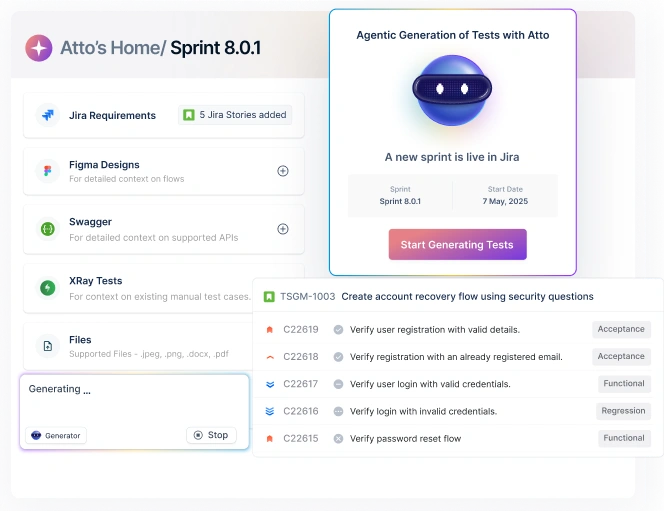
- Atto AI coworker with agents for test generation, execution, healing, and optimization
- Copilot turns Jira tickets, Figma designs, and user stories into test cases
- Built-in visual regression and WCAG 2.2 accessibility testing
- Unified support for desktop, Salesforce, and SAP apps
Pros
- Non-coders like QA leads and product managers can write and own tests directly
- Test maintenance time drops sharply after UI changes, thanks to self-healing
- Faster release cycles since there’s no local setup or flaky environment issues
Cons
- Pricing is not available on the website
Pricing: Sign up for free, and pricing is available on request
Playwright

Best for: Developer-heavy teams needing cross-browser end-to-end testing across one codebase
Playwright is an open-source testing framework built by Microsoft, originally by the team behind Puppeteer. It runs a single test suite across Chromium, Firefox, and WebKit, and supports JavaScript, TypeScript, Python, Java, and .NET out of the box.
Features
- Auto-wait pauses actions until elements are ready, reducing flakiness
- Trace Viewer captures screenshots, video, DOM snapshots, and network logs
- Codegen records user actions and converts them into test scripts
- Browser context isolation creates fresh profiles per test
Pros
- Fully open-source with no paid gating on parallel runs or dashboards
- Active Microsoft maintenance keeps releases and fixes frequent
- Strong community support on GitHub, Discord, and official docs
Cons
- Steeper learning curve for testers new to JavaScript or async patterns
- No native mobile app testing, only browser emulation
- Requires developer skills, so manual testers can’t contribute directly
Pricing: Free and fully open-source
Testim

Best for: Web and Salesforce teams wanting AI-driven test stability with the option to drop into code
Testim is a cloud-based AI testing platform, now part of Tricentis. It’s built mainly for web and Salesforce applications, combining record-and-playback authoring with AI-powered Smart Locators.
Features
- Smart Locators analyze element attributes and self-heal on UI changes
- Copilot generates custom JavaScript steps from plain-text descriptions
- Record-and-playback authoring with optional custom JS for complex flows
- Built-in CI/CD hooks for Jenkins, GitHub Actions, and CircleCI
Pros
- Quick setup and a visual editor work well for testers with minimal coding background
- Parallel cross-browser runs speed up regression across environments
- Tricentis backing opens access to a broader enterprise testing ecosystem
Cons
- Pricing is quote-based and can climb quickly as test volumes grow
- Advanced customization feels limited for seasoned automation engineers
- Complex flows and deeper debugging still need JavaScript skills
Pricing: Custom quote-based. Free trial available on request
WebdriverIO
Best for: Node.js teams wanting an open-source, extensible framework with cross-browser and mobile support
WebdriverIO is an open-source Node.js automation framework governed by the OpenJS Foundation. It runs on WebDriver, WebDriver BiDi, and Chrome DevTools protocols, giving teams flexibility between standard automation and deeper Chromium control.
Features
- BDD/TDD support through Mocha, Jasmine, and Cucumber out of the box
- CLI wizard sets up a full test suite in minutes
- Mobile, smart TV, and IoT testing via Appium integration
- Auto-waiting and built-in parallel execution across local or cloud
Pros
- Rich plugin ecosystem with community-maintained reporters, services, and integrations
- Works across major cloud grids like Sauce Labs, BrowserStack, and LambdaTest
- An active contributor community that offers strong troubleshooting support
Cons
- Steeper learning curve compared to simpler frameworks like Cypress
- Primarily JavaScript and TypeScript, with limited native support for other languages
- Configuration can feel overwhelming for beginners due to its many options
Pricing: Free and open-source
Puppeteer

Best for: Node.js developers focused on Chromium-based automation, scraping, or performance monitoring
Puppeteer is a Node.js library built by Google’s Chrome team, designed for fast Chromium-based automation. It’s commonly used for web scraping, PDF generation, performance monitoring, and functional testing.
Features
- Direct Chrome DevTools Protocol access for low-level browser control
- Headless and headful execution modes for server-side automation or debugging
- Built-in PDF generation and full-page or element-level screenshot capture
- Network interception and request mocking for testing API-dependent flows
Pros
- Lightweight and fast for Chrome-focused automation scripts
- Active maintenance by Google ensures quick support for new Chrome features
- Simple API that integrates easily with Jest, Mocha, and other JS test runners
Cons
- Primarily Chromium-focused, with Firefox support still less mature
- No native mobile app testing, only browser emulation
- Not built as a full end-to-end test framework, often needs a test runner on top
Pricing: Free and open-source
Rainforestqa

Best for: SaaS teams seeking no-code, AI-driven regression testing with optional crowdsourced testing on the side
RainforestQA is a cloud-based test automation platform that interacts with the visual layer of your app, like a real user would. It pairs AI-driven automation with optional crowdtesting, giving teams a mix of speed and human judgment in one tool.
Features
- Test creation through a prompt-driven visual editor
- Self-healing AI that updates tests when UI elements move or change
- Parallel execution on cloud Windows and macOS virtual machines
- CI/CD integrations with CircleCI, GitHub Actions, Jenkins, and GitLab
Pros
- Quick time-to-value, with teams often running first tests within hours
- Detailed failure reports include replays, screenshots, browser logs, and network logs
- Users report responsive customer support
Cons
- Pricing can climb quickly as test suites and crowdtesting usage grow
- Primarily built for web apps, with limited support for mobile or desktop testing
- Tests live inside the platform and can’t be exported to open-source frameworks
Pricing: Custom quote-based, scales with team size and testing volume
Keploy

Best for: Backend developers wanting automatic API and integration tests generated from real traffic
Keploy is an open-source API testing tool that captures real traffic at the network layer using eBPF, then replays it as tests. It turns real API calls, database queries, and streaming events into automated tests without needing SDKs or code changes.
Features
- Auto-generates tests and mocks from real API traffic with no code changes required
- Records and mocks databases like Postgres, MySQL, MongoDB, and queues like Kafka and RabbitMQ
- Language-agnostic, works with any framework or runtime
- CI/CD integrations with GitHub Actions, Jenkins, GitLab, and Kubernetes
Pros
- Reaches high test coverage in minutes, often faster than writing tests by hand
- Noise detection filters out non-deterministic fields, keeping tests stable across runs
- Active open-source community with strong GitHub adoption and a growing contributor base
Cons
- Onboarding and documentation can feel thin for newcomers
- Initial configuration needs Docker and networking knowledge to set up
- Test quality depends on having enough real traffic during recording
Pricing: Free open-source core. Team tier starts at $19/user/month. Custom enterprise pricing available
Nightwatch.js

Best for: Node.js teams needing one framework to cover E2E, component, mobile, and visual testing
Nightwatch.js is an open-source Node.js testing framework maintained by BrowserStack’s Open Source Program. It uses the W3C WebDriver API and combines several test types, from end-to-end to accessibility, into a single framework without extra plugins.
Features
- Component testing for Angular, React, Vue, and Storybook applications
- Built-in test runner with sequential or parallel execution across multiple browsers
- Native iOS and Android testing through Appium integration
- Automatic WebDriver management for Chrome, Firefox, Edge, and Safari, with built-in JUnit XML reporting
Pros
- Clean, beginner-friendly syntax that keeps test scripts easy to read and extend
- Works smoothly with cloud grids like BrowserStack, SauceLabs, and third-party providers
- Backed by BrowserStack’s Open Source Program, with a stable, long-term roadmap
Cons
- JavaScript and TypeScript only, limiting use for cross-language teams
- Smaller community and ecosystem compared to Cypress or Playwright
- WebDriver foundation inherits some of the complexity that lighter frameworks avoid
Pricing: Free and open-source
How to Choose the Right Cypress Alternative?
The best pick depends on your team’s skills, what you’re testing, and your budget. So, look for one that supports the way you work and the areas you need help with:
- Team skill: Check whether your team writes code daily or if manual testers and PMs also need to contribute. This decides if a codeless or code-first tool fits better.
- Testing scope: Map out what you need to cover, web, mobile, API, or backend. A single tool that covers multiple layers saves on switching costs later.
- Budget: Consider license fees, setup time, infrastructure, and maintenance. Open-source tools can be free, but the training, infrastructure, and upkeep involved may not always make them the best fit.
- Cross-browser coverage: Confirm native support for every browser your users run, including Safari and WebKit if iOS traffic matters.
- Maintenance load: Look at how the tool handles UI changes. Self-healing cuts rework significantly, while manual locator fixes add up across sprints.
- CI/CD fit: Check whether it integrates with your existing pipeline and supports parallel runs without additional paid add-ons.
Conclusion: Ready to Move Past Cypress?
Picking the right Cypress alternative comes down to three things: what you’re testing, who’s writing the tests, and how much time you can spend on maintenance. Get those clear first, then shortlist tools that actually fit. Check reviews, free trials, and live demos before committing.
If you want one place to handle testing across different browsers and devices without scripting, Testsigma offers a low-code automation solution that scales with you. Set up tests effortlessly with AI agents and reduce flaky runs with self-healing tools. Start a free trial of Testsigma today.
FAQ’s
Cypress runs only on JavaScript, lacks native Safari and mobile app support, and struggles with iframes and multi-tab flows. Parallel execution also sits behind its paid Cloud tier.
Testsigma covers web, mobile, and APIs from one platform, while Cypress is JavaScript-only and web-focused. It also self-heals tests when the UI changes, cutting maintenance effort.
Playwright and Testsigma lead here, with native support for Chrome, Firefox, Safari, and WebKit. Both run the same test suite across all major browsers without workarounds.
Yes. Testsigma and RainforestQA offer no-code authoring via plain-English commands or visual editors, making automation accessible to testers without coding skills.
Yes. Testsigma, WebdriverIO, and Nightwatch support native iOS and Android testing. Playwright and Puppeteer only handle mobile browser emulation, not native apps.