





Table Of Contents
- 1 Introduction
- 2 Why Seek RapidAPI Alternatives?
- 3 Comparison Table – Top 5 Alternatives
- 4 Top 8 RapidAPI Alternatives
- 5 How to Choose the Right RapidAPI Alternative
- 6 Conclusion
- 7 Frequently Asked Questions
Introduction
RapidAPI has long been recognized as a leading API marketplace and testing platform, helping developers discover, test, and connect with thousands of APIs in one centralized ecosystem. Its extensive catalog, unified billing, and ease of integration have made it popular among startups and enterprises alike.
However, as business needs evolve alongside market maturity and user expectations, many teams are now exploring RapidAPI alternatives that offer better pricing flexibility, enhanced platform stability, improved support, and predictable workflows.
Why Seek RapidAPI Alternatives?
While RapidAPI provides strong marketplace capabilities, it may not meet the needs of every business model, scale, or use case. Teams often start on RapidAPI but later seek more control, transparency, or enterprise-grade functionality. Factors such as unpredictable billing, limited automation features, or a lack of customization can prompt organizations to explore dedicated alternatives for API testing, management, and automation.
Common User Pain Points & Feedback
Based on real insights shared across Reddit, G2, Capterra, and StackOverflow, users frequently report:
- Payment and Billing Issues – Delayed payouts, unclear billing breakdowns, and unexpected charges without sufficient request logging.
- Service Stability Problems – API downtime, inconsistent performance, and sudden failures without proactive notification.
- Poor Customer Support – Slow response times, limited escalation paths, and difficulty getting human support during outages or billing disputes.
- Security Concerns – Lack of granular logging, IP tracking, and transparency in how malicious requests are detected and blocked.
- Cost Model Challenges – Pay-per-request pricing causing unpredictable monthly bills, making budgeting difficult.
- Interface and Usability Issues – A sometimes sluggish, hard-to-navigate UI with challenges accessing logs, metrics, and debugging workflows.
These recurring concerns are driving developers and organizations to look for more predictable, scalable, and user-friendly RapidAPI alternatives.
Comparison Table – Top 5 Alternatives
| Alternatives | Major Features | Best For | Unique Selling Point |
| Testsigma | API automation, AI-based test creation, CI/CD integration, no-code scripting | QA teams, dev teams, enterprises | Unified automated testing across API, web, mobile, and desktop |
| Postman | API development, collaboration, runtime testing, mock servers | Developers and API-first teams | End-to-end API lifecycle platform with collaboration tools |
| Mulesoft | API management, enterprise integrations, automation workflows | Large enterprises and regulated industries | Deep integration capabilities and robust governance |
| APILayer | API marketplace, subscription-based pricing, developer analytics | Startups and SaaS teams | Stable flat-rate API consumption model |
| Apify | Custom API workflows, scraping automation, and AI-based data pipelines | AI products, growth teams, data engineers | Automates data extraction and API generation |
Top 8 RapidAPI Alternatives
1. Testsigma

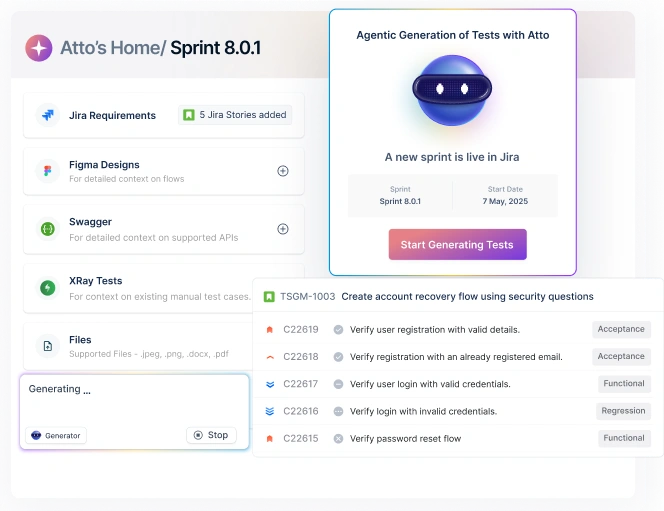
An agentic AI-powered unified automation platform offering scripted and no-code API testing alongside web, mobile, and desktop automation, making it ideal for companies seeking scalability, continuous testing, and fast authoring. Testsigma provides end-to-end functional test coverage with complete test suite execution, maintenance, and reporting. With natural-language test creation, integrated test data handling, CI/CD support, and real device/browser execution, Testsigma allows teams to validate APIs not just in isolation but as part of the complete user workflow, ensuring data consistency, integration reliability, and seamless cross-system validation.
Features of Testsigma
- Faster test creation – Testers or even non-technical stakeholders can write tests in plain language.
- Lower maintenance overhead – AI-driven self-healing and maintenance agents automatically adapt tests when UI or API changes occur, saving time, especially in agile environments.
- Broader test coverage across platforms – Consistent QA across APIs, web, mobile, and desktop, crucial for applications supporting multiple client apps or integrations.
- Seamless DevOps integration – Enabling QA to be part of the CI/CD pipeline and ensuring automated quality checks per build, improving release velocity and reliability.
- Scalable QA infrastructure – Without managing physical device labs, practical for small teams/startups, or distributed teams.
- Better test management & traceability – Including versioning, role-based access, coverage analytics, automated bug reporting, helpful for compliance, auditability, and collaboration across teams.
2. Postman

A well-adopted API lifecycle management and testing platform with strong collaboration features and a rich ecosystem of integrations.
Features of Postman
- API Request Building Across Protocols – Supports REST, GraphQL, SOAP, and now gRPC APIs, allowing teams to interact with and test diverse API architectures from a unified interface.
- Collections for Structured Testing – Organize API requests into collections and folders, making it easier to create reusable, modular, and version-controlled test suites.
- Automation With JavaScript-Based Scripting – Offers pre-request scripts and test scripts using JavaScript to perform dynamic request manipulations, data-driven validation, and complex assertion logic.
- Environment & Variable Management – Allows storing and switching between environment-specific configurations (Dev, QA, Staging, Production) using global, environment, and collection-level variables for seamless context reuse.
- Mock Servers & API Monitoring – Generate mock servers to simulate API behavior during early development and monitor API performance, uptime, and reliability with scheduled or triggered test runs.
- Collaboration – Features shared workspaces, role-based access, API documentation, and Git-based versioning to support distributed and cross-functional teams.
Pros of Postman
- Easy to use for beginners; no coding required to send requests
- Strong ecosystem with automation, documentation, and collaboration in one tool
- Supports advanced testing, assertions, and workflows
Cons of Postman
- Advanced features are mostly locked behind paid plans
- Not ideal for full end-to-end automation beyond API-level testing
3. Mulesoft
MuleSoft is an enterprise-grade integration and API management platform designed for organizations operating complex, distributed systems, including legacy infrastructure, hybrid cloud environments, and microservice-based architectures. With strong governance, security, and lifecycle management, MuleSoft is often chosen by large enterprises in regulated industries that require robust data compliance and scalable API ecosystems. It goes beyond testing by acting as a full API orchestration platform connecting applications, data, and automation workflows across business systems.
Features of Mulesoft
- Enterprise-Grade API Management – End-to-end control over API lifecycle, including design, development, security enforcement, governance, versioning, and deprecation workflows.
- Anypoint Platform for Integration & Orchestration – Supports seamless data exchange and system integration across SaaS apps, databases, ERPs, and proprietary legacy systems.
- Reusable API and Connector Marketplace – Offers prebuilt connectors for Salesforce, SAP, Oracle, AWS, Azure, Kafka, and more, reducing integration time and engineering effort.
- Security, Compliance & Access Control – Role-based permissions, SSO, encryption, audit logs, OAuth, JWT, and policy enforcement aligned with compliance frameworks (GDPR, PCI, HIPAA, etc.).
- API Governance & Monitoring – Centralized dashboards for performance insights, SLA tracking, anomaly detection, governance policies, and operational alerts.
- Low-Code & Pro-Code Development Support – Enables teams to build workflows visually with designers while supporting advanced logic through scripting and development frameworks.
- Scalable Deployment Options – Works across hybrid environments like cloud, on-premise, or multi-cloud, making it suitable for large-scale architecture modernization.
Pros of Mulesoft
- Highly secure and enterprise-ready with deep compliance support
- Strong governance and lifecycle control, ideal for large API ecosystems
- Robust connector and integration marketplace accelerates implementation.
Cons of Mulesoft
- Expensive, not ideal for startups or small teams
- Steeper learning curve compared to no-code API testing tools
4. Apilayer
APILayer is a curated API marketplace that offers a wide variety of ready-made, high-performance APIs across many categories (finance, geolocation, data-processing, security, scraping, etc.). It positions itself as a simpler, more predictable alternative to bigger marketplaces with clearly defined subscription plans, unified API key/SDK access, and easy integration
Features of Apilayer
- Large, Categorized API Marketplace – Access to dozens of API categories from currency conversion and exchange-rate data to geolocation, web scraping, PDF/ document processing, security tools, NLP, and more.
- Free & Paid Plans per API – Many APIs offer a free tier, allowing small-scale or experimental usage. Higher usage volumes require subscription plans.
- Predictable, Tier-Based Pricing – Users choose a plan per API; subscription management is designed to be simple.
- Unified Access via API Key / SDK – Once subscribed, integration is straightforward. You get a unified key/SDK to call the API, helping reduce credential/management overhead.
- Live Demos & Code Snippets – For many APIs, APILayer offers “live demo” consoles, quick-start samples, and ready-made code snippets for popular languages which lowers barrier to start.
- Support & Monetization Options for Providers – For teams releasing their own APIs, APILayer provides a platform to publish APIs and monetize them i.e., external vendors can list APIs on APILayer.
Pros of Apilayer
- Because of ready-made APIs, unified keys, and live demo support, developers can get started fast without building backend infrastructure themselves.
- Tier-based pricing helps with budgeting and avoids unpredictable “pay-per-call” overages common in some marketplaces.
- If your product includes exposing APIs, APILayer offers an easy way to publish, manage pricing, and monetize via the marketplace.
Cons of Apilayer
- For high-compliance, heavy-scale use cases, APILayer may not have the full governance, monitoring or orchestration capabilities of specialized API-management or integration platforms.
- When moving from free/trial to production or advanced use, you might need to upgrade, sometimes leading to sudden cost jumps if usage increases
5. Apify
Apify is a cloud-based web-scraping and automation platform. Its core idea: turn virtually any website into an API, enabling automated data extraction, web crawling, workflow automation, and data processing at scale. On Apify, “Actors” are serverless automation/scraping programs that run in the cloud. You can either use publicly available (pre-built) Actors or build your own using JavaScript or Python.
Features of Apify
- Pre-built Actors – Apify offers a large library of ready-made Actors for common tasks, product price scraping, content extraction, social media scraping, data collection, etc.
- Custom Scraper – For complex or custom tasks, you can write your own Actors using JavaScript or Python giving flexibility for advanced data extraction, automation, and customization.
- Full-Stack Web Scraping Support – Apify supports scraping normal HTML, handling JavaScript-rendered sites via headless browser automation, and crawling dynamic pages. This helps when scraping modern web apps that rely on JS rendering.
- Serverless & Scalable Infrastructure: As a cloud platform, you don’t need to manage servers, proxies, or scaling, Apify handles compute, proxy rotation, concurrency, storage, etc.
- Flexible Output & Data Integration: Data extracted can be stored and exported in structured formats, making it easy to plug into data pipelines, databases, analytics tools, or feed into AI/ML workflows.
- Task Scheduling & Automation Workflows: You can schedule scraping/automation tasks, run Actors on demand or via API, enabling periodic data collection, monitoring, or data pipeline automation.
Pros of Apify
- Instead of manual copy-pasting or building scraping infrastructure from scratch, you can start quickly using pre-built Actors or build custom ones.
- Since Apify handles the backend servers, proxies, scaling even large-scale scraping or frequent automation becomes manageable.
- Beginners can use ready-made Actors; developers or data engineers can build custom workflows via code, so it’s usable across skill levels.
Cons of Apify
- While there is a free plan and modest pricing for small jobs, heavy use (many Actors, frequent runs, large data volumes) can lead to higher costs.
- For advanced scraping or automation requiring custom code, some proficiency in JavaScript or Python is required.
6. Zyla API Hub
Zyla API Hub is a curated API marketplace that helps developers and businesses discover, connect, and manage a wide variety of APIs from a unified hub. It claims to simplify API adoption by offering: one account, one API key, and one SDK to access multiple APIs across diverse domains. It is positioned as a more structured, reliable alternative to larger general-purpose marketplaces, prioritizing API quality, documentation, and a smoother integration experience.
Features of Zyla API Hub
- Extensive, Categorized API Marketplace – Zyla lists thousands of APIs across finance, payments, data & analytics, health, social media, location, utilities, etc., making it easy to browse by category and pick the right API for the need.
- Single-Account, Single-Key, Single-SDK Access – Once you sign up, you get a unified API key/SDK to access different APIs, simplifying credential/credential-management overhead.
- Built-in Testing / Trial Periods – Many APIs come with a free trial period, allowing developers to test endpoints before committing to a subscription.
- Clean Documentation & Onboarding – Zyla provides clear, structured documentation and sample code for integrating APIs, lowering friction for developers.
- Subscription-Based – Rather than unpredictable pay-per-request billing, Zyla utilizes subscription-based pricing for many APIs, which facilitates cost planning and avoids unexpected overage bills.
- API Management Tools – The platform provides basic tools for managing APIs, tracking usage, and monitoring performance, which facilitates seamless integration management when using multiple APIs.
Pros of Zyla API Hub
- A single key/SDK and centralized management make it easier for developers to integrate multiple APIs without having to juggle different credentials or SDKs.
- A subscription-based model simplifies budgeting compared to unpredictable per-request billing, especially for consistent or high-volume usage.
- Zyla vets APIs before listing, reducing the risk of unreliable or poorly maintained endpoints, which gives more confidence compared to fully open marketplaces.
Cons of Zyla API Hub
- While curated, Zyla’s API catalog is smaller than those of massive marketplaces, which may limit variety for niche or very specialized API needs.
- If your use case involves very occasional API calls, paying a subscription may be costlier than a pay-per-use model.
7. Integrately
Integrately is a no-code workflow automation platform designed to help businesses automate processes without writing code or managing complex integrations. Similar to Zapier or Make, it allows users to visually connect applications and APIs using drag-and-drop workflows. Instead of requiring API knowledge or development expertise, Integrately simplifies automation by offering ready-made workflow templates, making it ideal for startups, marketing teams, operations teams, and business users focused on automation rather than software development.
Features of Integrately
- Visual Workflow Builder – Drag-and-drop interface to automate tasks by connecting apps visually without needing API or scripting knowledge.
- Pre-Built Automation Templates – Thousands of ready-made workflows help users quickly implement automations like CRM updates, notifications, lead sync, and task management without starting from scratch.
- Multi-Step & Conditional Workflows – Support for branching logic, filters, transformations, and conditional actions for complex business automation.
- App Integrations Ecosystem – Connects with 1000+ popular applications including CRM tools, email marketing platforms, helpdesks, databases, spreadsheets, and more.
- Task Monitoring & Execution Logs – Built-in monitoring dashboards show workflow activity, performance, and failures, enabling quick debugging and optimization.
- Webhooks & Custom API Support – Advanced users can connect custom apps or external APIs via webhooks when native integration isn’t available.
Pros of Integrately
- Extremely easy to use, ideal for non-technical users or business teams.
- Large collection of pre-made use cases and templates reduces setup time.
- Affordable pricing compared to alternatives like Zapier
Cons
- Not a replacement for full API testing or development workflows
- Limited customization compared to code-based automation tools
8. BugBug
BugBug is a codeless/low-code test automation tool for web applications that aims to make end-to-end (E2E) testing simple, accessible, and efficient. It replaces complex setup scripting, frameworks, or extensive QA infrastructure with a browser-based recorder (via a Chrome extension), letting teams record user flows and automatically convert them into automated tests.
Features of BugBug
- Codeless Test Recording & Playback – A Chrome extension captures all user interactions (clicks, typing, navigation) and converts them into test steps, no need to write code or manually manage selectors.
- Automatic Selectors, Smart Waiting, Smart Click & Scroll – The tool automatically identifies UI elements (no manual XPath/CSS), waits dynamically for elements to load, and handles scrolling or dynamic page behavior, making tests more stable, especially for modern, dynamic web apps.
- Edit & Rewind: Flexible Test Editing – If a test needs adjustment or part of it breaks, you can edit from any step and resume execution from that point, no need to record the whole flow again.
- Local & Cloud Execution + Scheduling – Tests can run locally (in your browser) or be scheduled to execute in the cloud. Cloud tests can run automatically at intervals, useful for regression testing, continuous monitoring, or periodic sanity checks.
- CI/CD & Integration Support – Supports integration with CI/CD pipelines using CLI or API, which allows automated test runs as part of builds/deployments. Also integrates with typical team tools (Slack/webhooks, Zapier, etc.) for notifications and collaboration.
Pros of BugBug
- Because it’s codeless and browser-based, even non-technical team members can write or maintain tests. Great for small teams or early-stage startups.
- You can create your first automated test in minutes: install extension → record workflow → run. Excellent for rapid iteration or frequent deploys.
- BugBug offers a free forever plan with unlimited local test runs and unlimited team users. Cloud runs and CI/CD features are available on paid tiers, making it affordable compared to many enterprise-grade tools.
cons of Bugbug.io
- BugBug doesn’t support mobile apps, desktop apps, or native mobile testing. It’s strictly for web apps running in Chromium-based browsers.
- While it handles many common scenarios, extremely complex test logic (heavy API orchestration, complex data-driven tests, advanced backend validations) may still require a more powerful or code-based tool.
How to Choose the Right RapidAPI Alternative
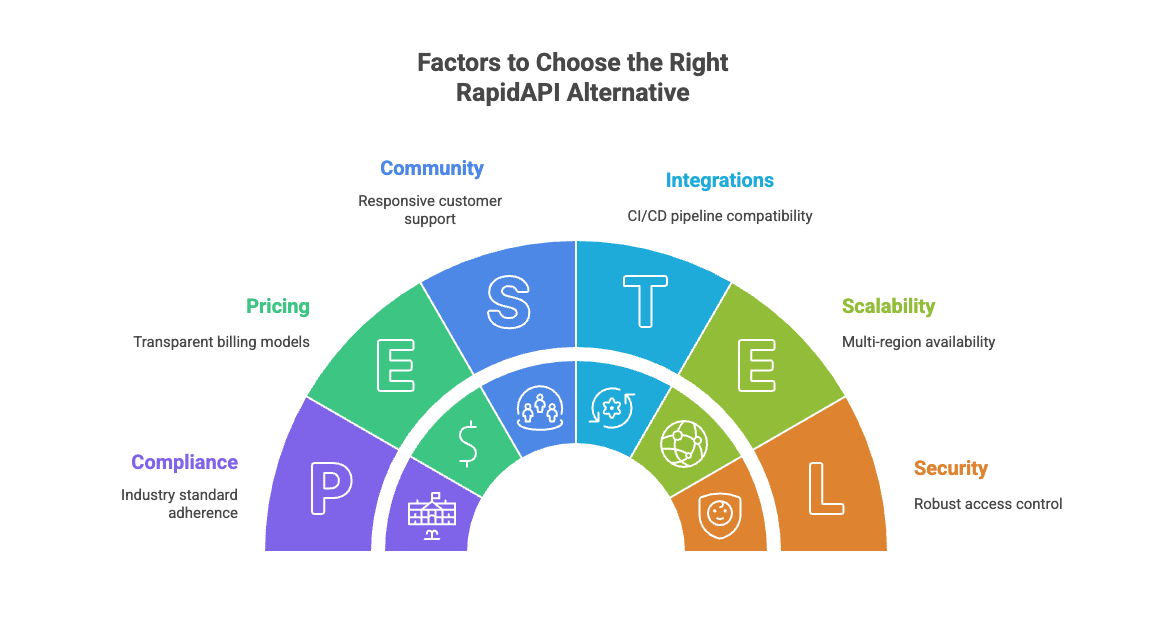
- Feature Fit – Check whether the platform supports your key needs, such as API marketplace access, automated testing, monitoring, or workflow automation.
- Pricing Predictability – Compare pay-per-use models with subscription models and ensure transparent billing through cost controls and usage logs.
- Scalability & Reliability – Look for uptime guarantees, consistent performance at scale, rate limit handling, and multi-region availability.
- Ease of Use – Ensure the UI is intuitive, debugging is straightforward, collaboration is supported, and low-code or no-code options are available if needed.
- Integrations- Confirm compatibility with CI/CD pipelines, developer tools, cloud platforms, and automation workflows.
- Community Strength – Evaluate the quality of documentation, onboarding experience, and responsiveness of customer support or community channels.
- Security & Compliance – Ensure robust access control, encryption, audit logs, API key governance, and compliance with industry standards (GDPR, SOC2, etc.).
Conclusion
Choosing the right RapidAPI alternative begins with understanding your use case: whether you need an API marketplace, a testing platform, or a comprehensive solution spanning the entire lifecycle. Run trials, compare pricing predictability, evaluate support responsiveness, and validate scalability before committing to a long-term commitment.
For teams seeking a unified solution that combines API automation with web, mobile, and CI/CD execution, Testsigma stands out as the most flexible and comprehensive alternative.
Frequently Asked Questions
Testsigma, Postman, and BugBug are strong picks depending on automation complexity.
RapidAPI focuses on marketplace access; Testsigma specializes in automated testing across multiple platforms.
Audit trails, data encryption, IP management, RBAC, and compliance certifications.
Ranges from self-serve only to dedicated SLA-backed enterprise support depending on platform tier.
Audit active APIs, export configurations and keys, map usage to the new provider, and run a phased migration with testing.