
AGENTIC TEST MANAGEMENT SOFTWARE
AI Agents to Plan, Create, Run and
Manage Tests in One Place
One central repository for all your tests. Replace spreadsheets and legacy tools.
AI Agents to plan sprints, generate tests with prompts, run tests, and report bugs.
Affordable for every QA team. Start free and scale at $14/user/month.
7-day free trial. No credit card required.


























Test Management Reimagined with Atto,
your AI coworker
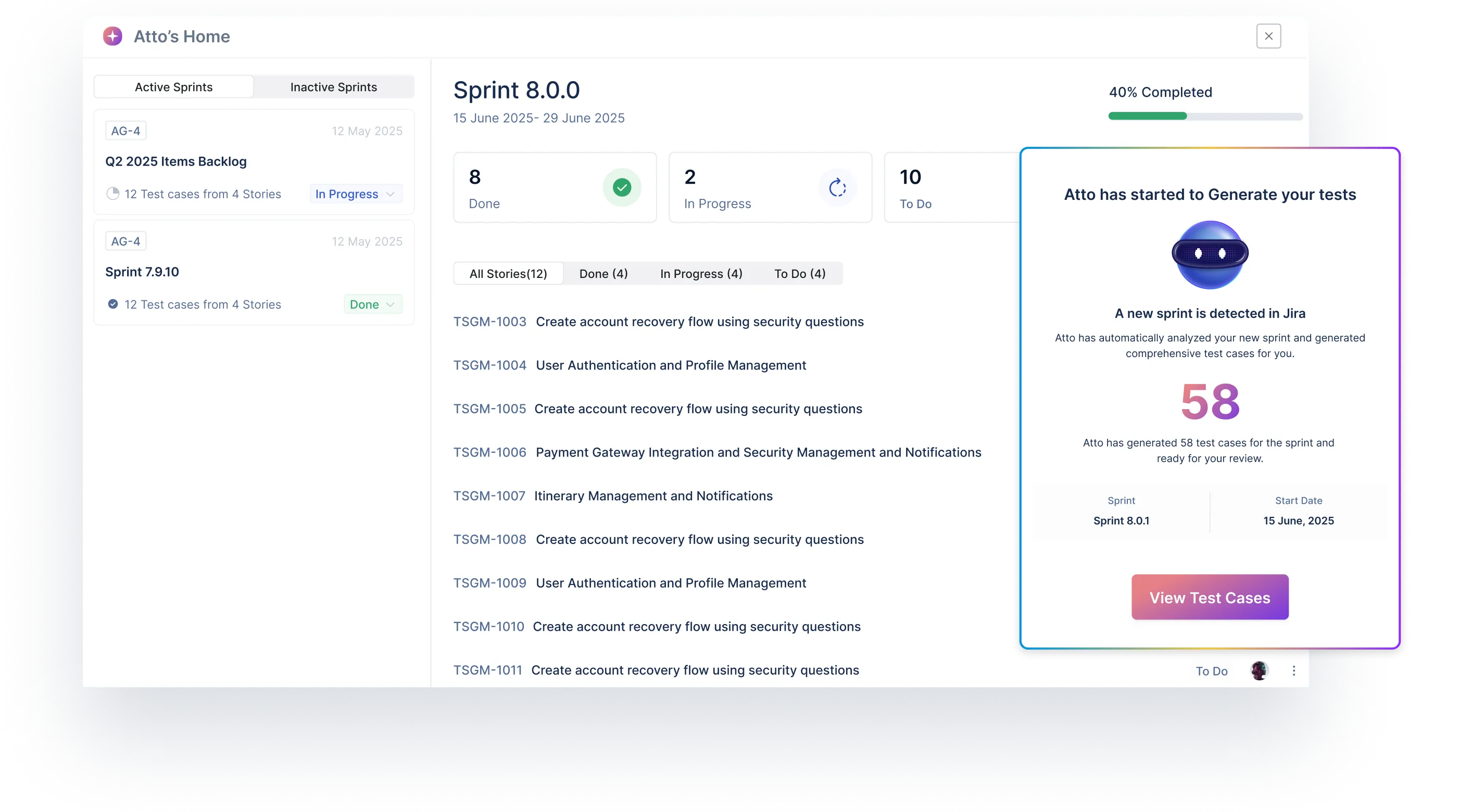
Atto mobilizes specialized AI agents to handle planning, test case writing, test case execution, and bug reporting automatically, while keeping you in control.




Testament of the Value Delivered

The clean UI and intuitive workflows make automation effortless. Instead of writing test cases from scratch, I can generate accurate AI-driven cases in minutes and adapt them for unit, regression, or any other type of testing.

Ekam Kaur Kalra
Senior QA Analyst, 5X
With two-way JIRA integration, I can see test case history and update test cases from JIRA. I like the AI agent′s capabilities to fetch story info from JIRA, and we can upload our own info via videos, docs and generate test cases. The tool has good enough features with reasonable pricing.

Pavan Kumar
Lead SDET, Growfin.ai
This platform truly feels like a game changer. The sprint planning and test activities ramp up quickly, making it easy to get started. Creating test cases feels intuitive. Sharing test results with stakeholders is straightforward.

Brian Robles
Information Security Engineer, Cisco
Users love us



Enterprise-grade security

Start testing in 2 minutes.
No steep learning curve.
Sign up for the free 7-day trial. Complete onboarding in a minute and start testing right away. No credit card required. Guided onboarding to help you.
AI you can trust without
losing control
When agents generate or execute tests, you can pause, refine or re-run, so results match real-world behavior.
Works where you
work
Two-way Jira sync for requirements traceability. CI/CD pipelines: Jenkins, GitHub, GitLab, Azure DevOps and more.
Pricing that doesn’t
scare you
Start instantly with a 7-day free trial. Plans start at just $14/user/month. Free forever plan available.
Why Replace Legacy Test Management Tools
with Test Management by Testsigma
| With Spreadsheets | With Legacy Tools | Test Management by  | |
|---|---|---|---|
| Setup & Onboarding | None but chaotic | Long setup time, clunky onboarding | Start testing in minutes with guided onboarding |
| Test Case Writing | Fully manual | Manual or semi-automated | AI Agent instantly generates test cases from Jira, Linear, Figma, images, videos, prompts |
| Traceability | None | Partial, hard to manage | Built-in end-to-end traceability |
| Collaboration | Offline, email-based | Siloed, heavy | Real-time collaboration with auto-mapped stories, bugs |
| Test Execution & Bug Reporting | Manual, error-prone | Manual. Needs tool switching. | AI Agents execute tests & file bugs with human-in-the-loop |
| Sprint Readiness | Always lags behind dev | Weeks of prep work | Test planning starts as soon as sprint goes live |
| Integrations | None | Limited, dated | Native integration with Jira, Linear and Clickup + more coming very soon |
Start Testing From Day Zero.
Stay Ahead Of Development.
Two-way Sync
With Jira
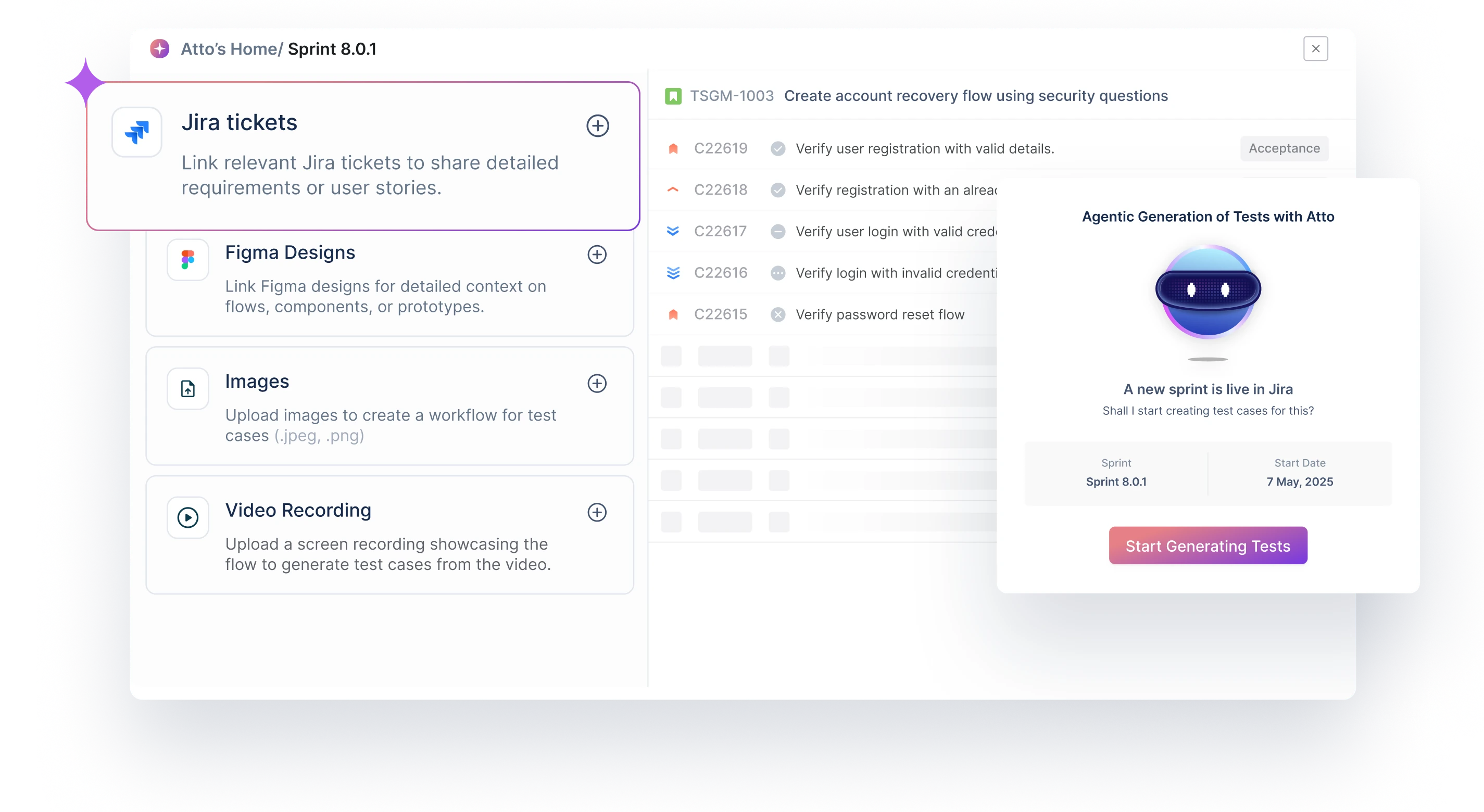
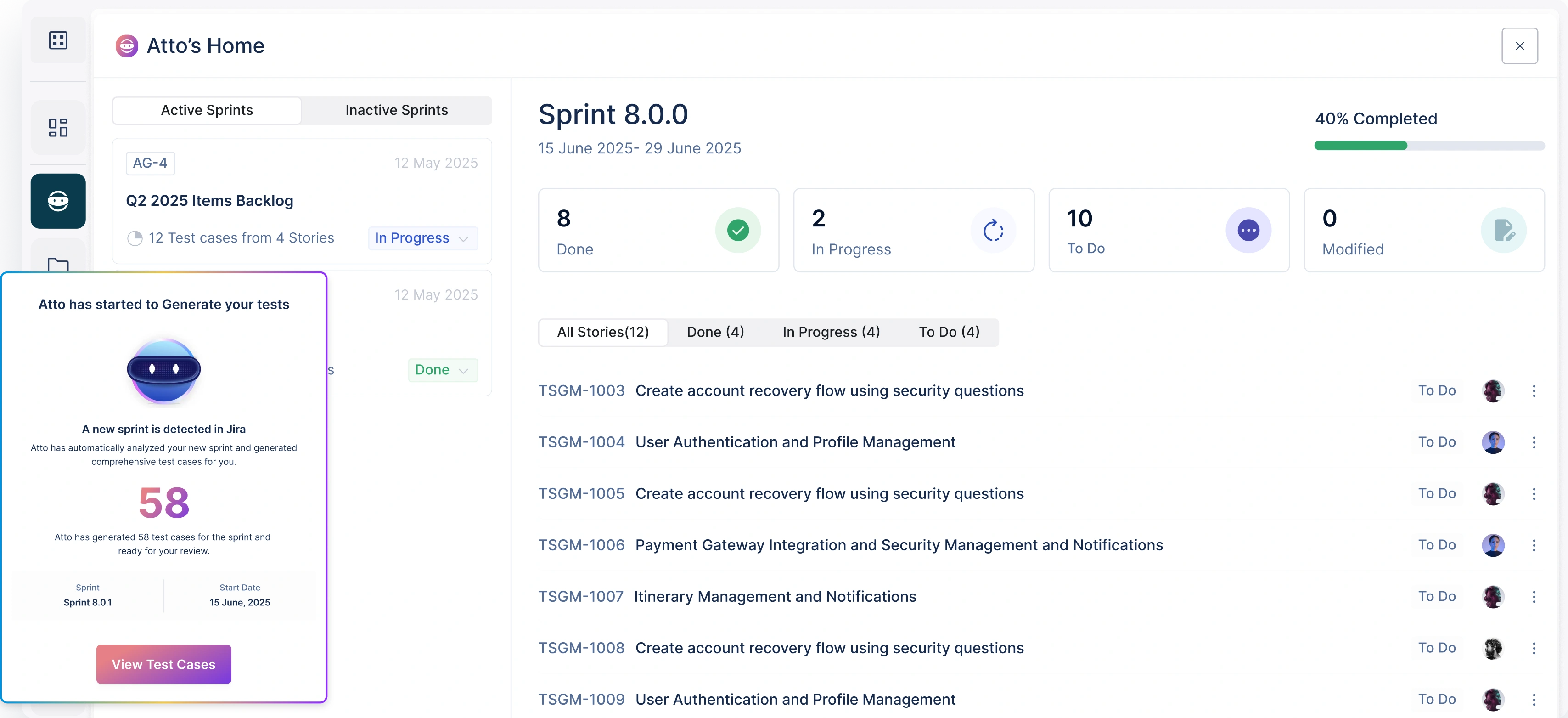
The Sprint Planner automatically detects new Jira sprints the moment they begin and pulls every story into Test Management by Testsigma. No manual input.
Clean Story-to-test
Mapping
Every test case that the Generator creates links directly to a Jira story with clear steps, preconditions, and validations.
Ready-to-test Before
Sprint Day 1
Start testing before day one with review-ready test cases, generated as soon as the sprint is active. Visible coverage matrix from day zero.
Create Detailed, Contextual Test
Cases Instantly With AI
Maximised Test
Coverage
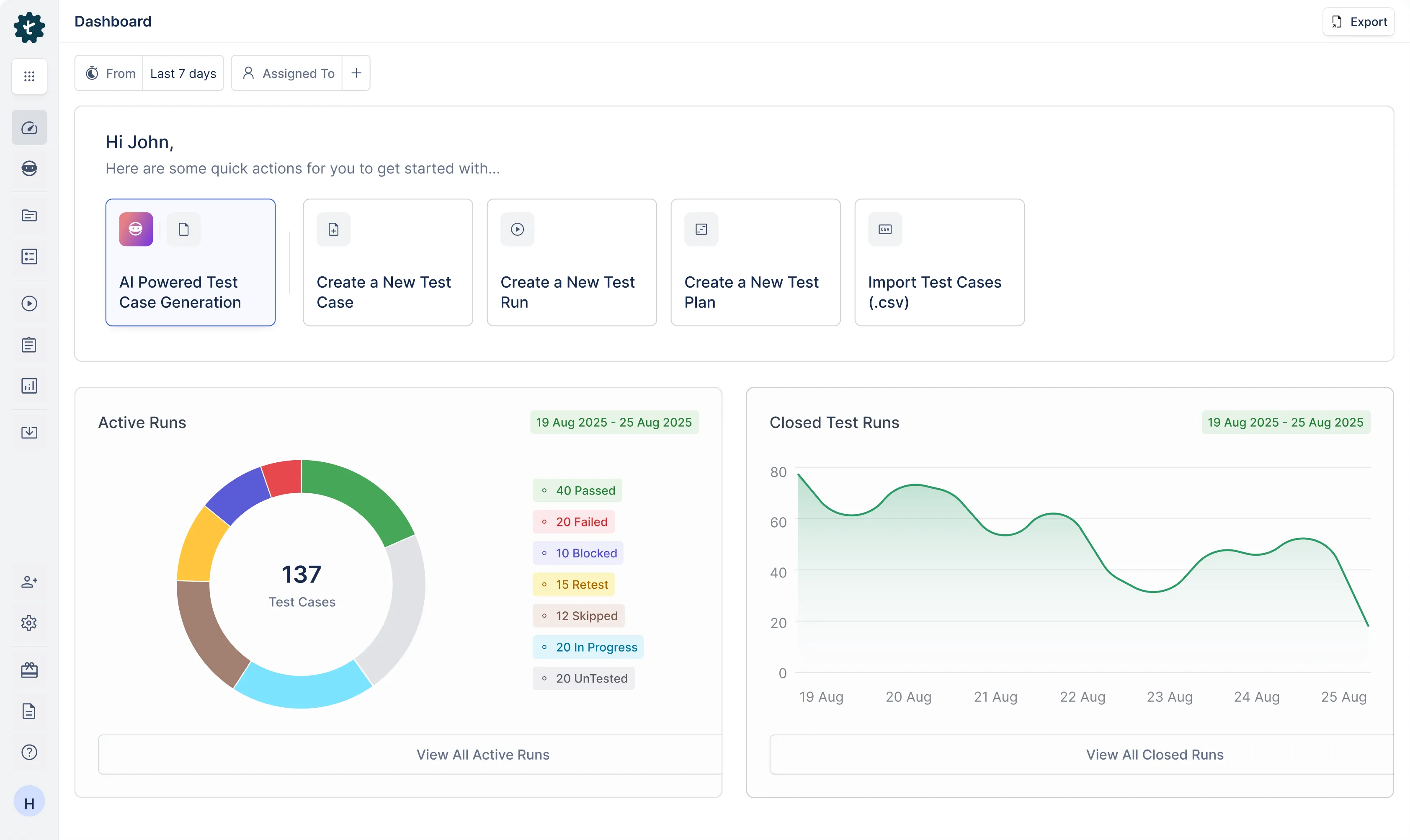
The Generator creates both positive and negative flows with edge cases, too. Get rid of copy-pasting from spreadsheets, hours lost writing step-by-step and fear of missed cases.
Editable, Detailed
Tests
Your tests are auto-filled with steps, data, and preconditions. The tests are editable with an interactive chat to tweak at any step. No flaky tests ever!
Reusable
Tests
Test cases you create are reusable across different scenarios. Create once, use as many times as you want. Duplication becomes unnecessary.
Run Tests Where You Wrote Them, With AI
Human-in-the-loop
AI Execution
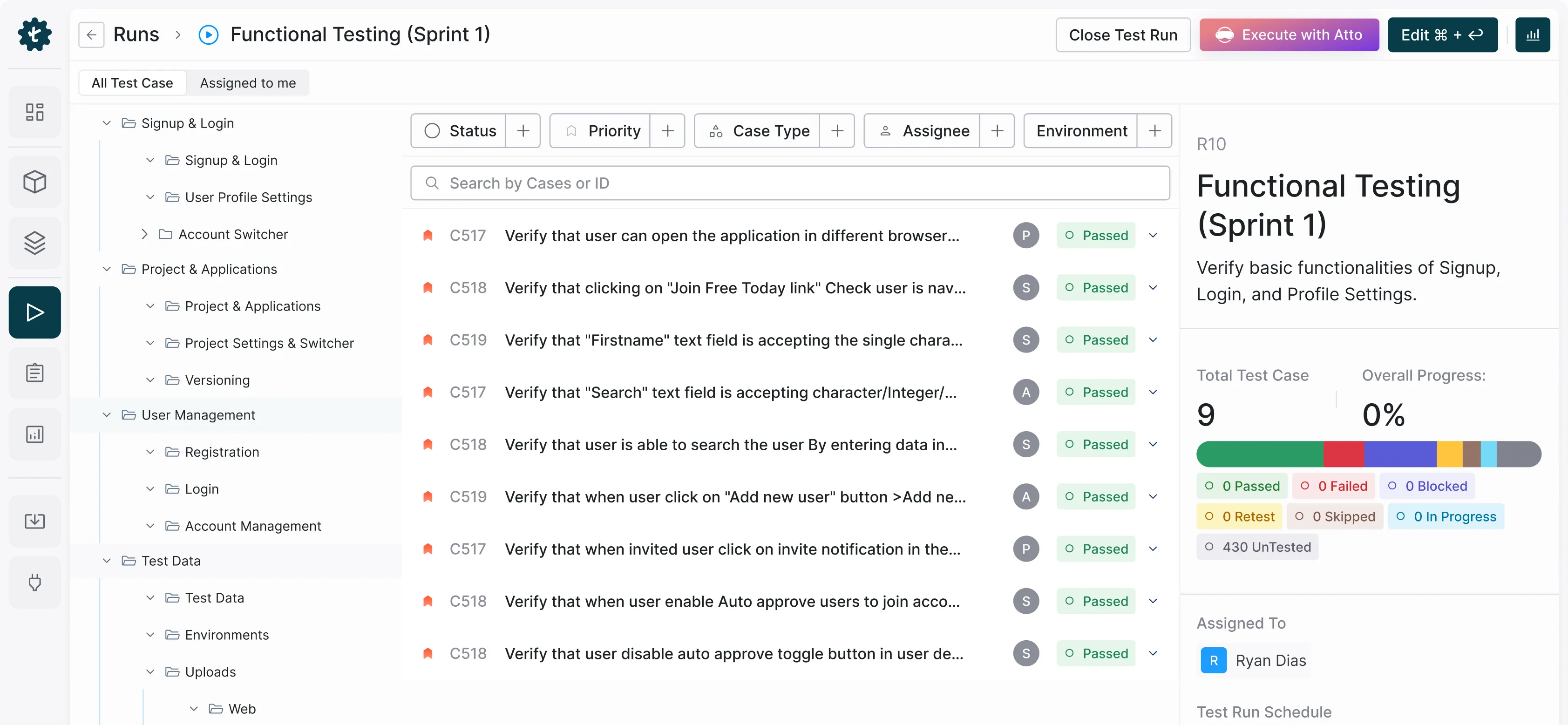
With live browser execution, visual step logs and auto-generated test data, sit back and watch the Runner execute your tests while control stays with you.
Track Run
Status
Clear dashboard where you can track runs, keep an eye on progress and fix issues as and when they arise.
Non-functional Testing Covered
The Runner auto-detects usability bugs, accessibility gaps and visual/UI consistency. These checks run in parallel with your test steps, giving you early visibility.
Bugs Reported With Context,
The Moment You Found Them
Instant Defect
Logging
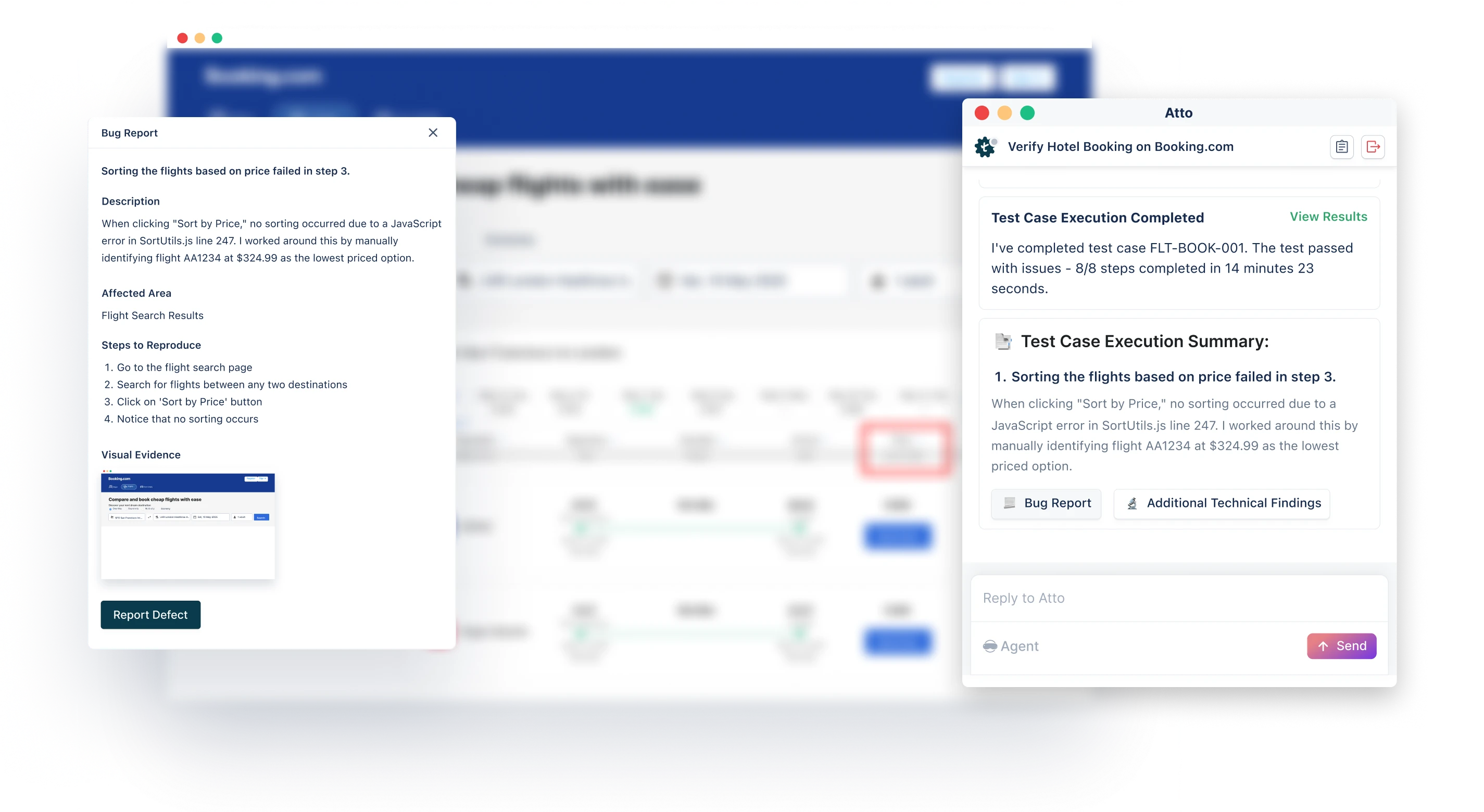
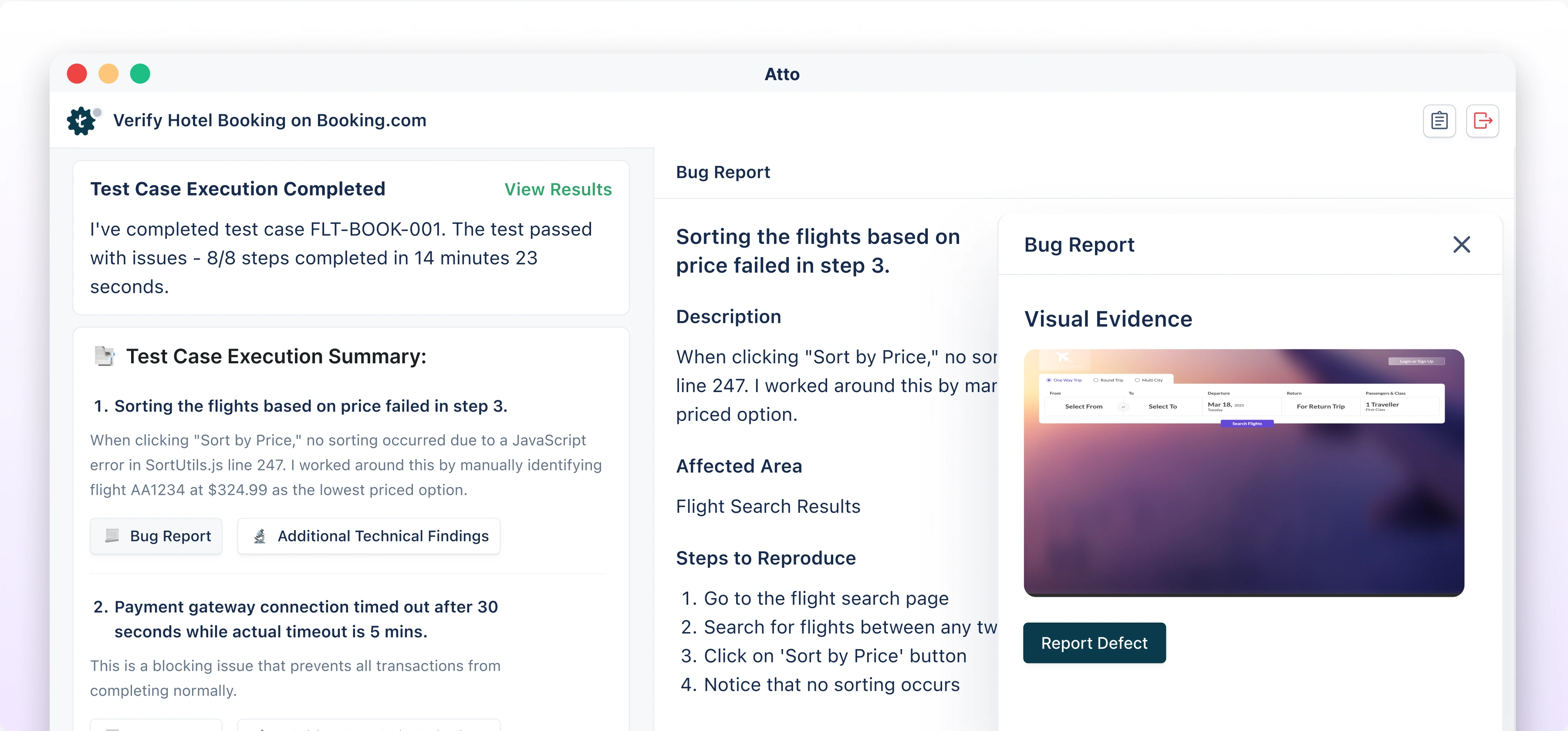
Once a step fails and you click on “Report bug”, the bug is logged on Jira, Linear or Clickup with every detail needed and steps to reproduce too.
Human-in-the-loop
Approach
The Bug Reporter generates a summary, description and steps to reproduce for the bug, which you can review and make changes if required.
Two-way Jira
sync
With two-way Jira sync, you can directly link the bug with a new Jira issue or an existing issue with just a click. You can link a bug to multiple existing issues, too.
What is Test Management Tool?
A test management tool helps testers plan and create tests, execute them and report bugs from failed tests while keeping the test cases, test runs, test plans, and bug reports organized for a streamlined and centralized testing process. A good test management tool will be able to operate as a single source of truth for the entire QA team, offering them full traceability while fostering collaboration with review mechanism and reporting. Ultimately, testers can start testing at dev team’s speed, and complete the entire testing process significantly faster with no bugs slipping to production.
Features of Test Management Platform
The following are the key features of test management platform:
This defines the testing objectives - what to test, when to test, who will test it, and how success will be calculated. The test management platform will offer a structured workspace where this can happen upfront before all other steps of testing.
Test Management by Testsigma can help you:
- Get all your sprints synced with the test management platform so you can start testing as soon as a sprint starts.
- Work in sync with the dev team and not lag behind.
Benefits of Test Management Tool
Create detailed, structured test cases from Jira stories, Figma flows, PRDs, images and user journey videos - all just with a prompt
One Central Repository for
All Your Tests
A test management tool acts as a single source of truth with all test cases, run results, and bugs organized in one place. This will avoid confusion and information silo that happen with spreadsheets. Anybody in the team can easily search, version and reuse tests across projects as and when needed. With an organized central repository, teams in different locations, including testers, developers and product managers can work on same assets without duplication and miscommunication.
Traceability to Requirements
and Bugs
Losing track of how tests link to actual requirements and bugs is a pain. A test management tool which syncs two-way with a project management tool offers full traceability. Every single requirement is linked to the right test cases. Every failed test is linked to the respective bug. Questions like "Has this user story been tested?" or "Which bug is blocking this feature?" become easy to answer. Traceability also simplifies audits and compliance reporting, with coverage and defect mapping part of the workflow.
Collaboration Across QA,
Dev, and Product
Modern QA is never an isolated process. Several teams are involved with a need for high collaboration. A test management tool becomes a shared workspace for testers, developers and product managers to plan, review and execute tests. Instead of QA being the bottleneck, any stakeholder can see test progress, offer feedback and take ownership of fixes. This reduces back-and-forth communication and builds trust in the QA process across teams, while everyone stays updated on release readiness.
Test Reusability At
Scale
Tests rarely exist alone with many features sharing steps, flows, or data. Without reusability, testers end up wasting time rewriting similar test cases. A test management platform ensures resuability is achieved with the test cases already organized in the repository with complete visibility and option to add into new test runs. This eliminates redundancy and duplication, cuts down maintenance work and keeps tests consistent as the product evolves.
Integration With Dev
Tools
A test management platform connects with the development stack, including tools like Jira, so QA can link test cases to user stories, report defects directly in Jira, and keep statuses in sync without duplicating updates. A good test management platform has a two-way integration which makes it even better - as and when tests are updated in the platform, it reflects in the project management tool in real time. You eliminate tool switching and unnecessary errors. Probably, you can even cancel your QA status meetings forever.
Manual Test Case Management vs
Using a Test Case Management Platform
| Manual Test Case Management | Using a Test Case Management Platform | |
|---|---|---|
| Test Planning Speed | Slow, difficult to maintain with spreadsheets. Updates get missed. | Planning is streamlined with tests organized and mapped to requirements. |
| Error Reduction | Risk of missed test cases, duplicated steps is high. Documents can be outdated. | With structured repositories and version control, redundancy is less/nil and duplication is eliminated. |
| Scalability | Spreadsheet size, team bandwidth and manual effort needed limit opportunity to scale. | Handles large volumes of test cases that multiple teams across locations can use in different projects and releases. |
| Traceability & Coverage | No clear linkage with coverage or impact of changes tough to track. | End-to-end traceability between requirements, test cases, and defects is achievable. |
| Collaboration | Difficult for team to work together with data on individual sheets. | Shared access, role-based permissions, and integrations with dev tools like Jira foster collaboration and team work. |
| Cost Efficiency | Involves high, redundant effort which comes at a cost. | Time and cost saved with minimal rework achieved through centralized processes and automated reporting. |
| Visibility & Control | Very low, with stakeholders relying on status meetings for updates. | Comes with real-time dashboards and reports for full visibility into QA progress. |
Frequently Asked Questions
What are the top test management tools of 2025?
How Does Testsigma Test Management Platform Work?
Why should businesses use Testsigma Test Management Tool?
Test Management by Testsigma is a fully agentic AI-powered solution that empowers QA teams of all sizes to test more with less effort. With an AI agent for every stage of your testing lifecycle - from test planning to test creation and test execution and bug reporting, and two-way Jira integration, the AI-native tool brings speed, accuracy, traceability and visibility to your QA process. You can start with a 7-day free trial and then upgrade to the Pro plan at $14/user/month.