




Prompt Templates for Pro-level test cases
Get prompt-engineered templates that turn requirements into structured test cases, edge cases, and negatives fast every time.

Table Of Contents
- 1 Overview
- 2 What is Error Guessing in Software Testing?
- 3 Steps to Use Error Guessing: How to Find the Fault in Software Testing?
- 3.1 Step 1: Understand the Application and Domain
- 3.2 Step 2: Leverage Tester’s Experience and Intuition
- 3.3 Step 3: Consider Past Defects and Common Failures
- 3.4 Step 4: Think from the User’s Perspective
- 3.5 Step 5: Identify Risk-Prone Areas
- 3.6 Step 6: Document and Execute the Test Ideas
- 3.7 Step 7: Review, Learn, and Iterate
- 4 Examples of Error Guessing in Action
- 5 Benefits of Error Guessing in Software Testing
- 6 Limitations of the Error Guessing Technique
- 7 When to Use the Error Guessing Technique?
- 8 4 Tips to Enhance Your Error Guessing Technique
- 9 Common Misconceptions About Error Guessing
- 10 A Quick and Effective Template for Error Guessing
- 11 Error Guessing vs Other Software Testing Techniques
- 12 Final words: Automating Error Guessing with Testsigma
- 13 FAQs
Overview
What is Error Guessing in Software Testing?
Error guessing is an experience-driven testing technique where testers use intuition and past knowledge to predict potential defects.
How to Apply the Error Guessing Technique?
- Understand the application and domain
- Leverage the tester’s experience and intuition
- Consider past defects and common failures
- Think from the user’s perspective
- Identify risk-prone areas
- Document and execute test ideas
- Review, learn, and iterate
When to Use the Error Guessing Technique?
- When documentation is limited or incomplete
- At the end of formal test execution
- During exploratory testing sessions
- In high-risk and complex areas
Even the most detailed test plans can miss unexpected bugs. Experienced testers often catch these issues not by following strict procedures, but by relying on intuition and past experience. This instinct-driven approach is known as error guessing. In this blog, we’ll break down what error guessing is, when it works best, and how you can use it to uncover defects that formal test cases might overlook.
What is Error Guessing in Software Testing?
Error guessing is a testing technique where testers rely on their experience and intuition to identify potential defects. Instead of following predefined test cases or techniques, they anticipate where the application might fail.
Here are the key characteristics that define the error guessing technique:
- Experience-driven: Testers apply lessons learned from previous projects and past defects they’ve encountered.
- Intuition-based: It relies on gut feelings about where problems are most likely to surface.
- Situational and project-specific: The approach adapts based on the application type, domain, and user behavior patterns.
- Risk-focused: Testers target areas with the highest probability of failure or critical impact.
Steps to Use Error Guessing: How to Find the Fault in Software Testing?
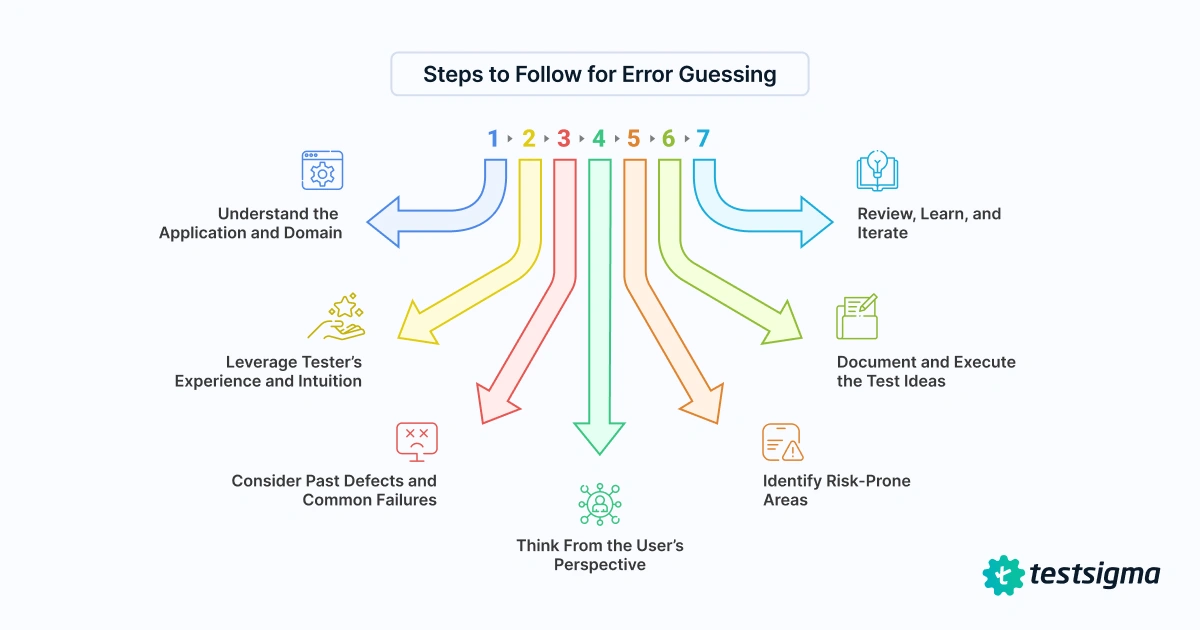
While error guessing is driven by your gut feeling and judgment, here is a structured process you can follow to apply it effectively during software testing.
Step 1: Understand the Application and Domain
Start by learning what the application does and who uses it. Talk to developers about the core functionality and ask business analysts about user expectations.
Furthermore, research the industry domain as different industries have different processes. For example, banking apps handle money transactions differently from how gaming apps handle user sessions.
Step 2: Leverage Tester’s Experience and Intuition
Think about bugs you’ve found in applications before. Consider what broke in your last project and why. Your past experience is your biggest asset here, and trust your instincts when something feels wrong or fragile – go for it.
Step 3: Consider Past Defects and Common Failures
Review your defect logs from previous releases if they’re available. Look for recurring patterns in how features have failed in the past.
Applications tend to break in predictable ways across projects. For instance, payment gateways often fail during network interruptions, whereas file uploads crash when unsupported formats are used.
Step 4: Think From the User’s Perspective
A user rarely will follow the path you designed for them. They might click the submit button multiple times when the page loads slowly. They can accidentally enter data in unexpected formats or skip some steps.
So, put yourself in their shoes and follow the same path that they might take.
Step 5: Identify Risk-Prone Areas
Focus on elements that handle critical operations like security, payments, or data storage since failures here cause the most damage. Next, check complex integrations between different system components where things often break.
Finally, prioritize new features over stable old ones because they’re more likely to have bugs.
Step 6: Document and Execute the Test Ideas
Brainstorm and write down test scenarios, even if they seem obvious at first. Once documented, execute them one by one and track what happens.
Moreover, document any defects with clear reproduction steps so others can also understand the issue. It even helps to build a knowledge base that will come in handy in future projects.
Step 7: Review, Learn, and Iterate
After completing your testing cycle, take time to analyze the results. Which guesses led to actual bugs and which ones didn’t pan out?
Share your findings with your team and walk them through your thought process so everyone can learn from your experience. Plus, use these insights to refine the approach for the next project.
Examples of Error Guessing in Action
Here are common scenarios where testers use their intuition to find defects:
- Input Validation Errors
Your users might enter an unusual character in a phone number field. They could paste a 500-character essay into a zip code box or could even leave mandatory fields blank and hit submit anyway.
Test these scenarios because applications often accept invalid data when validation rules are weak or missing.
- Error Handling and Recovery
What happens if someone’s internet drops during payment processing? Try simulating network failures at critical moments. Moreover, test what happens when users enter the wrong password 5 times in a row. Check if the app crashes gracefully or loses data when force-closed mid-operation.
- Boundary Conditions and Constraints
Start by testing the edges of what the system claims it can handle. If a file upload says it accepts up to 5MB, try uploading exactly 5MB, then push it with 5.1MB. Do the same with text fields by entering the maximum characters, then adding one more character.
Plus, test zero values and negative numbers where they don’t belong, like age fields or quantity inputs.
- Usability and User Experience Issues
Think about how real users actually behave when they’re impatient or distracted. They hit the back button in the middle of multi-step forms to change something. They often resize browser windows to odd dimensions or rotate their phones mid-task.
Test these scenarios because they help find interface problems that make your app frustrating to use in the real world.
- Security Gaps
Try entering SQL commands in search boxes to check for injection flaws. Test login forms with passwords like “123456” or “password”. Also, modify URL parameters to access restricted pages. These checks help catch security holes before real attackers find them.
Benefits of Error Guessing in Software Testing
Now, let’s look at why error guessing is worth adding to your testing approach:
- Fast and cost-effective: No need for extensive documentation or lengthy test case preparation. You can start testing based on your experience and what your gut tells you.
- Complements formal testing: It fills gaps left by structured methods, providing broader coverage when combined with techniques such as boundary value analysis.
- Good at catching hidden defects: Some bugs only surface when users behave in ways you didn’t expect. Error guessing helps you think like real users who don’t follow documented workflows.
Limitations of the Error Guessing Technique
Like any testing technique, error guessing has drawbacks you should be aware of.
- Relies on tester’s skill and intuition: Absolute guessing error depends heavily on your skills and knowledge, which means newer testers might struggle without having enough experience.
- May miss systematic coverage: This technique doesn’t guarantee your testing will cover every important scenario, and there’s no clear way to measure your actual coverage.
- Hard to standardize: You can’t easily replicate error guessing across team members or projects, and documenting intuitive decisions so others can follow them is challenging.
When to Use the Error Guessing Technique?
Error guessing is best used when formal methods fall short. Here’s when you should apply this technique for maximum impact:
- When documentation is limited: Use it when requirements are vague or incomplete and you need to fill the gaps. Your experience serves as a guide when written specifications don’t provide enough detail about expected behavior.
- At the end of formal test execution: Apply it after completing structured test cases to catch anything you might have missed. This final pass often shows edge cases that didn’t fit into your planned test scenarios.
- During exploratory testing sessions: Combine it with exploratory testing to make your ad-hoc testing more focused and effective. Your intuition helps you navigate the application and spot issues that demand deeper investigation.
- In high-risk and complex areas: Use it to check critical features like payment processing or data handling where failures have serious consequences. These areas benefit from the extra scrutiny that your experience brings.
4 Tips to Enhance Your Error Guessing Technique
Here are some practical ways to become more effective at predicting where defects hide:
- Learn from defect taxonomies and bug databases: Study past defects to understand common failure patterns across different projects. Look at bug databases to see how similar applications failed before.
- Collaborate with developers and business analysts: Discuss with developers about areas they find tricky to work on. Business analysts can share insights about how users actually interact with the application.
- Use brainstorming sessions with the team: Gather your team to brainstorm potential failure scenarios together before testing begins. Multiple perspectives help you find scenarios you might not think of on your own.
- Combine with automation for repeatable scenarios: Once you identify a valuable test scenario through error guessing, automate it for future runs. This frees you up to focus on finding new issues rather than retesting old ones.
Common Misconceptions about Error Guessing
When it comes to error guessing in software testing, there are several myths that can make it seem too unreliable to use in projects. Let’s clear these up:
- Not random testing: Error guessing relies on experience and informed judgment rather than random actions. You’re making kind of informed guesses based on past knowledge and current understanding of the application.
- Not a replacement for formal methods: This technique works best alongside structured methods like equivalence partitioning or boundary value analysis. Think of it as an additional layer rather than a complete replacement.
- Not unmeasurable: You can track and measure error guessing by documenting your test ideas and results. Recording what you tested and what you found makes the process valuable and useful.
A Quick and Effective Template for Error Guessing
Use this checklist to guide your error-guessing efforts and systematically cover common failure areas.
Input Validation
- Submit forms with empty or null values in mandatory fields
- Enter special characters like @#$% in text inputs
- Paste extremely long strings that exceed expected character limits
- Copy content with hidden formatting from external sources
Boundary Conditions
- Enter maximum and minimum allowed values in numeric fields
- Test values just above and below defined limits
- Input zero or negative numbers where they shouldn’t be valid
- Upload files at exactly the maximum size limit
Session and State Handling
- Let sessions expire during critical operations like checkout or form submission
- Log in from multiple devices or browsers simultaneously with the same credentials
- Use the browser back button in the middle of multi-step workflows
- Switch between tabs or minimize the app during active processes
Error Messages and Exception Handling
- Simulate network interruptions during data submission or file uploads
- Test on slow connections to trigger server timeouts
- Force-close the application during critical operations to check data integrity
- Send invalid API responses or remove expected data fields
Security Loopholes
- Enter SQL commands in search boxes and input fields
- Test for cross-site scripting by entering script tags in text areas
- Modify URL parameters to access pages without proper authorization
- Try logging in with commonly used weak passwords
User Behavior Variations
- Click action buttons multiple times in rapid succession
- Submit forms without completing all required steps or validation
- Refresh the browser while data is being processed or saved
- Rotate device orientation on mobile apps during active operations
Error Guessing Vs Other Software Testing Techniques
| Aspect | Error Guessing | Boundary Value Analysis | Explortary Testing | Negative Testing |
| Approach | Experience and intuition-based | Systematic testing at boundaries | Simultaneous learning and testing | Testing with invalid inputs |
| Documentation | Flexible and not mandatory | Requires clear boundary definitions | Light documentation | Requires test case preparation |
| When to use | High-risk areas | Known input ranges and limits | New features, unclear requirements | Validating error handling |
| Skill level | Depends on the tester’s experience | Can be applied by anyone | Requires testing experience | Detailed experience is not needed |
| Coverage | Unpredictable, risk-focused | Predictable boundary coverage | Broad exploratory coverage | Focused on invalid scenarios |
| Test design time | Quick, minimal planning | Moderate planning needed | Flexible, evolves during testing | Requires upfront planning |
Final Words: Automating Error Guessing with Testsigma
Error guessing goes beyond standard test cases and lets you evaluate applications using real-world instincts. You can master this technique with experience and time.
However, repeating these tests manually across every release is difficult and time-consuming. Automation can handle these repetitive tasks while you focus on finding new scenarios.
With platforms like Testsigma, you can automate valid test scenarios to run on their own in future releases. It lets you set up tests in plain English, plus its self-healing feature automatically fixes broken tests, saving you hours of maintenance work. This way, you catch more bugs while shipping faster.
FAQs
No, error guessing focuses specifically on predicting failures, while exploratory testing is about learning the application and designing tests on the fly as you explore it.
Yes, anyone can start using this technique, but effectiveness improves with time and practice. New testers can take help from past data or experienced members to improve their technique.
When you understand the common pain points and user behaviors specific to your field, your guesses become far more targeted and effectiv
To define error in software testing, an error is a mistake made during development that can lead to defects in the final product.