
AI In Software Testing: A Complete Guide
TL;DR
- AI in software testing uses ML to generate, run, and maintain tests automatically, cutting manual effort and catching defects earlier.
- The #1 challenge QA teams report is data & privacy risk (43%), followed by inconsistent AI performance (26%) and inaccurate results (17%).
- AI augments manual testers; it doesn’t replace them. Humans still own documentation review, complex scenario design, and UX judgment.
- Self-healing tests are AI’s biggest maintenance win: they auto-update when the UI changes instead of breaking.
- Tools like Testsigma let teams write tests in plain English (NLP) and generate them from Jira, Figma, or screenshots via Testsigma Copilot.
- As AI coding agents (Claude Code, GitHub Copilot, and Cursor) ship code faster, the harder problem shifts to verification , knowing what’s actually been tested. Testsigma works alongside any coding agent and any QA stack to close that gap.
What Is AI in Software Testing?
AI in software testing means using machine learning and natural language processing to help write, run, and maintain tests. The core testing principles haven’t changed. What’s changed is who’s doing the heavy lifting: a model that’s learned from thousands of prior test runs, instead of a person clicking through the same regression suite for the tenth time this sprint.
Test generation, execution, and maintenance can now run through AI with far less manual setup than a few years ago. Self-healing scripts adjust when the UI shifts instead of breaking the whole suite. Models trained on past runs start flagging the scenarios most likely to catch a real bug, not just padding the count.
What Is the Role of AI in Software Testing?
AI generates test cases, executes them, and analyzes the results, and it does this with a fraction of the manual setup teams used to need. The models improve as they go too, learning from each test run which scenarios tend to catch real bugs versus which ones just pad the count.
None of this replaces manual testing. It shifts where human attention goes. A QA engineer who used to spend Monday morning writing boilerplate test cases can spend it instead on the scenario nobody thought to automate, the edge case a customer hit last quarter, or the workflow that only breaks under load. More coverage, fewer slip-throughs, and a lower cost per test cycle. That’s the trade being made, and for most teams it’s a good one.
What QA Teams Say: Top Challenges With
AI in Testing
A Testsigma practitioner survey found four recurring pain points:
| Challenge | % of respondents | What it looks like |
|---|---|---|
| Data & privacy risks | 43% | Feeding production data into AI tools creates GDPR/HIPAA/SOC 2 exposure. |
| Inconsistent performance | 26% | Self-healing makes wrong element associations; results vary run to run. |
| Inaccurate results | 17% | AI-generated assertions don’t reflect real app behavior, creating false confidence. |
| Complexity of adopting AI | 14% | Learning curve, CI/CD integration effort, team skill gaps. |
Key takeaway: The barrier to AI in testing isn’t enthusiasm; it’s trust in data security, consistent behavior, and accurate results. Teams should prioritize tools offering data masking/synthetic data, audit trails for AI decisions, and human-in-the-loop review before promoting AI-generated tests to a regression suite.
Types of AI Testing
- Unit testing auto-generates test cases from code structure, surfaces edge cases, and predicts bug-prone areas.
- Functional testingprioritizes test cases by real user flows, automates data-driven tests, and generates realistic test data.
- Non-functional (performance) testing flags bottlenecks from historical data, distributes load intelligently, and adapts as the system changes.
- Visual testing compares screenshots to catch UI regressions and subtle visual anomalies humans miss.
Manual Testing vs AI Testing
| Manual Testing | AI Testing | |
|---|---|---|
| Speed | Sequential, time-consuming | Accelerated, parallelizable |
| Coverage | Limited by tester bandwidth | High , covers scenarios humans miss |
| Accuracy | Prone to human error | Consistent, monitored, automated |
| Cost over time | Expensive to scale (hiring, training) | Higher upfront tool cost, lower long-run cost |
| Maintenance | Manual script updates on every UI change | Self-healing, updates automatically |
| Example tools | Human testers (no dedicated tool) | Testsigma, Katalon |
Benefits of AI in Software Testing
- Faster test creation: A regression suite that took a QA team 3 days to write by hand now gets built in hours. AI reads the application under test, generates cases for the paths a human would eventually get to anyway, and does it for scenarios with 50+ input combinations without anyone typing each one out.
- Higher test coverage: Manual testers work from what they remember to check. AI works from the actual code paths and data ranges, so it catches the boundary case at 255 characters or the null value nobody thought to try. That’s coverage you don’t get by adding more testers, only by changing how the cases get generated.
- Higher accuracy A script that runs the same steps 1,000 times doesn’t get bored on the 800th run. Manual execution is where typos, skipped steps, and misread results creep in, especially late in a sprint when everyone’s tired. Removing that human variable means the test result reflects the code, not the tester’s attention span that day.
- Continuous testing: AI-driven suites plug straight into CI/CD, so every commit triggers a run instead of waiting for a scheduled regression pass. A build that breaks something gets flagged in minutes. Compare that to a manual cycle, where the same bug might not surface for 3 days, by which point 5 more commits have landed on top of it.
- Lower maintenance overhead: Around 60% of teams spend 11+ hours a week just keeping test suites from breaking every time the UI shifts. Self-healing tests catch a moved button or a renamed field and adjust the locator on their own. Instead of a failed suite and someone digging through logs to find out why, the test keeps running and the team gets its Monday morning back.
Why AI Matters for Test Automation: The Traditional Pain Points
| Traditional challenge | AI-driven fix |
|---|---|
| Slow, code-heavy test creation | Low/no-code, NLP-based test authoring (e.g., Testsigma) |
| Test maintenance burden (60% of teams: 11+ hrs/week) | Self-healing automation |
| Test data generation (30%+ of automation issues) | Automated, synthetic test data generation |
| Flaky tests | AI-driven stability via adaptive locators |
| Slow ROI | Low-code automation cuts test creation time ~70% (KPMG) |
Understanding the importance of AI in QA is crucial, as it enhances test accuracy, accelerates test cycles, and helps teams adapt quickly to changing software environments.
How to Use AI in Software Testing
- Self-healing tests. A renamed button ID or a dropdown moved 20 pixels breaks a traditional script even when the feature works fine. Self-healing tests recognize the element by behavior and context instead of a fixed locator, so the script updates itself. Broken locators are the top reason teams abandon automation after a redesign, not because the app broke, but because the tests lost their way around it.
- Automated test data generation. Writing test data by hand means someone manually covers edge cases: empty fields, boundary values, and special characters. AI generates that data automatically, including combinations a person tends to skip, like a 256-character string in a 255-character field. When the generation is tied back to the original requirement or ticket, the data maps to what was actually asked for, instead of existing as a disconnected asset nobody can trace later.
- AI-generated test reports. Pass/fail alone doesn’t tell a developer much. AI reports surface which module fails most often, which test flakes without a code change behind it, and where a regression is likely to resurface. When results sync both ways with the tracking tool a team already uses, a logged result shows up on the story instantly, with no tab-switching to check coverage.
- Accelerated regression testing. Regression suites repeat the same checks after every change. AI runs that suite in the background and flags what needs a second look, freeing testers for exploratory work, the kind that finds bugs nobody scripted for. Agents handle the repetitive execution; the tester still decides what ships.
- Low-code and no-code testing. Writing “log in with valid credentials and check the dashboard loads” in plain English used to require someone who knew Selenium to translate it. AI can turn a ticket or a design file directly into test cases, with no manual translation step, which opens authoring to PMs and manual QA who know the feature but don’t code.
- Defect analysis. ML trained on past bugs and commit history flags which modules break most, usually the ones touched often or patched repeatedly. Feeding that back into planning means new test coverage weights toward the riskiest areas instead of spreading effort evenly across everything.
What Tasks Can AI Handle vs. What Still Needs a Human?
AI can help with:
- Test case creation per field or component, mapping inputs to expected outputs faster than someone typing each one by hand
- Re-running the right tests after a code change, using risk-based selection instead of rerunning the entire suite every time
- Test planning for new features, drafting an initial coverage plan straight from a requirement or ticket
- Automating repetitive, similar workflows, the login checks, and form validations that don’t change much between releases
- UI, performance, and load test generation, simulating traffic or interactions at a scale no team could script manually
Still needs a human:
- Documentation review, understanding what a feature is actually supposed to do, not just what the ticket says
- Complex scenario design, tracing logic across multiple components in a way that needs judgment, not pattern matching
- Test result interpretation, deciding whether a failure is a real bug, a flaky test, or an acceptable tradeoff
- UX testing, whether the flow feels right to an actual person, which no model can judge from the outside
What I am looking for is automated testing, integration coverage, QA results, important user journeys, and knowledge of what has been modified. I would also need somebody to challenge the results of those tests because many successful tests don’t mean a lot when they make the same wrong assumptions.
Co-Founder & CTO, Atty

Will AI Replace Software Testers?
No. AI automates repetitive execution and maintenance, but humans still own test case judgment, business-context validation, and interpreting results. Roughly 70% of manual QA tasks are automatable, which raises ROI and speed; it doesn’t eliminate the role.
Why AI-Native Teams Need a Verification Layer, Not Just a Testing Tool
Code now ships faster than anyone can manually confirm it’s been tested. When most commits come from AI coding agents, the bottleneck isn’t writing the code anymore; it’s knowing what’s actually covered.
Traditional test automation still assumes a person decides what to test next. Someone looks at the diff, guesses what might have broken, and writes or triggers tests accordingly. That worked when code shipped at human speed. It doesn’t scale when an agent can generate a week’s worth of commits before lunch.
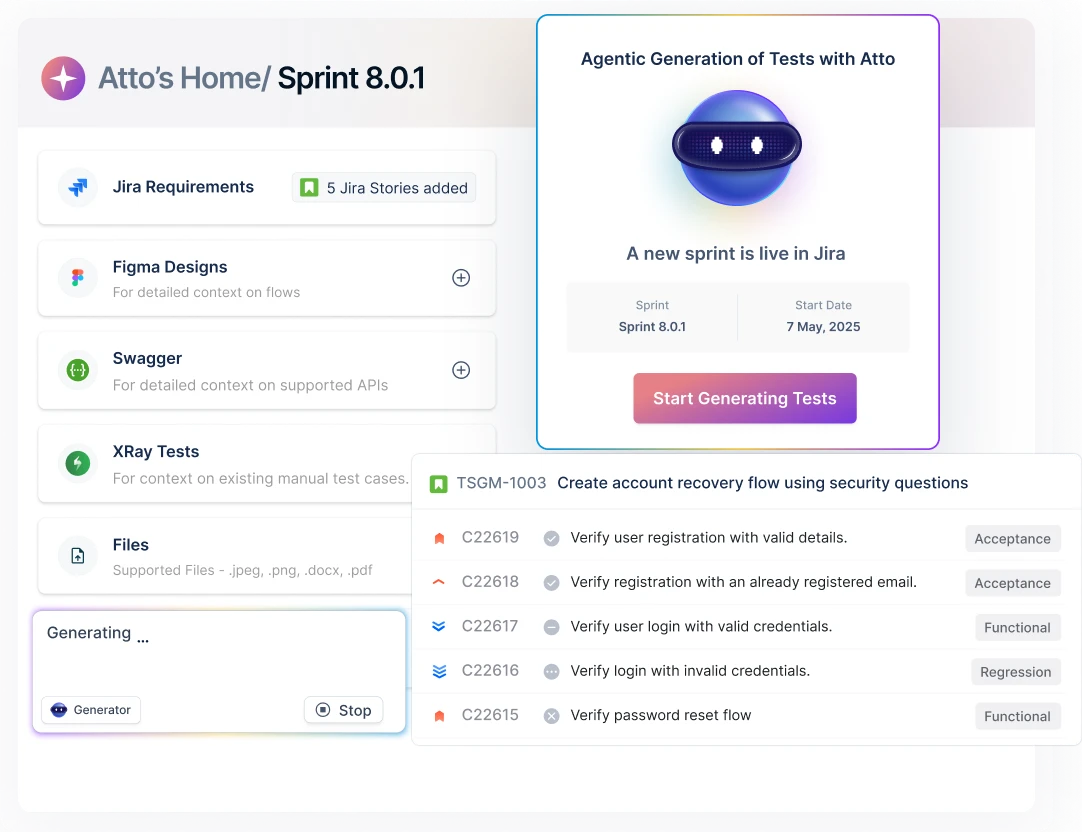
A verification layer works differently. It reads each sprint’s code changes against what’s already covered, writes and runs the tests that are missing on its own, and rolls the result into a single confidence score instead of five disconnected coverage reports from five different tools. A team can then answer one question every sprint: is this safe to ship?
That’s the direction Testsigma is extending toward: a layer that sits underneath whatever coding agent (Claude Code, Copilot) and QA stack (Playwright, Appium, or Testsigma itself) a team already has in place, rather than asking them to replace it.
How to Implement AI Testing Using Testsigma
Testsigma is a cloud-based, low-code AI test automation platform for web, mobile, desktop, and API testing, with Testsigma Copilot as its GenAI layer for test creation.
Step-by-step:
- Connect an input source, link Jira or Figma, or upload a screenshot/video of the flow you want tested.
- Generate with Copilot, prompt Copilot in plain English (e.g., “test the checkout flow”) to produce executable test steps.
- Review and refine, validate the generated steps against actual business logic before promoting to your regression suite (addresses the “inaccurate results” concern above).
- Enable self-healing, turn on auto-healing so locator/UI changes don’t break the suite.
- Run in CI/CD, integrate with your pipeline for continuous execution and reporting.
- Check coverage against the sprint, not just the suite, compare what was shipped this sprint (including AI-agent-generated code) against what’s actually been tested, so gaps surface before release rather than after.
AI Testing Tools in the Market
There are several AI-powered test automation tools available today beyond Selenium. Testsigma is one option, a cloud-based platform using NLP for test case creation and an AI-powered core for test maintenance.
For a full breakdown of how Testsigma compares to Katalon, Mabl, Tricentis TOSCA, Applitools, and others, see our complete guide to AI testing tools.
Conclusion
AI is changing how software testing works and making it easier to automate. It uses machine learning and predictive analytics to help testers find bugs faster and more accurately, saving time and money. AI-powered tools can generate test cases, analyze results, and spot potential problems before they cause real damage.
AI is a must-have for any software development team looking to stay ahead in this digital world. Testsigma is built for teams who want to use AI in software testing without needing to be deeply technical. From creating test cases to analyzing results, it handles the heavy lifting, works with different testing frameworks, and integrates with the tools your team already uses. Testsigma also connects naturally with your broader delivery pipeline; see how it fits into DevOps orchestration alongside your CI/CD tooling.
If you’re looking for a way to speed up your software testing using AI, Testsigma is the place to start.
Frequently Asked Questions
What is AI in software testing?
AI in software testing means using machine learning and natural language processing to help write, run, and maintain tests. The core testing principles haven’t changed , what’s changed is who’s doing the heavy lifting: a model trained on thousands of prior test runs instead of a person clicking through the same regression suite every sprint. Self-healing scripts adjust when the UI shifts instead of breaking, and models trained on past runs flag the scenarios most likely to catch a real bug.
Will AI take over Software Testing?
No, AI will not replace human involvement in software testing. While AI can assist in automating certain aspects of the process, humans will still be necessary for tasks such as formulating test cases, providing context, and making judgments on test results.
How is AI used in Automation Testing?
AI is used to make testing more accessible and more efficient. It helps automate the testing process, such as creating test cases, running tests, analyzing results, and spotting errors. AI-powered testing tools use machine learning algorithms and predictive analytics to create tests automatically, find bugs or security issues, and even get better at finding problems over time by learning from past test runs.
What tasks can AI handle in testing, and what still needs a human?
AI can handle test case creation per field or component, re-running the right tests after a code change using risk-based selection, test planning for new features, automating repetitive workflows, and UI, performance, and load test generation. A human is still needed for documentation review, complex scenario design across multiple components, interpreting whether a test failure is a real bug or an acceptable tradeoff, and UX testing , judging whether a flow feels right to an actual person.
What are the top challenges QA teams face when adopting AI in testing?
A Testsigma practitioner survey found four recurring pain points: data and privacy risks (43%), inconsistent AI performance from self-healing making wrong element associations (26%), inaccurate results from AI-generated assertions that don’t reflect real app behavior (17%), and complexity adopting AI such as learning curve and CI/CD integration effort (14%). The barrier isn’t enthusiasm; it’s trust in data security, consistent behavior, and accurate results.
Why do AI-native teams need a verification layer, not just a testing tool?
When most commits come from AI coding agents, the bottleneck isn’t writing code anymore; it’s knowing what’s actually covered. Traditional test automation assumes a person decides what to test next, which doesn’t scale when an agent can generate a week’s worth of commits before lunch. A verification layer instead reads each sprint’s code changes against what’s already covered, writes and runs the missing tests, and rolls the result into a single confidence score so a team can answer one question every sprint: is this safe to ship?
