

Worksoft has been a leading choice for enterprise automation, especially for SAP, ERP, and end-to-end business process testing, thanks to its scriptless workflows and deep system integrations. But as QA and engineering teams shift toward faster release cycles and modern DevOps practices, many organizations are finding Worksoft harder to scale and maintain.
Teams today expect broader browser and platform coverage, easier CI/CD integration, AI-assisted maintenance, and tools that support both technical and non-technical users. Rising licensing costs, flakiness, and complex setup requirements have also pushed enterprises to explore more flexible, cloud-ready solutions.
This guide highlights the 8 best Worksoft alternatives in 2025, comparing their strengths, unique capabilities, and ideal use cases to help teams choose a tool that aligns with modern automation needs.

Table Of Contents
- 1 Why Seek Worksoft Alternatives?
- 2 Comparison Table: Top 5 Alternatives
- 3 Top 8 Worksoft Alternatives
- 4 How to Choose the Worksoft Alternative
- 5 Conclusion
- 6 FAQs
Why Seek Worksoft Alternatives?
While Worksoft remains a strong solution for enterprise-scale SAP and packaged application testing, many teams find it challenging to adapt to today’s faster, more agile delivery cycles. As organizations modernize their tech stacks and adopt DevOps, they need tools that are easier to maintain, integrate seamlessly with cloud-based pipelines, and support a wider range of platforms and applications. Worksoft’s complexity, higher ownership costs, and limited flexibility often push teams to look for alternatives that offer broader test coverage, AI-assisted automation, and better usability for both technical and non-technical roles.
Common User Pain Points & Feedback
From user discussions across community forums and enterprise engineering groups, several recurring challenges with Worksoft frequently emerge. Below is a summary of the most common issues teams encounter when scaling or modernizing their test automation efforts.
- Flakiness and Inconsistency in Test Execution: Users often report unstable tests, especially when automating across UI-heavy ERP workflows, leading to unreliable results.
- High Setup And Maintenance Overhead: Worksoft’s architecture and workflow configurations require significant initial setup and ongoing upkeep, which slows down scaling.
- Limited Browser and Platform Support: Coverage beyond traditional enterprise systems can feel restrictive, making it harder to test modern web, mobile, and cloud applications.
- Complex Licensing and High Cost: The tool’s licensing model and long-term ownership costs frequently come up as major concerns for cost-conscious teams.
- Difficulties Integrating With Modern CI/CD Pipelines: Worksoft’s integrations lag behind lightweight, cloud-ready tools, creating friction for DevOps teams.
- Lack of Agility for Agile and DevOps Teams: Its slower test creation cycles and heavier processes don’t align well with rapid sprint-based delivery.
- Limited Support For Non-Technical Users / Business Testers: Despite being scriptless, many users report that test creation still feels too complex for business teams without technical guidance.
Comparison Table: Top 5 Alternatives
To quickly scan the landscape, here’s a side-by-side look at five leading Worksoft alternatives, covering core strengths, best-fit scenarios, pricing style, and what makes each tool stand out.
| Tool | Major Features | Best For | Unique Selling Point |
| Testsigma | AI-powered, no-code/low-code automation for web, mobile, API; self-healing; cloud execution | Teams needing a unified, modern, scalable automation platform | Agentic AI that converts requirements (Jira, Figma, user stories) into runnable tests |
| Tricentis Tosca | Model-based testing; strong SAP/ERP coverage; risk-based approach | Large enterprises with complex packaged applications | Industry-leading SAP and end-to-end business process automation |
| UiPath Test Suite | Integrated UI, API, and RPA testing; reusable automation components | Organizations already using UiPath RPA | Unified automation across testing and RPA in one ecosystem |
| Micro Focus UFT One | Scripted & keyword-driven automation; broad legacy and desktop tech support | Enterprises with legacy systems or older app stacks | Mature tool with wide protocol and application coverage |
| ProdPerfect | Autonomous regression testing based on real user behavior | SaaS teams wanting hands-off regression coverage | Automatically builds and maintains E2E tests from production data |
Top 8 Worksoft Alternatives
To help enterprises find solutions that offer stronger agility, broader automation coverage, and modern CI/CD readiness, here are the top 8 Worksoft alternatives in 2025. These platforms provide powerful capabilities across SAP/ERP automation, AI-driven testing, autonomous regression, and full-stack observability, making them strong contenders for teams outgrowing Worksoft’s limitations.
1. Testsigma

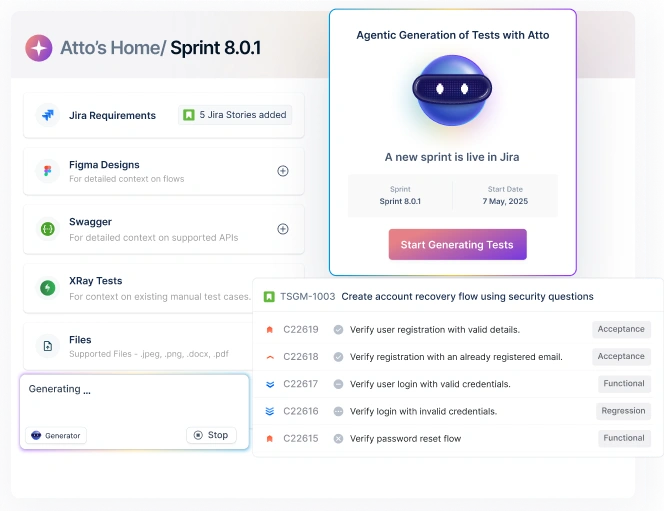
Testsigma is an AI-native, agentic test automation platform designed to automate the entire testing lifecycle from planning and test generation to execution, analysis, maintenance, and optimization. Powered by AI coworker Atto and a suite of specialized agents, including Generator, Runner, Healer, Analyzer, and Optimizer, Testsigma enables teams to create end-to-end automated tests 10x faster using plain English, recorded workflows, or imported requirements. With built-in test management, self-healing, and execution on 3,000+ real browsers and devices, it serves as a unified platform for web, mobile, API, desktop, and ERP testing.
Key Features
- Generator, Healer, Runner, Analyzer, and Optimizer agents accelerate creation, execution, debugging, and maintenance.
- Plain-English test creation via NLP or via recording real user flows.
- Unified testing platform for web, mobile, API, Salesforce, SAP, and ERP systems.
- Self-healing tests that automatically adapt to UI and workflow changes.
- 3000+ browsers & real devices for cloud-based test execution.
- Parallel execution & auto-scheduling for faster release cycles.
- Integrated test management including planning, test reviews, analytics, and reporting.
- Debugger with screenshots, logs, and videos for real-time root-cause analysis.
- AI-driven test optimization to detect gaps and generate missing test coverage.
- 30+ native integrations including Jira, Jenkins, Azure DevOps, GitHub, Bamboo, and more.
Pros
- End-to-end automation in one platform, eliminating siloed tools.
- AI-driven lifecycle automation significantly reduces test creation, triage, and maintenance time.
- Extremely beginner-friendly thanks to no-code test authoring in English.
- Highly scalable with fast, reliable execution across thousands of browsers/devices.
- Strong support for both business and technical users, no-code plus extensibility with custom logic
- Ideal for agile and DevOps teams needing continuous testing and quick feedback loops.
Cons
- A feature-rich platform may feel overwhelming at first for very small or early-stage teams.
- Teams used to traditional scripted tools may need a brief adjustment period to adopt no-code/AI workflows.
2. Tricentis TOSCA

Tricentis Tosca is a leading enterprise test automation platform built around model-based testing, designed to support complex end-to-end business process automation across SAP, Oracle, Salesforce, and other packaged applications. Widely adopted in large enterprises, Tosca offers deep ERP coverage, risk-based testing, strong governance features, and extensive support for legacy, desktop, API, and cross-technology workflows. Its scriptless, model-driven approach helps teams standardize automation across large QA organizations with predictable governance and compliance.
Key Features
- Model-based test automation for reusable, modular test assets.
- Deep SAP/ERP testing support, including SAP S/4HANA and SAP Fiori.
- Risk-based testing (RBT) to prioritize high-impact test scenarios.
- Continuous testing integrations with enterprise CI/CD tools.
- API, desktop, mobile, and cross-technology automation in one suite.
- Service virtualization for stable testing environments.
- Data integrity and data-driven testing for complex business workflows.
- Enterprise governance capabilities such as versioning, audits, and compliance tracking.
- Test case design and planning tools are built into the platform.
Pros
- Excellent SAP and packaged application support, ideal for large enterprises.
- Strong test governance for highly regulated industries and global QA teams.
- Model-based automation improves reusability and long-term asset scalability.
- RBT (risk-based testing) accelerates prioritization for critical business flows.
- Rich ecosystem with integrations for DevOps, service virtualization, and test data management.
Cons
- High licensing and implementation costs, making it difficult for mid-sized teams to adopt.
- Steep learning curve, requiring extensive training before teams become productive.
3. UiPath Test Suite

UiPath Test Suite is an enterprise-grade testing platform built on top of the UiPath automation ecosystem, offering unified automation across UI testing, API testing, RPA workflows, and enterprise applications. With the introduction of UiPath Test Cloud and Autopilot for Testers, UiPath has expanded into agentic testing, using AI agents to assist with test generation, execution, analysis, and maintenance. It is particularly strong for organizations already invested in UiPath RPA, as it allows full reuse of automation components across both testing and process automation.
Key Features
- Agentic testing with Autopilot for AI-assisted test generation, scoping, and analysis
- Enterprise testing for 190+ packaged apps, including SAP, Salesforce, Oracle, Epic, and Guidewire
- Unified platform for UI, API, RPA, and mobile testing
- Agent Builder to create custom AI agents tailored to enterprise testing needs
- Reusable automation components shared across RPA and testing workflows
- Parallel cloud execution and performance testing capabilities
- Full CI/CD support with version control, analytics, and governance
- Low-code and coded authoring to support different user skills
- Comprehensive reporting with traceability and orchestration
Pros
- Best suited for organizations already using UiPath RPA, enabling strong reuse and unified automation governance
- Powerful AI-driven capabilities for test generation and reporting through Autopilot
- Large enterprise application coverage with strong SAP and packaged app support
- Flexible authoring with low-code, no-code, and coded options
- Robust execution and orchestration scaled through Test Cloud
Cons
- Very costly for teams not already invested in UiPath, as licensing is tied to the larger UiPath ecosystem
- Heavy platform dependency, making it less suitable for organizations wanting a lightweight or standalone testing tool
4. Micro Focus UFT One
UFT One (now part of OpenText’s Functional Testing portfolio) is an enterprise functional test automation tool designed to handle complex, end-to-end testing across web, mobile, API, desktop, mainframe, and packaged apps like SAP and Salesforce. It combines GUI and API testing in a single solution and uses embedded AI capabilities (AI object detection, AI recording, image-based automation) to increase resiliency and reduce maintenance effort at scale.
Key Features
- AI-powered functional testing with advanced object recognition, AI-based recording, mockup identification, and image-based automation.
- UI and API automation in one tool for full end-to-end coverage across front-end and back-end services.
- Support for 200+ technologies, including SAP, Salesforce, Java, Citrix, mainframe, and composite apps.
- Cross-browser and cross-platform testing with a single script, allowing for replay across browsers.
- Parallel and distributed execution across web, mobile, and API tests for faster cycles.
- Tight DevOps integrations with CI/CD and ALM/Octane for continuous testing.
- Service virtualization and integration with LoadRunner and UFT Digital Lab for more realistic environments and mobile/web lab support.
Pros
- Extremely broad technology coverage, including legacy, mainframe, desktop, web, and major enterprise apps.
- AI-driven automation features help reduce test creation and maintenance time and improve object resiliency.
- Mature, enterprise-focused ecosystem with strong integrations into ALM, CI/CD, performance testing, and service virtualization tools.
- Suitable for very large organizations with complex, heterogeneous application landscapes.
Cons
- High licensing and total cost of ownership, especially for smaller or mid-sized teams.
- Steep learning curve, often requires formal training and specialist skills before teams are productive.
5. Leapwork

Leapwork is a no-code, AI-powered test automation platform built around a visual flow-based engine that lets teams design automation without scripting. Aimed at large enterprises, it supports end-to-end testing across web, desktop, legacy, virtual desktops, and major business systems like SAP, Dynamics 365, Salesforce, ServiceNow, Oracle, Citrix, and mainframe, making it a strong fit for cross-application business process testing similar to Worksoft.
Key Features
- Visual, no-code flow editor for building test automation without programming.
- Cross-technology automation spanning web, desktop, mainframe, Citrix, SAP, Dynamics 365, Salesforce, ServiceNow, Oracle, and more.
- AI-enhanced stability and speed, including AI-driven recognition and self-healing-like robustness.
- Dedicated SAP, Salesforce, and Dynamics capabilities (e.g., SAP smart recorder, D365 migration from RSAT).
- End-to-end regression and business process testing across multiple systems in one flow.
- DevOps & CI/CD integrations with Azure DevOps, Jenkins, Jira, TeamCity and others, plus REST API.
- Hyper-visual debugging with videos, logs, and step-level inspection.
Pros
- Strong alternative to Worksoft for SAP, Dynamics, Salesforce and other enterprise apps, with dedicated adapters and smart recorders.
- No-code visual approach makes it accessible to business users and QA, not just developers.
- Cross-technology coverage supports realistic end-to-end business process automation across legacy and modern systems.
- Recognized Microsoft partner with tight alignment for Dynamics 365 and Power Platform.
- Case studies report significant improvements in testing time, bug reduction, and product enhancement throughput.
Cons
- Enterprise-focused pricing can be expensive for smaller teams or organizations just starting with automation.
- Visual/no-code paradigm may feel restrictive for teams that prefer full code-based control.
6. Katalon

Katalon is an AI-augmented test automation platform used by enterprise teams looking for a more flexible, modern, and cost-efficient alternative to Worksoft. While it doesn’t focus on SAP/ERP business-process automation as deeply as Worksoft, it is widely adopted by organizations needing end-to-end automation across web, API, mobile, and desktop applications, with strong DevOps alignment and significantly lower tooling overhead. With an integrated platform like Katalon Studio, TestCloud, TestOps, and TrueTest, Katalon offers a faster, AI-driven way to scale automation across enterprise applications and digital workflows.
Key Features
- AI-assisted test generation using natural language via StudioAssist.
- TrueTest automatically generates tests from real user journeys and AI agent behavior.
- Automation across web, API, mobile, and desktop, covering the majority of enterprise digital workflows.
- Centralized test orchestration and reporting with TestOps for enterprise governance.
- Cloud execution via TestCloud, eliminating infrastructure setup.
- Low-code and scripted automation in a unified IDE (Studio).
- Visual testing, data-driven automation, and user-journey coverage for high-fidelity regression testing
Pros
- Much easier to adopt and maintain compared to Worksoft’s heavier enterprise setup.
- Ideal for organizations modernizing beyond SAP automation into broader web/mobile/API ecosystems.
- Significantly more cost-efficient for enterprises scaling automation across teams.
- Supports both technical and non-technical testers, unlike traditional code-heavy frameworks.
- AI and user-behavior-based test generation allows faster coverage expansion than Worksoft’s model-based approach
- Cloud-ready and DevOps aligned, suitable for continuous testing pipelines.
Cons
- Not a 1:1 replacement for Worksoft’s SAP/ERP-level automation, best for digital app automation, not deeply embedded enterprise workflows.
- Limited packaged application automation compared to Worksoft, Tosca, or Panaya.
7. Opkey

Opkey is an AI-native, no-code test automation and ERP lifecycle optimization platform built specifically for complex enterprise applications such as Oracle Cloud, Workday, SAP, Salesforce, Dynamics, Coupa, and Veeva. Its strongest appeal—as a Worksoft alternative—is its deep packaged-app automation, pre-built test accelerators, impact analysis, self-healing scripts, and AI agents designed for ERP implementations, updates, and business-as-usual operations. Opkey enables organizations to drastically reduce testing time, de-risk quarterly updates, streamline configuration, and automate end-to-end business processes across multiple enterprise systems.
Key Features
- No-code ERP automation for Oracle, Workday, SAP, Dynamics, Coupa, Veeva, Salesforce, and more.
- AI-powered Testing Agent that autonomously creates, executes, analyzes, and maintains test scripts.
- Pre-built test accelerators and industry-specific ERP templates to speed up projects.
- Impact analysis to identify which business processes will be affected by patches or configuration changes.
- AI-powered self-healing for scripts that adapt automatically to UI and workflow changes.
- Config Agent for automated configuration mapping, comparison, and migration during implementations.
- Training Agent that generates user guides and continuous enablement documentation from test cases.
- Support Agent providing intelligent, AI-driven real-time issue resolution for end users.
- Risk-based testing and autonomous selection of optimal regression suites.
- Strong integrations with CI/CD tools, test management platforms, and device clouds.
- Enterprise governance with full audit trails, compliance support, and SOC2 / ISO / GXP certifications.
Pros
- One of the closest functional equivalents to Worksoft, with deep ERP-specific automation and real business process coverage.
- Massive pre-built library for Oracle, Workday, SAP, Coupa, and others, significantly accelerates implementations and updates.
- Exceptional for quarterly cloud updates (Oracle 25D, Workday releases, etc.) through autonomous test generation and impact analysis
- Strong AI-driven approach reduces manual testing and documentation workloads
- Highly suitable for system integrators, shared services teams, and large IT organizations handling multi-application ERP ecosystems.
- Recognized for cost savings, reduced BAU testing effort, and fast patch readiness.
Cons
- Primarily focused on ERP ecosystems, so it is not ideal if the organization needs broader testing beyond enterprise applications.
- Enterprise-level pricing may be high for smaller teams or organizations with limited automation needs.
- Steep learning curve for non-ERP teams due to the depth of packaged-app capabilities.
8. Dynatrace
Dynatrace is an AI-driven observability and automation platform that provides full-stack monitoring across applications, infrastructure, services, and user experience. Its Davis® AI engine automatically analyzes metrics, traces, logs, and events to detect anomalies, pinpoint root causes, and power automated actions. Rather than creating functional ERP tests like Worksoft, Dynatrace focuses on release validation, quality gates, and SLO-based decisions in CI/CD pipelines, helping teams decide whether a build is safe to promote based on real performance and reliability data.
Key Features
- Full-stack observability for cloud-native and enterprise apps (APM, infrastructure, logs, real user monitoring).
- Davis AI engine for automated anomaly detection and root cause analysis.
- Quality gates & release validation that use SLOs and SLIs to automatically approve or block releases in the pipeline.
- Site Reliability Guardian & Cloud Automation to integrate evaluations directly into CI/CD (Jenkins, GitLab, etc.).
- Real user & synthetic monitoring to track UX across web and mobile.
- Automatic dependency mapping (Smartscape) and service topology visualization.
Pros
- Excellent for teams shifting from test-only thinking to observability-driven quality, you get real-time performance and reliability data, not just pass/fail on scripted tests.
- Powerful quality gates can automatically decide if a build should progress based on SLOs and error budgets, reducing manual QA gatekeeping.
- Great fit for microservices, cloud-native, and SAP/enterprise backends where performance, latency, and availability are as critical as functional behavior.
- Strong CI/CD integration for DevOps/SRE teams that want automated feedback loops in their pipelines.
Cons
- Not a functional test automation tool, Dynatrace does not generate or execute ERP business process tests like Worksoft, Opkey, Tosca, or Testsigma.
- Doesn’t replace SAP/Workday/Oracle test suites; it complements them by validating releases from a performance/observability perspective.
9. QA Wolf

QA Wolf is an AI-native, fully managed test automation service that delivers rapid end-to-end test coverage for web and mobile applications. Instead of providing a tool that teams must configure and maintain, QA Wolf builds, runs, and maintains your entire automated test suite for you, using Playwright for web and Appium for mobile, with all code handed over and no vendor lock-in. While not a 1:1 functional replacement for Worksoft’s ERP and packaged-app automation, QA Wolf is often considered by organizations that want to move away from heavy, high-maintenance enterprise tools and adopt a done-for-you automation model that accelerates delivery and reduces QA overhead.
Key Features
- AI and human hybrid test creation and maintenance are completed and maintained
- 80% automated E2E test coverage in 4 months, delivered as a service.
- Playwright-based test automation, with open-source code you own.
- Appium-based mobile automation, with no vendor lock-in.
- 100% parallel execution infrastructure included
- Zero-Flake Guarantee, AI triages failures, humans confirm root cause.
- Pass/Fail results within 3 minutes, supporting fast releases.
- Human-verified bug reports, with screenshots, videos, logs, and repro steps.
- CI/CD integration for fully automated testing on every deployment.
- Dedicated QA engineers ensure 24-hour test maintenance.
Pros
- Offloads test automation completely, ideal for teams struggling with the heavy maintenance burden of Worksoft or ERP automation.
- Much faster to implement, teams can achieve substantial test coverage within weeks instead of months or years.
- Zero-flake execution reduces noise and instability, making results more reliable for developers.
- Perfect for fast-moving digital teams, product engineering, and web/mobile-first organizations.
Cons
- Not a packaged-app automation tool, it cannot replace Worksoft for SAP, Oracle, Workday, Dynamics, or other ERP business processes.
- Best suited for modern digital applications, not deep enterprise workflows or backend processes.
- The managed-service model may limit hands-on control for teams that prefer internal ownership of test design.
How to Choose the Worksoft Alternative
With so many enterprise-grade tools in the market, the best Worksoft alternative depends on your stack, release velocity, and how tightly you’re tied to ERP ecosystems. Use the checklist below to evaluate each option before committing.
- Ease of Use: Check how quickly QA, business users, and developers can start building and maintaining tests, no-code/low-code tools and AI assistance can shorten onboarding dramatically.
- Price & Total Cost of Ownership: Look beyond licenses: factor in infrastructure, implementation effort, training, and ongoing maintenance, especially for large ERP landscapes.
- Technical Support & Services: Evaluate availability of onboarding help, response SLAs, partner ecosystem, and whether the vendor offers professional services or managed support.
- Integration Capabilities: Confirm seamless integration with your CI/CD (Jenkins, GitHub Actions, Azure DevOps), ALM, defect tracking (Jira, ServiceNow), and monitoring tools.
- Scalability: Assess how the platform handles thousands of tests, multiple applications, and global teams, look for parallel execution, cloud elasticity, and multi-project governance.
- Technology Stack Compatibility: Make sure it supports your key systems: SAP, Oracle, Workday, Dynamics, Salesforce, custom web/mobile apps, APIs, mainframe, or Citrix, whatever your real landscape is.
- AI/ML Capabilities: Prioritize tools that use AI for impact analysis, self-healing, autonomous test generation, flakiness reduction, and smarter reporting, not just as a buzzword add-on.
Conclusion
Selecting the best Worksoft alternative depends on your applications, team structure, and release speed. The right tool should streamline testing, reduce maintenance effort, and support your ERP or digital ecosystem without adding complexity. Whether you need deep packaged-app automation or a more flexible, AI-driven platform, focus on solutions that improve reliability, integrate smoothly with your workflows, and scale as your business grows. With the right choice, teams can cut testing effort, accelerate releases, and achieve higher confidence in every update.
FAQs
Top Worksoft alternatives for enterprise automation include Testsigma, Tricentis Tosca, UiPath Test Suite, Micro Focus UFT One, Leapwork, Opkey, Panaya, and Katalon. The best fit depends on whether you’re more focused on ERP-heavy processes (Opkey, Tosca, Panaya, Leapwork) or broader digital/web automation (Testsigma, Katalon, QA Wolf).
Testsigma focuses on AI-powered, no-code/low-code automation across web, mobile, API, and ERP, with agentic AI for test generation, execution, and maintenance. Compared to Worksoft, it’s typically easier to onboard, more CI/CD-friendly, and better suited for teams that want a single cloud platform for both enterprise apps and custom digital experiences.
Yes, Testsigma, Leapwork, Katalon, and UiPath Test Suite all offer low-code or no-code test creation. These platforms allow business users and non-developers to participate in automation while still giving technical teams room to extend tests with code where necessary.
Testsigma, Katalon, UiPath Test Suite, Micro Focus UFT One, and QA Wolf all support web and mobile test automation. If you also need ERP or packaged-app coverage, Tools like Testsigma, Opkey, Leapwork, and Tosca can bridge both business processes and digital channels.
In 2025, agentic and AI-native platforms are gaining traction. Testsigma, Opkey, QA Wolf, and Dynatrace stand out as notable options. These tools focus on autonomous test generation, self-healing, impact analysis, and faster feedback loops for modern DevOps and ERP environments.