






Table Of Contents
Overview
- This blog covers 10 real-world API examples across payments, maps, social media, and cloud services with live HTTP request formats.
- Learn how to call any API in 6 steps using Postman or cURL, from getting an API key to validating the response.
- Automate API testing for any of these examples using Testsigma’s codeless platform in under 10 minutes.
- Every API example includes the endpoint, request format, and expected response so you can copy and test immediately.
What Are API Examples?
An API (Application Programming Interface) is a set of rules that allows two software systems to communicate. A real-world API example is a specific implementation of those rules: a defined endpoint, a request format, and an expected response that developers can call from their own applications.
The most common type is the REST API, which uses HTTP methods (GET, POST, PUT, DELETE) and returns data in JSON format. Understanding concrete API examples is the fastest way to learn how APIs work in production.
REST API Example
A REST API call to the OpenWeatherMap API to retrieve current weather in New York:
GET https://api.openweathermap.org/data/2.5/weather?q=New+York&appid=YOUR_API_KEY
Expected response (200 OK):
1
2{
3
4  “weather”: [{“description”: “clear sky”}],
5
6  “main”: {“temp”: 295.15, “humidity”: 60},
7
8  “name”: “New York”
9
10}
11
12
13
[SCREENSHOT: Postman GET request to OpenWeatherMap showing 200 response body]
SOAP API Example
A SOAP API uses XML-based messaging over HTTP and is common in enterprise and financial systems. The request wraps data in a rigid XML envelope structure, unlike REST which uses JSON.
<soapenv:Envelope xmlns:soapenv=”http://schemas.xmlsoap.org/soap/envelope/”>
<soapenv:Body>
<getUser>
<userId>12345</userId>
</getUser>
</soapenv:Body>
</soapenv:Envelope>
Graphql API Example
GraphQL allows clients to request only the exact fields they need, reducing over-fetching.
1
2query {
3
4  user(id: “1”) {
5
6    name
7
8    email
9
10    posts {
11
12      title
13
14    }
15
16  }
17
18}
19
20
What You Need before You Start
Here is what you need to have in place before making your first API call.
Tools and Prerequisites
Before working with any API example, you need:
- A REST client: Postman (recommended for beginners), cURL (command line), or Testsigma for automated testing.
- An API key for the API you are testing, available from the developer portal of each provider.
- The base URL and endpoint documentation for the API you plan to test.
- A basic understanding of HTTP methods: GET retrieves data, POST creates resources, PUT updates existing resources, and DELETE removes them.
Sample Public APIs to Use for Testing
These free APIs are ideal for practicing API calls before working with production services:
- JSONPlaceholder (https://jsonplaceholder.typicode.com): Fake REST API for testing and prototyping, no authentication required.
- ReqRes (https://reqres.in): Realistic user API with GET, POST, PUT, and DELETE endpoints.
- HTTPBin (https://httpbin.org): Returns request data back to you, useful for debugging headers and payloads.
10 Real-World API Examples
Here are 10 commonly used APIs across different industries, each with the endpoint, request format, and expected response.
1. Google Maps API
The Google Maps Platform provides geolocation, directions, and places data. Developers use it to embed maps, calculate routes, and display location-based content in web and mobile applications.
GET https://maps.googleapis.com/maps/api/geocode/json?address=Austin,TX&key=YOUR_API_KEY
Expected response: JSON object with formatted address, latitude, and longitude values.
2. Paypal Payments API
The PayPal REST API uses OAuth 2.0 authentication and supports payment creation, refunds, and subscription management.
POST https://api-m.paypal.com/v2/checkout/orders
Authorization: Bearer ACCESS_TOKEN
Content-Type: application/json
1
2{
3
4  “intent”: “CAPTURE”,
5
6  “purchase_units”: [
7
8    {
9
10      “amount”: {
11
12        “currency_code”: “USD”,
13
14        “value”: “10.00”
15
16      }
17
18    }
19
20  ]
21
22}
23
24
Expected response: 201 Created with an order ID and approval link.
3. GitHub API
The GitHub API allows programmatic access to repositories, issues, pull requests, and user profiles.
GET https://api.github.com/repos/testsigma-dev/testsigma
Authorization: token YOUR_GITHUB_TOKEN
Expected response: JSON object with repository metadata including stars, forks, and open issue count.
4. Twitter/x API
The X API enables access to posts, timelines, user data, and engagement metrics. Access requires an approved developer account and a Bearer token.
GET https://api.twitter.com/2/tweets?ids=TWEET_ID
Authorization: Bearer YOUR_BEARER_TOKEN
Expected response: JSON array with tweet text, author ID, and public engagement metrics.
5. Openweathermap API
Returns current weather conditions, 5-day forecasts, and historical climate data by city name, ZIP code, or geographic coordinates.
GET https://api.openweathermap.org/data/2.5/forecast?q=Chicago&appid=YOUR_API_KEY&units=metric
Expected response: JSON array of 40 forecast entries at 3-hour intervals over 5 days.
6. Youtube DATA API
Allows searching, retrieving video metadata, managing playlists, and accessing channel analytics.
GET https://www.googleapis.com/youtube/v3/videos?id=VIDEO_ID&key=API_KEY&part=snippet,statistics
Expected response: JSON object with video title, description, view count, and like count.
7. Slack API
The Slack API supports bot creation, automated message posting, and workspace management.
POST https://slack.com/api/chat.postMessage
Authorization: Bearer xoxb-YOUR-BOT-TOKEN
Content-Type: application/json
1
2
3{
4
5  “channel”: “#general”,
6
7  “text”: “Automated API test message from QA pipeline.”
8
9}
10
Expected response: {“ok”: true, “channel”: “C123456”, “ts”: “1234567890.123456”}
8. Stripe API
Stripe’s REST API handles payment processing, refunds, customer records, and subscription billing. It uses HTTP Basic authentication with your secret key.
POST https://api.stripe.com/v1/payment_intents
Authorization: Bearer sk_test_YOUR_SECRET_KEY
Content-Type: application/x-www-form-urlencoded
amount=2000¤cy=usd&payment_method_types[]=card
Expected response: 200 OK with a payment intent object containing a client secret.
9. Discord API
The Discord API enables bot creation, server management, message automation, and user management across servers (guilds).
GET https://discord.com/api/v10/users/@me
Authorization: Bot YOUR_BOT_TOKEN
Expected response: JSON object with the authenticated bot’s username, ID, and avatar hash.
10. Openai Chatgpt API
The OpenAI API allows developers to send prompts and receive AI-generated responses for chatbots, content generation tools, and automation workflows.
POST https://api.openai.com/v1/chat/completions
Authorization: Bearer YOUR_API_KEY
Content-Type: application/json
1
2{
3
4  “model”: “gpt-4”,
5
6  “messages”: [
7
8    {
9
10      “role”: “user”,
11
12      “content”: “Explain REST APIs in one sentence.”
13
14    }
15
16  ]
17
18}
19
20
Expected response: JSON object with a choices array containing the generated message content.
Step-by-step Guide: How to Call an API
Follow these six steps to make your first API call using Postman or cURL.
Step 1: Get an API Key
Register for a developer account on the API provider’s official site. Most public APIs such as Google, OpenAI, and Stripe issue an API key directly from their developer dashboard after sign-up. Keep this key private and never commit it to version control or share it in public repositories.
Step 2: Read the API Documentation
Before making any request, open the official API reference and identify the base URL, available endpoints, required headers, authentication type (API key, OAuth 2.0, or Bearer token), and the expected request and response format.
Step 3: Make Your First Get Request
Open Postman. Select GET as the HTTP method. Enter the full endpoint URL including any required query parameters. Click Send and inspect the response body and status code in the lower panel.
GET https://api.openweathermap.org/data/2.5/weather?q=Austin&appid=YOUR_API_KEY
Expected result: 200 OK with a JSON response body.
Step 4: Send a Post Request
Select POST as the HTTP method. Click the Body tab, choose “raw,” and set the format dropdown to JSON. Enter your JSON payload in the text area.
POST https://jsonplaceholder.typicode.com/posts
Content-Type: application/json
1
2
3{
4
5  “title”: “API Test Post”,
6
7  “body”: “Testing POST request with JSONPlaceholder”,
8
9  “userId”: 1
10
11}
12
Expected result: 201 Created with the new resource object returned in the response body.
Step 5: Handle API Responses
Parse the JSON response body and verify that all required fields are present, values match expected data types, and no fields that should contain data return null. A 200 OK status code alone does not confirm the API returned correct data.
Step 6: Validate Response Codes
At minimum, check for these status codes in every API test suite:
| Status Code | Meaning | Test Type |
|---|---|---|
| 200 OK | Successful GET or PUT request | Positive |
| 201 Created | Successful POST request | Positive |
| 400 Bad Request | Malformed or invalid input | Negative |
| 401 Unauthorized | Missing or invalid credentials | Negative |
| 404 Not Found | Endpoint or resource does not exist | Negative |
| 500 Internal Server Error | Server-side failure | Edge case |
How to Test These API Examples in Testsigma
Testsigma is an AI-powered, codeless test automation platform that allows QA teams to build and execute REST API tests without writing scripts. The following steps work for any of the 10 API examples listed above.
Step 1: Create a New Test Case
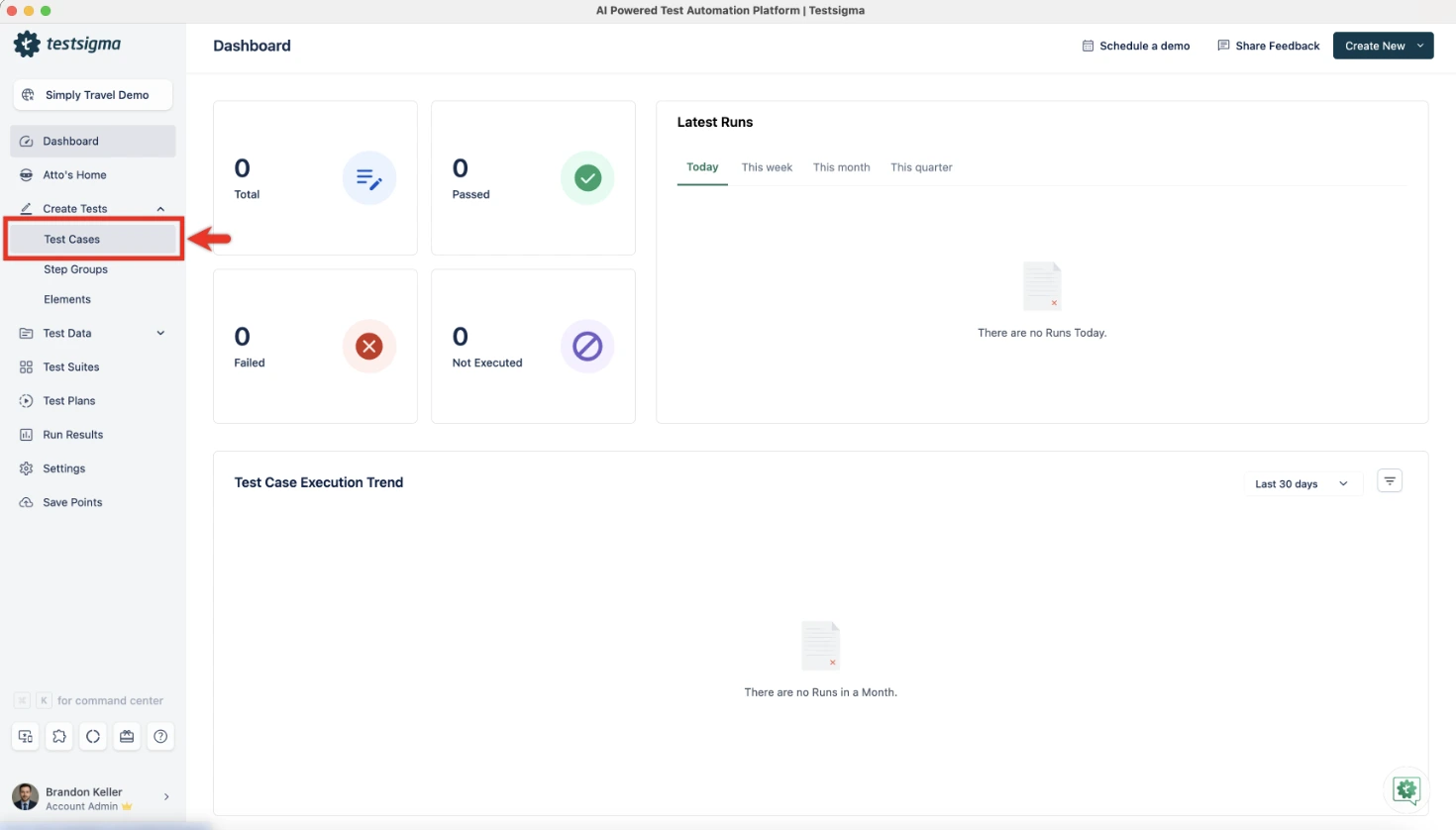
Log in to your Testsigma account. Click the “+” icon in the left navigation sidebar and select “Test Case.” Enter a descriptive name such as “OpenWeatherMap GET Weather” and click “Write Test Manually.”
Step 2: Select the REST API Step Type
On the test step creation page, hover over the first blank step row. A dropdown appears with step type options. Select “Rest API” from the list.
Step 3: Enter API Endpoint and Method
In the API Request tab that opens, enter the full endpoint URL in the URL field. Select the HTTP method from the method dropdown (GET, POST, PUT, DELETE, or PATCH). For the OpenWeatherMap example, select GET and append your API key as the appid query parameter.
Step 4: Add Headers and Authorization
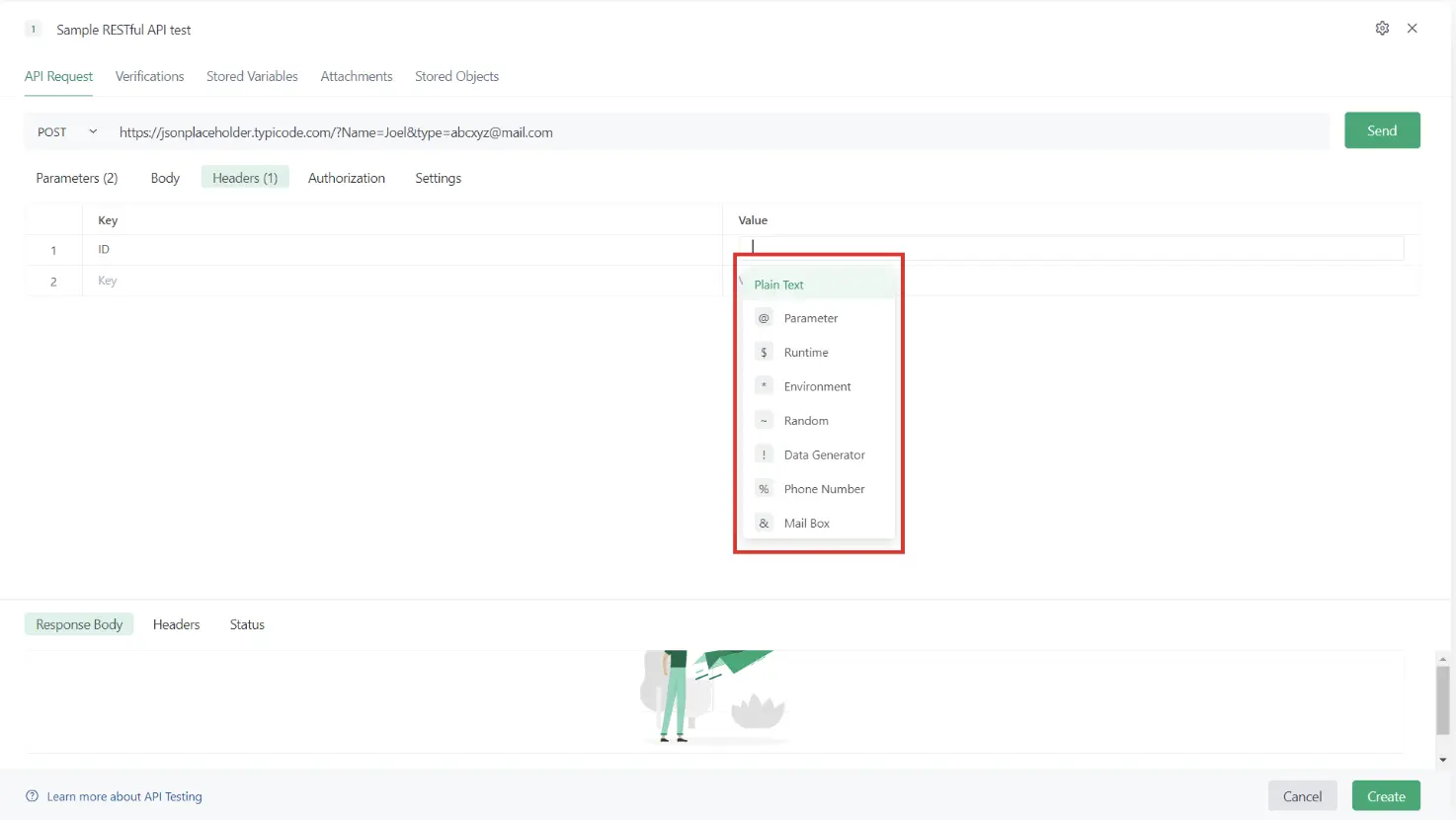
Click the “Headers” tab. Add key-value pairs for any required request headers. For APIs using Bearer token authentication (GitHub, Slack, OpenAI), enter Authorization as the key and Bearer YOUR_TOKEN as the value. Store sensitive tokens as environment variables and reference them using {{TOKEN_NAME}} syntax.
Step 5: Set Response Assertions
Click “Send” to fire a live request and confirm the API returns a response. Then click the “Verifications” tab. Click “Add Verification,” select “Response Code” from the dropdown, and enter 200 as the expected value. Add a second verification for a specific response body field if needed (for example, verify that main.temp exists and is not null for the weather API).
Step 6: Run the Test and Review Results
Click “Run” from the Test Case page. After execution completes, click “View Results” to open the full test run report. The report shows each assertion’s pass or fail status, the actual value returned versus the expected value, and the full response body for debugging failed steps.
Common API Errors and Fixes
These are the most frequent API errors you will encounter and how to resolve them.
- 401 Unauthorized: The request is missing valid credentials or the token has expired. Verify your API key format and regenerate the token if needed.
- 403 Forbidden: Your credentials are valid but lack permission for the requested resource. Check the OAuth scope and API plan access level.
- 404 Not Found: The endpoint URL is incorrect or the resource does not exist. Check for typos, invalid resource IDs, and trailing slash requirements.
- 429 Too Many Requests: The API rate limit has been reached. Implement request throttling and use exponential backoff for retries.
- 500 Internal Server Error: A server-side failure usually not caused by your request. Log the payload and timestamp, retry to confirm reproducibility, and report to the provider if it persists.
Best Practices for Working with API Examples
Follow these practices to keep your API tests reliable, secure, and scalable.
- Always Validate Response Schema: Do not stop at checking the status code. Validate the structure and data types of the response body. A 200 OK with a null value in a required field is still a failure.
- Use Environment Variables for API Keys: Never hardcode keys or tokens in test steps or shared collections. Store them as environment variables to prevent exposure and simplify key rotation.
- Automate API Tests in CI/CD: Integrate your API test suite into Jenkins, GitHub Actions, or CircleCI so tests run automatically on every code push or pull request.
- Test Both Positive and Negative Scenarios: Every API example should have a corresponding negative test with invalid input, missing authentication, or a non-existent resource ID to catch security and error-handling defects.
Conclusion
APIs power nearly every modern application, and knowing how to call, test, and automate them is an essential skill for any QA or development team. Start with the examples in this guide, build your first automated tests, and integrate them into your CI/CD pipeline to catch issues before they reach production.
FAQs
JSONPlaceholder is the most recommended starting point. It requires no authentication and supports all standard HTTP methods.
REST uses HTTP methods and returns lightweight JSON. SOAP uses a strict XML envelope format and is common in legacy enterprise systems.
The three most common methods are API key, Bearer token, and OAuth 2.0.
Yes. Postman supports manual API testing and Testsigma supports fully automated API testing, both without writing any code.
It means the request was sent without valid credentials or with an expired token. Check your API key and regenerate it if needed.
GET retrieves data without modifying anything. POST sends data to the server to create a new resource.
Create a test case, select the Rest API step type, enter the endpoint and method, add headers, set response assertions, and click Run.
It validates that backend services return correct data, handle errors properly, and enforce security controls. It runs faster than UI testing and catches defects earlier.