- Testsigma Agent
 Pre-requisites
- Setup: Windows, Mac, Linux
- Setup: Kubernetes (Helm)
- Setup: Android Local Devices
- Setting Up iOS Local Devices
- Arguments Usage Details
- Agent Upgrade Guide
- Update Agent Manually
- Update Drivers Manually
- Delete Corrupted Agent
- Delete Agents: Soft & Permanent
- Triggering Tests on Local Devices
- FAQs
- troubleshooting
- How to Fix Agent Startup & Registration Errors?
- How to Configure Agent Logs?
- How to Upgrade Testsigma Agent Automatically?
- How to Add Max Sessions for Agents?
- How to Resolve Access Blocked Errors When Downloading the Agent?
- Why is Testsigma Agent Not Detecting My Installed Browser?
- How do I Configure Proxy Settings for the Testsigma Agent?
How do I Configure Proxy Settings for the Testsigma Agent?
In some environments, the Local Agent must connect through a proxy for most URLs but bypass the proxy for specific internal or trusted domains (for example: testsigma.com, AWS endpoints, internal company apps, etc.). In such cases, you can configure hostname/domain patterns in the nonProxyHosts property.
Any URL that matches the nonProxyHosts patterns will connect directly, while all other traffic will use the proxy.
Steps to Configure nonProxyHosts
- Open the TestsigmaAgent installation directory.
- Navigate to agent_data and open args.yml file.
- Add or update the following properties with approved domains:
http.nonProxyHosts: "localhost|127.0.0.1|*.testsigma.com|*.amazonaws.com|<internal-domain-1>|<internal-domain-2>"
https.nonProxyHosts: "localhost|127.0.0.1|*.testsigma.com|*.amazonaws.com|<internal-domain-1>|<internal-domain-2>"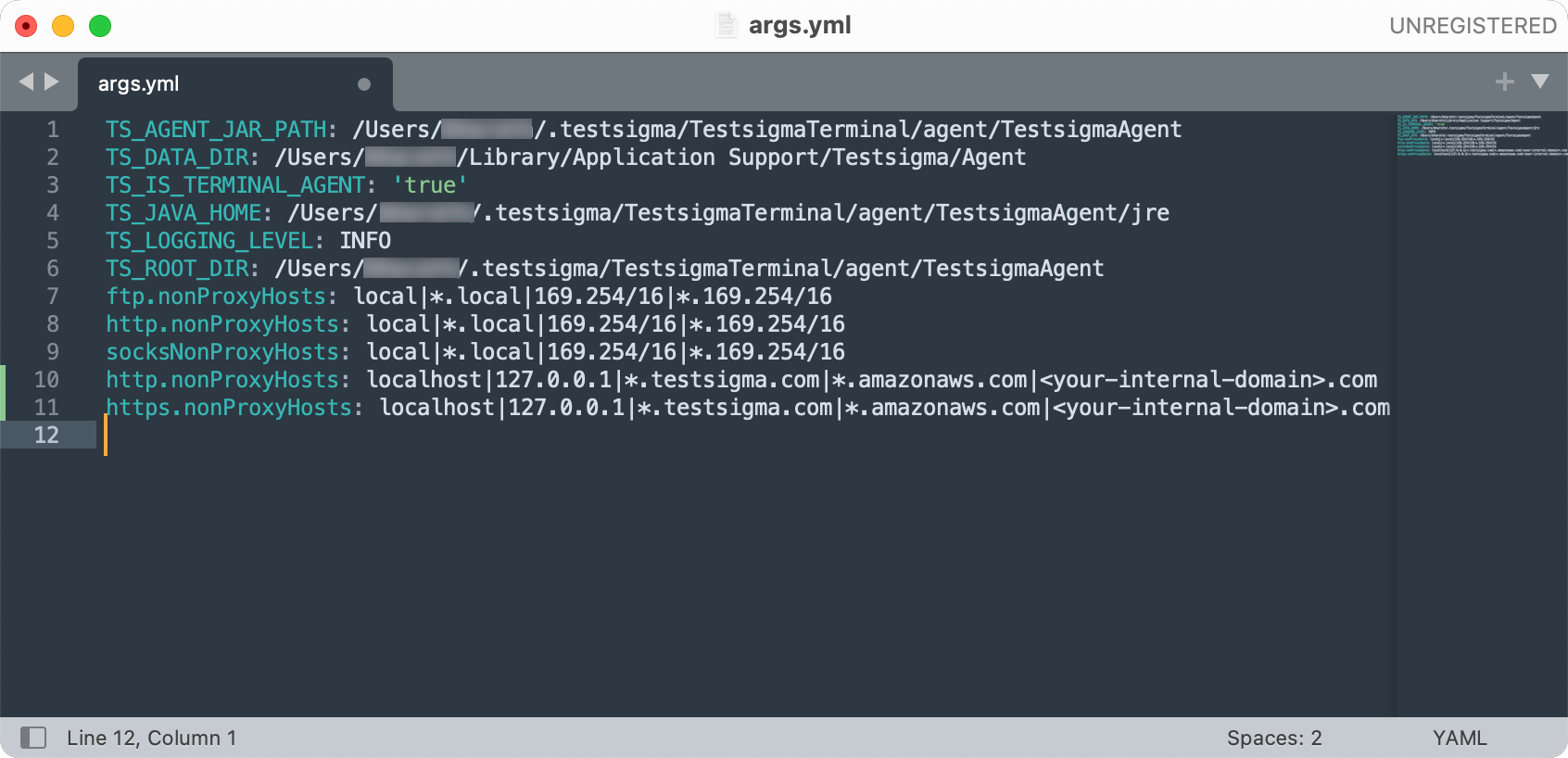
NOTE:
You can add multiple domains separated by | (pipe).
- Save the file and restart the Local Agent.
Additional Proxy Properties Support
The following Java system properties are supported for configuring proxy settings for Agents and Cloud executions:
| Property Name | Description |
|---|---|
| http.proxyHost | Host address of the HTTP proxy server |
| http.proxyPort | Port number of the HTTP proxy server |
| http.proxyUser | Username for HTTP proxy authentication |
| http.proxyPassword | Password for HTTP proxy authentication |
| https.proxyHost | Host address of the HTTPS proxy server |
| https.proxyPort | Port number of the HTTPS proxy server |
| https.proxyUser | Username for HTTPS proxy authentication |
| https.proxyPassword | Password for HTTPS proxy authentication |
| http.nonProxyHosts | Hosts that bypass the HTTP proxy |
| https.nonProxyHosts | Hosts that bypass the HTTPS proxy |
| java.net.useSystemProxies | Enables OS-configured proxy settings |
Example Configuration:
http.proxyHost: 'proxy.example.com'
http.proxyPort: '8080'
http.proxyUser: 'username'
http.proxyPassword: 'password'

https.proxyHost: 'proxy.example.com'
https.proxyPort: '8080'
https.proxyUser: 'username'
https.proxyPassword: 'password'

http.nonProxyHosts: 'localhost|127.0.0.1|*.example.com'
https.nonProxyHosts: 'localhost|127.0.0.1|*.example.com'

java.net.useSystemProxies: trueNOTE:
Replace example.com with your internal domain if specific proxies must be bypassed.

Want to contribute or report missing content?