


Table Of Contents
- 1 The Ultimate Guide to Selenium AI in 2026
- 2 Key Takeaways
- 3 What Is Selenium AI?
- 4 What Are the Benefits of Using AI with Selenium?Stable, reliable tests: AI identifies the root cause of flaky tests (timing or locator issues) and suggests fixes like adjusted waits or retries.
- 5 Fewer broken scripts: when a UI element changes, AI identifies it via text, position, and DOM hierarchy, so tests keep running unattended.
- 6 Smarter locator selection: AI picks the most stable locator strategy per element and updates it as the app evolves, removing the guesswork from XPath vs. CSS decisions.
- 7 Less hardcoding: AI interprets element context during runs, reducing reliance on hardcoded IDs, URLs, and input values.
- 8 Better cross-browser coverage: AI detects browser-specific layout shifts, loading delays, and rendering differences across Chrome, Firefox, Safari, and Edge automatically.
- 9 What Are the Real-World Use Cases for Selenium AI?
- 10 How Does AI Enhance Selenium’s Core Capabilities?
- 11 Selenium AI vs. Traditional Selenium: What’s the Difference?
- 12 How to Implement Selenium AI in Your Testing Workflow?
- 13 What Are the Disadvantages and Challenges of Selenium AI?
- 14 How Does Testsigma Go Beyond Selenium AI?
- 15 What Is the Future of Selenium AI?
- 16 Why QA Teams Should Move Beyond Selenium Entirely
- 17 Conclusion
- 18 Frequently Asked Questions
The Ultimate Guide to Selenium AI in 2026
Selenium AI adds machine learning, NLP, and computer vision to Selenium WebDriver so tests self-heal, adapt to UI changes, and predict which cases to run, instead of breaking on every locator change. 63% of QA teams plan to adopt AI-powered testing platforms, since Selenium alone can’t keep pace with modern release velocity. Platforms like Testsigma deliver these capabilities natively, with no plugins or scripting required.
Key Takeaways
- Selenium AI = ML + NLP + computer vision layered onto Selenium WebDriver.
- Fixes the #1 Selenium pain point: brittle locators that break on every UI change.
- Five core additions: self-healing locators, auto test-case generation, smart element recognition, predictive test selection, intelligent waits.
- Testsigma replaces the “bolt AI plugins onto Selenium” approach with one native platform, no framework to maintain.
- It also doesn’t ask you to pick sides: Testsigma’s agents (Coverage Planner, Analysis) work as a verification layer regardless of which coding agent wrote the code under test or which QA stack runs alongside it.
- The honest limit: even AI-augmented Selenium still requires coding skill and Selenium-specific framework upkeep. That’s the real reason to consider moving beyond it, not a vendor talking point.
What is Selenium AI?
Selenium AI refers to augmenting Selenium WebDriver, the open-source browser automation framework, with AI capabilities that make it adaptive, predictive, and easier to maintain.
Traditional Selenium relies on static, hardcoded locators like XPath, CSS selectors, and IDs. Every time a UI element changes, a button renamed, a class updated, an element moved, those locators break and require manual repair. Selenium AI eliminates this fragility with an intelligence layer that continuously learns and adapts.
According to a World Quality Report by Capgemini, 63% of QA teams plan to adopt AI-powered testing platforms. This reflects a growing recognition that traditional Selenium, while still widely used, struggles to keep pace with modern development velocity on its own.
Five Core AI Capabilities Added to Selenium
| Capability | How It Works | Problem It Solves |
|---|---|---|
| Self-Healing Locators | AI monitors element changes and auto-updates selectors using multi-attribute analysis (text, position, hierarchy, and visual context) | Broken tests from every UI update, the major Selenium maintenance drain |
| Auto Test Case Generation | ML analyzes user session recordings, logs, and analytics to generate Selenium tests mirroring real user journeys | Manual test creation misses real-world usage paths and edge cases |
| Smart Element Recognition | Computer vision and NLP find elements by visual position, neighboring text, and structural context, not just static locators | StaleElementReferenceException and fragile XPath dependencies |
| Predictive Test Selection | AI evaluates code changes, historical failure rates, and risk scores to run only impacted tests | Full-suite runs in CI/CD, creating hours of unnecessary delay |
| Intelligent Wait & Timing | AI analyzes page-load behavior in real time, dynamically adjusting waits instead of static timeouts | Flaky tests from race conditions and inconsistent load timing |
What Are the Benefits of Using AI with Selenium?stable, Reliable Tests: AI Identifies the Root Cause of Flaky Tests (timing OR Locator Issues) and Suggests Fixes like Adjusted Waits OR Retries.
Fewer Broken Scripts: When a UI Element Changes, AI Identifies it Via Text, Position, and DOM Hierarchy, so Tests Keep Running Unattended.
Smarter Locator Selection: AI Picks the Most Stable Locator Strategy Per Element and Updates it As the App Evolves, Removing the Guesswork From Xpath Vs. CSS Decisions.
Less Hardcoding: AI Interprets Element Context During Runs, Reducing Reliance on Hardcoded IDs, URLs, and Input Values.
Better Cross-Browser Coverage: AI Detects Browser-Specific Layout Shifts, Loading Delays, and Rendering Differences across Chrome, Firefox, Safari, and Edge Automatically.
Faster regression cycles: AI maps code changes to the tests they affect, running only those, reducing regression cycle times significantly.
What Are the Real-World Use Cases for Selenium AI?
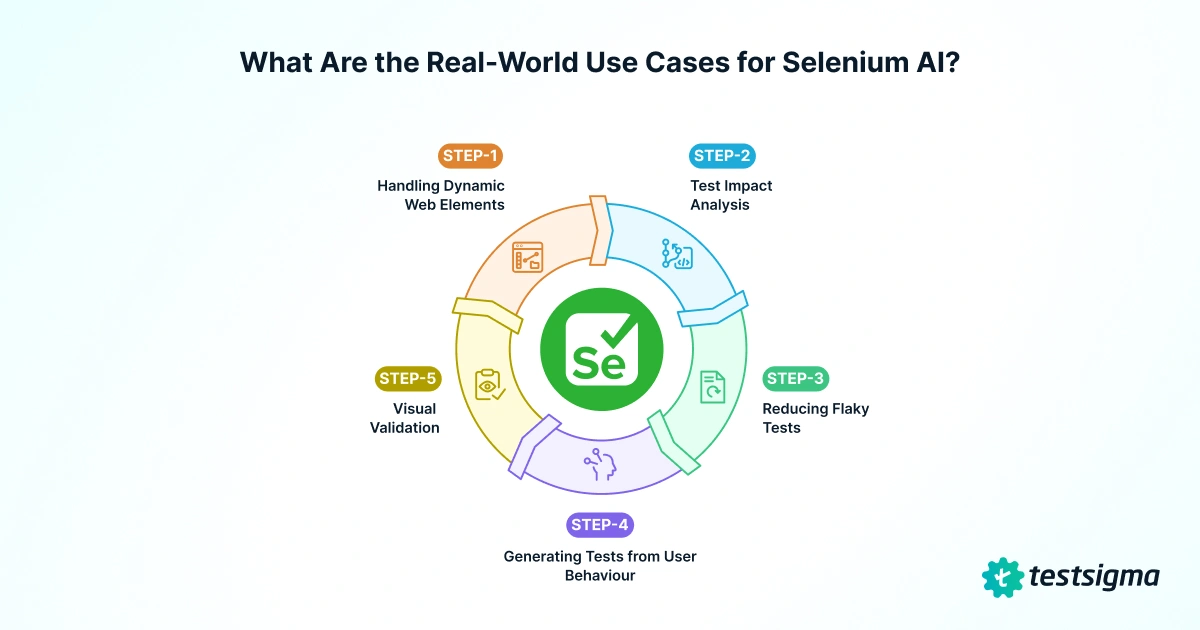
Here is where Selenium AI makes the most practical difference for QA teams today.
1. Handling Dynamic Web Elements: UI elements change constantly in modern web apps: button IDs update, classes change, elements move. Traditional Selenium breaks every time this happens. AI solves this through multi-attribute element analysis, examining structural context, nearby text, and visual position to find and update the correct element automatically.
2. Test Impact Analysis: Running the full test suite on every commit wastes time. AI evaluates code changes and identifies only the tests affected, so unaffected tests are skipped automatically, keeping CI/CD pipelines fast without sacrificing coverage.
3. Reducing Flaky Tests: Flaky tests are caused by timing issues, dynamic data, and inconsistent environments. AI analyzes execution logs to find the root cause and suggests fixes like adjusted waits, retry logic, or more stable locators.
4. Generating Tests From User Behavior: AI can analyze session recordings and usage analytics to generate test cases that reflect how real users interact with your app, rather than how engineers assume they do, surfacing high-value flows like checkout paths and onboarding sequences that manual scripting often misses.
5. Visual Validation: Selenium only validates the DOM, not what is actually rendered on screen. AI-powered visual validation uses computer vision to detect layout shifts, misaligned elements, and rendering issues that standard assertions would miss, while distinguishing meaningful changes from harmless ones, like dynamic content or rotating banners, to reduce false positives.
How Does AI Enhance Selenium’s Core Capabilities?
| Selenium Limitation | AI Enhancement | Business Impact |
|---|---|---|
| Static locators break on every UI change | Self-healing: multi-attribute element analysis adapts automatically | 90% reduction in script maintenance overhead |
| Full suite runs after every commit | Predictive test selection: only impacted tests run | 60-80% faster CI/CD feedback cycles |
| Arbitrary static waits cause flakiness | Smart waits: AI adapts timeout dynamically to real page-load behavior | Fewer false failures; more reliable green builds |
| No native visual testing capability | AI visual validation: semantic image comparison across browsers and screen sizes | Visual regressions caught before release, no extra tooling |
| Manual test creation misses real user paths | Behavior-based generation: AI turns session recordings into Selenium scripts | Higher coverage relevance; tests reflect actual usage patterns |
| Difficult to diagnose failure root cause | AI-powered debugging: smart logs, screenshots, and failure reasoning surface the why | Faster mean-time-to-resolution (MTTR) across sprints |
Selenium AI Vs. Traditional Selenium: What’s the Difference?
Every Selenium team hits the same walls: broken locators, slow regression cycles, and tests that need constant fixing. AI tackles each of these at the root.
| Aspect | Traditional Selenium | Selenium AI |
|---|---|---|
| Locator Handling | Static XPath/CSS breaks with every UI change | Multi-attribute recognition adapts automatically |
| Test Maintenance | High effort; frequent manual updates after each sprint | Self-healing reduces maintenance by up to 90% |
| Script Creation | Manual, time-consuming, requires coding | AI-generated from NL prompts, sessions, or design files |
| Dynamic UI Handling | Fails when elements move, are renamed, or hidden | Adapts using structural, textual, and visual context |
| Execution Speed | Full suite every time; hours of CI/CD delay | Predictive selection runs only impacted cases |
| Flaky Test Management | Manual log analysis required | AI detects patterns, suggests fixes, applies auto-retries |
| Wait & Timing Logic | Static waits cause either delays or race condition failures | Smart waits adjust to real page-load behavior dynamically |
| Visual Validation | Requires separate tools or custom code | Built-in semantic comparison |
| Cross-Browser Testing | Needs extensive scripting and manual validation per browser | AI detects cross-platform inconsistencies and recommends fixes |
| Scalability | Becomes harder to manage as test cases grow | AI-driven optimization scales with the application |
| Skill Requirement | Strong coding skills (Java, Python, JS) | Natural-language authoring: non-engineers can contribute |
How to Implement Selenium AI in Your Testing Workflow?
Adding AI to your Selenium setup does not have to happen all at once. Follow these steps to get started gradually and build confidence before expanding coverage.
Step 1: Audit Your Pain Points
Identify what costs you the most time: broken locators, flaky tests, or slow regression cycles. Testsigma’s dashboard gives you visibility into failure trends and flaky test counts out of the box.
Step 2: Choose Your Approach, Testsigma As the Unified Platform
Skip the plugin juggling. Rather than bolting AI plugins onto an existing Selenium framework, Testsigma replaces them with one platform. No test code required; tests are authored in plain English via the AI-powered NLP engine.
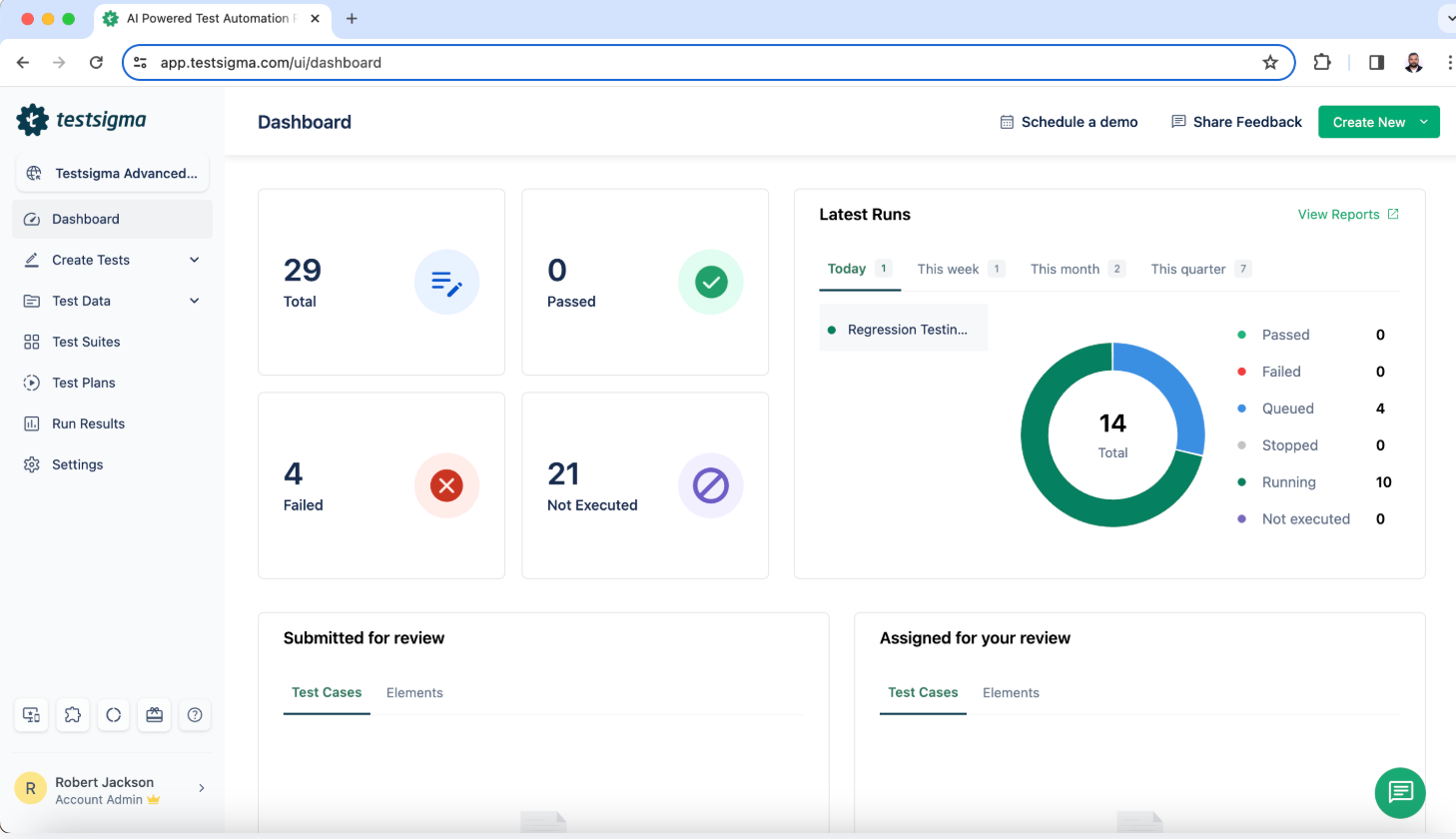
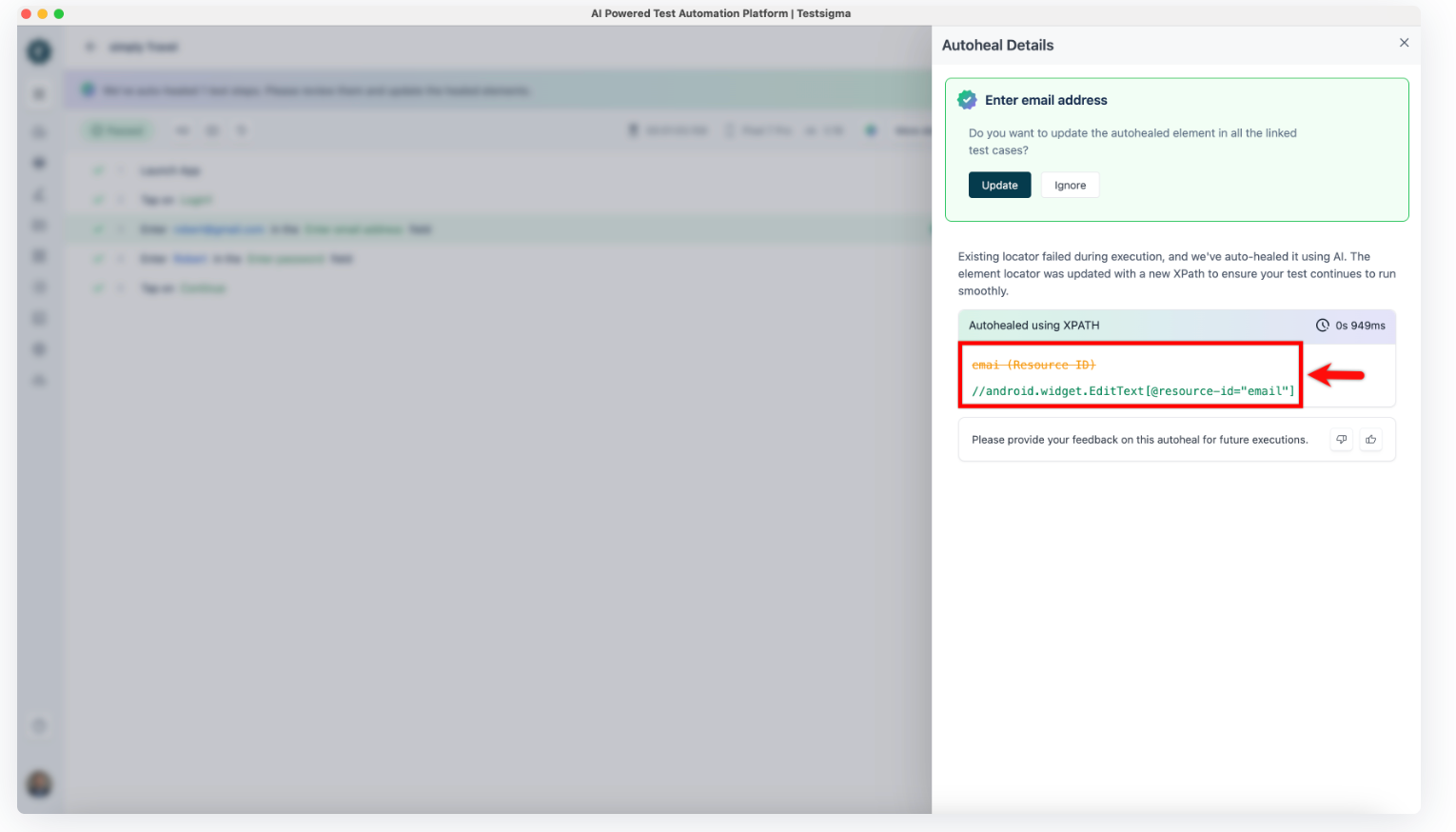
Step 3: Self-Healing Locators (Built-in)
Self-healing delivers the fastest ROI for most teams. Testsigma’s self-healing is native, with no add-ons needed. When a UI element changes, it identifies the closest match and updates the locator automatically. Apply this to your most brittle suites first and track manual fixes avoided.
Step 4: CI/CD Integration
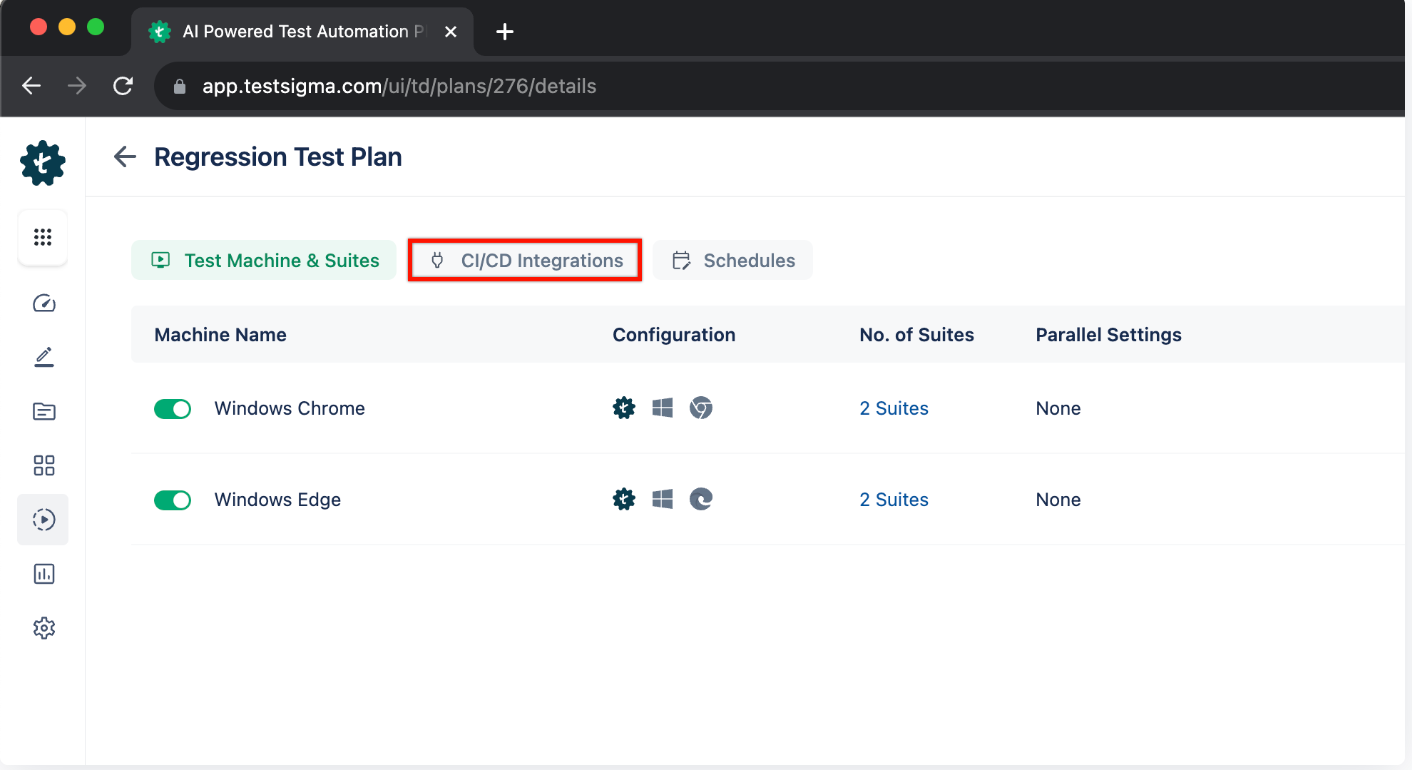
Testsigma integrates with GitHub Actions, Jenkins, and Azure DevOps via REST APIs and plugins. Test impact analysis ensures only relevant tests run on each code push, keeping feedback loops fast.
Step 5: Add Visual Validation
Capture visual baselines across key pages. On subsequent runs, AI flags only meaningful regressions, ignoring dynamic elements like timestamps or rotating banners, no separate visual-testing license needed.
Step 6: Monitor & Iterate
Track metrics weekly via Testsigma’s Reports & Analytics: flaky test count, suite execution duration, pass/fail trends by sprint, and maintenance hours. Use these to decide where to expand AI coverage next (mobile, API, data-driven tests).
Key advantage: authoring, self-healing, visual testing, CI/CD, and reporting all live in one platform, so your team isn’t stitching together multiple tools or maintaining custom integrations.
What Are the Disadvantages and Challenges of Selenium AI?
AI makes Selenium smarter, but adopting it comes with real trade-offs worth understanding before you commit.
| Challenge | Root Cause | How to Mitigate |
|---|---|---|
| High initial setup cost | AI tools and upgraded infrastructure require upfront investment | Start with a cloud-based platform like Testsigma: zero infrastructure cost, pay for outcomes |
| Steep learning curve | Teams used to classic Selenium must learn new AI-augmented paradigms | Choose no-code platforms; most teams see stable coverage within 2-3 sprints |
| Tool compatibility gaps | Some AI tools don’t support all Selenium features or test types | Use a unified platform covering web, mobile, API, desktop, SAP, and Salesforce |
| AI over-reliance risk | Blind trust in AI predictions leads to missed edge cases or false-positive test results | Maintain human review gates; use AI as a co-pilot, not sole authority |
| Opaque debugging | AI self-healing decisions aren’t always transparent, hard to understand why a fix was made | Choose platforms with explainable AI logs and annotated failure reports |
| Data privacy concerns | Some AI tools send test data to third-party cloud services | Evaluate data residency policies; prefer SOC 2-compliant options for sensitive apps |
How Does Testsigma Go beyond Selenium AI?
Selenium AI solves a lot of problems, but you still need coding skills, framework knowledge, and time to maintain scripts. Testsigma removes all of that, a no-code platform covering everything Selenium AI offers, and more.
| Selenium AI Limitation | Testsigma Solution | Key Metric |
|---|---|---|
| Still requires coding to implement/maintain | No-code creation, plain English or recorded flows | Zero scripting; any team member can create tests |
| AI tools often cover only one pain point | Seven agents covering every phase: plan, generate, execute, analyze, maintain, report | End-to-end lifecycle automation |
| Limited to web testing | Unified platform for web, mobile, API, desktop, SAP, Salesforce | Single platform for all test types |
| Manual device/browser configuration | 3,000+ real and virtual devices instantly accessible in cloud lab | No device procurement or setup |
| Fragmented CI/CD integrations per plugin | 30+ native CI/CD, bug tracker, and collaboration connectors | Works with your existing DevOps stack |
| Self-healing limited to locator repair | Full Maintenance Agent: heals locators, flags flaky tests, removes obsolete steps | 90% maintenance reduction |
| No intelligent test coverage analysis | The Coverage Planner Agent maps gaps and suggests new scenarios automatically | Higher automation coverage achievable |
| Debugging requires manual log review | Analysis Agent: real-time failure correlation with code changes, screenshots included | Faster MTTR; one-click bug filing |
The deeper shift underway isn’t Selenium getting smarter, it’s testing becoming a verification layer that sits above any single framework or coding agent. Self-healing locators fix how a test survives; they don’t tell you whether this sprint’s changes are actually covered.
That’s the piece Testsigma’s Coverage Planner and Analysis agents add on top of Selenium-AI-style capabilities: reading code changes against existing coverage and scoring release confidence, not just keeping individual tests alive.
This works whether your Selenium suite sits next to code from Claude Code, GitHub Copilot, or a human developer, and whether the rest of your QA stack is Playwright, Appium, or Selenium itself, the agents don’t require you to abandon Selenium or standardize on one coding agent first. It’s the same architecture behind Testsigma’s agentic AI testing approach and vibe testing for AI-generated apps, applied here specifically to teams already invested in Selenium.
What is the Future of Selenium AI?
Selenium AI is evolving fast, and the teams that stay ahead of these shifts will have a real advantage in speed and test reliability.
| Trend | What It Means for Selenium Teams | Timeline |
|---|---|---|
| More Adaptive Test Scripts | AI will handle increasingly dynamic UIs like single-page apps, real-time components, and WebSockets, with near-zero script maintenance | 2025-2026 |
| Tighter DevOps Integration | AI will natively integrate with PR workflows, auto-generating test cases for new code and self-reviewing test coverage on every merge | 2025-2026 |
| Predictive Bug Prevention | AI will study historical patterns to flag risky code paths before they are tested, shifting QA from reactive to proactive | 2026-2027 |
| Plain English Test Authoring | Natural language will replace scripted Selenium entirely, “test the checkout flow on mobile in Firefox” becomes a runnable test case | Already here (Testsigma); broader industry: 2026 |
| AI-Explained Failure Reasoning | AI will not just report that a test failed, it will explain why, link to the responsible code change, and suggest the exact fix | 2025-2026 |
| Full Visual Intelligence | AI will test layout precision, font rendering, responsive breakpoints, and accessibility across all browsers and screen sizes autonomously | 2026-2027 |
Why QA Teams Should Move beyond Selenium Entirely
Selenium AI improves what Selenium can do. But sometimes the smarter move is to leave Selenium behind altogether. Here is how to know if that applies to your team.
You spend more time maintaining tests than writing them. Even with AI augmentation, Selenium still needs constant framework upkeep. If maintenance is eating into your sprints, the problem is the foundation. Testsigma eliminates framework maintenance entirely with self-maintaining, no-code automation.
Non-engineers can’t contribute to testing. Selenium is code-first by design. AI plugins don’t change that. Testsigma lets anyone on your team write and run tests in plain English, no coding required.
You’re testing across web, mobile, and API. Selenium is built for web. Everything else requires stitching together separate frameworks. Testsigma covers web, mobile, API, and desktop in one unified platform.
Your pipeline needs faster feedback. Large Selenium suites struggle to keep up with fast release cycles even with test impact analysis. Testsigma runs tests on 3,000+ real devices in the cloud, keeping feedback loops tight without infrastructure overhead.
Your team is too small to manage a Selenium framework. Building and maintaining Selenium with AI integrations requires expertise that smaller teams often don’t have. Testsigma removes that barrier with a ready-to-use platform that needs no setup.
Conclusion
Selenium AI makes test automation faster, more stable, and far easier to maintain. Whether you add AI capabilities to your existing Selenium setup or move to a no-code platform like Testsigma, the impact on your team’s speed and reliability is real. The best time to start is now.
Frequently Asked Questions
Add AI through tools that support smart test creation and maintenance, like Testsigma. These help track UI changes, manage locators, and improve coverage without rebuilding your framework from scratch.
It fixes broken locators automatically and identifies which tests are worth running on each change, so testing gets faster and more reliable without hand-coding every adjustment.
Higher upfront cost, less transparent AI decision-making (which complicates debugging), a learning curve, and, if the tool is cloud-based, data privacy considerations to evaluate before adoption.