





You already have Playwright coverage. Dozens of specs, maybe hundreds, running clean in CI. The question isn’t whether Playwright works. It’s whether your team wants to keep hand-fixing locators while the rest of QA moves to AI-native testing.
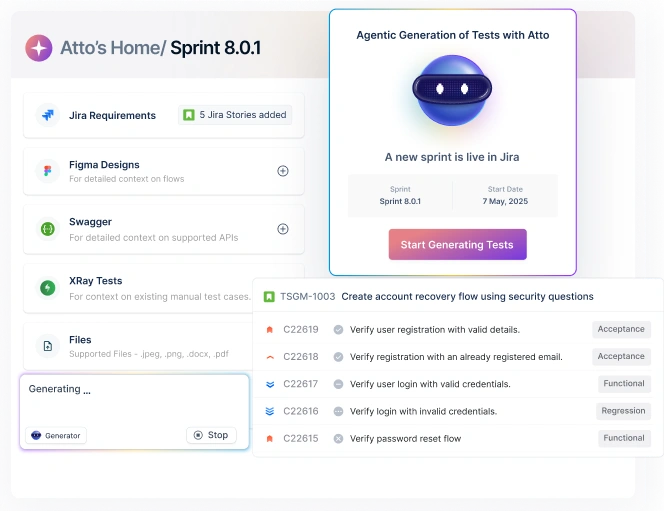
Arcus CLI is Testsigma’s answer for teams in that spot. It connects an AI coding agent, currently documented for GitHub Copilot, with Claude Code also listed among Testsigma’s supported connections, to Arcus by Testsigma. As you write and run Playwright tests inside that agent, Arcus captures the context: your prompts, the tool calls, the files you touched. You push that context to QI Home, and Atto, Testsigma’s AI agent system, generates matching Testsigma test cases from it.
One thing worth flagging before you start: there’s no single command that reads a folder of existing .spec.ts files and outputs a finished Testsigma suite. Capture happens as your agent works, not after the fact, by parsing old files. That distinction shapes how you should plan the migration, and it’s worth understanding before you convert Playwright scripts to Testsigma test cases at any scale.
Table Of Contents
- 1 What Arcus CLI Does (and Why Convert Playwright Tests at All)
- 2 Before You Start: Prerequisites and What You’ll Need
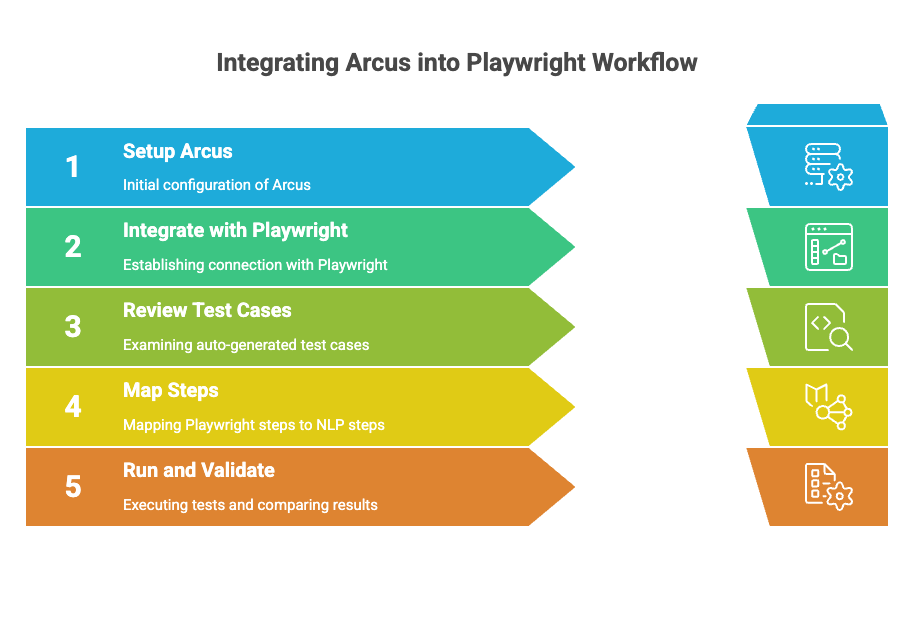
- 3 Step 1: Install and Authenticate Arcus CLI
- 4 Step 2: Connect Arcus to Your Playwright Development Workflow
- 5 Step 3: Review the Auto-Generated Test Cases in QI Home
- 6 Step 4: How Atto Maps Your Playwright Steps to Testsigma’s NLP Steps
- 7 Step 5: Run, Validate, and Compare Results Against Your Original Suite
- 8 What Changes After Conversion: Self-Healing, Maintenance, and Reporting
- 9 Why Teams Convert Instead of Rewriting from Scratch
- 10 Common Migration Pitfalls and How to Avoid Them
- 11 FAQs
What Arcus CLI Does (and Why Convert Playwright Tests at All)
Three terms come up constantly in this workflow, so here’s what each one means.
Arcus is Testsigma’s test management platform, the place your projects, test cases, and runs live. QI Home is the inbox inside Arcus where developer context lands after you push it, sorted into Unmapped Context or a mapped sprint. Atto is Testsigma’s AI coworker, a set of specialized agents (Generator, Executor, Healer, Analyzer, and others) that plan, write, run, and maintain tests.
Arcus CLI is the plugin that sits inside your coding agent. When it’s connected to a project, it watches your prompts, tool calls, and file edits as you build. You push what it captured to QI Home with one command, and Atto’s Generator Agent turns that activity into Testsigma test cases for QA to review.
Why bother, if your Playwright suite already passes? Two reasons show up most often on teams that make the switch.
Maintenance is the big one. Playwright locators break every time a class name or DOM structure shifts, and someone has to go fix them by hand. Testsigma’s Healer Agent repairs broken steps automatically and shows you a before/after view so you can confirm the fix. Some Testsigma customers report cutting locator maintenance sharply once healing takes over that work.
Readability is the other. Testsigma test cases read as plain-English steps, “Click on Login button” instead of page.getByRole(‘button’, { name: ‘Login’ }).click(). That means a manual tester or product manager can review, edit, or extend a test case without touching code. Your Playwright suite stays valuable while you build this out. Nothing here requires deleting it on day one.
Before You Start: Prerequisites and What You’ll Need
Get these in place first:
- An active project in Arcus by Testsigma, with your team members added.
- A supported coding agent installed and configured. GitHub Copilot is currently documented; Claude Code is also listed among Testsigma’s supported AI coding tool connections.
- Playwright work actually happening inside that agent. Arcus captures context from active sessions, so this works best on a team that already drafts or edits Playwright specs with an AI coding agent, not one editing by hand in a plain text editor.
- If you want context linked to pull requests automatically, the Arcus GitHub App installed on your repo.
- A rough sense of which Jira sprint or Ad-Hoc session new test cases should land under, since you’ll map context to one during the push.
Because this is a capture-forward workflow, treat your existing backlog of Playwright specs separately from your day-to-day work. We’ll cover both.
Step 1: Install and Authenticate Arcus CLI
Install the Arcus plugin for your coding agent. The exact install command depends on which agent and release you’re on, so check Arcus’s current plugin documentation before running it.
Once it’s installed, authenticate:
/arcus:login
This opens a browser login flow. Complete it, then return to your coding agent. Nothing gets captured or converted at this step. It just connects the plugin to your Testsigma account.
What can go wrong here: plugin availability and command names vary by coding agent and by release, since this integration is still rolling out. If a command isn’t recognized, confirm you’re on a supported agent version and reinstall the plugin before troubleshooting further.
Step 2: Connect Arcus to Your Playwright Development Workflow
With the plugin authenticated, link it to your project:
/arcus:project <project-id>
From here, work normally. Write or edit your Playwright specs inside your coding agent as you already do, using the agent to generate locators, actions, and assertions. Arcus records the prompts you send, the tool calls the agent makes, and the files it touches in the background. You don’t need to narrate anything for the tool’s benefit. It’s watching the same session you’re already running.
Before/after example: before connecting Arcus, a developer’s Playwright session produces a .spec.ts file and nothing else. After connecting it, that same session also produces a capture in Arcus, ready to push, without any extra typing from the developer.
What can go wrong here: if you paused mid-session or switched projects without running /arcus:project again, context can end up attached to the wrong project. Check the active project before a long work session, not after.
Step 3: Review the Auto-Generated Test Cases in Qi Home
When you’re ready, map the captured context to a sprint, then push it:
/arcus:map
/arcus:push
Mapping first means the context lands directly under the correct sprint in QI Home. Skip mapping and it lands under Unmapped Context instead, where QA routes it manually. Either way, once it’s pushed, Atto’s Generator Agent reads the captured activity and drafts test cases.
Open QI Home to review what came through. Each entry shows the source context and the test cases Atto generated from it. This is the point to check names, steps, and coverage before anything gets added to a real test run, since Atto drafts these for review, not for blind execution.
What can go wrong here: a session with very little meaningful activity, a quick typo fix, say, produces a thin or empty draft. That’s expected. Push substantive chunks of work, not every keystroke.
Step 4: How Atto Maps Your Playwright Steps to Testsigma’s NLP Steps
Because Atto generates test steps from the same actions and page structure your Playwright code touches, the resulting test cases follow a predictable pattern. This table gives you the rough translation.
| Playwright concept | Testsigma equivalent |
| Locator (page.getByRole(), page.locator()) | Element, identified by a natural-language description |
| Assertion (expect(x).toBeVisible()) | Verification step |
| Action (page.click(), page.fill()) | Plain-English step, e.g. “Click on Login button” |
| beforeEach hook or fixture | Step Group (a reusable set of steps) |
| test() or describe() block | Test Case |
| Codegen recorder | Test Step Recorder or Testsigma Copilot |
| npx playwright test in CI | A Test Run triggered through a CI/CD integration |
Don’t confuse Testsigma Copilot with Arcus CLI here. Copilot is a separate, in-product feature that generates test scenarios from a live web page you’re recording against. Arcus CLI captures context from your coding agent instead. They solve similar problems from opposite directions.
Step 5: Run, Validate, and Compare Results Against Your Original Suite
Once you’ve approved test cases in QI Home, add them to a test run the same way you’d add any other Testsigma test case. If your team already has CI/CD integrations set up, Jenkins, CircleCI, GitHub Actions, and Azure DevOps are all documented, trigger the new run the same way your Playwright suite already triggers.
Run both suites in parallel for at least a sprint before you retire anything. Compare pass/fail results against your original Playwright run for the same workflow. Differences usually come down to timing: Playwright’s auto-waiting and Testsigma’s step execution don’t always pause for exactly the same conditions, so a flaky step in one tool can be stable in the other and vice versa.
Keep a short list of workflows where the two disagree. That list is more useful than a pass rate, since it tells you exactly where to spend review time instead of re-checking everything.
What Changes after Conversion: Self-Healing, Maintenance, and Reporting
Once a workflow exists as a Testsigma test case, it runs on Testsigma’s engine, regardless of whether it started life as Playwright code. That matters for two of Atto’s agents in particular.
How the Healer Agent Handles a Changed Locator Post-Migration
When a page changes and a step can no longer find its element, the Healer Agent looks at nearby text, parent containers, and prior layout data to find the right one, repairs the step, and shows you a before/after card. You approve or reject the fix. Nobody opens the test case and manually rewrites a selector.
How the Analyzer Agent Flags Flaky Steps Carried over From the Original Playwright Spec
If a workflow was already a little flaky in Playwright, timing-sensitive, dependent on network conditions, that flakiness usually carries over. The Analyzer Agent monitors execution and surfaces flaky elements and steps so QA can see the pattern across runs instead of chasing a single failure.
Reporting also consolidates. Instead of a separate Playwright HTML report and a separate Testsigma dashboard, converted workflows show up alongside manually authored test cases in the same run history, with the same execution metadata.
Why Teams Convert Instead of Rewriting From Scratch
Rewriting a suite from zero means someone re-learns every workflow, re-derives every edge case, and re-decides what “done” looks like for each test, on top of writing the steps. Converting through Arcus keeps the workflow knowledge your Playwright suite already encodes and changes how the steps get expressed, not what they cover.
Testsigma reports that customers have cut test execution time from eight weeks to five weeks per sprint after adopting Atto’s agents, and that automation speed has increased sharply for suites in the thousands of test cases. Those are Testsigma’s own figures from customer case studies, not independent benchmarks, so treat them as a directional signal rather than a guarantee for your suite. What tends to hold across teams is the shape of the win: less time spent on locator upkeep, more time spent on actual coverage gaps.
There’s a real trade-off too. Testsigma test cases don’t export back to Playwright code. If your team values owning plain code you can run anywhere, that’s a cost worth weighing against the maintenance savings before you commit a large suite to the switch.
Common Migration Pitfalls and How to Avoid Them
Assuming Arcus CLI parses your existing spec files. It doesn’t. There’s no bulk importer that takes a folder of .spec.ts files and produces a finished suite. For your existing backlog, the practical path is to identify the core workflow each old spec validates, then have Atto generate a matching test case from a prompt describing that workflow, or re-run the flow through a connected coding agent so Arcus captures it fresh. Either way, plan review time into the migration instead of expecting a one-shot conversion.
Pushing context too early or too late. Push after a meaningful chunk of work, a completed feature or fix, not after every file save. Too granular and QI Home fills with thin, disconnected drafts. Too infrequent and you lose the specific prompts and tool calls that made the generated test case accurate.
Skipping the mapping step. You can push without running /arcus:map, and the context still lands in QI Home. But it sits in Unmapped Context until someone routes it manually, which adds a review step your team will forget under deadline pressure. Map before you push when you already know the sprint.
Treating generated test cases as final. Atto drafts from what it observed. It doesn’t know your team’s naming conventions or which edge cases matter most to stakeholders. Review before adding a generated test case to a real run, the same way you’d review a pull request.
Not tracking data and environment differences. Test data and environment configuration from your Playwright setup don’t carry over automatically. Rebuild what you need using Testsigma’s Data Sets so parameterized runs behave the way your original suite did.
FAQs
Yes, but not through one automated import. Arcus CLI captures new work going forward. Your current backlog gets rebuilt through Atto’s generator, using the workflow each spec already validates as your source of truth, which is faster than writing every step by hand but still needs a human pass.
It connects a coding agent, such as GitHub Copilot or Claude Code, to Arcus by Testsigma, so your prompts, tool calls, and file changes are captured and pushed to QI Home for Atto to turn into test cases.
No, you don’t touch the Playwright code itself. But there’s no line-by-line conversion either. Atto generates new Testsigma test cases from captured context or from a description of the workflow, rather than parsing your .spec.ts files.
Testsigma test cases don’t use Playwright’s locator syntax at all. Atto’s generated steps reference elements by a natural-language description, and the Healer Agent keeps that reference working automatically as the UI changes.
Testsigma’s plans are quote-based rather than published at a fixed price, with a free trial available. The CLI plugin itself isn’t a separate line item; it’s part of using Arcus by Testsigma. Check current pricing before you budget for a rollout.
Yes. Arcus by Testsigma integrates with Jenkins, CircleCI, GitHub Actions, and Azure DevOps, among others. A converted test case runs in a Test Run the same way any other Testsigma test case does.
They don’t carry over automatically. Recreate what you need as Testsigma Data Sets so your converted workflows can run against the same range of inputs your Playwright suite did.
Yes. Once a workflow becomes a Testsigma test case, it runs on Testsigma’s engine like any other, so the Healer Agent applies the same way regardless of where the test case originated.