





Mobile apps live and die by their user experience. In fact, studies show that nearly 80% of users abandon an app due to a poor user experience, and UI-related issues are among the top reasons for uninstallation. With thousands of device models, multiple OS versions, and constant feature updates, even a small UI glitch can impact retention, ratings, and revenue.
That’s where Mobile UI Testing becomes critical. It ensures that every button, gesture, layout, and transition works seamlessly across devices, delivering a consistent, intuitive experience to every user.
In this complete guide, we’ll break down what Mobile UI Testing is, why it matters, how to do it effectively, and how modern automation can help teams scale with confidence.
Table Of Contents
- 1 What is Mobile UI Testing?
- 2 Why Mobile UI Testing is Important
- 3 What to Test in Mobile App UI Testing?
- 4 How to Test a Mobile UI?
- 5 Manual Mobile UI Testing
- 6 Automated Mobile UI Testing
- 7 Best Practices for Mobile UI Testing
- 8 Future Trends in Mobile UI Testing
- 9 Challenges in Mobile UI Testing
- 10 How Can Testsigma Help with Automated Mobile UI Testing
- 11 Frequently Asked Questions
What is Mobile UI Testing?
Mobile UI Testing is the process of validating that a mobile app’s user interface looks, behaves, and responds correctly across devices, screen sizes, and operating systems. It ensures users experience a smooth, intuitive, and visually consistent interface, whether they’re using Android or iOS.
| If functional testing checks whether the app works, Mobile UI testing checks how well it looks and feels while working.It focuses on what users actually see and interact with. |
Why Mobile UI Testing is Important
Mobile apps compete in an environment where users expect perfection. A slow screen, misaligned button, or broken gesture can instantly damage trust, and users rarely give second chances.
First Impressions Decide Retention
Users judge an app within seconds.
If the UI feels cluttered, inconsistent, or unresponsive, they:
- Abandon the session
- Leave negative reviews
- Uninstall the app
Device & OS Fragmentation Is Massive
Mobile apps must work across:
- Hundreds of Android device models
- Multiple screen sizes and resolutions
- Frequent iOS and Android updates
- Different OS versions running simultaneously
UI Bugs Directly Impact Revenue
Broken CTAs, overlapping elements, or non-clickable buttons can:
- Reduce conversions
- Interrupt checkout flows
- Decrease sign-ups
- Increase churn
App Store Ratings Depend on UX
App store algorithms prioritize ratings and reviews.
Poor UI experiences lead to:
- 1-star reviews
- Lower rankings
- Reduced organic downloads
Frequent Releases Increase Risk
With agile development and CI/CD pipelines:
- UI changes happen frequently
- New features affect layouts
- OS updates break rendering
Users Expect Seamless Cross-Platform Experiences
Users switch between:
- Android and iOS
- Phones and tablets
- Portrait and landscape
Competitive Advantage
In crowded app marketplaces, experience is the differentiator.
Apps with smooth, intuitive UIs:
- Convert better
- Retain longer
- Earn higher ratings
- Build stronger brand loyalty
Also read about – Mobile testing tools
What to Test in Mobile App UI Testing?
Mobile UI testing focuses on validating everything users see and interact with in the app to ensure the interface looks consistent, responds correctly, and works smoothly across different devices and screen sizes. This includes verifying that UI elements like buttons, icons, text fields, images, and menus are properly aligned, readable, and visually consistent. Testers should also verify that the layout adapts correctly to various screen resolutions, orientations (portrait and landscape), and device types (such as phones and tablets).
It’s equally important to validate how users interact with the interface. This includes testing gestures such as tap, swipe, scroll, and pinch to ensure they respond accurately and without delay. Other key areas include navigation flows, screen transitions, loading indicators, error messages, and how data is displayed within the UI. Additionally, testers should verify accessibility features, dark mode compatibility, and overall UI performance to ensure the app provides a smooth and intuitive experience across different operating systems and devices.
How to Test a Mobile UI?
Testing a mobile UI involves systematically validating how the interface looks, responds, and behaves across devices and user interactions. Below are the key steps teams typically follow to ensure the UI delivers a smooth and consistent user experience.
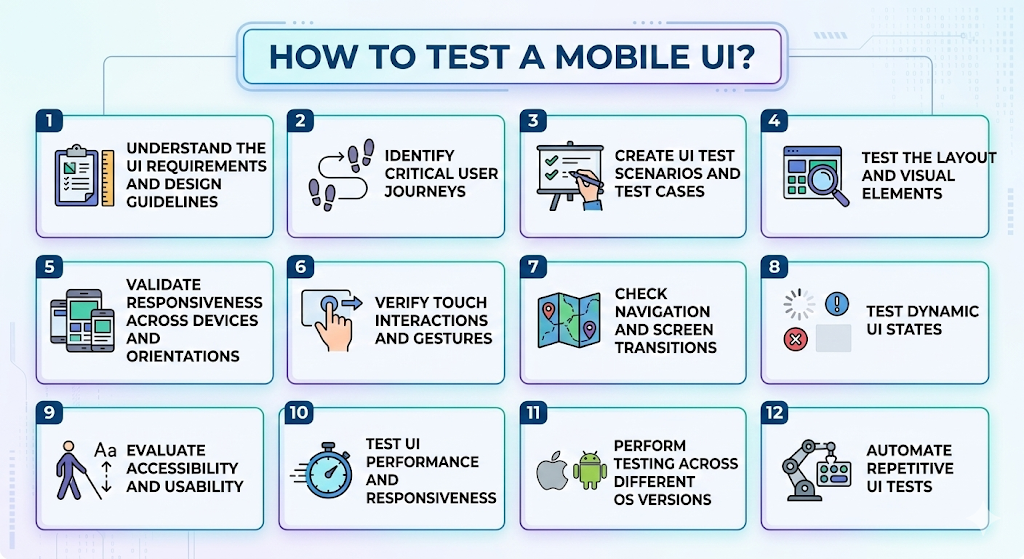
- Understand the UI requirements and design guidelines
Start by reviewing product requirements, wireframes, design specifications, and UI style guides. This helps testers understand expected layouts, colors, spacing, and interaction behaviors, so they know what the UI should look like and how it should function. - Identify critical user journeys
Map the most important flows in the app, such as login, onboarding, search, checkout, or form submission. These flows should be prioritized for UI testing because they directly impact user experience and conversions. - Create UI test scenarios and test cases
Write structured test cases that validate visual elements, interactions, and navigation. For example, test cases may verify button alignment, font consistency, screen transitions, gesture responses, and error message displays. - Test the layout and visual elements
Check whether UI components like buttons, images, input fields, and menus are properly aligned and rendered. Ensure text is readable, images are not distorted, and no elements overlap or appear outside the screen boundaries. - Validate responsiveness across devices and orientations
Run tests across different screen sizes, resolutions, and device types, including smartphones and tablets. Also, verify that the UI adapts correctly when switching between portrait and landscape modes. - Verify touch interactions and gestures
Test all user interactions, including taps, swipes, scrolling, pinch-to-zoom, and long presses. Confirm that gestures respond accurately and that touch targets are large enough for comfortable interaction. - Check navigation and screen transitions
Ensure users can move between screens smoothly. Validate back-button behavior, menu navigation, deep links, and ensure screen transitions work without glitches or delays.
Cut Mobile UI Testing Effort by 80% with Testsigma – Try Testsigma now
- Test dynamic UI states
Validate how the UI behaves during loading, empty, and error states. For example, confirm that loading spinners appear correctly, error messages are displayed when needed, and empty states guide users appropriately. - Evaluate accessibility and usability
Test accessibility features like font scaling, screen reader compatibility, color contrast, and focus order. This ensures the UI remains usable for all users, including those with accessibility needs. - Test UI performance and responsiveness
Measure how quickly screens load, whether animations are smooth, and if the UI remains responsive during interactions. Laggy or slow interfaces can negatively affect user satisfaction. - Perform testing across different OS versions
Validate the UI on multiple versions of online Android emulator and iOS simulator online to ensure compatibility and consistent behavior across operating systems. - Automate repetitive UI tests
Once critical UI scenarios are identified, automate them to run regularly during development and regression cycles. Automation helps teams catch UI regressions quickly as the application evolves.
Also read – Android emulators for PC
Manual Mobile UI Testing
Manual mobile UI testing is the process of human testers interacting with the mobile application to verify that the user interface looks correct and behaves as expected. Instead of using automated scripts, testers manually navigate through the app on real devices or emulators to validate visual elements, layouts, and user interactions from an end-user perspective.
Because it involves real human observation, manual testing is particularly useful for identifying visual inconsistencies, usability issues, and experience-related problems that automated tools may miss.
Key Areas Tested in Manual UI Testing
Testers typically validate the following aspects:
- Layout and visual design – Verify that buttons, icons, text fields, and images are properly aligned, readable, and visually consistent.
- Navigation and screen flow – Ensure users can move smoothly between screens and that back buttons, menus, and links work correctly.
- Touch interactions and gestures – Check taps, swipes, scrolling, pinch-to-zoom, and long-press gestures to confirm they respond accurately.
- Responsiveness across devices – Test how the UI adapts to different screen sizes, resolutions, and orientations.
- Error messages and UI states – Validate loading indicators, empty states, warning messages, and disabled elements.
Automated Mobile UI Testing
Automated Mobile UI Testing uses automation tools and scripts to simulate user interactions with a mobile application and verify that the interface behaves as expected. Instead of testers manually navigating the app, automated mobile app testing performs actions such as tapping buttons, entering text, swiping through screens, and validating UI elements. This helps teams run UI tests faster, more frequently, and across many devices.
Automation is especially useful for regression testing, where the same UI scenarios must be tested repeatedly after each update. By integrating automated UI tests into CI/CD pipelines, teams can quickly detect visual or interaction issues before releasing new versions of the app.
What Automated UI Tests Typically Validate
Automated mobile UI tests commonly check:
- UI element presence and visibility – Verifying that buttons, forms, images, and labels appear correctly on the screen.
- User interactions – Simulating taps, swipes, scrolling, and text input to ensure UI components respond properly.
- Navigation and workflows – Testing user flows such as login, checkout, or form submission.
- UI behavior across devices – Running the same tests on multiple devices, screen sizes, and operating systems.
- Regression testing – Ensuring that new code changes do not break existing UI functionality.
Best Practices for Mobile UI Testing
To ensure a smooth and consistent user experience, teams should follow proven best practices when testing mobile app interfaces. These practices help reduce UI defects, improve test coverage, and make testing more efficient across devices and releases.
- Test on real devices whenever possible – Emulators and simulators are useful for early testing, but real devices reveal issues related to screen resolution, hardware performance, touch sensitivity, and OS behavior that virtual environments may miss.
- Prioritize testing on the most-used devices and OS versions – Instead of testing on every possible device, focus on the combinations most commonly used by your users. This helps maximize coverage while keeping testing efficient.
- Validate UI responsiveness across screen sizes – Ensure the interface adapts properly to different resolutions, aspect ratios, and orientations, including portrait and landscape. This prevents layout issues like overlapping elements or truncated text.
- Test real user interactions and gestures – Verify that taps, swipes, scrolling, pinch-to-zoom, and long presses work accurately using a remote test lab. Touch responsiveness is critical to mobile user experience.
- Keep UI test cases small and focused – Break tests into smaller, independent scenarios instead of long workflows. This makes it easier to identify failures and maintain tests as the UI evolves.
- Combine manual and automated testing – Use manual testing to evaluate usability, visual design, and exploratory scenarios, while automation should handle repetitive tasks such as regression testing and cross-device validation.
- Include UI testing in CI/CD pipelines – Integrating UI tests into continuous integration workflows helps teams catch visual and interaction issues early in the development cycle.
- Regularly update UI test cases – Mobile apps evolve quickly. Keeping test cases up to date ensures tests remain relevant and continue validating the latest interface changes.
Future Trends in Mobile UI Testing
Mobile UI testing is rapidly evolving as mobile apps become more complex and release cycles become faster. New technologies such as AI, cloud infrastructure, and intelligent automation are reshaping how teams test user interfaces and ensure quality at scale.
- AI-powered test automation – Artificial intelligence is transforming how UI tests are created and executed. Modern tools can analyze application behavior and automatically generate relevant test cases, reducing the manual effort required to design and maintain tests.
- Self-healing test scripts – Traditional UI tests often fail when small interface changes occur. AI-driven self-healing mechanisms can automatically detect these changes and update test scripts, significantly reducing maintenance overhead and improving test stability.
- Visual AI and computer-vision testing – Visual testing tools now use computer vision to detect layout issues, pixel differences, and rendering problems across devices. This enables teams to verify UI consistency and visual correctness at scale.
- Codeless and low-code test automation – No-code platforms allow testers, product managers, and other non-technical team members to create automated UI tests using visual workflows instead of complex scripts, making automation more accessible across teams.
- Cloud-based device testing – Cloud testing platforms provide access to hundreds of real devices and OS combinations. This enables teams to run UI tests in parallel across different environments without maintaining physical device labs.
- Shift-left and continuous testing – UI testing is increasingly integrated into CI/CD pipelines so that tests run automatically during development. This helps detect UI defects earlier and reduces the cost of fixing issues later in the release cycle.
- Agentic and autonomous testing systems – Emerging testing systems use AI agents that understand application behavior, generate tests, adapt to UI changes, and execute testing workflows with minimal human intervention.
Challenges in Mobile UI Testing
Mobile UI testing can be complex due to the wide variety of devices, operating systems, and user environments. Ensuring a consistent, smooth interface across these variations can pose several challenges for testing teams.
- Device fragmentation – Mobile apps must work across hundreds of device models with different screen sizes, resolutions, hardware capabilities, and OS versions. Testing every possible combination is difficult and time-consuming.
- Frequent OS updates – Operating systems are updated regularly, which can affect UI rendering, gestures, permissions, and system behaviors. A UI that works perfectly on one OS version may break on another.
- Inconsistent screen sizes and resolutions – Mobile devices come in many form factors, from small phones to tablets and foldables. Ensuring that layouts remain responsive and visually consistent across all screen sizes is a major challenge.
- Flaky UI automation tests – Automated UI tests can sometimes fail due to timing issues, animations, network delays, or asynchronous UI updates, even when the application itself is working correctly.
- High maintenance of test scripts – UI elements often change as the app evolves. Even small UI updates, such as changing element identifiers or layout structures, can break existing automated tests.
- Gesture complexity – Mobile apps rely heavily on gestures like swipes, long presses, and multi-touch interactions, which can be harder to simulate and validate reliably in automated tests.
- Performance variations across devices – Differences in CPU, memory, and GPU performance can affect how quickly UI elements load or respond, making it challenging to maintain consistent user experiences.
- Network and real-world conditions – Mobile users often operate under varying network conditions. Poor connectivity can affect UI states, including loading indicators, error messages, and data rendering.
How Can Testsigma Help with Automated Mobile UI Testing
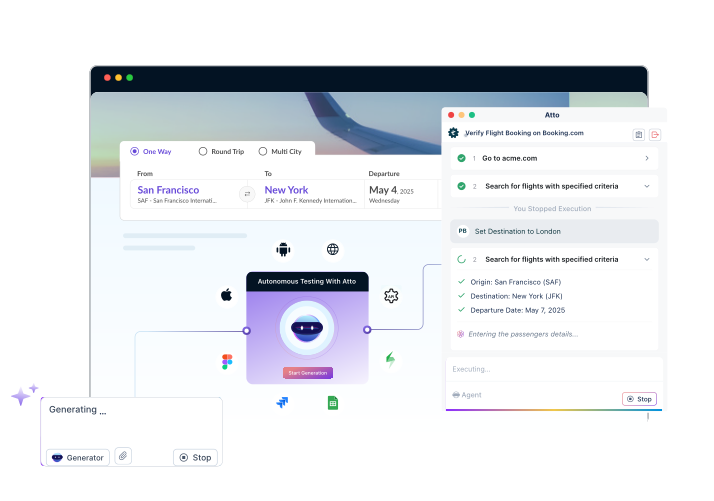
Testsigma helps teams automate mobile UI testing faster by removing the complexity of traditional automation frameworks. It provides AI-powered, no-code testing across Android, iOS, the web, and APIs from a single platform.
Here’s how Testsigma simplifies automated mobile UI testing:
Core Mobile Testing Capabilities
- Android and iOS testing support for native mobile applications
- Access to 3,000+ real mobile devices for reliable testing across device models
- Emulator and simulator support for faster development and testing
- Cloud-based execution without complex device setup
No-Code Mobile Test Creation
- Create tests using plain English steps instead of writing code
- Use a smart recorder to capture taps, swipes, and mobile interactions
- Enables manual testers to easily transition to automation
AI-Powered Test Automation
- Auto-healing locators automatically update when UI elements change
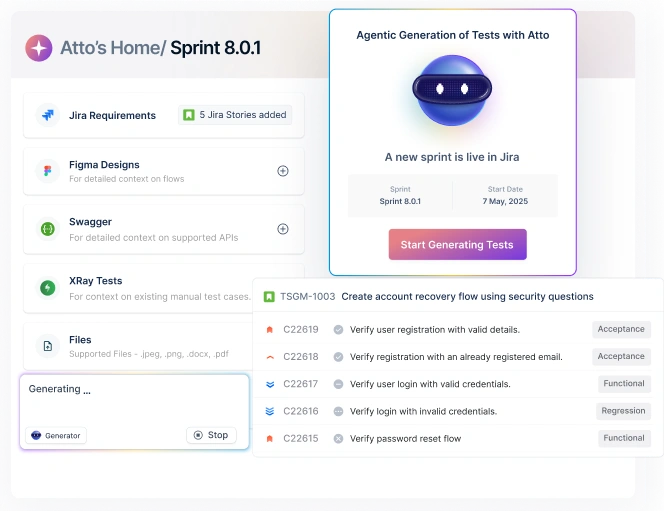
- AI test generation from requirements or design tools like Jira and Figma
- Reduces test maintenance effort
Cross-Platform Testing
- Test Web, Mobile, and APIs in one platform
- Run end-to-end workflows across applications
- Reuse test components across platforms
Test DATA Management
- Parameter-driven tests for running multiple data combinations
- Separate test data profiles for QA, staging, and production
- Import data from Excel or external sources
CI/CD Integration
- Integrates with Jenkins, GitHub Actions, and GitLab CI
- Automated test execution in pipelines
- Detailed reports with screenshots, videos, and logs
Problems Testsigma Solves
- Complex Android/iOS setup → Simple cloud execution
- Frequent UI changes → AI auto-healing tests
- Manual testing bottlenecks → No-code automation
- Multiple testing tools → Unified testing platform
By combining AI automation, real-device testing, and no-code test creation, Testsigma helps teams scale automated mobile UI testing while releasing apps faster with higher quality.
Frequently Asked Questions
What Are the Differences Between Mobile UI Testing vs Web UI Testing?
Mobile UI testing validates app interfaces on mobile devices, including touch gestures and different screen sizes. Web UI testing focuses on browser-based interfaces, primarily involving clicks, keyboard input, and cross-browser compatibility.
How Can Mobile UI Testing Contribute to the Success of an App?
Mobile UI testing improves usability, prevents visual bugs, ensures smooth interactions, and delivers a consistent experience across devices, helping increase user satisfaction, retention, and app store ratings.
How Is Mobile UI Testing Different from Mobile Functional Testing?
Mobile UI testing checks layout, design, and user interactions. Mobile functional testing verifies that app features such as login, payments, and data processing work correctly.
How to Effectively Test Mobile Apps Across Multiple Devices and OS Versions?
Prioritize commonly used devices, test on real devices and emulators, validate different screen sizes and OS versions, and automate key tests to run across multiple environments.
How to Maintain Automated Mobile UI Tests as Applications Evolve?
Use stable locators, keep tests modular, update tests regularly after UI changes, integrate tests into CI/CD pipelines, and use self-healing automation tools to reduce maintenance effort.