




Table Of Contents
- 1 Key Takeaways
- 2 What is In-House Test Automation?
- 3 How In-House Automation Typically Starts
- 4 The In-House Testing Stack
- 5 When In-House Automation is Genuinely the Right Call
- 6 The Real Advantages of In-House Test Automation
- 7 Where In-House Test Automation Breaks Down
- 8 What QA Teams Actually do
- 9 What is Testsigma? The alternative
- 10 In-House Test Automation vs Testsigma: Head-to-Head Comparison
- 11 Where In-House Automation Still Wins
- 12 Where Testsigma Wins Decisively
- 13 The Hybrid Path
- 14 Total Cost of Ownership: The 3-Year Comparison
- 15 What Teams Consistently Undercount
- 16 When the Crossover Happens
- 17 Who Should Stick With In-House Automation?
- 18 Who Should Consider Testsigma?
- 19 4-Step Migration From In-House Testing to Testsigma
- 20 What You Bring and What You Leave Behind
- 21 Control vs Maintenance: Making the Call
- 22 FAQs for In-House Test Automation
Key Takeaways
- What is In-House Test Automation? Building, running, and maintaining your own test framework using tools like Selenium, Playwright, or Cypress. Your engineers own the code, the infrastructure, and the upkeep, and it’s common for teams that want full control over how tests are written and executed.
- Where Does In-House Automation Struggle? Maintenance often eats 40-70% of QA time once suites get large. SDET salaries and framework migrations push costs higher than most teams plan for, and suites tend to plateau around 200-300 tests, where upkeep cancels out new coverage.
- When Should You Consider Testsigma? When test maintenance is slowing down releases instead of supporting them, when manual testers need to automate without learning to code, and when you need web, mobile, API, and desktop coverage in one place.
In-house test automation usually follows the same pattern for most teams. It includes manual regression, starting blocking releases, and a homegrown framework that branches and grows from basic scripts.
The in-house test automation vs Testsigma decision has no single right answer. In-house QA testing gives you control, while Testsigma gives you lower maintenance and faster onboarding.
Moving on, we shall cover where in-house testing wins, where it breaks down, a head-to-head comparison, a 3-year cost model, and who should pick which approach.
What is In-House Test Automation?
In-house test automation is when your engineering team owns the entire testing setup. Instead of buying a ready-made platform, the team assembles its own framework from open-source libraries, execution infrastructure, and CI/CD pipelines.
This means your team:
- Write the test code
- Manage browser drivers
- Maintain execution environments
- Keep the suite in step with each release.
It is a real automated testing software project that remains alongside your product.
How In-House Automation Typically Starts
When your manual regression becomes a bottleneck during a sprint, one of your capable engineers writes scripts to automate core flows like login or checkout. This is the most typical way in-house test automation begins when you scale.
For years, this referred to Selenium, where engineers downloaded web drivers, managed versions, and wrote code in Java, Python, or C# to drive the browser.

More recently, you have probably moved to Playwright, a modern code-first framework.
Industry surveys suggest Playwright adoption has reached around 45%, while Selenium has slipped to roughly 22%, and Cypress is near 14%.
Playwright is popular for its ability to talk to browsers directly, wait for elements automatically, and run tests in parallel quickly. However, the core pattern stays the same, where a skilled engineer writes custom scripts.
The In-House Testing Stack
A serious in-house automation framework has several layers, and each one needs attention:
- Framework layer: The test runner, page objects, custom assertions, and data configuration.
- Infrastructure layer: Local device labs and browser containers, or a licensed cloud grid like BrowserStack or LambdaTest.
- CI/CD layer: Custom config that triggers tests in Jenkins, GitHub Actions, GitLab, or Azure DevOps on each commit.
- The people: SDETs (Software Development Engineers in Test) who blend dev and QA skills.
An SDET in-house team is the biggest line item. In the US, SDET salaries typically run from $90,000 to $140,000, with senior architects above $180,000. In the UK, the range is roughly £60,000-£90,000.
When In-House Automation is Genuinely the Right Call
In-house automation is the right choice when your application uses non-standard protocols, proprietary backend systems, or air-gapped environments that block external cloud access.
It also fits enterprises with a mature platform engineering group, a stable product UI, and the budget to keep dedicated SDETs.
In those cases, a tuned framework can deliver fast local feedback that generic platforms find hard to match.
The Real Advantages of In-House Test Automation
A fair comparison calls for taking the in-house automation framework seriously. Here is where it genuinely shines:
Full Control over Architecture and Tooling
Since the framework is built by you through manual coding, teams get complete design freedom. You can pick your test runners, build custom reporting, and write low-level wrappers that codeless tools may not support.
Deep Product Knowledge in the Suite
Code-first testing lets engineers embed business logic directly into tests. Scripts can connect to databases to check the state, seed test data with SQL, and stub API responses.
This pushes validation past surface-level UI checks into real backend data integrity.
No Vendor Lock-in
Open-source frameworks keep your testing IP portable. The whole suite stays as code in your own repositories.
If a grid provider raises prices or changes terms, you can move without rewriting your tests. That independence is a real strategic advantage.
DATA Stays Inside Your Environment
For finance, healthcare, and public sector teams, this matters a lot. An in-house framework can run entirely inside private cloud, secure networks, or internal servers.
No transaction data, customer records, or source code leaves the corporate perimeter, which reduces third-party compliance risk.
Customization without Limits
Custom stacks can handle unusual needs. Whether you interface with legacy mainframes, test custom hardware, or validate niche compliance systems, an in-house framework can be extended to fit.
Where In-House Test Automation Breaks down
The strengths are real, but so are the limits. This is where most teams start asking the build-vs-buy question.
The Maintenance Ceiling
Custom suites rely on static locators like CSS classes, IDs, and XPath to find elements. This is sometimes called brittle selectors or locator churn. Agile teams ship constantly, and small frontend changes break those selectors often.
Teams running mature suites commonly spend a significant portion of their QA capacity on fixing these maintenance ceilings. For older Selenium suites, some studies put the hidden costs of in-house test automation even higher.
Scaling Costs More Than Teams’ Budget
The total cost of ownership of in-house testing is mostly dominated by people. Code-based suites need advanced skills, so you pay a premium for SDET talent.
Recruiter fees, onboarding, debugging time, and major framework upgrades further raise the price of a commercial platform.
The 200-300 Test Plateau
A set of under 50 tests is manageable by one engineer, but complexity compounds as tests accumulate.
Around 200-300 tests, many teams hit a plateau where daily failures from UI changes match or exceed the team’s ability to fix them.
At that point, engineers spend their shift triaging failures or deleting tests they can no longer maintain, instead of covering new features.
Framework Decay
Open-source dependencies keep changing, which forces periodic large refactors. Moving from Selenium 3 to 4, for example, meant switching protocols, replacing deprecated classes, and reworking timeout handling.
These migrations, plus the eventual shift to engines like Playwright, create ongoing technical debt. This framework migration cost pulls engineers away from testing the actual product.
Key-Person Dependency
Custom frameworks are often built by one senior SDET or a small group. They are rarely documented well and reflect the author’s personal style.
When that person leaves, the suite can become a black box. This knowledge concentration risk often leads to test suite rot and, eventually, an abandoned automation effort.
What QA Teams Actually Do
In practice, the pattern repeats across teams. They:
- Start with manual testing because it feels faster
- Write scripts that break when the UI shifts
- Fail to run the regression suite manually as it grows
- End up fixing scripts more than finding bugs
Recognizing this loop early is what usually triggers a serious test automation platform comparison.
What is Testsigma? the Alternative
Testsigma is a cloud-based, low-code test automation platform powered by agentic AI. It brings planning, authoring, execution, and maintenance into one interface. So, you don’t have to assemble and maintain your stack.
Agentic AI-Powered Test Automation in Practice
At the center is Atto, Testsigma’s agentic AI system. “Agentic” simply means AI that can take actions and complete tasks, not just answer questions.

Atto runs a set of specialized AI agents that act like QA coworkers:
- Planner: maps critical paths and edge cases based on risk and code impact.
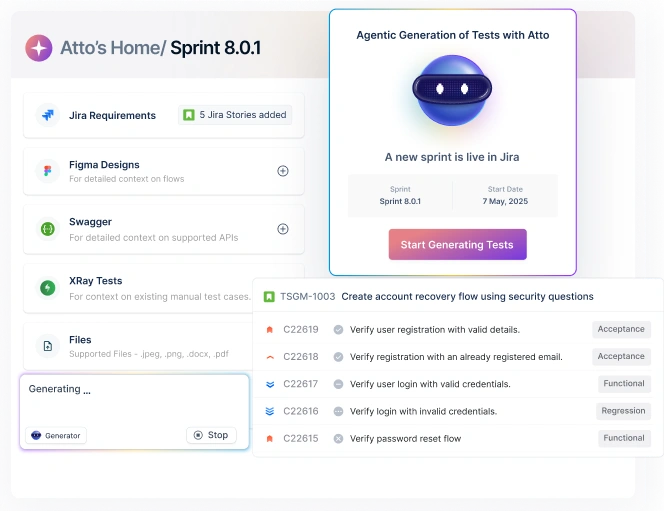
- Generator: turns plain English, Jira stories, or Figma designs into test steps.
- Runner: executes tests and explores the app for coverage gaps.
- Healer: fixes broken locators on the fly during a run.
- Analyzer: finds the root cause of failures and suggests fixes.
- Bug Reporter: builds detailed bug reports with logs and video, then pushes them to tools like Jira.
Test Creation From Plain English, JIRA, OR Figma
Testsigma uses natural-language test authoring, so you write steps like “Click on Login button” instead of locator and driver code.
Its generative features can also read Jira tickets, PRDs, or Figma designs and turn them into runnable tests. This lets manual testers and business analysts contribute to automation early.
Coverage across Web, Mobile, API, Desktop, and Salesforce
Instead of stitching separate tools together, Testsigma covers multiple platforms and cross-browser testing in one place.
A single flow can validate a web transaction, call a REST API, run a step on a real iOS or Android device, and confirm a state change in Salesforce or SAP. That removes a lot of tool sprawl.
Self-Healing Tests
Brittle locators are the primary failure point in traditional automation. Testsigma’s Healer agent scores multiple element attributes during each run, including DOM hierarchy, layout, and nearby text.
When a change moves or renames an element, the AI finds the right target and continues without failing the build. This can cut locator-based maintenance by up to 90%, which is the core idea behind self-healing test automation.
Infrastructure Included
You also skip the device lab. Testsigma includes a cloud lab with access to more than 3,000 real iOS and Android devices and over 800 browser and OS combinations.
This swaps a CapEx-heavy on-premise lab for an OpEx cloud model, with parallel execution and no system admin overhead.
In-House Test Automation Vs Testsigma: Head-to-head Comparison
The table below compares both approaches across critical dimensions:
| Dimension | In-House Automation | Testsigma |
| Setup time | Weeks to months: design, repo setup, pipeline, drivers | Same-day start: cloud SaaS, no local install |
| Skill required | High SDET-level scripting and DevOps | Plain English / no-code for testers and BAs |
| Maintenance burden | Manual locator and script rewrites | AI self-healing, up to ~90% less locator upkeep |
| Browser & device coverage | Manage a lab or license a grid | 3,000+ real devices, 800+ browser/OS combos included |
| CI/CD integration | Custom pipeline config and webhooks | Native connectors for Jenkins, GitHub Actions, Azure DevOps |
| Scalability | Hire more SDETs, add VM runners | On-demand parallel cloud execution |
| Security & compliance | Your internal controls | SOC 2 Type II, ISO 27001, HIPAA-ready, GDPR |
| Team accessibility | Developers and SDETs only | Testers, BAs, product owners, non-coders |
| Cost model | CapEx: salaries, infra, licenses | OpEx: predictable subscription |
| Vendor risk | Zero, code in your own Git | Managed ecosystem with import/export and data portability |
Where In-House Automation Still Wins
For apps needing low-latency browser access, custom database triggers, or specialized protocol handling, code-first frameworks like Playwright remain very effective.
It is also the only realistic path for air-gapped environments that block external cloud connections entirely.
Where Testsigma Wins Decisively
Testsigma is the stronger fit for fast-moving product teams that want to cut testing overhead. It handles frequently changing UIs well, since self-healing resolves locator breaks automatically.
It even lets manual QA and product managers build and run tests in plain English, so you don’t need a large SDET in-house team to keep regression alive.
The Hybrid Path
The choice is not always all-or-nothing. Many teams run Testsigma alongside an existing framework.
Developers keep using Playwright or Cypress for fast unit and integration smoke tests during pull requests.
The wider QA team uses Testsigma and alternatives for functional regression, mobile, and end-to-end flows. Here’s how Testsigma compares to other automation tools.
This keeps dev pipelines lightweight while letting QA scale coverage without adding maintenance work for developers.
Total Cost of Ownership: The 3-Year Comparison
To compare long-term cost, here is an illustrative model for a 10-person QA team over 3 years. Treat these as directional estimates.
The in-house model assumes one automation architect and one senior SDET, an external browser grid license, CI/CD compute, and a test management tool.
The Testsigma model assumes a Pro/Enterprise subscription, included infrastructure, and a small slice of internal DevOps time.
| Cost Category | In-House Y1 | In-House Y2 | In-House Y3 | Testsigma Y1 | Testsigma Y2 | Testsigma Y3 |
| Personnel / DevOps | $294,000 | $308,700 | $324,135 | $33,750 | $14,175 | $14,884 |
| Execution Grid | $12,000 | $15,000 | $18,000 | Included | Included | Included |
| CI/CD Compute | $6,000 | $7,200 | $8,500 | Included | Included | Included |
| Test Management | $3,000 | $3,000 | $3,000 | Included | Included | Included |
| Platform Subscription | $0 | $0 | $0 | $36,000 | $38,000 | $40,000 |
| Migration/Onboarding | $0 | $0 | $0 | $5,000 | $0 | $0 |
| Annual Total | $315,000 | $333,900 | $353,635 | $74,750 | $52,175 | $54,884 |
| Cumulative | $315,000 | $648,900 | $1,002,535 | $74,750 | $126,925 | $181,809 |
In this model, the 3-year direct difference is roughly $820,000. Your numbers will vary with team size, salaries, and suite complexity.
What Teams Consistently Undercount
The most common mistake is assuming “free” open-source licenses mean zero cost. The highest hidden cost is opportunity cost. Every hour a senior engineer spends fixing selectors or updating drivers is an hour not spent on product features.
Teams also undercount flaky pipelines. False failures delay releases, burn compute, and force engineers into long triage sessions.
When the Crossover Happens
Early on, in-house scripting can look cheap, especially when devs write tests in their spare time. However, the crossover usually lands between 18 and 24 months.
By then, the suite has passed the 200-test mark, and the team has to hire dedicated SDETs to keep up. As salaries scale and locator upkeep grow, the in-house curve rises steadily.
Testsigma keeps human maintenance flatter, which is where the long-term cost advantage comes from.
Who Should Stick with In-House Automation?
In-house is the better call for some teams. Be honest about whether you are one of them:
- Genuinely unique requirements: Proprietary protocols, custom IoT hardware, or air-gapped networks that cannot send data to external SaaS APIs.
- Mature enterprise frameworks: Stable products with dedicated SDET teams and a well-integrated, working suite, where migration risk may outweigh the gains.
- Testing companies: QA service providers whose business is deep Selenium, Playwright, and Cypress expertise need to keep that code-level mastery in-house.
Who Should Consider Testsigma?
Testsigma fits teams feeling the maintenance squeeze better than teams with a strong need for customization.
- Spending more than 30% of QA time on maintenance: The Healer agent can cut locator upkeep sharply, freeing time for real coverage.
- Manual testers who need to automate: Plain-English authoring lets analysts and product managers contribute without a coding bootcamp.
- Shipping faster than the framework keeps up: AI-assisted authoring helps teams cover new features during active sprints, not weeks later.
- Needing mobile + web + API in one place: Consolidating avoids juggling Selenium, Appium, and Postman separately.
- Regulated industries: Audit-ready reports and certified infrastructure (SOC 2 Type II, ISO 27001, HIPAA-ready, GDPR) reduce manual compliance work.
4-Step Migration From In-House Testing to Testsigma
Migration does not have to be risky or all at once. A phased approach preserves your existing test value as you transition to lower-maintenance execution.
- Account Setup and Critical Paths (Week 1): Configure the cloud workspace, set up access, and pick your top 5-10 business-critical regression flows.
- Core Flow Migration (Weeks 2-3): Recreate those high-value flows in plain English. This becomes your baseline validation suite.
- Scale and CI/CD Integration (Weeks 4-5): Wire Testsigma into your pipeline (GitHub Actions, Jenkins, and similar) and turn on the AI agents to plan and monitor runs.
- Offload the Core Stack (Week 6): Once Testsigma suites are stable on every pull request, retire the high-maintenance legacy framework.
What You Bring and What You Leave behind
You do not have to throw away your assets. Test cases in Excel, CSV, or XML import into Testsigma’s test management, parameterized data sheets move into the data manager, and your CI/CD triggers stay intact (you just swap the run command for a Testsigma API call).
What you leave behind is the overhead of driver updates, Selenium Grid troubleshooting, custom reporting code, and fragile XPath maintenance.
Most mid-sized teams complete the move to test automation frameworks in 2-6 weeks, depending on suite size.
Control Vs Maintenance: Making the Call
In-house automation works for unique, regulated, or air-gapped needs. However, for most teams, maintenance costs climb past the 200-test plateau and slow releases. If upkeep is crowding out new coverage, it’s worth comparing options.
Testsigma helps QA teams create, run, and maintain automated tests across web, mobile, API, and desktop from one platform.
FAQs for In-House Test Automation
It is building and maintaining your own test framework with open-source tools like Playwright, Selenium, or Cypress, plus your own execution infrastructure. Your engineers write the test code and manage the full pipeline.
The main advantages are full architectural control, no vendor lock-in, and strong data security. Code-based frameworks let teams hook directly into databases and APIs and run tests inside isolated environments.
The biggest drawbacks are heavy locator maintenance, rising SDET costs, and framework decay. Teams often spend 40–70% of QA time maintaining tests instead of adding coverage, which creates a scaling bottleneck.
Testsigma is a codeless, cloud-hosted, AI-powered platform. It unifies web, mobile, desktop, and API testing, lets you author tests in plain English, and uses AI agents for generation, parallel execution, and self-healing, which lowers maintenance.
Build in-house when you have unique protocols, strict air-gapped requirements, or a mature framework with a dedicated SDET team that already works well. In those cases, migration risk can outweigh the benefits.
In an illustrative model, a 10-engineer in-house setup can exceed $300,000 in year one and pass $1,000,000 over three years, driven by salaries, grids, and compute. A platform subscription model is typically far lower over the same period. Verify current pricing for your situation.
Yes. You can import existing test cases, data sheets, and CI/CD triggers, then move critical regression flows progressively over a 2–6 week window using Testsigma’s import tools, rather than rebuilding everything at once.
In-house is traditionally favored because execution stays inside your network. Testsigma offers comparable enterprise security with SOC 2 Type II, ISO 27001, and HIPAA-ready compliance, plus on-premises and private cloud deployment options.