




Table Of Contents
- 1 Key Takeaways
- 2 What is a test cycle in Jira?
- 3 How to create a test cycle in Jira manually (Zephyr Squad)
- 4 How to create a test cycle in Zephyr Scale
- 5 How to generate test cycles from Jira automatically
- 6 How Testsigma eliminates manual test cycle setup from Jira
- 7 API-based automation: creating test cycles programmatically
- 8 Testsigma vs. Zephyr for test cycle management
- 9 Best practices for test cycle management in Jira
- 10 Frequently asked questions
Key Takeaways
- Jira has no native “test cycle” concept — it comes from plugins like Zephyr Squad and Zephyr Scale layered on top of Jira.
- A test plan groups test cycles, a test cycle holds test cases for a time-boxed window, and a test run is the actual execution of a test case.
- Manual cycle setup in Zephyr Squad or Zephyr Scale typically takes 1-2 hours per sprint and repeats every sprint.
- True automatic generation means a tool reads Jira sprint data and builds test cases from story content without manual initiation — Testsigma’s Sprint Planner Agent does this using GenAI.
- Zephyr Scale and Zephyr Squad both expose REST APIs that let teams script cycle creation into CI/CD pipelines like Jenkins or GitHub Actions.
- Testsigma’s two-way Jira sync keeps story and test status updated in both systems automatically, without manual switching.
To generate test cycles from Jira automatically, you need a Jira test management tool that actually reads your sprint data, not just connects to Jira. Testsigma does this through a Sprint Planner Agent that reads your Jira stories and generates test cases using GenAI, cutting setup time significantly. Most teams using it stop spending Tuesday morning rebuilding the same cycle they had two weeks ago.
If you’re currently doing this by hand in Zephyr Squad or Zephyr Scale, this guide covers both the manual steps and what fully automated test cycle generation actually looks like.
What is a Test Cycle in JIRA?
Jira doesn’t have a native concept called a “test cycle.” The terminology comes from test management plugins (primarily Zephyr Squad and Zephyr Scale) that add QA-specific layers on top of Jira’s standard issue tracking.
Test Cycle Vs. Test Plan Vs. Test Run: Quick Definitions
Start with the container. A test plan groups test cycles under a specific version or release milestone. Think of it as the project folder.
Inside that sits the test cycle: a time-boxed execution group that holds the test cases you’ll run during a sprint. One test plan can have multiple cycles running in parallel or sequence (smoke, regression, exploratory, UAT).
A test run is what actually happens when someone sits down and executes a test case inside that cycle. Pass, fail, blocked: that’s the run. Evidence gets attached, defects get logged.
Nested order: test plan > test cycle > test run.
Why JIRA Doesn’t Handle Test Cycles Natively
Jira is built for issue tracking. Sprint planning, backlog grooming, defect logging: it handles all of that well. What it doesn’t have is any concept of test steps, execution status per cycle, or traceability between a story and the Jira test cases that verify it actually works.
Plugins fill this gap. Zephyr Squad is the lightweight option for teams that want test tracking without leaving Jira. Zephyr Scale (formerly TM4J, now part of SmartBear’s Zephyr family) gives you a separate test repository with version control and richer reporting, better suited for teams juggling hundreds of test cases across multiple projects.
Neither one generates test cycles from your sprint data.
How to Create a Test Cycle in JIRA Manually (Zephyr Squad)
Zephyr Squad lives inside Jira. Once installed from the Atlassian Marketplace, it adds a Tests or Zephyr Squad tab to your project sidebar.
Step-by-step in Zephyr Squad (jira Cloud)
- Go to your Jira project and click the Tests or Zephyr Squad tab in the sidebar.
- Click Cycle Summary from the Zephyr menu.
- In the left panel, select the Release/Version the cycle belongs to. If it’s not tied to a specific version, choose Unscheduled.
- Click the Create New Test Cycle button or the + icon.
- Fill in the cycle details:
- Name: Something specific, like “Sprint 1 Smoke Test” or “v1.0 Regression”
- Description: The purpose of the cycle
- Build and Environment: Optional. Enter the build number and environment (e.g., Staging, QA)
- Start Date and End Date
- Click Save (or Create and Edit if you want to add test cases immediately).
- Open the cycle from your Cycle Summary list and click Add Tests or Add Tests to Cycle.
- Add test cases using one of two methods:
- Individually: Search by test case ID
- Via Filter: Use a Jira search filter or JQL to bulk-add test issues
- Select a folder if applicable, and assign test executions to specific team members.
Once saved, testers open the cycle, run the manual steps, update statuses (Pass, Fail, Blocked), and log defects directly from the cycle view.
Cloning an Existing Cycle to Save Time
If you run a similar regression cycle every sprint, cloning avoids re-entering everything. Go to your Cycle Summary, locate the cycle you want to clone, and click the three dots on the right side of the cycle’s progress bar. Select Clone Cycle, update the name, dates, and build details, then click Save. Cloning copies all test cases in the cycle but resets execution statuses, comments, and defects to give you a clean slate.
Cloning saves time, but it’s still manual. You’re still deciding which test cases go in, still assigning testers, still updating dates. Every single sprint.
How to Create a Test Cycle in Zephyr Scale
Zephyr Scale is a separate app from Zephyr Squad. Both are part of SmartBear’s Zephyr product family but targeted at different team sizes. Scale gives you a standalone test case library, versioned test cases, and richer reporting. It’s typically used by teams managing hundreds or thousands of test cases across multiple projects.
Creating From the Test Cycles Module
- Open your Jira project and click Zephyr Scale in the project sidebar.
- Click Test Cycles in the top menu.
- Click + New Test Cycle (or + Create).
- Fill in the cycle details in the popup:
- Name: Something descriptive, like “Sprint 1 Regression” or “June Release”
- Description: Scope or objective of the cycle
- Project Version / Release: The Jira Fix Version this cycle is tied to
- Start and End Dates: The testing window
- Folder: Where to organize this cycle, if you’re using folders
- Click Save.
Once the cycle is created, open it to add test cases from your Test Repository and assign them to testers.
If you’ve used either tool for more than a few sprints, you already know the pattern. Sprint starts, QA lead opens Zephyr, rebuilds the cycle, assigns cases, sets dates. It takes 1-2 hours depending on how many stories are in scope. Then you do it again next sprint. And the one after that.
The setup isn’t hard. It’s just repetitive in a way that compounds, and it happens right when the team has the least bandwidth.
How to Generate Test Cycles From JIRA Automatically
Both Zephyr tools require you to manually build each cycle. You choose the sprint, select the test cases, assign testers, set dates. For teams releasing weekly or biweekly, this setup becomes a recurring tax before every sprint begins.
What ‘automatic Generation’ Actually Means in Modern Test Tools
The word “automatic” gets used loosely. In most tools it just means a faster UI for doing the same manual steps. Real automatic generation is different: the tool reads your Jira sprint data (stories, acceptance criteria, descriptions) and builds a test plan from it without you initiating anything. The test cases come from the story content, not from a library you hand-picked.
That requires a live Jira integration plus AI that can interpret requirements. Most traditional test management tools have the integration. Almost none have the second part.
How Testsigma’s Sprint Planner Agent Auto-Detects Sprints
Testsigma connects to your Jira project via a Jira two-way integration. Once connected, the Sprint Planner monitors your Jira board for new or active sprints.
When a sprint starts, or when you trigger the agent manually, it pulls all the stories in scope, reads the titles and acceptance criteria, and organizes a test plan. You never open Testsigma and start a cycle from scratch. The agent groups stories, names the cycle after the sprint, and queues test case generation. All before you’ve touched it.
Generating Test Cases From JIRA Stories Using GenAI (Copilot)
After detection, Testsigma’s Copilot can generate test cases from Jira stories using the story content as input. It can also pull from Figma designs or written requirements outside Jira if you’ve linked those sources.
The output isn’t a final test suite. It’s a draft for review. Testers go through what Copilot produced, approve what looks right, edit what doesn’t, and add edge cases the AI missed. Nothing goes live without a human sign-off. The shift is that instead of writing test cases from scratch, you’re reviewing a draft. Most testers find that takes 20 minutes where it used to take two hours.
Two-Way Sync: Status Updates in JIRA Reflect in Testsigma
Once a cycle is running, status updates in Testsigma (pass, fail, in progress, blocked) sync back to the corresponding Jira story automatically. A failing test flags the linked story without anyone manually switching between tools.
It works in reverse too. A story closed or moved out of sprint in Jira gets reflected in the Testsigma cycle. Both systems stay in sync without anyone acting as the bridge.
How Testsigma Eliminates Manual Test Cycle Setup From JIRA
Sprint starts Monday. By Tuesday morning, the QA lead is in Zephyr rebuilding the cycle from scratch: picking test cases, assigning executions, setting the date range. By the afternoon it’s live. Half a day of overhead that produced zero test coverage.
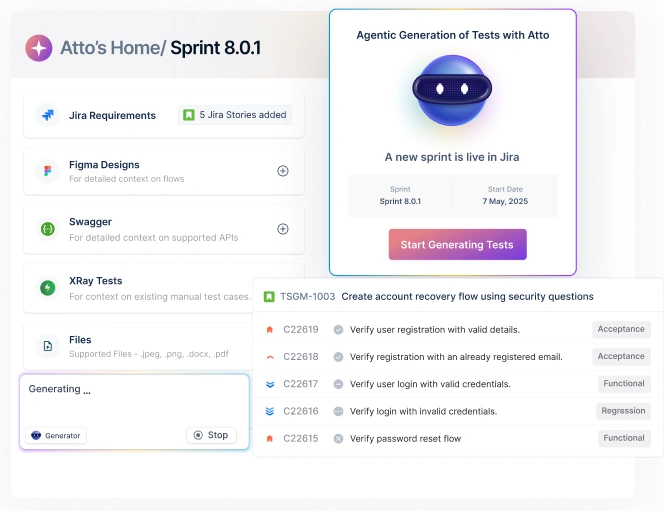
Testsigma’s Atto compresses that window significantly. The Sprint Planner agent detects the sprint, the Generator agent builds the test cases, and the QA lead’s job becomes reviewing a draft instead of authoring one from scratch.
There’s a specific workflow that makes this practical:
- Once you have your free Testsigma trial account, connect it to your Jira project (OAuth-based, takes under five minutes). In case you don’t have a free trial account yet, you can sign up here.
- In Testsigma, create a project and attach your Jira project to it from the project settings.
- Go to Atto’s Home and open the Other Sprints tab. Your Jira sprints appear here under Inactive.

- Select the sprint you want to test, review the stories in scope, and click Activate.
- Click Start Generating Tests. Atto’s Generator Agent reads each story and generates test cases with preconditions, steps, and expected results.

- Review each generated test case, refine using AI if needed, select a folder, and click Accept to save it.

As the sprint runs, story statuses sync automatically between Jira and Testsigma. When a sprint closes in Jira, Atto prompts you to mark it as done in Testsigma.
Atto handles the detection and generation. You’re pulled in only at the review and accept stage, which is where the judgment should sit anyway.
API-Based Automation: Creating Test Cycles Programmatically
If you’re not using a tool like Testsigma, you can still automate parts of test cycle creation using APIs. Both Zephyr Squad and Zephyr Scale expose REST APIs that let you create cycles, add test cases, and assign executions without going through the UI.
Using Zephyr Scale REST API to Auto-Create Cycles
Zephyr Scale’s REST API (v2 for Jira Cloud) uses Bearer token authentication. Generate your token from Jira by going to your profile icon, selecting Zephyr Scale API Access Tokens, and clicking Create access token.
Here’s a basic example of creating a test cycle via the API:
POST https://api.zephyrscale.smartbear.com/v2/testcycles
Authorization: Bearer YOUR_ZEPHYR_SCALE_TOKEN
Content-Type: application/json

{
  "projectKey": "QA",
  "name": "Sprint 42 Regression",
  "description": "Auto-created by CI/CD pipeline",
  "plannedStartDate": "2026-07-01T09:00:00Z",
  "plannedEndDate": "2026-07-14T18:00:00Z"
}
The response returns the cycle key (e.g., QA-R42), which you use to track execution status or link test cases in a follow-up request.
For Zephyr Squad, the API structure differs. It uses Jira’s REST API base with Zephyr-specific endpoints under /rest/zephyr/1.0/.
For a deeper walkthrough including how to link test cases after cycle creation, this Atlassian community thread covers the full two-step flow with real payloads.
Triggering Cycle Creation From CI/CD Pipelines (jenkins, GitHub Actions)
The API approach gets more useful when you wire it into your CI/CD pipeline. Here’s a common pattern:
- When a sprint is created in Jira (via Jira webhook), trigger a script that calls the Zephyr Scale API to create a test cycle.
- When a build is deployed to staging (via Jenkins or GitHub Actions), trigger test execution and push results back to the cycle via the API.
A GitHub Actions step for this might look like:
- name: Create test cycle in Zephyr Scale
  run: |
    curl -X POST
      -H "Authorization: Bearer ${{ secrets.ZEPHYR_SCALE_TOKEN }}"
      -H "Content-Type: application/json"
      -d '{"name": "Build ${{ github.run_number }} Regression", "projectKey": "QA"}'
      https://api.zephyrscale.smartbear.com/v2/testcycles
This gives you a new cycle per build, with results linked to the specific commit. The limitation: you’re still manually maintaining the list of test case keys to include. There’s no AI reading your Jira stories and deciding which tests are relevant.
Testsigma Vs. Zephyr for Test Cycle Management
| Zephyr Squad | Zephyr Scale | Testsigma | |
| Auto-generation from sprints | No | No | Yes (with Sprint Planner agent) |
| AI test case generation | No | No | Yes (with Generator agent) |
| Jira two-way sync | Two-way (manual update) | Two-way (manual update) | Two-way auto-sync in real time |
| Test case library | Limited (in-Jira) | Yes (separate repo) | Yes |
| CI/CD integration | Via API | Via API | Native + API |
| Pricing model | Per-user Jira add-on | Per-user Jira add-on | Separate platform |
| Test cycle setup | Manual | Manual | Automated |
| Best for | Small teams, lightweight QA | Large teams, enterprise test libraries | Teams that want AI to handle cycle setup |
When to Use Each Tool
Zephyr Squad makes sense if your team is small (under 10 testers) and you don’t need a separate test library. It lives inside Jira, it’s fast to set up, and for teams that just need basic test tracking it does the job without adding another platform.
Zephyr Scale is the better fit once you’re managing a large repository across multiple projects and need version-controlled test cases. The REST API is solid for pipeline automation. If your engineering team already has CI/CD scripts and wants to plug test cycle creation into them, Scale gives you the primitives to do that.
Testsigma is worth evaluating if the setup overhead is the actual problem, not the execution. The value isn’t in having another test case library. It’s in not having to build the cycle manually every sprint.
Best Practices for Test Cycle Management in JIRA
- Don’t clone blindly. Cloning feels like a shortcut but it’s actually a debt trap. That test case you wrote for a feature three sprints ago probably doesn’t reflect how the feature actually works now. Fast to copy, slow to notice when it fails to catch the right things.
- Name cycles consistently. Use a naming convention that includes sprint number and test type: S42-Regression, S42-Smoke. It makes filtering reports easier.
- Keep cycles focused. One cycle per test objective. Running regression and exploratory in the same cycle makes status reporting meaningless.
- Assign test cases before the sprint starts. Testers should know what they’re executing on day one. Assignments that happen mid-sprint compress execution time and leave coverage gaps.
- Publish results before the sprint review. Defects found during the cycle need to be visible before the team demos the work, not surfaced in the retrospective after the fact.
- Test case age is a real metric, not a housekeeping task. A test case that hasn’t been touched in 6 months is either testing something that never changes (fine) or testing something nobody’s looked at in 6 months (not fine). Worth knowing which one it is.
The manual test cycle setup process hasn’t changed much in a decade. Open the tool, pick test cases, assign testers, set dates. Every sprint, without exception. Zephyr Squad and Zephyr Scale handle this well, and if you have someone who can maintain API scripts, the automation options are solid.
The faster path is a tool that does the reading for you. Testsigma’s Sprint Planner agent isn’t going to write perfect test cases for poorly-written Jira stories. But for teams that do put detail into their stories, the sprint-start ritual shrinks from hours of construction to a short review session.
Frequently Asked Questions
Jira doesn’t have a native test cycle concept. A test cycle is a feature added by test management plugins like Zephyr Squad or Zephyr Scale. It’s a time-boxed container of test cases tied to a sprint or release, used to track which tests were run, by whom, and what the results were.
Install a test management plugin like Zephyr Squad or Zephyr Scale from the Atlassian Marketplace. In Zephyr Squad, go to Test Cycles in your project sidebar, click Create Cycle, add your test cases, assign testers, and set a date range. In Zephyr Scale, use the Test Cycles module to create a cycle and pull cases from the test case repository.
Jira can’t generate test cycles on its own. Automation requires a third-party tool with sprint detection and AI-based test case generation. Testsigma’s Sprint Planner Agent auto-detects active Jira sprints and generates a draft test cycle with AI-written test cases from your user stories, reducing cycle setup time by 50–80%.
Zephyr Squad is a lightweight test management add-on built directly inside Jira, suited for smaller teams. Zephyr Scale (formerly TM4J) is a separate platform with its own test case repository, versioning, and enterprise reporting. Scale supports larger test libraries and more complex traceability; Squad is faster to set up with a simpler UI.
In Zephyr Squad, associate a cycle with a sprint or version using the Version field during cycle creation. In Zephyr Scale, use the Traceability tab on a Jira issue to link test cases. With Testsigma’s two-way sync, every test case links automatically to its source story and status updates reflect in both systems in real time.
Use the Zephyr Scale REST API to POST a new test cycle when a build triggers. Add the call as a step in your Jenkins or GitHub Actions workflow, passing the cycle name, project key, and test case keys as JSON. For automated test case selection from Jira stories, Testsigma’s Sprint Planner Agent handles this without manual scripting.
Zephyr Squad and Zephyr Scale are the most widely used Jira-native options. QMetry and Tricentis Test Management (formerly Adaptavist TM4J) are alternatives. For teams that want AI-generated test cycles tied directly to Jira sprints, Testsigma’s Jira integration goes further than any plugin-based option — it reads sprint data and auto-generates the test plan without manual input.