





TestLink is a legacy open-source test management system that many QA teams have used over the years for organizing test cases, plans, requirements, and execution results. Because it is web-based and free, it allows teams to centralize test management without heavy costs. Over time, though, as software development practices shifted toward DevOps, CI/CD pipelines, and automation-driven testing, many QA teams started looking at more efficient, integrated, and automation-friendly alternatives. These newer tools promise smoother workflows, better scalability, easier collaboration, and tighter integration with modern development practices, helping teams move faster and maintain quality even under frequent releases.
Table Of Contents
- 1 Why Seek TestLink Alternatives?
- 2 Common User Pain Points & Feedback
- 3 Compare Top 5 TestLink Alternatives
- 4 Top 8 TestLink Alternatives
- 5 How to Choose the Right TestLink Alternative
- 5.1 1. Does the tool support both manual and automated testing together?
- 5.2 2. How well does the tool integrate with your CI, issue tracker, and development stack?
- 5.3 3. Is the tool easy for the team to adopt and maintain?
- 5.4 4. Will the tool scale as your testing needs grow?
- 5.5 5. Does the tool offer strong reporting and traceability?
- 6 Conclusion
- 7 FAQ
Why Seek TestLink Alternatives?
TestLink still provides core test management functions such as test case writing, test plan creation, mapping requirements to test cases, execution tracking, and basic reports. However, in today’s context of Agile and DevOps, it starts to show its age. The interface and workflow feel dated and less intuitive compared to modern tools.
For small or static teams that rely mostly on manual testing, TestLink can still do the job. But as teams grow, projects become more complex, and automation becomes a key part of the process, limitations begin to surface. Integration with automated testing frameworks and CI/CD pipelines is weak or requires workarounds. Reporting capabilities are basic: dashboards and analytics tend to be minimal or not visually rich, which reduces visibility for stakeholders.
Also, because setup, maintenance, and configuration of TestLink require manual effort (web server, database, upgrades, backups), newer teams may find it cumbersome compared to cloud-based or SaaS tools that offer out-of-the-box, managed setups.
Common User Pain Points & Feedback
From user feedback and community discussions, these issues recur frequently:
- Clunky or outdated interface: Many users find TestLink’s UI old-fashioned. Navigation can feel cumbersome, and the lack of intuitive design elements makes usage less smooth.
- Poor automation support: While TestLink allows test case management and manual execution, it lacks native support for automated test execution or seamless integration with modern test automation frameworks or CI/CD pipelines.
- Slow performance at scale: When test suites grow large or projects become complex, users report slow response times and delays in opening test cases or managing test plans.
- Limited reporting and analytics: The out-of-the-box reporting tools and dashboards are often basic, lacking rich visualizations or flexible filtering, which makes it hard for stakeholders to get insights from test data beyond pass/fail.
- Maintenance and setup overhead: Because it must be self-hosted and maintained (server, database, upgrades), using TestLink adds infrastructure burden. For teams without dedicated support, this can become a hurdle.
- Poor collaboration support for modern workflows: Modern QA and development teams often work distributed, use shared dashboards, need real-time traceability, versioning, comments, and features, which are lacking or limited in TestLink.
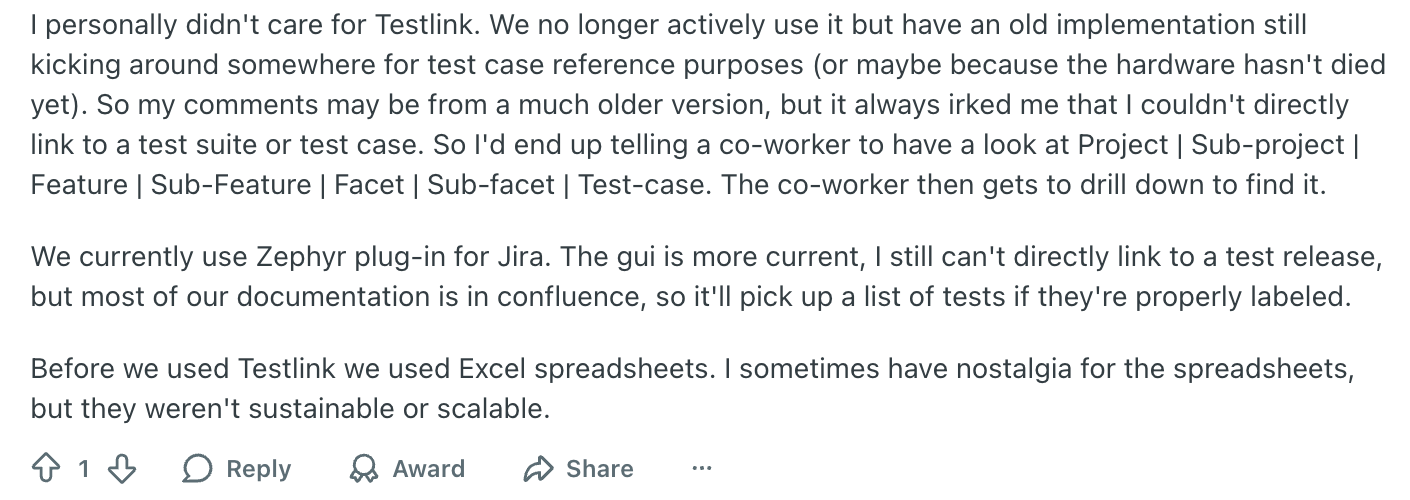
- User complaints from real-world use: In community discussions, users have described TestLink as “tedious to use,” especially when test cases grow large or when they need to track large numbers of cases. One user wrote:
Here’s what users say about TestLink on Reddit:
Modern UI, intelligent AI agents for end-to-end test management, completely free, & a full replacement for TestRail- Try for Free.
Compare Top 5 TestLink Alternatives
| Tool | Major Features | Best For | Major Advantage |
| Test Management by Testsigma | Unified handling of manual, automated, and exploratory testing.Agentic AI capabilities.CI/CD integration.End-to-end traceability.Modern UI Easier test maintenance | Teams using both manual and automated tests; teams aiming for CI/CD-driven testing workflows | Seamless automation support & unified test management in one platform |
| TestRail | Structured test case managementTest plans/milestonesDetailed dashboards and reporting Good integration with issue trackers | Teams managing large manual test suites and needing organized planning and reporting | Strong organization and visibility for manual testing and release readiness |
| Qase | Clean, modern interfaceQuick setupSupport for automation via API/CLILightweight cloud-based tool | Small or agile teams needing test management without heavy overhead | Fast adoption, easy to learn, minimal setup cost, and effort |
| Zephyr | Integration with project/issue tracking ecosystemsSupport for manual and automated testsScalable for larger teams | Teams already invested in a project-tracking ecosystem, or transitioning to automation while retaining manual testing | Close alignment with development workflows and scalable support for growing teams |
| Testmo | Unified manual, automated, and exploratory test supportModern, responsive UICI/integration supportFlexibility for mid-sized teams | Teams needing flexible workflows, mixing manual and automated testing, without enterprise-level complexity | Balanced mix of automation support and ease of use with modern interface and flexible pricing |
Top 8 TestLink Alternatives
- Test Management by Testsigma
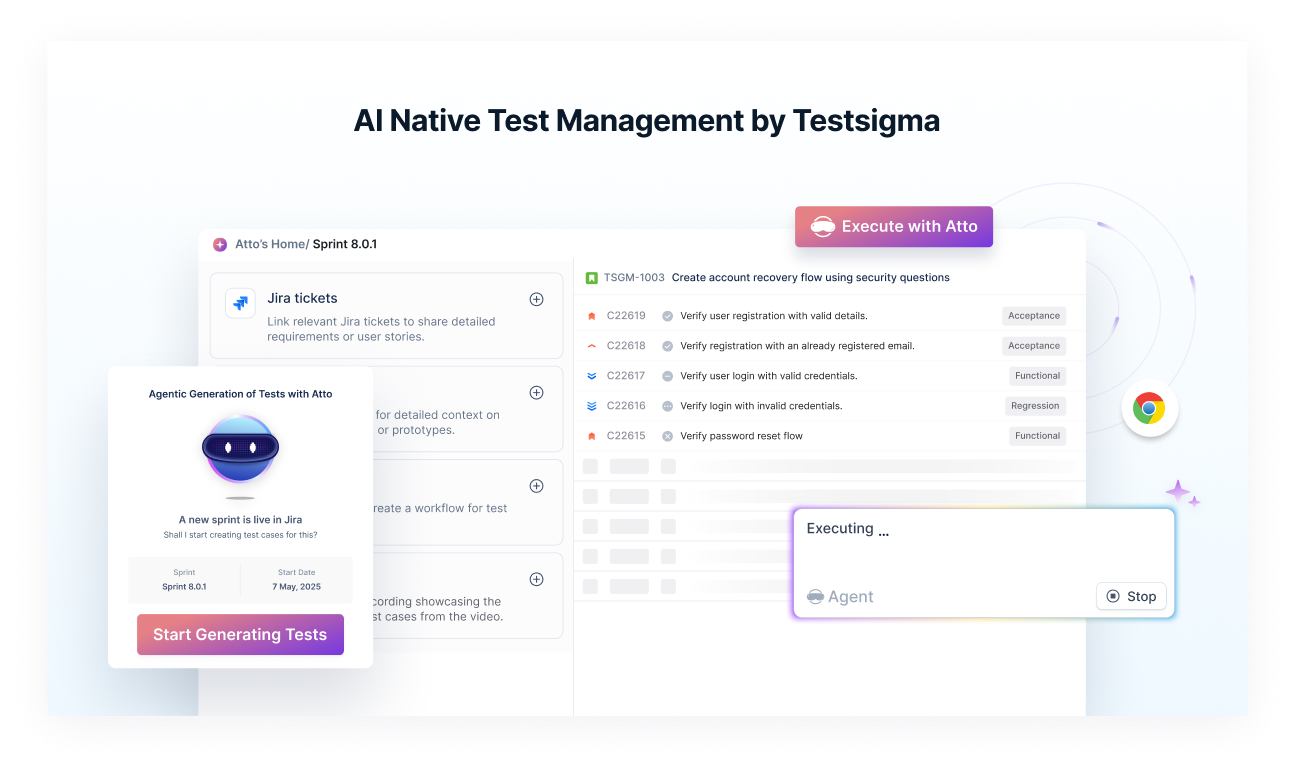
Test Management by Testsigma is a modern, unified test management solution designed to handle manual, automated, and exploratory testing in a single platform. It aims to address the full lifecycle of QA, from test case creation to execution and bug reporting. Teams often choose Test Management by Testsigma over older tools because it offers a more integrated, end-to-end workflow that fits well with modern DevOps practices.
Key Advantages over TestLink:
- Unified Testing in One Platform
Teams choose it because they do not have to maintain separate tools for manual and automated testing. Everything sits together, which reduces effort and confusion.
- Strong Automation Support
It is built to connect easily with automation frameworks and CI tools, so automated test results flow directly into the same dashboard as manual tests.
- Cleaner Reporting and Traceability
Its dashboards, coverage views, and requirement links make it easier to understand what has been tested and what still needs attention.
- Easier Setup and Maintenance
Unlike self-hosted tools, the setup is quick, and teams spend less time maintaining servers or dealing with configuration issues.
- TestRail

TestRail is a structured and feature-rich test management platform that helps teams organise test cases, plan test runs, and track progress across releases. It is known for its detailed test planning workflow and strong visibility for QA managers.
Key Advantages over TestLink:
- Better Test Organisation
Teams prefer it for its clean folder structure, custom fields, and flexible test case modelling, which makes scaling test repositories easier.
- Milestones, Test Plans, and Test Runs
Its planning features give clear visibility into progress, helping teams understand deadlines and release readiness.
- Rich Dashboards and Reports
TestRail gives detailed coverage reports, activity summaries, and result trends that help teams make informed decisions.
- Reliable Integrations
It integrates smoothly with issue trackers and automation tools, reducing manual updates and improving collaboration.
See TestLink vs TestRail detailed comparison!
- Qase

Qase is a fast, lightweight test management tool designed for agile teams that want a simple interface without sacrificing automation support. It aims to reduce the friction teams often face with older tools.
Key Advantages over TestLink:
- Simple and Modern Interface
Teams switch from TestLink because Qase is easier to navigate and requires almost no learning curve.
- Automation Friendly API and CLI
It supports test automation through APIs and command-line triggers, helping CI pipelines stay connected to test reporting.
- Quick Setup for Small Teams
No complex configuration is needed, which makes it ideal for teams starting out or moving away from spreadsheets or outdated systems.
- Cost Effective
Its pricing and free plan make it appealing for small teams that need test management without heavy investment.
- Zephyr

Zephyr is a popular test management solution, especially for teams that want testing to live closely with their issue tracking ecosystem. It supports manual testing, automation inputs, and project-wide visibility.
Key Advantages over TestLink:
- Tight Integration With Project Tracking
Teams choose it because it connects smoothly with their existing development workflows, reducing context switching.
- Support for Manual and Automated Tests
It works well for teams that are in the middle of transitioning from manual testing to automation.
- Scalable for Large Teams
Zephyr handles multiple projects, large test repositories, and big QA teams better than legacy systems.
- Improved Reporting
Its reporting features make it easier to track execution cycles and release quality.
- Testmo

Testmo is a newer platform built for modern QA processes, bringing together manual testing, automation result imports, and exploratory testing in one place.
Key Advantages over TestLink:
- Unified Test Management
Teams prefer Testmo because it avoids fragmentation. Manual, automated, and exploratory tests all live under one view.
- Clean and Fast User Interface
Compared to older tools, Testmo feels faster and more intuitive, which helps with onboarding.
- CI and Automation Integrations
Its API, automation imports, and integrations with CI systems make it suitable for teams with growing automation needs.
- Flexible for Mid-Sized Teams
It works well for teams that want something modern without the overhead of enterprise platforms.
- Testiny

Testiny is a simple, clean test management tool built for teams that want quick onboarding, reliable execution tracking, and good collaboration features without complexity.
Key Advantages over TestLink:
- Easy and Fast Setup
Teams coming from TestLink appreciate how quickly they can get started with Testiny without long setup steps.
- Integrations With Popular Dev Tools
It connects with issue trackers and CI systems so teams can sync testing and development workflows easily.
- Real Time Dashboards
Its live reporting helps teams understand progress without manually updating spreadsheets or outdated systems.
- Access Control and Permissions
Growing teams like that they can manage user roles cleanly, which helps maintain project hygiene.
- Tuskr

Tuskr is a scalable test management platform known for high performance, especially when handling very large test repositories. It is built for teams that care about speed, clarity, and automation support.
Key Advantages over TestLink:
- Handles Very Large Test Suites
Teams move to Tuskr because it can manage hundreds of thousands of test cases without slowing down.
- CI Ready Automation Support
Tuskr offers APIs and CLI tools that make it easy to push automation results into the platform.
- Full Traceability
It supports requirement mapping, test coverage tracking, and defect linking, which helps large teams stay in control.
- Flexible Pricing
Its pricing makes it easier for teams to adopt the tool without committing to heavy enterprise costs.
- SpiraTest

SpiraTest is a full ALM-style test management system that combines test management, requirements tracking, and defect management in a single product. It is built for teams that want end-to-end visibility.
Key Advantages over TestLink:
- Complete ALM Workflow
Teams choose it because everything from requirements to defects sits together, improving traceability.
- Broad Integration Ecosystem
It connects with many development, automation, and project management tools, which supports diverse workflows.
- Advanced Dashboards and Metrics
SpiraTest gives detailed insights into test coverage, defect trends, and release health.
- Suitable for Enterprise Teams
It is a strong choice for large organisations that need structured processes and visibility across many teams.
How to Choose the Right TestLink Alternative
1. Does the Tool Support Both Manual and Automated Testing Together?
If your team is moving toward automation or already running automated suites, choose a tool that brings manual, automated, and exploratory tests into one place. This avoids scattered workflows and keeps all results visible in the same dashboard.
2. How Well Does the Tool Integrate with Your CI, Issue Tracker, and Development Stack?
A good TestLink alternative should plug smoothly into your existing pipeline. Look for integrations with your CI system, bug tracker, version control, and automation frameworks. Strong integration support reduces manual work and helps achieve reliable, continuous testing.
3. Is the Tool Easy for the Team to Adopt and Maintain?
Teams often move away from TestLink because it feels heavy and dated. Make sure the alternative you choose has a clean interface, quick onboarding, and minimal maintenance. Cloud-based tools usually reduce setup time and remove the burden of server management.
4. Will the Tool Scale As Your Testing Needs Grow?
If your test repository is expanding or your QA team is growing, choose a tool that can handle large test suites, multiple projects, and detailed reporting without slowing down. Scalability becomes important as teams mature and automation coverage increases.
5. Does the Tool Offer Strong Reporting and Traceability?
Modern QA teams need visibility into coverage, test health, requirements, and defects. Pick a tool that provides clear dashboards, progress tracking, and requirement links. Good reporting makes planning easier and helps stakeholders understand release readiness.
Conclusion
TestLink has served teams well for many years, but its limitations become clear as projects grow and testing relies more on automation and faster release cycles. Switching makes sense when you need smoother integrations, easier workflows, and better visibility across manual and automated tests. Modern platforms, such as Test Management by Testsigma, offer a more flexible, automation-first approach that suits today’s Agile and CI-driven environments. Before migrating, compare a few alternatives, explore their features, and try their free plans to understand what works best for your team. A thoughtful evaluation will help you choose a tool that supports long-term quality. Switch now with a free trial!
FAQ
Teams usually move away from TestLink when they outgrow its basic interface, manual-heavy workflows, and limited automation support. As testing shifts toward faster releases, CI pipelines, and richer reporting, they prefer tools that offer smoother integrations, better usability, and stronger collaboration.
Tools like Test Management by Testsigma, TestRail, Zephyr, and Qase offer reliable Jira integrations. Among them, Testsigma and TestRail tend to deliver the most seamless and flexible syncing for issues, requirements, and traceability.
Yes, for teams that want an automation-first workflow and a unified space for manual, automated, and exploratory tests. TestRail is strong for structured manual testing, but Testsigma provides a more modern, connected approach that fits CI-driven teams.
Most cloud-based tools have a light learning curve. Since they come with modern interfaces, built-in guides, and quick setup, teams usually adopt them faster than self-hosted systems like TestLink.
Test Management by Testsigma, TestRail, Testmo, and SpiraTest stand out for detailed dashboards, coverage insights, execution trends, and release readiness reports.
Test Management by Testsigma, TestRail, Qase, Testmo, and Tuskr provides strong CI/CD support. They offer APIs, automation result imports, and connectors that help teams push test results into their pipelines without manual effort.