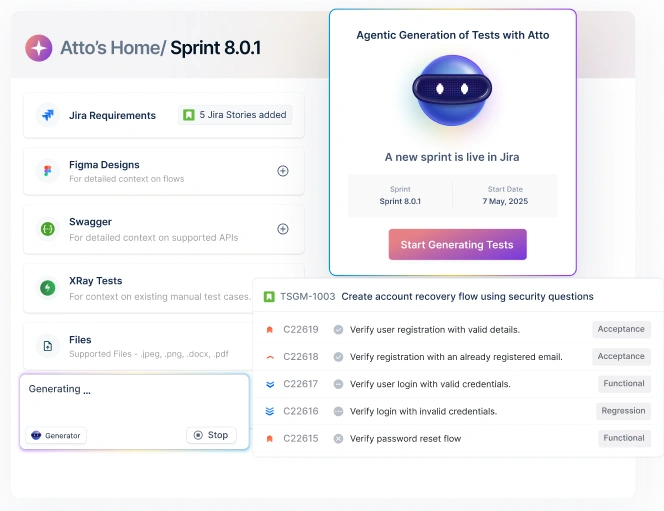
In an era where software evolves faster than ever, testing is no longer just a phase—it’s a mindset. From manual testing to automation, and now to AI-assisted testing, the field has transformed into a creative, data-driven discipline. One of the most interesting developments in this transformation is the use of testing prompts—structured instructions given to AI tools or agents to generate, execute, or optimize test cases.
If you’ve ever used ChatGPT, Copilot, or any AI-based testing tool, you’ve already worked with prompts. But in software testing, these prompts aren’t just for conversations; they’re blueprints for creating smarter, more efficient test processes.
In this post, we’ll explore what testing prompts are, why they matter, and how teams can use them to make testing faster, more creative, and more collaborative.
User Acceptance Testing https://testsigma.com/blog/user-acceptance-testing-checklist/ User Acceptance Testing https://testsigma.com/user-acceptance-testing-tools
What Are Testing Prompts?
A testing prompt is essentially a well-structured instruction or query given to an AI tool to perform a testing-related task. Think of it as the “input” that tells an intelligent system what kind of testing output you expect.
Also Read: anchor text here
For example:
-
- “Generate test cases for a login page with email and password validation.”
-
- “Write a set of regression tests for a shopping cart checkout flow.”
-
- “Create 10 negative test scenarios for file upload functionality.”
text here
Each of these prompts gives context, intent, and scope—allowing the AI model to generate relevant test scenarios, steps, or even automated scripts.
Why Testing Prompts Are Becoming a Big Deal
The rise of AI-driven automation platforms (like Testsigma, Katalon, or Testim) and AI coding assistants has created a new way to think about testing. Instead of writing lengthy scripts or documents, testers can simply prompt an AI to do the heavy lifting.
Here’s why this matters:
-
- Speed and Efficiency Traditional test case design can take hours, even days. With well-structured prompts, testers can generate dozens of test cases in seconds, drastically accelerating test coverage.
-
- Consistency and Standardization AI follows structure. By reusing prompts or refining them, teams can ensure uniformity across test documentation, naming conventions, and coverage.
Pros: Testsigma
- No-code interface suitable for teams without extensive coding expertise.
- Comprehensive test coverage across various platforms.
- AI-driven self-healing reduces maintenance efforts.
- Scalable for enterprise-level applications.
- Strong integration capabilities with popular DevOps tools.
Cons: Testsigma
- Requires a stable internet connection for optimal performance.
- Initial setup may require some learning curve for new users.
-
- Creativity and Exploration A good prompt doesn’t just replicate known cases—it sparks new ones. AI can generate edge cases or scenarios testers might overlook, broadening exploratory testing.
-
- Collaboration Between QA and AI Prompts bridge human understanding and machine execution. The human provides context and intent; the AI provides breadth and scale. Together, they make testing smarter.
Summarize this article with AI:
Examples of Testing Prompts in Action
Here are a few examples of how testing prompts can be used across different types of testing:
1. Functional Testing
“Generate positive and negative test cases for a payment gateway supporting credit cards, PayPal, and coupons.”Pros
- Add Content here
- Add content here
Cons
- Add content here
- Add content here
AI-generated output could include:
-
- Valid card payments
-
- Expired cards
-
- Invalid CVV
-
- Interrupted network scenarios
-
- Coupon edge cases
2. API Testing
“Write Postman test scripts for a GET endpoint that retrieves user details based on a user ID.”
AI can output:
-
- Request syntax
-
- Expected status codes
-
- Validation checks for response schema
-
- Negative tests (missing ID, invalid token, etc.)
3. Performance Testing
“Suggest load testing scenarios for a social media app where users upload images and videos.”
Expected AI ideas:
-
- 1000 concurrent uploads
-
- Uploads during peak hours
-
- Network throttling scenarios
4. Security Testing
“List common vulnerabilities to test in a login module.”
AI might suggest:
-
- SQL injection
-
- Cross-site scripting (XSS)
-
- Brute-force protection
-
- Password policy enforcement
In all these cases, prompts act like a creative brainstorming partner—one that never gets tired of generating ideas.
The Art of Writing Good Testing Prompts
Just like crafting test cases, prompt engineering is a skill. The quality of your prompt determines the relevance and accuracy of AI’s response.
Here are some best practices for writing effective testing prompts:
-
- Be Specific, Not Vague Instead of saying, “Write test cases for a login page,” specify context like: “Write 10 test cases for login functionality with email and password validation, covering positive, negative, and edge cases.”
-
- Set the Scope Indicate what kind of testing you’re focusing on—functional, regression, security, or usability.
-
- Add Constraints or Tools If you want results in a particular format, mention it. Example: “Write Selenium test cases in Python for validating a sign-up form.”
-
- Include Expected Outcomes Tell the AI what you want to achieve. For instance: “Generate test scenarios that help identify performance bottlenecks in API calls.”
-
- Iterate and Refine Prompts are not one-and-done. Refine based on AI’s responses to improve precision.
Overview
Importance of Mobile Browser Testing
- Ensures consistent visual layout and responsive experiences across different mobile browsers and devices.
- Delivers reliable user experiences amid rapid growth in mobile web usage and demand.
- Detects functionality and performance issues early, especially in fragmented device and OS environments.
Challenges in Mobile Browser Testing
- Vast device/browser fragmentation makes it hard to test all combinations efficiently.
- Frequent OS and browser updates may introduce unexpected bugs, necessitating constant re-testing.
- Network variability and limited hardware resources on mobile devices can skew test results.
- Emulators often miss real-world behavior; real device testing is more accurate but complex.
Best Practices for Mobile Browser Testing
- Build a cross-browser testing checklist tailored to the devices and mobile browsers your users care about.
- Prioritize testing based on market share and user traffic, without skipping less common browsers.
- Verify screen layouts and navigation flows across various resolutions and orientations.
- Test performance under different network speeds to ensure scalability and responsiveness.
Tools for Mobile Browser Testing
- Testsigma: Codeless AI-powered platform; automates mobile browser tests across 3,000+ real devices and browsers.
- Espresso: Google’s UI testing framework for Android, with fluent Java/Kotlin syntax and built-in synchronization.
- XCTest: Apple’s official iOS testing framework; integrates tightly with Xcode and supports both simulators and real devices.
- TestCafe: A Node.js based framework that tests mobile web in responsive emulation mode without needing WebDriver.
- Appium: Open-source tool using WebDriver protocol; supports mobile web, native, and hybrid app testing across many languages and platforms.
How AI Tools Use Testing Prompts Today
Modern AI testing platforms are taking prompts beyond simple text. Here’s how:
1. Visual Prompts
AI can now generate test cases based on images or screen designs. For example, uploading a Figma design of a checkout page can trigger automatic test case generation covering all visible UI elements.
2. Behavior-Based Prompts
AI models trained on user behavior can simulate real-world usage by understanding session data, heatmaps, and workflows.
3. Multimodal Prompts
The latest generation of testing tools combines text, screenshots, videos, and logs into prompts—allowing AI to analyze context deeply before suggesting test actions.
Benefits of Using Testing Prompts in Agile and CI/CD Environments
In agile or continuous delivery environments, speed and adaptability are everything. Testing prompts enhance agility in several ways:
-
- Instant Test Generation: You can create regression or smoke tests right after each sprint build.
-
- Continuous Learning: AI models adapt to your test data and improve test accuracy over time.
-
- Cross-Team Collaboration: Even non-technical members can create test scenarios with plain-English prompts.
-
- Integration with DevOps: Prompts can trigger automated test generation directly from CI/CD pipelines.
Imagine this: a developer commits a code update, the AI agent detects the change, and—based on a stored prompt template—auto-generates and runs the corresponding tests. That’s the future we’re walking into.
Challenges and Limitations
While testing prompts are powerful, they’re not magic bullets. Some challenges include:
-
- Ambiguous Prompts → Poor Outputs AI still struggles with vague or incomplete instructions. Clarity is key.
-
- Contextual Gaps AI can misinterpret business logic if not trained on domain-specific data.
-
- Overreliance on AI Testers should treat AI as a collaborator, not a replacement. Human validation is still critical.
-
- Data Security Concerns Prompting with sensitive information (like API keys or credentials) must be handled carefully.
These issues don’t discredit AI testing—they highlight the importance of combining human intuition with AI scalability.
The Future: Prompt-Driven Test Automation
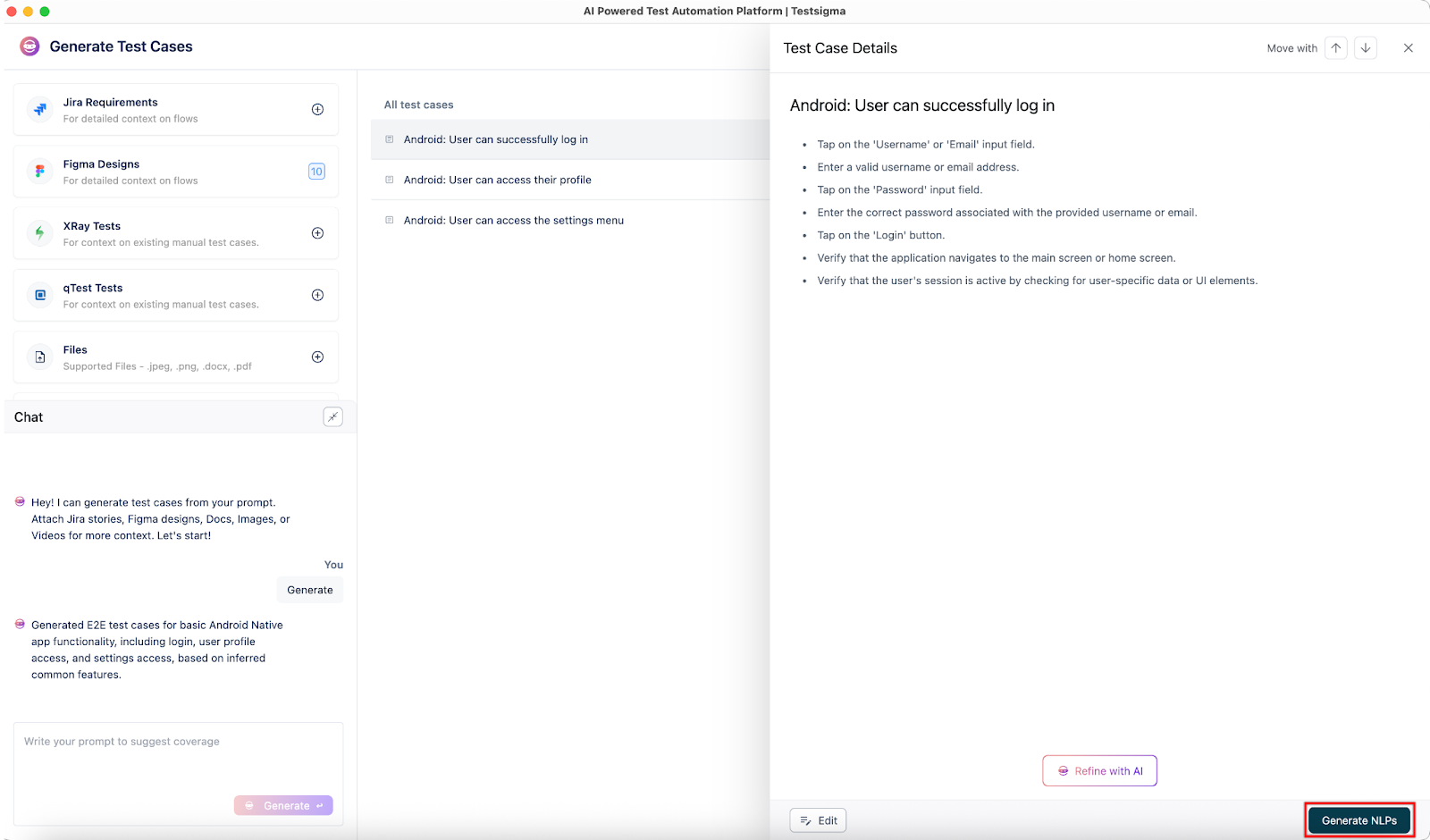
We’re entering the age of prompt-driven development and testing. Soon, QA teams won’t need to manually script tests. Instead, they’ll manage intelligent agents that interpret high-level prompts, execute tests, and even self-optimize based on historical results.
Platforms like Testsigma, Mabl, and Functionize are already experimenting with AI agents that act on testing prompts—automatically planning, developing, executing, maintaining, and analyzing tests.
In this world, prompts become the new “test plans”—succinct, adaptive, and always up to date.
Conclusion
Testing prompts are changing how we think about test creation and execution. They blend human creativity with machine intelligence, helping QA teams achieve the holy grail of speed, quality, and scalability.
Whether you’re a tester, developer, or product manager, learning how to write effective testing prompts will soon be as essential as knowing how to write a good user story.
The next time you open your testing platform, try prompting it. You might just find that your new favorite testing partner doesn’t sit in a meeting—it lives in your command bar.
Would you like me to make this blog SEO-optimized for “AI testing prompts” or “prompt-based test automation” (with proper keywords and structure for ranking)?
You can inspect your mobile applications using Chrome DevTools or Safari Web Inspector. However, for real device inspection at scale, tools like Testsigma provide access to actual Android and iOS devices for broader device testing and coverage.
To test mobile views, simulate various screen sizes using Browser Developer tools or use a testing platform like Testsigma that offers a cloud device lab for real device testing.
No, selenium does not support mobile browser testing. But it can be integrated with other tools for testing mobile browsers.