



Table Of Contents
- 1 Overview
- 2 What Is Test Data Automation?
- 3 Why Test Data Automation Is Critical in CI/CD Environments
- 4 Core Components of a Test Data Automation Framework
- 5 Types of Test Data Used in Automation
- 6 How to Automate Test Data Using Testsigma
- 7 Best Practices for Test Data Automation
- 8 Common Challenges and How to Fix Them
- 9 Test Data Automation Tools: How to Choose
- 10 Conclusion
- 11 FAQs
Overview
- Test data automation replaces manual data preparation with a self-service, programmatic flow that delivers data the moment a test run begins.
- It covers four core operations: generation, masking, transformation, and provisioning, all without human intervention.
- Half of all organizations lack centralized test data management, leading to slow, inconsistent, and ad hoc data access.
- Automated synthetic data generation and masking solve GDPR, HIPAA, and CCPA compliance risks in test environments.
- Testsigma includes native test data management with parameterized profiles, built-in data generators, runtime variables, and CI/CD-connected execution in a single platform.
What is Test DATA Automation?
Test data automation is the process of automatically creating, managing, and delivering the data your tests need to run, on demand, in the right format, at the right time. It replaces the manual cycle of spreadsheet-based datasets, database dumps, and data request tickets that slow down QA teams in fast-moving delivery pipelines.
At its core, test data automation connects your test execution engine directly to a data supply chain. That chain handles generation, masking, transformation, and provisioning without requiring a human to intervene at any point in the cycle.
How it Differs From Manual Test DATA Management
In manual test data management, a QA engineer or data admin prepares datasets before each test run. They identify what data is needed, request it from the source system, clean or mask it if required, and load it into the test environment. This process introduces wait times that can range from hours to days in enterprise environments.
Test data automation replaces that cycle with a self-service, programmatic flow. Data is generated or provisioned the moment a test run begins, using pre-configured profiles, built-in generator functions, or API-connected source systems. The QA engineer defines the rules once. The platform executes them every time.
Test DATA Automation Vs. Test DATA Management
These two terms are related but distinct. Test data management (TDM) is the broader discipline — it covers the strategy, governance, and tooling for handling test data across the SDLC. Test data automation is the execution layer within TDM. It is the part that runs without human hands touching it.
| Dimension | Test Data Management | Test Data Automation |
|---|---|---|
| Scope | Strategy + governance + tooling | Execution + provisioning + generation |
| Who does it | Data engineers, QA leads, DBAs | Automation frameworks + CI/CD pipelines |
| Cadence | Planned, policy-driven | On-demand, event-triggered |
| Dependency | Can be manual or automated | Always automated |
Why Test DATA Automation is Critical in CI/CD Environments
Here is why manual test data processes become a bottleneck the moment your team moves to continuous delivery.
The Cost of Manual DATA Provisioning
When test data depends on manual processes, every deployment window becomes a waiting game. QA teams submit data requests, developers or DB admins fulfill them, and testing cannot begin until the data lands in the right environment. According to the World Quality Report 2024–25, half of all organizations lack centralized test data management ownership, meaning data access is ad hoc, slow, and inconsistent.
That delay compounds at scale. A team running 500 automated test cases across three environments, three times a day, cannot afford to wait for manual data every cycle. The math does not work. Automation is the only viable path.
Shift-Left Testing and the DATA Readiness Gap
Shift-left testing moves quality checks earlier into the development cycle. But moving tests earlier only helps if the data those tests need is available at that earlier stage. When data provisioning lags behind development velocity, shift-left becomes shift-left-but-wait.
Test data automation closes that gap by making data available the moment a test is ready to run. Developers can test their own features against realistic datasets in local or integration environments without submitting a ticket or waiting for the QA environment to be refreshed.
Compliance Pressures: Gdpr, Hipaa, and Ccpa
Using production data in test environments creates regulatory risk. GDPR, HIPAA, and CCPA each impose strict controls on how personally identifiable information (PII) is handled, stored, and accessed. Test environments often have weaker access controls than production, which makes raw production data a liability.
Test data automation solves this by generating synthetic datasets that mirror production data structures without containing real PII. Where production subsets are necessary, automated masking replaces sensitive fields with realistic but fictitious values before the data reaches the test environment. Compliance becomes a property of the data pipeline, not an afterthought.
Core Components of a Test DATA Automation Framework
These are the three building blocks that make up a reliable test data automation framework.
DATA Extraction (source System Integration)
The first component is the ability to connect to your source systems like production databases, APIs, third-party services, or flat files, and pull the data your tests need. Connecting directly to source systems at test runtime creates performance risk. The recommended approach is to extract data on a scheduled basis and store it in a staging layer, separate from the live production environment.
This extraction layer handles synchronization. It ensures that the datasets available to your test environment reflect the current state of production without putting load on production systems during test execution.
DATA Management (masking, Subsetting, Transformation)
Once extracted, data must be processed before it reaches test environments. This stage covers four key operations:
- Masking: Replacing real PII fields (names, emails, SSNs) with synthetic but format-valid values.
- Subsetting: Extracting a representative slice of a large dataset rather than copying the full production database.
- Transformation: Converting data formats to match what the test environment or application version expects.
- Generation: Creating net-new synthetic records where production data cannot be used or does not cover required test scenarios.
DATA Provisioning (on-Demand Delivery to Test Environments)
The provisioning layer delivers the right data to the right environment at the right time. Self-service provisioning allows QA engineers to request a dataset, trigger a data-driven test run, or import a pre-configured profile without waiting on another team. CI/CD-integrated provisioning goes one step further, data is provisioned automatically as part of the pipeline trigger, with no manual step required between code commit and test execution.
Types of Test DATA Used in Automation
Understanding the different types of test data helps you choose the right strategy for each testing scenario.
Static / Raw Test DATA
Raw test data is hard-coded or manually entered values used directly in a test step. It is the simplest form and works well for stable, non-sensitive values that do not change between runs, such as a fixed product SKU, a dropdown option value, or a static URL path.
Raw data becomes a problem when it is used for values that change (passwords, timestamps) or when the same value is reused across parallel test runs, causing conflicts. Use raw data only for values that are genuinely static and non-unique.
Parameterized Test DATA (Data-driven)
Parameterized test data separates test logic from test inputs. A single test case runs multiple times, each time with a different row from a data profile or external file. This is the foundation of data-driven testing, the same login flow, for example, can be validated against 50 different user credential combinations without writing 50 separate test cases.
In Testsigma, parameterized data is managed through Test Data Profiles. Each profile is a table of values. Each column is a named parameter. Each row is one test iteration.
Runtime-Generated Test DATA
Runtime data is created during test execution and passed between steps. For example, a test that creates a new user account in step one can capture the generated user ID from the API response and use it in subsequent steps for profile update or deletion flows. This approach ensures data is always fresh, unique, and contextually correct for the flow being tested.
In Testsigma, runtime data is stored in Runtime Variables and accessed using the $|variableName| syntax in test steps.
Synthetic Test DATA
Synthetic data is programmatically generated data that mimics real production data in structure and format but contains no actual PII. It is the safest option for regulated environments and the most scalable option for high-volume test generation. Synthetic data generators can produce valid email addresses, realistic names, phone numbers, credit card formats, addresses, and date ranges on demand.
Testsigma provides a library of built-in Data Generator functions that generate synthetic values at the test step level, no external tool required.
Masked Production Subsets
When real production data patterns are required for accurate testing, a masked subset is the practical compromise. A representative slice of production data is extracted, stripped of all PII through automated masking, and loaded into the test environment. This gives tests realistic data complexity without the compliance exposure of using raw production records.
How to Automate Test DATA Using Testsigma
Testsigma includes a native Test Data Management module that covers the full test data lifecycle, parameterized profiles, runtime variables, built-in data generators, CSV import, and CI/CD-connected execution, inside the same platform where you write and run your tests.
Step 1: Create a Test DATA Profile
Navigate to Test Data > Test Data Profiles in your Testsigma project. Click Create and give the profile a descriptive name (for example, checkout_user_data or login_credentials_regression).
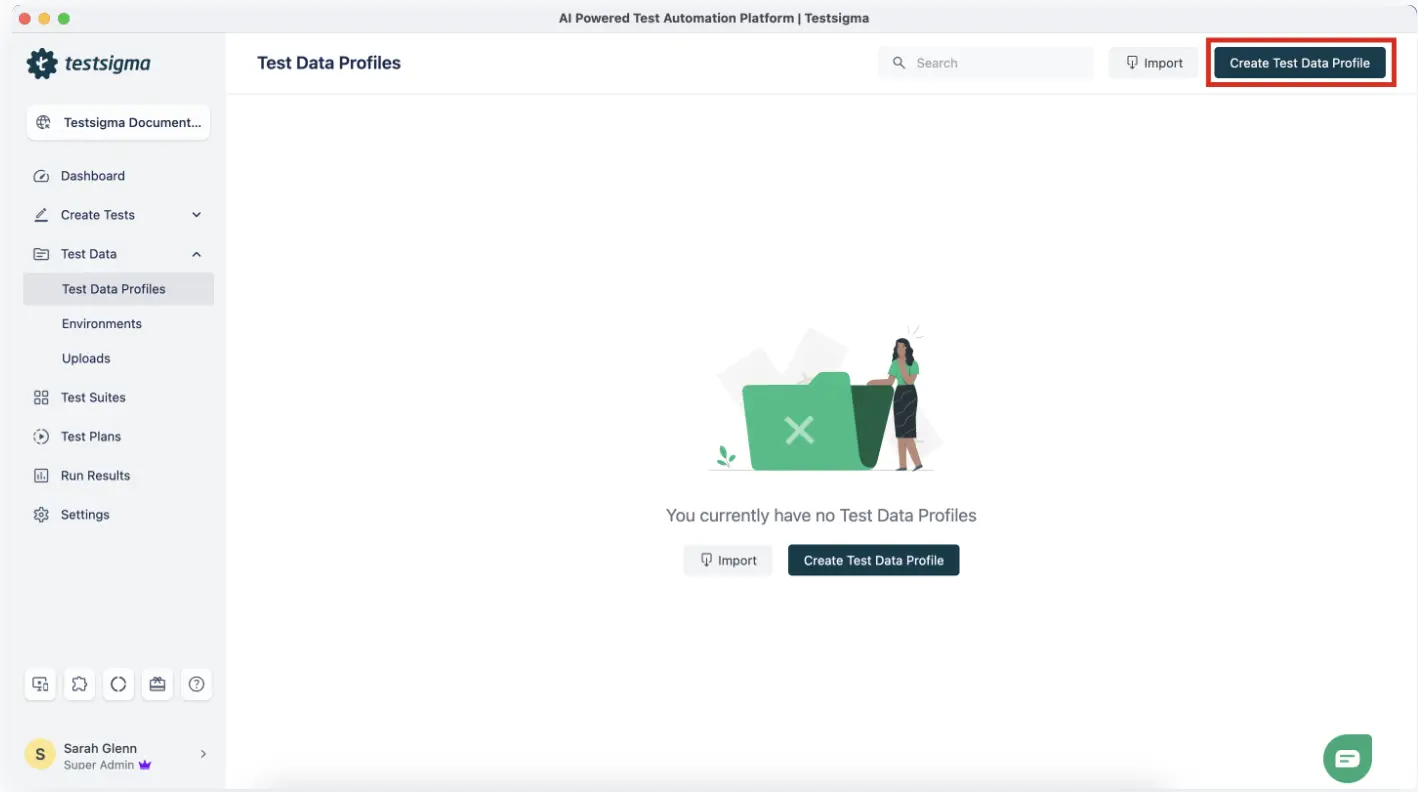
Define your column schema by adding column names that match the parameters your test cases will reference. Common column names include username, password, email, firstName, productId, and shippingZip. Add rows for each data variation you want to test.
Example Test Data Profile: login_credentials_regression
| Username | Password | Expected Role |
| admin@test.com | Admin@1234 | Admin |
| viewer@test.com | Viewer@5678 | Viewer |
| editor@test.com | Editor@9012 | Editor |
| invalid@test.com | wrongpass | Error |
Each row in this profile produces one complete test run iteration. A test case bound to this profile runs four times automatically with no duplicate test case required.
Step 2: Bind the Profile to a Test Case
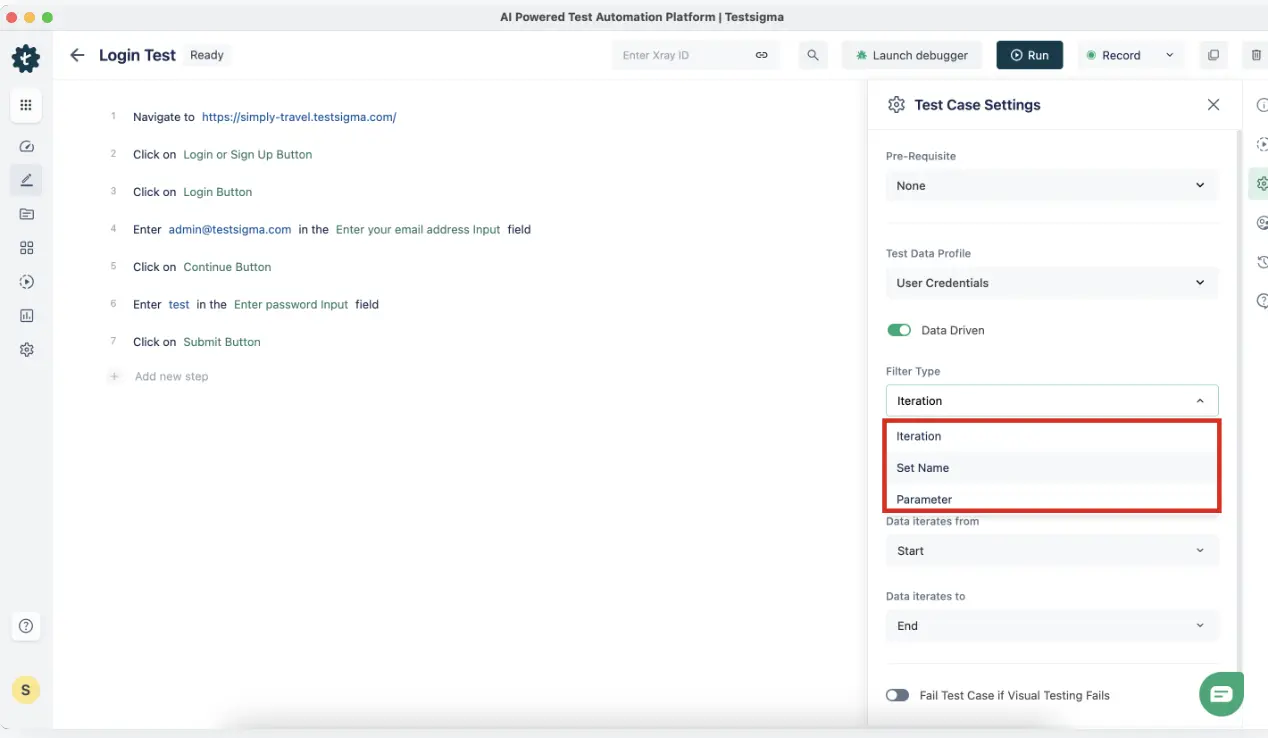
Open your test case in the editor. In the test case settings panel, locate the Test Data Profile field and select the profile you created. Testsigma now knows to iterate this test case once for each row in the profile.
In your test steps, switch the data type from Raw to Parameter for any field that should pull from the profile. Reference the column by name using the @ symbol.
Test Step: Enter text “@username” in the username field
Test Step: Enter text “@password” in the password field
Test Step: Click “Login”
Test Step: Verify that the user role label equals “@expected_role”
When this test runs, Testsigma substitutes @username, @password, and @expected_role with the values from the current profile row. Each iteration validates a different credential combination.
Step 3: Use a DATA Generator for Dynamic Fields
For fields that must be unique per run, such as email addresses during a registration flow, or order IDs during a transaction test, use Testsigma’s built-in Data Generator functions instead of static parameter values.
In your test step, switch the data type to Data Generator. Select the function category and the specific function. Testsigma generates a valid, unique value at runtime every time the step executes.
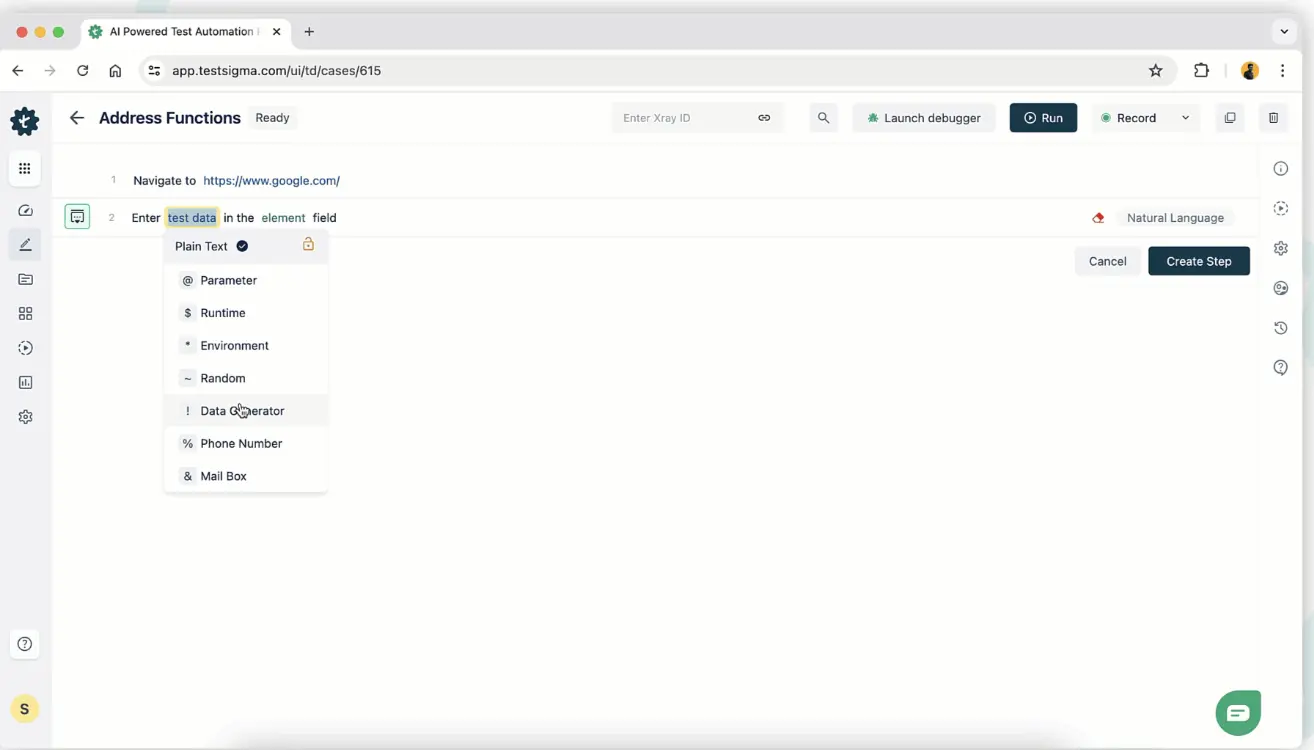
Commonly used built-in generator functions:
| Category | Function | Sample Output |
|---|---|---|
| EmailFunctions | randomEmail | user_k7x2@test.com |
| IdNumber | randomNumber | 84723910 |
| Internet | domainName | testdomain-4k2.com |
| DateFunctions | futureDate | 2026-08-14 |
| Address | fullAddress | 312 Oak St, Austin, TX 78701 |
| Company | companyName | Nexora Solutions |
// What Testsigma executes behind the scenes when Data Generator is used
// No code required from the QA engineer — the platform handles generation
// EmailFunctions.randomEmail() → injects: user_k7x2@test.com
// IdNumber.randomNumber() → injects: 84723910
// DateFunctions.futureDate() → injects: 2026-08-14
// Each test run receives a freshly generated value, no conflicts between runs
Step 4: Import a CSV for Large DATA Sets
When you already have a large dataset in an external file, legacy test data, compliance-required data sets, or production-exported masked subsets, import it directly into Testsigma using the CSV import feature.
Navigate to Test Data Profiles > Import TDP. Upload your CSV file. Testsigma maps each CSV column to a profile parameter automatically. Review the column mapping, validate the imported rows, and save the profile.
# Sample CSV for import: payment_test_data.csv
card_number,expiry,cvv,card_type,expected_result
4111111111111111,12/27,123,Visa,Success
5500005555555559,11/26,456,Mastercard,Success
4000000000000002,01/28,789,Visa,Declined
6011111111111117,09/25,321,Discover,Success
After import, this profile is immediately available for binding to any test case in the project. All four card scenarios run as separate iterations with a single test case.
Step 5: Trigger DATA-Driven Execution Via CI/CD
Enable data-driven mode in your Testsigma test plan settings. This tells the platform to iterate the test plan across all rows in the bound profile when the plan executes. Then connect the plan to your CI/CD pipeline using the Testsigma REST API or the native CI/CD integrations.
Jenkins integration example:
// Jenkinsfile — Testsigma data-driven test plan trigger
pipeline {
agent any
stages {
stage(‘Run Testsigma Data-Driven Tests’) {
steps {
sh ”’
curl -X POST https://app.testsigma.com/api/v1/execution_results \
-H “Authorization: Bearer ${TESTSIGMA_API_KEY}” \
-H “Content-Type: application/json” \
-d ‘{
“testPlanId”: 1234,
“environmentId”: 56,
“runDataDriven”: true
}’
”’
}
}
stage(‘Poll for Results’) {
steps {
sh ”’
# Poll the results endpoint until execution completes
STATUS=”IN_PROGRESS”
while [ “$STATUS” = “IN_PROGRESS” ]; do
sleep 30
STATUS=$(curl -s -H “Authorization: Bearer ${TESTSIGMA_API_KEY}” \
https://app.testsigma.com/api/v1/execution_results/latest \
| python3 -c “import sys,json; print(json.load(sys.stdin)[‘status’])”)
done
echo “Execution completed with status: $STATUS”
”’
}
}
}
}
The pipeline triggers a test run for every row in the data profile, captures the per-row pass/fail results, and surfaces the outcome inside your Jenkins build report.
Best Practices for Test DATA Automation
Follow these practices to keep your test data reliable, secure, and maintainable across environments.
Isolate Test DATA Per Environment
Dev, QA, staging, and production environments require separate datasets. What passes in Dev with permissive test accounts will produce false positives in Staging if the same credentials have different permission states. Maintain distinct test data profiles per environment and reference the correct profile using environment-level variables in Testsigma.
- Environment variable pattern in Testsigma
- Create an Environment called “QA” with variable: base_url = https://qa.yourapp.com
- Create an Environment called “Staging” with variable: base_url = https://staging.yourapp.com
- Bind test steps to $|base_url| — the correct value resolves at runtime per environment
Always Clean up DATA Post-Run
Every test that creates data must also delete it. If a test crashes mid-run, the teardown step may not execute, leaving orphaned records in the environment that can contaminate the next run. The safest approach is to clean up at the start of each run, not just at the end.
Initialize your test environment by deleting any records that match the test data criteria before the test creates new ones. Use API calls in a setup step group to handle this programmatically, independent of whether the previous run succeeded or failed.
Version Control Your Test DATA Profiles
Test data profiles are assets, not disposable config. When your application schema changes, new fields, renamed columns, updated validation rules, your data profiles must change with it. Store exported profile CSVs in your version control repository alongside your test scripts. Tag profile versions alongside code releases so you can trace which data configuration was active during any given test run.
Never Hardcode Sensitive Credentials in Test Scripts
Credentials, API keys, and environment-specific secrets hardcoded into test steps create security risk and maintenance burden. A password change in one place should not require a search-and-replace across 200 test steps. Store all sensitive values as Testsigma Environment variables and reference them with the *|variableName|* syntax. For secrets passed from CI, inject them as pipeline environment variables and reference them in the Testsigma API call.
# Correct: pass the API key from the CI environment, never embed it in the script
-H “Authorization: Bearer ${{ secrets.TESTSIGMA_API_KEY }}”
# Incorrect: hardcoded credential in the request body
-H “Authorization: Bearer ts_abc123xyz456_hardcoded”
Generate DATA at Runtime for Uniqueness
Reusing the same email address, username, or order ID across multiple test runs causes conflicts in environments with uniqueness constraints. Generate unique values at runtime using Testsigma’s built-in Data Generators instead of maintaining large pre-seeded lists. Runtime generation eliminates collisions in parallel test execution and removes the maintenance overhead of keeping static data lists up to date.
Common Challenges and How to Fix Them
Here are the most common test data challenges teams face and how to solve them.
Flaky Tests Caused by Shared OR Stale DATA
When multiple test runs read from and write to the same data records simultaneously, test outcomes depend on execution order rather than application behavior. This is one of the most consistently reported causes of test flakiness in CI environments, and it is not a test script problem, it is a data isolation problem.
The fix is to ensure each run operates on a unique set of records. In Testsigma, use Data Generator functions (such as EmailFunctions.randomEmail or IdNumber.randomNumber) to generate unique identifiers for every run. For flows that require pre-existing records, create those records through an API setup step at the beginning of the test rather than depending on shared static records that other runs may modify.
// Anti-pattern: reusing a static test user across all runs
// username = “shared_testuser@company.com”
// Risk: parallel runs overwrite each other’s session state
// Correct pattern: generate a unique user per run
// Testsigma Data Generator → EmailFunctions.randomEmail()
// → user_4k2x@test.com (unique per run, no conflict)
If you experience unexplained intermittent failures in parallel runs, check whether the failing tests share a common data dependency. Testsigma’s auto-healing capability can also help identify and repair test steps that break due to data-state changes in the application under test.
DATA Drift across Environments
Application schema changes break test data profiles that were built against the previous schema. The test does not fail because the application is broken. It fails because the data it is sending no longer matches what the application expects.
Catch schema drift early by running a data validation step in your CI pipeline after every deployment. The validation step calls the application’s API with a known profile record and asserts that the response shape matches your expected schema. If the assertion fails, the pipeline surfaces a data contract violation before a single UI test runs.
// Data contract validation — POST to /api/users with profile row
// Assert response body schema matches expected shape
{
“expected”: {
“id”: “string”,
“email”: “string”,
“role”: [“Admin”, “Viewer”, “Editor”],
“createdAt”: “ISO8601”
}
}
Gdpr, Hipaa, and Ccpa Compliance in Test Environments
Using real production records in test environments is a compliance violation under GDPR, HIPAA, and CCPA. Test environments have weaker access controls, broader team access, and less audit rigor than production. Real PII in those environments is exposed to anyone with read access to the test database.
Legacy System Integration Gaps
Legacy databases often lack REST APIs, consistent schema documentation, or modern connectivity options. Direct extraction from these systems is risky and slow. Wrapping the legacy system in a middleware connector or a data virtualization layer is the standard approach. The automation framework connects to the virtualization layer rather than the legacy system directly, getting current data without destabilizing the source.
If full virtualization is not feasible, export a masked subset on a scheduled basis (nightly or per sprint) and load it into a staging data store. The test environment pulls from that store. The legacy system is never on the critical path of test execution.
Test DATA Automation Tools: How to Choose
Not every team needs the same tool. The right choice depends on your test stack, data sensitivity requirements, scale of testing, and whether you need a standalone TDM platform or a test automation platform with native data management.
Key Evaluation Criteria
Before evaluating any tool, answer these questions:
- Does the tool integrate with our existing test automation platform, CI/CD pipeline, and database types?
- Does it support synthetic data generation, data masking, and subsetting — or only one of these?
- Can QA engineers self-serve data without involving a DB admin or data engineer?
- Is compliance-ready masking built in, or does it require a separate configuration layer?
- What is the learning curve for a mid-level QA engineer with no data engineering background?
Tool Comparison
| Tool | Best For | Synthetic Data | CI/CD Integration | Compliance (GDPR/HIPAA) | Code Required |
|---|---|---|---|---|---|
| Testsigma | End-to-end automation with native TDM — no separate tool | Yes (built-in generators) | Yes (REST API, Jenkins, GitHub Actions) | Parametered + masked profiles | No (no-code/low-code) |
| Perforce Delphix | Enterprise data virtualization at scale | Yes | Yes | GDPR, HIPAA, CCPA — full stack | Yes (config-heavy) |
| Informatica TDM | Large enterprise subsetting and masking pipelines | Yes | Partial | GDPR, HIPAA | Yes |
| GenRocket | Real-time data generation for Agile unit and integration testing | Yes | Yes (API) | Configurable | Moderate |
| Faker (Python) | Developer-level unit test synthetic data | Yes | Yes (script-level) | None native | Yes (Python) |
| Tonic.ai | Synthetic PII-safe data for complex schema environments | Yes (AI-powered) | Yes | GDPR, HIPAA, CCPA | Low |
Testsigma is the only option in this list that combines test automation and test data management in a single platform. For teams that want to eliminate the overhead of configuring and maintaining a separate TDM tool alongside their test automation stack, it is the most operationally efficient starting point.
For teams with existing enterprise TDM investments (Delphix, Informatica), Testsigma’s CI/CD integration and REST API make it straightforward to connect the TDM output to Testsigma test plans without replacing existing data infrastructure.
Conclusion
Test data automation is not something you add after your test suite is mature. It is a prerequisite for building one. Treat test data as a first-class artifact, generate unique values at runtime, integrate provisioning into your CI/CD pipeline, and automate cleanup from the start. Platforms like Testsigma handle all of this natively, so your team spends less time waiting on data and more time shipping quality software.
FAQs
It is the process of automatically generating, managing, and provisioning the data your tests need to run. It eliminates manual data preparation by delivering accurate datasets on demand.
Data-driven testing is a technique where one test case runs with multiple inputs. Test data automation is the broader practice of managing how all test data is created, stored, and delivered.
Start with parameterized data for regression tests, runtime-generated data for unique-field scenarios, and synthetic data for any environment that handles PII.
Not always. Platforms like Testsigma cover most needs natively, but teams with complex masking requirements or regulatory audit obligations may still need a dedicated TDM tool.
Use API teardown steps at the start of each run to delete records from the previous run. This ensures cleanup happens even if the previous run crashed.
Use synthetic data generation within the test platform and apply automated masking at the extraction stage for any data sourced from production.