



Table Of Contents
- 1 Overview
- 2 What is SaaS Testing?
- 3 Why SaaS Testing Matters in Software Testing?
- 4 SaaS Testing Methodology: How Does it Work?
- 5 Types of SaaS Testing
- 6 Challenges in SaaS Application Testing
- 7 Best Practices to Run the SaaS Test Effectively
- 8 Manual vs Automated SaaS Application Testing
- 9 Top 4 Best Tools for SaaS Application Testing
- 10 Scale SaaS Testing With Confidence
Overview
What is SaaS Testing?
SaaS testing checks that cloud applications work well for all users across multi-tenant environments and frequent deployments.
How Does SaaS Testing Work?
The process includes five key steps:
- Plan and prioritize critical user journeys
- Design test cases for multi-tenant scenarios
- Set up production-like environments
- Execute automated and manual tests continuously
- Monitor results and refine coverage
What Are the Main Types of SaaS Testing?
SaaS testing covers six essential areas:
- Functional testing for features and workflows
- Performance testing for load and scalability
- Security validation for data protection
- Compatibility checks across browsers and devices
- API testing for endpoints and integrations
- Compliance validation for regulatory requirements
Almost all teams today rely on SaaS applications for their day-to-day work. Any minor issue or crash can cause significant revenue loss, damaged reputation, and frustrated customers who won’t take a minute to switch to your competitor.
Traditional testing techniques won’t work here because SaaS environments are dynamic and complex with multiple integrations.
A dedicated SaaS testing approach is needed to handle the architectures, continuous updates, and varying user loads without slowing down releases.
In this guide, we’ll help you understand how to carry out a SaaS test, plus common challenges, tools, and tips to test your application the right way.
What is Saas Testing?
SaaS testing validates cloud-based applications to ensure they work correctly across different environments, users, and integrations. It checks functionality, performance, security, and reliability before and after each update.
Unlike traditional software installed locally, SaaS products run on remote servers and serve multiple customers simultaneously. As such your SaaS test must support shared infrastructure, frequent deployments, and varying loads.
For example, consider a project management tool like Asana or Monday.com Testers verify that tasks sync across devices, permissions work correctly for different roles, and the system handles peak usage without slowing down. They also check how new features interact with existing integrations, such as Slack or Google Drive.
Why Saas Testing Matters in Software Testing?
SaaS testing prevents costly downtime, protects customer data, and ensures your application performs reliably under real-world conditions. Here are the key benefits:
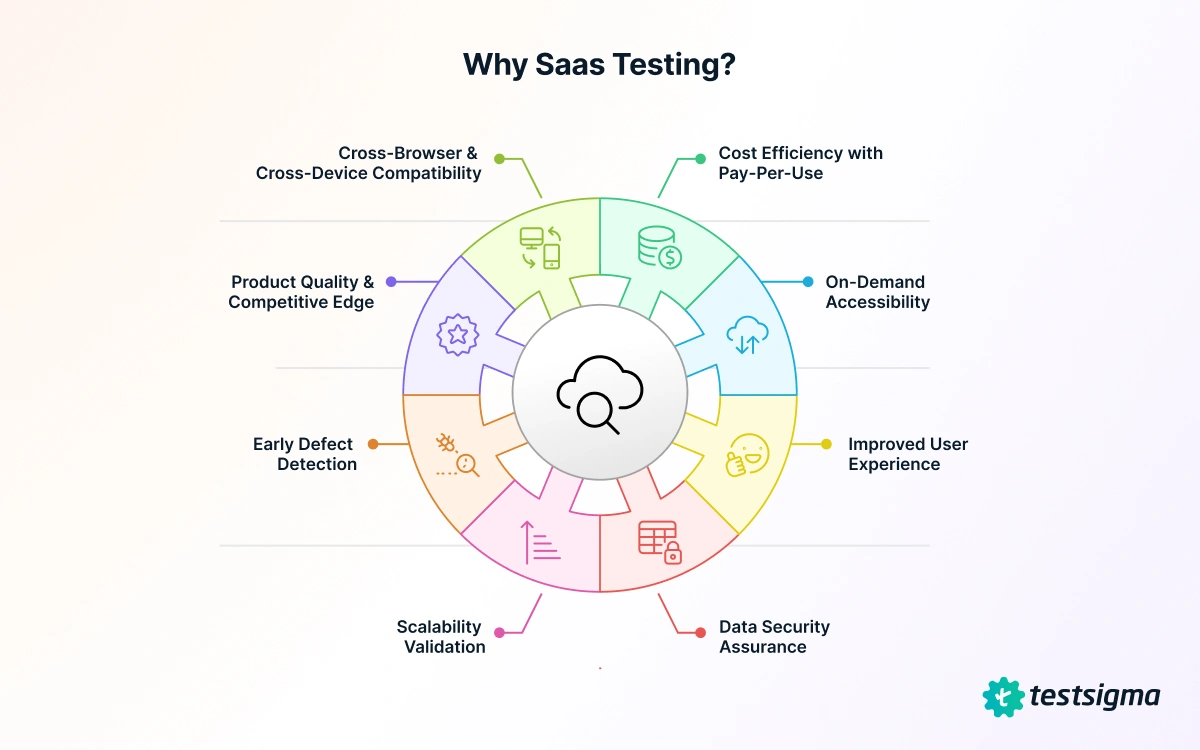
- Prevents revenue loss from downtime: When your application goes down, every customer feels it immediately. A single outage can cost thousands in lost subscriptions and permanently damage your reputation.
- Protects customer data across tenants: Multi-tenancy means one security flaw could expose data from multiple organizations. A SaaS test ensures there is proper isolation between customer environments and validates that access controls work correctly.
- Maintains performance under varying loads: Your application might work fine with 100 users, but crash with 10,000. SaaS load testing identifies such bottlenecks before they impact real customers during peak usage periods.
- Catches integration failures early: Most SaaS products integrate with third-party tools such as payment gateways, CRMs, and communication platforms. So, it’s important to verify that these connections remain stable after updates or API changes.
- Ensures browser and device compatibility: Customers access your application from different browsers, operating systems, and devices. By conducting a SaaS test across all devices, you can ensure it works consistently everywhere.
Saas Testing Methodology: How Does it Work?

Let’s now try to understand how the SaaS test works:
- Plan and Prioritize Tests
Start by identifying critical user journeys and high-risk areas that impact revenue, security, or user experience most directly. Prioritize tests based on feature usage data and business impact rather than testing everything equally.
Define clear test objectives for each sprint or release cycle. Moreover, decide which tests run automatically, which need manual validation, and where exploratory testing adds value.
- Design Test Cases and Scenarios
Create test cases that cover functional requirements, edge cases, and how the system behaves when things go wrong. In addition, focus on multi-tenant scenarios where multiple customers use the application simultaneously.
- Set Up Test Environments
Your staging environment should mirror production as closely as possible. Here are the key environment components to replicate for the SaaS test:
- Database configurations and schema versions
- Third-party API integrations and authentication services
- Caching layers and CDN setups
- Server specifications and network configurations
Maintain separate environments for development, integration testing, and user acceptance testing.
Also Read: Test Environments
- Execute Tests Continuously
Run both manual and automated tests simultaneously to leave no gaps.
First, set up an automated test that runs on every code commit to spot issues immediately. Focus on unit and integration tests to get fast feedback. Also, include comprehensive end-to-end and performance suites overnight to avoid slowing down deployments.
With platforms like Testsigma, you can streamline this process. It lets you easily create automated tests in plain English and run them continuously across 3000+ devices.
Meanwhile, use manual testing to explore new features and scenarios that require human judgment. They verify that automation covers critical workflows properly and spot gaps based on how users actually interact with the application.
- Monitor, Report, and Iterate
Track test results in real-time dashboards that show pass rates, failure trends, and flaky test patterns. When tests fail, determine if it’s a genuine bug, an environmental issue, or a test maintenance need.
Make sure to fix flaky tests immediately, as they can reduce confidence in your test suite. Remember to regularly review test coverage and retire old tests that no longer provide value.
Types of Saas Testing
Testing SaaS applications involves multiple approaches to cover each aspect of the software, from functionality to performance and user experience. Each of these tests addresses specific areas that could impact customers or business operations.
Here are the different types of SaaS testing:
- Functional Testing
Functional testing verifies that features work as intended across different user roles and scenarios. Here are the key areas to validate:
- Login workflows and password reset functionality
- Data entry forms with proper validation and error handling
- Search functions and filtering capabilities
- Permission-based access controls for different user roles
- Multi-tenant functionality to ensure data isolation between customers
- Performance and Scalability Testing
Performance testing measures how your application handles increasing user loads and data volumes. Here are the different performance tests that you need to focus on:
- Load testing simulates concurrent users to see when response times degrade.
- Stress testing pushes the system beyond normal capacity to find breaking points.
- Spike testing checks recovery from sudden traffic surges like product launches.
- Soak testing runs extended tests to catch memory leaks or gradual degradation.
Scalability testing ensures your infrastructure scales with demand, testing auto-scaling configurations, database replication, and CDN performance across geographic regions. Teams also monitor API response times and database query performance under various load conditions.
- Security and Compliance Validation
Security testing protects customer data from breaches, unauthorized access, and vulnerabilities. Here are some of the critical security checks to run:
- SQL injection and cross-site scripting vulnerabilities
- Authentication bypass attempts and weak password policies
- Session hijacking and token expiration handling
- Data encryption at rest and in transit
- API authentication and rate limiting
Compliance validation ensures your application complies with industry regulations such as GDPR, HIPAA, and SOC 2. This includes testing data retention policies, audit logging, user consent workflows, and the ability to export or delete customer data on request.
- Compatibility and Accessibility Testing
Compatibility testing verifies that your application works across different browsers, operating systems, and devices. These include:
- Desktop browsers such as Chrome, Firefox, Safari, and Edge
- Mobile browsers like iOS Safari, Chrome for Android
- Operating systems, including Windows, macOS, Linux, iOS, Android
- Screen resolutions and responsive breakpoints
In addition, accessibility testing ensures that users with disabilities can navigate your application effectively. It focuses on keyboard navigation, screen reader compatibility, color contrast ratios, and alternative text for images.
- API and Integration Testing
API testing validates endpoints that support your application’s backend and connect with external services. Teams verify that APIs return data in the correct format, handle error conditions gracefully, and maintain consistent performance.
Some of the essential API validation checks to focus on are:
- Response status codes and error messages
- Data format consistency (JSON, XML structure)
- Authentication and authorization checks
- Rate limiting and throttling behavior
- Timeout handling and retry logic
Integration testing checks how your SaaS product interacts with third-party tools. This includes payment processors, email services, CRM platforms, and authentication providers like OAuth or SSO systems.
Challenges in Saas Application Testing
Testing SaaS applications isn’t easy due to constant updates, multi-tenant complexity, and the need to support diverse device combinations. Here are the key challenges you can face:
- Fast Release Cycles
SaaS products release updates constantly, sometimes multiple times daily. Teams need automated web app testing pipelines that validate changes quickly without causing downtime. Traditional testing cycles don’t work here because there’s no time for lengthy manual checks between deployments.
- Real World Data Privacy
Testing with production data risks exposing sensitive customer information. However, synthetic test data often misses edge cases that only appear with real-world patterns.
So, teams must balance comprehensive testing with privacy compliance through data masking and secure test environments.
- Device and Browser Fragmentation
Users access SaaS applications from countless browser versions, operating systems, and devices. Testing every possible combination manually is impossible.
As such, teams should decide based on user analytics while using cloud platforms to expand coverage efficiently.
- Tester-Developer Collaboration
SaaS teams deploy code multiple times a day, which breaks down when testers and developers work in silos. It’s because developers don’t know what testers need and testers can’t keep pace with changes.
So, involve testers during feature planning and encourage developers to write tests while coding. This shared responsibility catches problems faster and keeps releases moving smoothly.
- Managing Multi-Tenant Complexity
Testing must verify that no customer’s data leaks into another customer’s environment. This requires validating tenant isolation at the database, application, and API levels while simulating concurrent usage patterns.
Best Practices to Run the Saas Test Effectively
Getting SaaS testing right requires more than just following a structured process. It requires you to make strategic choices about what to test, how to handle security, and where to focus your automation efforts. Here are some tips that can help:
- Automate Repetitive Test Cases
Focus automation on tests that run with every deployment, like login flows and payment processing. This frees up manual testers to explore edge cases and new features. Start with your most critical user journeys and gradually expand coverage based on usage patterns.
- Maintain Test Data Quality
Keep test data realistic and representative of actual user patterns. Also, update datasets regularly to include new edge cases discovered in production. Use data masking techniques to protect sensitive information while maintaining data accuracy for thorough validation.
- Monitor Production for Real Issues
No testing catches everything before launch. Use monitoring tools to track errors, performance drops, and unusual patterns as they occur with actual users. Then, analyze these insights and convert them into automated tests to prevent similar issues in future releases.
- Prioritize Security Testing Throughout
Security can’t wait until the end of development. Run vulnerability scans with each release and regularly validate authentication mechanisms. Test data encryption at rest and in transit, and schedule quarterly penetration tests to spot vulnerabilities that automated tools miss.
Manual Vs Automated Saas Application Testing
Both manual and automated testing play important roles in SaaS quality assurance. Understanding when to use each approach helps teams work efficiently without sacrificing coverage.
Manual Testing
manual testing approach involves testers interacting with the application directly to validate functionality and user experience. Here’s when it’s best to use:
- Exploring new features without predefined test scripts
- Evaluating visual design and layout consistency
- Testing complex user workflows that require human judgment
- Validating usability and accessibility for real users
- Investigating bugs that automated tests flagged
Automated Testing
Automated testing uses scripts and tools to execute test cases repeatedly without manual intervention. Let’s see when you must use it:
- Regression testing after every code deployment
- API endpoint validation and response verification
- Load and performance testing with thousands of virtual users
- Cross-device testing across multiple platforms
- Data-driven testing with large datasets
Finding the Right Balance
Start by automating tests that run most frequently and protect critical business workflows. Keep manual testing for areas that require human insight, such as user experience evaluation. This combination lets teams maintain fast release cycles while catching issues that automation alone would miss.
Top 4 Best Tools for Saas Application Testing
Choosing the right tool determines how effectively you catch bugs and maintain test coverage across deployments. Here are four options that handle SaaS-specific testing challenges well:
- Testsigma

Probably one of the best saas testing tools, Testsigma AI-driven platform offers intelligent test creation and maintenance capabilities. It detects breaking changes automatically and updates affected tests, reducing maintenance overhead as your application scales.
You get detailed analytics on test, execution trends, and failure patterns to prioritize testing efforts that matter and improve product quality.
- Apache JMeter

JMeter specializes in performance and load testing for SaaS applications by simulating thousands of concurrent users. It tests API endpoints, web services, and database connections under stress while measuring response times and throughput.
- Postman

Postman focuses on API testing and monitoring for SaaS integrations without requiring code. Teams validate REST, SOAP, and GraphQL endpoints while checking response formats, status codes, and authentication flows.
- Katalon Studio

Katalon Studio combines web, API, mobile, and desktop testing in one platform with both codeless and scripted options. It includes built-in keywords for common testing actions and integrates with Git for version control.
Scale Saas Testing with Confidence
Effective SaaS testing prevents costly downtime, protects customer data, and ensures your application scales smoothly as your user base grows. However, coordinating tests across frequent deployments, multiple tenants, and varied device combinations stretches even experienced teams to the limit.
Testsigma automates regression suites, API validation, and cross-browser testing without coding skills. Its AI agents identify flaky tests and suggest optimizations, while seamless CI/CD integration keeps testing in sync with your release schedule.
With Testsigma, find critical bugs before they reach production and deliver SaaS products your customers can rely on.