


Table Of Contents
- 1 Key Takeaways
- 2 What Is AI Unit Testing?
- 3 What Are the Benefits of AI Unit Testing?
- 4 How Does AI Unit Testing Work? The Technical Process
- 5 What Are the Challenges of AI Unit Testing?
- 6 What Are the Best Strategies for Effective AI Unit Testing?
- 7 Best Practices for AI Unit Testing
- 8 Top AI Unit Testing Tools: Detailed Comparison
- 9 How to Measure the ROI of AI Unit Testing
- 10 How to Implement AI Unit Testing: Step-by-Step
- 11 What Is the Future of AI Unit Testing?
- 12 Conclusion
- 13 FAQs
Key Takeaways
- AI-generated unit testing analyzes your code, generates tests automatically, catches edge cases, and keeps tests updated as your codebase evolves.
- More code is being written faster than ever, making automated unit test generation essential to keep quality in check.
- AI expands coverage of untested paths, reduces manual test authoring time, and integrates directly into CI/CD pipelines.
- AI lacks business context, so human review remains essential for logic-heavy and domain-specific edge cases.
- Top tools include GitHub Copilot for IDE integration, Diffblue Cover for Java, Qodo for Python and JavaScript, and Testsigma for unified coverage across unit, integration, and E2E testing.
You just finished writing a new function. Before moving on, you need to make sure it works, which traditionally means manually designing test cases, predicting inputs, and writing assertion logic yourself. For a single function that is manageable. Across an entire codebase, it becomes a bottleneck.
AI unit testing removes that bottleneck. It analyzes your code, generates tests automatically, catches edge cases you would likely miss, and keeps everything in sync as the code changes.
The timing matters too. GitHub’s Octoverse report found that 46% of new code is now AI-generated, meaning codebases are growing faster than ever, often with fewer engineers who fully understand every line. Manual unit testing cannot keep pace with that. AI unit testing can.
What is AI Unit Testing?
AI unit testing is the application of machine learning, large language models, and static analysis to automate the most manual parts of unit testing: test case design, input/output prediction, edge case discovery, and test maintenance.
Traditional unit testing requires a developer to manually identify every function needing a test, design all scenarios, write assertion logic, and update tests whenever code changes. AI eliminates or dramatically accelerates each step:
| AI Component | What the AI Does | Manual Effort It Replaces |
| Code Analysis | Scans code to map all functions, methods, classes, and dependencies requiring tests | Manual codebase audit for test gaps; estimating coverage |
| Test Case Generation | Generates unit tests covering happy paths, boundaries, null inputs, exception scenarios, and edge cases | Writing individual test cases for every function, the most time-intensive step |
| Input/Output Prediction | Predicts valid and invalid inputs and their expected outputs, including error states | Manual test data design and expected result tables |
| Test Maintenance | Auto-refactors tests when source code changes, keeping them in sync without manual repair | Chasing broken tests after every code change; the leading cause of test suite debt |
| Bug Detection | Identifies untested code paths and potential defects early, before code review or QA handoff | Manual coverage gap analysis; static analysis tooling |
| CI/CD Integration | Generates tests that slot into CI/CD pipelines, triggering on every commit | Manual pipeline configuration per test framework; environment setup overhead |
What Are the Benefits of AI Unit Testing?
AI unit testing tools don’t replace developer judgment, they handle the mechanical parts of testing so developers can focus on the parts that actually require thinking.
Faster Test Creation
Writing unit tests manually is slow. AI scans code, identifies test scenarios, and generates assertions in a fraction of the time. Teams with sparse or legacy codebases see the biggest gains, since AI can produce baseline coverage from scratch without needing existing tests to reference.
Better Code Coverage
Manual test design tends to cover the happy path and miss edge cases under time pressure. AI consistently catches boundary conditions, null inputs, error states, and rarely executed branches, the tests developers know they should write but don’t.
Lower Maintenance Burden
Keeping tests in sync with changing code is the hidden cost most teams underestimate. When source code changes, AI detects what broke, updates affected assertions, and flags anything that needs a human decision. The test suite stays accurate without constant manual upkeep.
Clean CI/CD Integration
AI-generated tests use standard frameworks (Jest, JUnit, pytest, NUnit) and run on every commit. Bugs get caught at the function level before they reach integration or QA, where they cost significantly more to fix.
More Developer Time on Harder Problems
Testing mechanics can consume 20–30% of a developer’s week on teams with strong test culture. Offloading that work lets developers focus on logic design, architecture, and the edge cases that require real reasoning.
How Does AI Unit Testing Work? the Technical Process
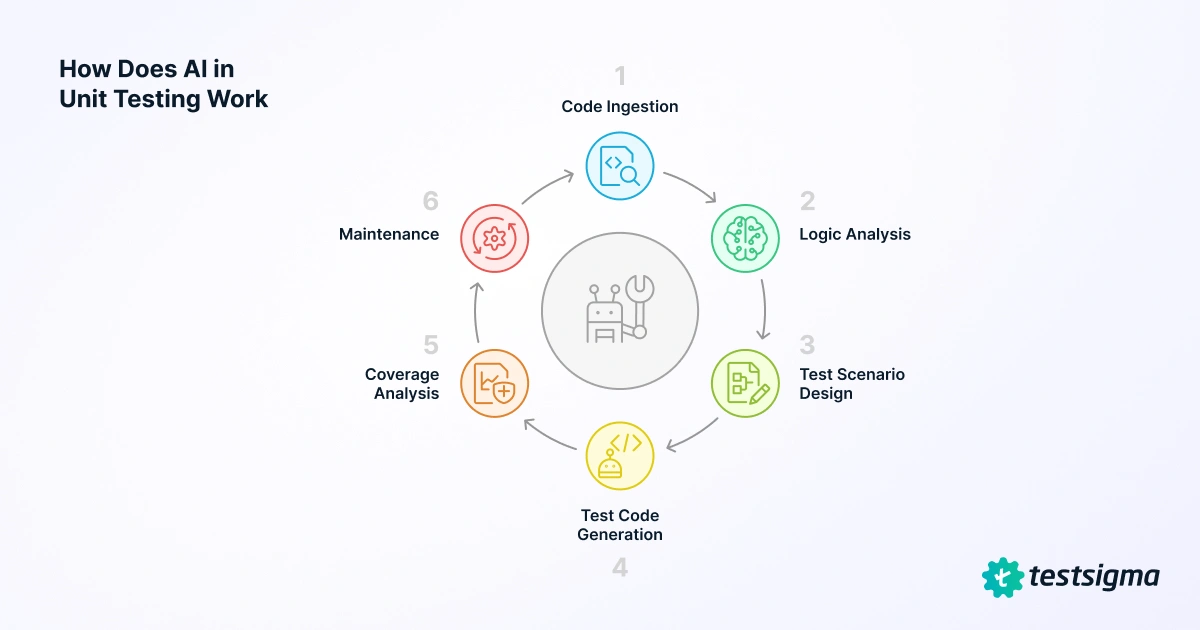
AI unit testing follows a six-stage cycle that runs automatically within your IDE or CI/CD pipeline:
Code Ingestion
The AI parses your source code into an abstract syntax tree, mapping every function, method, class, and dependency. This gives it a complete picture of what needs to be tested and how the pieces relate.
Logic Analysis
The AI traces control flow through each unit, including conditions, loops, error handlers, and return types, and builds a behavioral model of what inputs the code accepts, what outputs it produces, and what exceptions it can throw.
Test Scenario Design
Using the behavioral model, the AI defines test scenarios across valid inputs, invalid inputs, boundary values, null and empty cases, and exception triggers. Each scenario specifies input parameters and expected outcomes before any test code is written.
Test Code Generation
The AI writes test code in your framework of choice, matching your project’s naming conventions and code style. The output is a ready-to-run test file, not a template.
Coverage Analysis
The AI cross-references the generated tests against your existing suite and flags untested code paths. The result is a prioritized gap report showing exactly where coverage is weak and why it matters.
Maintenance
When source code changes, the AI identifies which tests are affected, updates assertions to match the new behavior, and flags anything that needs a human decision. The suite stays current without manual upkeep after every commit.
What Are the Challenges of AI Unit Testing?
AI unit testing saves time, but it introduces tradeoffs that are easy to overlook until they become problems.
- Code quality affects test quality. Sparse, undocumented code produces shallow tests. Add docstrings and type hints before running AI generation.
- AI can miss domain-specific edge cases. Treat AI output as a first draft and always review for business logic correctness.
- Tests can pass for the wrong reasons. Review assertions to confirm they verify the right behavior, not just that the code ran.
- Fast-moving codebases need continuous generation. Run AI test generation on every pull request, not as a one-time setup.
- Unit-specific tooling is still maturing. Use purpose-built tools like Diffblue Cover or Qodo rather than general AI assistants.
- AI amplifies testing knowledge, it does not replace it. Teams without testing fundamentals will struggle to evaluate AI output.
- High coverage can mask logic gaps. Pair AI unit testing with mutation testing to verify tests actually catch real bugs.
- External tools create IP and compliance risk. Use IDE-native or self-hosted tools and review vendor data agreements before adopting anything.
Also Read: AI and ML in software testing
What Are the Best Strategies for Effective AI Unit Testing?
Getting value from AI unit testing depends less on the tooling and more on how you use it.
Combine TDD with AI Generation
Write the core test case manually to capture business intent, then let AI generate boundary, negative, and edge-case variations. Human judgment stays on the critical decisions; AI handles coverage expansion.
Use Synthetic Test DATA
Never let AI replicate real customer records in test scenarios. Instruct it explicitly in your project configuration and use synthetic data generation for realistic but safe inputs, especially important in GDPR and HIPAA environments.
Automate Generation Inside CI/CD
Trigger AI test generation when new functions are detected, run the full suite on every pull request, flag functions below 80% branch coverage, and auto-update assertions when source code changes break existing tests.
Tools like GitHub Copilot, Qodo, and UnitTestBot support this via CLI or GitHub Actions. Diffblue Cover has native support for Java, Maven, and Gradle pipelines.
Best Practices for AI Unit Testing
AI unit testing only works well if you treat the output as a starting point, not a finished product.
Treat AI output as a first draft. Review every generated test: does it verify the right behavior, or just that the code ran? AI generates plausible assertions, not necessarily correct ones.
Use descriptive test names. AI defaults to generic names that tell you nothing when a test fails in CI/CD. Follow a consistent pattern like login_withExpiredToken_returns401.
One scenario per test. AI sometimes bundles multiple assertions into one test. If a generated test has more than two assertions, split it.
Cover negative scenarios deliberately. AI skews toward happy-path tests. After generation, check that each function has at least as many error-path tests as success-path tests.
Isolate units with mocks. AI may generate tests that quietly call real databases or external services. Replace those with mocks like Mockito for Java or jest.mock for JavaScript.
Set project context before generating. Without constraints, AI produces generic tests that need rework. Specify your language, framework, naming conventions, and style upfront.
Validate coverage quality, not just percentage. High line coverage with weak assertions is worse than lower coverage with strong ones. Use mutation testing tools like PIT or Stryker to confirm your tests actually catch real bugs.
Top AI Unit Testing Tools: Detailed Comparison
AI unit testing tools vary significantly in how they work, what languages they support, and where they fit in your workflow. Some are built for specific ecosystems like Java, others work across languages through your existing IDE, and a few take a no-code platform approach. The comparison below covers the tools worth evaluating in 2025.
| Tool | Best For | Languages | IDE | Key AI Capability | Pricing |
| GitHub Copilot | IDE-integrated test suggestions during coding | All major languages | VS Code, JetBrains, Visual Studio | Multi-file context; TDD support; inline test suggestions | $10/mo individual; $19/mo business |
| Diffblue Cover | Java teams needing automated unit tests at scale | Java only | IntelliJ IDEA; CLI for CI/CD | Purpose-built Java unit test generation; auto-adapts when code changes | Community: free; Enterprise: €10k/mo+ |
| Qodo (CodiumAI) | Behavior-driven tests with edge case coverage in VS Code | Python, JS, TypeScript, Java (beta) | VS Code, JetBrains (side panel) | Behavior-focused generation; side-by-side AI review; TDD-first approach | Free tier; Pro on request |
| Windsurf | NL prompt-to-test generation inside IDE | Multiple via NL prompt | Windsurf IDE; VS Code compatible | Write tests in plain English; method reference-based generation | Free tier; Pro: $10/mo |
| UnitTestBot | Java/Python IntelliJ users needing complete test generation | Java, Python | IntelliJ IDEA plugin | Generates complete tests with descriptions; detects hidden bugs | Free (open source) |
| Bito | Test generation combined with code review | Multiple languages | VS Code, JetBrains | Test generation + code review + code explanation in one tool | Free tier; Pro available |
| Claude | Flexible prompt-driven generation without IDE lock-in | All languages via prompt | API/web; integrates via prompt | Conversational generation; explain-then-generate; strong for complex logic | Free; Pro $20/mo; API token pricing |
| Testsigma | QA teams needing AI across unit, integration, and E2E | No-code (all languages via platform) | Web-based + 30+ CI/CD integrations | 7 AI agents: Generator, Optimizer, Maintenance, Analyzer, Coverage Planner | Free trial; demo at testsigma.com |
How to Measure the ROI of AI Unit Testing
Adopting AI unit testing is easy to justify, measuring its impact is what builds the case for scaling it.
| ROI Metric | How to Measure | Benchmark Target | Frequency |
| Test Authoring Time Saved | Track hours writing unit tests per sprint before and after AI adoption | 50–80% reduction within 3 sprints | Weekly |
| Code Coverage Delta | Compare branch and line coverage % using your coverage tool before and after AI generation | 15–25% coverage increase on first run | Per sprint / per PR |
| Test Maintenance Hours | Track time spent updating broken unit tests after code changes | 60–70% reduction with auto-refactoring | Monthly |
| Defect Escape Rate | Count bugs found in QA/production in units covered by AI tests | 40%+ reduction in unit-level defect escapes | Per release |
| Time-to-Green on CI | Measure time from code commit to passing unit test suite | 30–50% reduction from AI test selection | Per commit / daily |
| False Positive Rate | Track tests that fail without a real defect | Below 5% false positive rate on AI tests | Weekly |
| Infrastructure Cost Change | Compare test environment compute costs before and after AI test optimization | 10–20% reduction via test suite pruning | Monthly / quarterly |
How to Implement AI Unit Testing: Step-by-step
Here is a practical step-by-step for teams adopting AI unit testing for the first time, from tool selection to full pipeline integration.
1. Audit Current Coverage
Use Testsigma’s Test Plan Results dashboard to review pass/fail rates by application, suite, or module. Your lowest-coverage areas become your first AI automation targets.
2. Choose the Right Tool for Your Stack
Testsigma supports web, mobile (iOS/Android), API, and desktop testing. It works via browser with NLP-based authoring, so no IDE plugin or coding expertise is needed.
3. Set Project-Level AI Configuration
Create a project, define your application type, configure test environments, and set up Test Data Profiles for synthetic and parameterized data.
4. Generate Tests on Lowest-Coverage Modules First
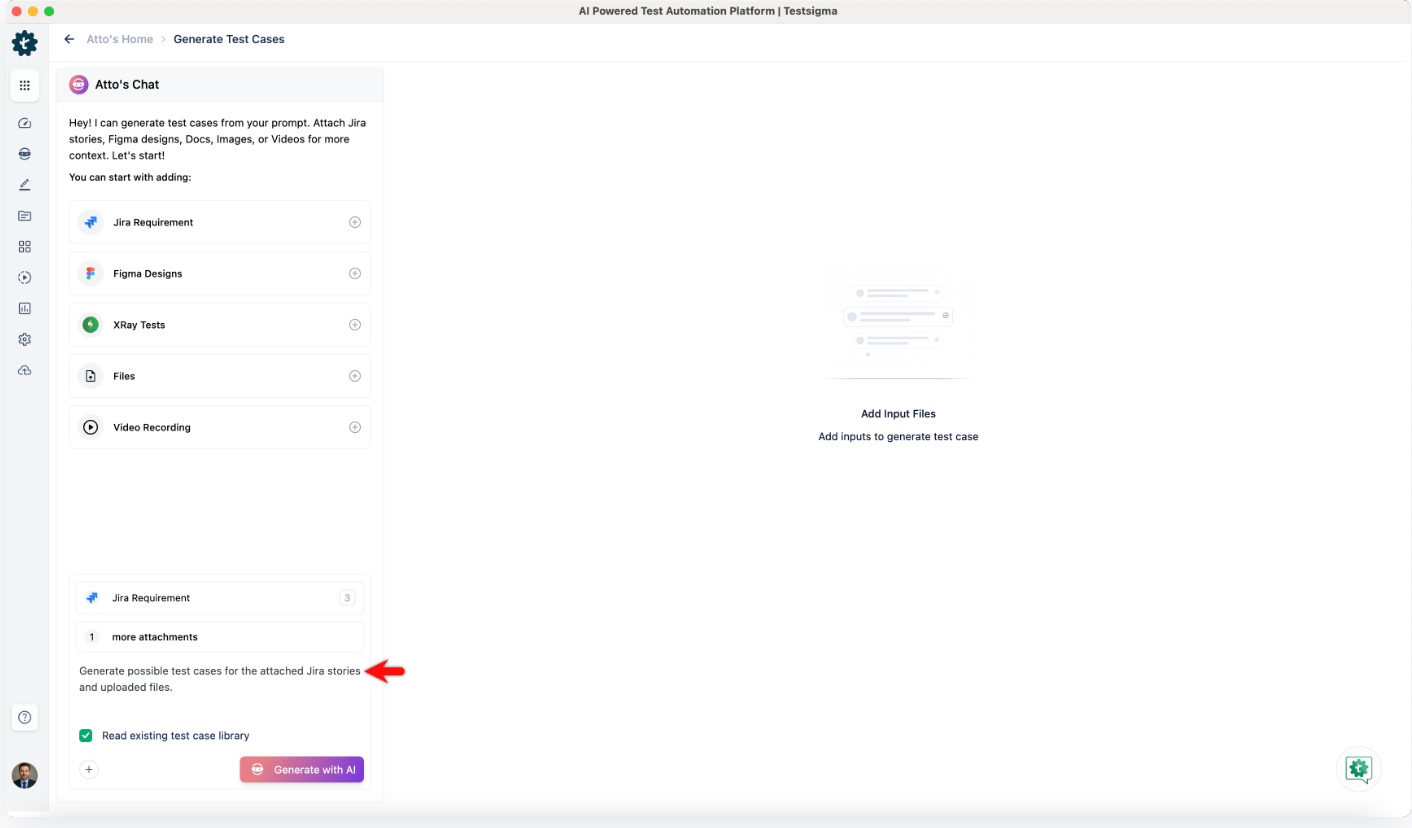
Use Atto to generate test cases from natural language, user stories, manual test cases, or screen recordings. Review the first batch manually before scaling.
5. Set up CI/CD Integration
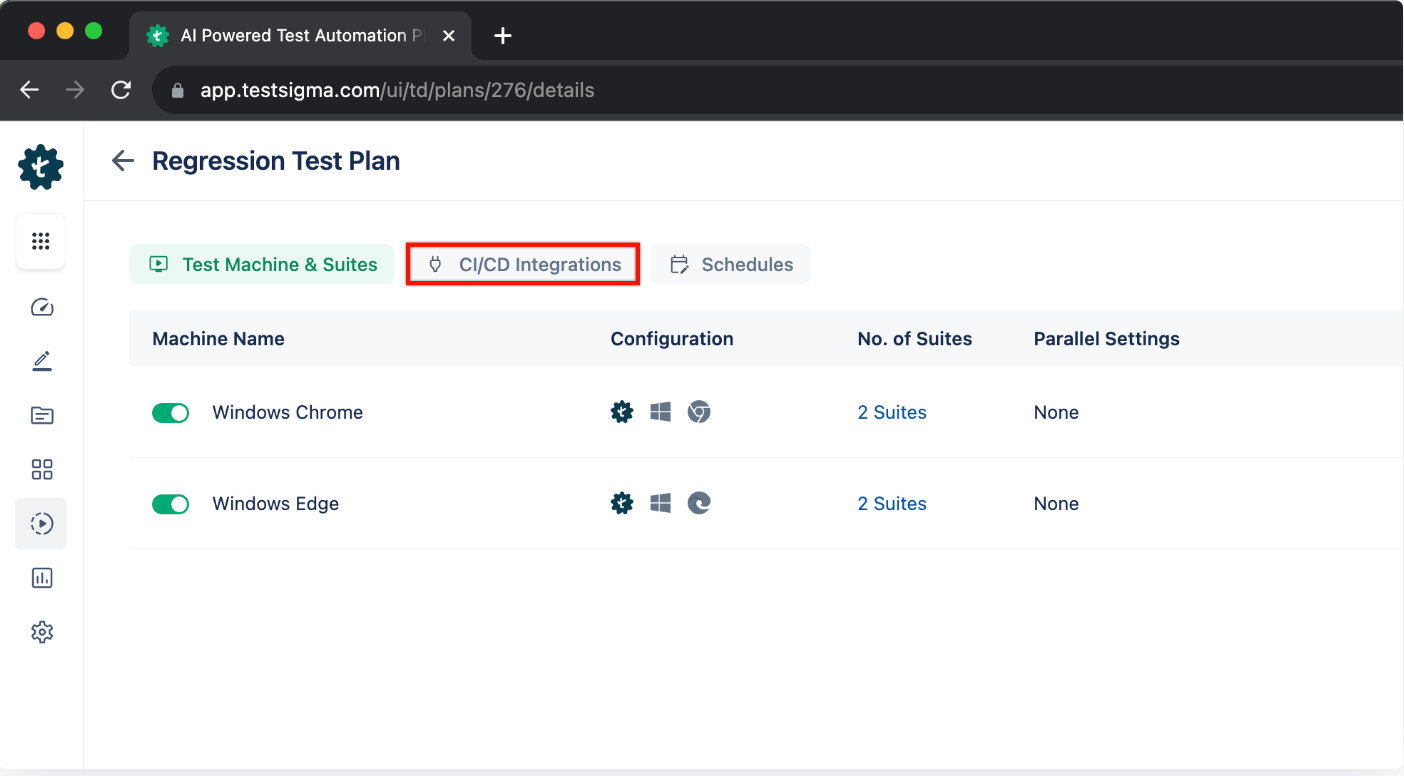
Connect to Jenkins, GitHub Actions, GitLab CI, Azure DevOps, or CircleCI. Trigger test runs on PR creation, merge, or a scheduled cadence via REST API or CLI.
6. Establish a Review Protocol
For each AI-generated test, verify the test name matches the action, assertions are correctly defined, test data is parameterized, and dependencies are set at suite level.
7. Track Metrics and Iterate
Use Testsigma’s Reports and Analytics to track pass/fail trends, flakiness rates, and coverage by module. Re-run Atto on failing or stale tests after each sprint review.
What is the Future of AI Unit Testing?
The near-term focus is on making AI generation smarter and faster inside the IDE. Tools like Qodo and GitHub Copilot are already moving toward context-aware generation that understands business intent, not just code structure, and real-time test suggestions that appear as you type. Mutation testing integration is also on the roadmap, which would let AI verify its own generated tests actually catch real bugs without manual intervention.
Further out, the bigger shift is toward full automation of the testing lifecycle. Self-improving test suites that learn from past failures, AI-driven TDD where the failing test is written before the implementation, and cross-layer coordination where unit, integration, and end-to-end tests stay in sync automatically. Most of this lands between 2026 and 2028, but the foundations are being built now.
Conclusion
AI unit testing transforms one of software development’s most time-intensive practices. By automating test case design, input/output prediction, edge case discovery, and maintenance, AI enables developers to ship faster with higher confidence and fewer defects escaping to later testing stages.
Start with your lowest-coverage modules, choose a tool matched to your language and IDE, and treat AI output as a first draft that your team reviews and approves. That workflow, AI does the breadth, humans verify the depth, is how the best engineering teams are using AI unit testing today.
The goal: Not 100% AI-generated tests. A test suite where AI handles the repetitive 80% so your team can focus on the 20% that requires genuine engineering judgment.
FAQs
Yes, AI can analyze code and automatically generate unit tests, including for edge cases and common scenarios.
No, AI unit testing works best for well-structured codebases and specific languages, but may not be ideal for highly complex or rapidly changing projects
No, while AI can catch many common issues, it may miss logic-related or context-specific bugs that require human judgment.
Popular choices include Diffblue Cover for Java, which generates unit tests autonomously from bytecode; Qodo (formerly CodiumAI); GitHub Copilot; Cursor; and Claude Code, which write tests inside your IDE or terminal. For measurable coverage gains, pair the generator with a coverage tool such as JaCoCo, Istanbul, or coverage.py in CI and review generated assertions. Unit-level AI should be complemented by AI end-to-end testing, like Testsigma, so coverage reflects real user flows and not just lines of code.
Run Diffblue Cover in CI so tests regenerate when code changes, and commit generated tests to a separate, clearly labelled folder. Treat them as a regression baseline that captures current behaviour, then review assertions on critical business logic by hand. Start with legacy modules that have low coverage, track coverage trends over time, and fail builds only on meaningful drops. Keep human-written tests for intended behaviour and edge cases.