


For over a decade, Robot Framework has been a popular open-source solution for automating tests across web, API, and desktop applications. Its keyword-driven approach and extensibility made it a go-to choice for many QA teams. Yet, as testing practices evolve toward cloud-based, AI-driven, and CI/CD-integrated automation, many teams now find Robot Framework less adaptable to modern delivery speeds and scalability needs.
Organizations are increasingly looking for simpler, faster, and more collaborative testing solutions that reduce setup complexity and support diverse technology stacks. This has fueled the rise of new automation platforms and frameworks built for flexibility and continuous testing. In this guide, we explore the top Robot Framework alternatives that modern teams are adopting in 2025, from open-source tools to intelligent, codeless testing solutions.
Table Of Contents
Why Seek Robot Framework Alternatives?
While Robot Framework has long served as a reliable foundation for test automation, its legacy design and limited adaptability are becoming more apparent in modern testing environments. As teams shift toward faster release cycles, cloud scalability, and AI-powered automation, many find the framework’s structure and dependencies slowing down progress. This has prompted businesses to explore newer, more flexible tools that align with today’s agile and continuous testing demands.
Common User Pain Points & Feedback
Despite its strong community and open-source flexibility, Robot Framework users frequently report practical challenges that impact ease of adoption and long-term scalability. Below are the most cited pain points gathered from verified reviews, Reddit discussions, and developer forums.
Complex Setup & Configuration
Many users describe Robot Framework’s setup as time-consuming and intricate, particularly when integrating with tools like Selenium, Appium, or CI/CD pipelines. Some reviewers on G2 mention needing to install multiple libraries and manage dependencies manually, a process that ‘feels more like building a framework than using one.’
Limited Native Support for Certain Languages
Robot Framework’s Python-centric architecture limits flexibility for teams working primarily in JavaScript, Java, or mixed environments. Developers on Stack Overflow note friction when trying to bridge multiple tech stacks, often requiring extra wrappers or plug-ins to achieve compatibility.
Steep Learning Curve for Custom Libraries
While extensibility is a strength, creating or maintaining custom libraries demands advanced Python skills. Several users highlight that the syntax and test structure differ from conventional codebases, making onboarding slower for new automation engineers.
Web Testing Flakiness/browser Automation Issues
Many testers report unstable web tests when using Selenium-based automation through Robot Framework. Minor UI changes can break scripts, and debugging often requires additional layers of scripting, which is a recurring theme in Reddit automation threads from 2024 to 2025.
Slow Test Execution & Scalability Challenges
As test suites grow, teams experience performance bottlenecks and longer execution times. Scaling parallel runs or integrating with CI/CD systems demands custom scripting and infrastructure work, reducing overall efficiency.
Limited Built-in Reporting
Although Robot Framework provides a basic HTML report, users frequently note that it lacks depth and interactivity compared to modern reporting dashboards. Teams often resort to third-party tools to gain visual insights or trend analytics, adding to maintenance overhead.
Accelerate reliable automation with AI-powered, self-healing test execution



Top 8 Robot Framework Alternatives
As testing needs expand beyond traditional frameworks, a new wave of modern, scalable automation tools has emerged to simplify testing across web, mobile, and API environments. Below are eight leading Robot Framework alternatives that teams are adopting in 2025, each offering unique strengths, from codeless cloud platforms to powerful open-source ecosystems.
1. Testsigma

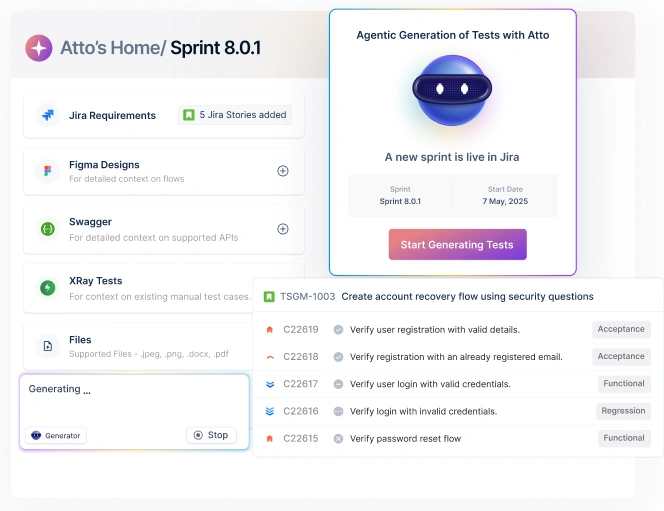
Testsigma is an AI-driven, cloud-based test automation platform that redefines how teams create, execute, and manage automated tests. Positioned as the world’s first Agentic Test Management Software, it introduces AI agents that autonomously handle test creation, execution, maintenance, and optimization. Designed for both technical and non-technical users, Testsigma enables end-to-end automation across web, mobile, API, and ERP systems — all within a single unified platform.
Key Features
- Agentic Automation: AI coworkers such as Generator, Runner, Analyzer, Optimizer, and Maintenance Agent automate every stage of the testing lifecycle.
- Codeless Test Creation: Write tests in plain English (NLP-based) or generate them instantly by recording user flows.
- Self-Healing Tests: Automatically detect and fix flaky tests during execution for enhanced reliability
- Cloud-Native Execution: Run tests across 3,000+ browsers and real devices in parallel.
- Comprehensive Test Management: Integrates test planning, execution, analytics, and reporting in one place.
- Native Integrations: Connect seamlessly with Jira, Jenkins, Azure DevOps, GitHub, Bamboo, and 30+ other DevOps tools.
- Enterprise-Grade Security & Compliance: Built with robust data protection standards and proven scalability for large teams.
Pros
- Zero Setup Time: No environment setup required, start testing instantly on the cloud.
- 10x Faster Test Creation: NLP-based automation allows even non-coders to write tests quickly.
- Reduced Maintenance (Up to 90%): Self-healing capabilities minimize manual intervention.
- Unified Testing Platform: Supports multiple app types and environments in one place.
- High Scalability: Designed for continuous testing within large CI/CD pipelines.
- Excellent Reporting: Built-in dashboards and analytics provide deep visibility into quality metrics.
Cons
- AI Familiarity Required: Teams may need brief onboarding to make the most of AI agents.
- Cloud-Centric Setup: Works best in cloud environments, though hybrid use is possible.
2. Selenium

Selenium is the de-facto open-source framework for browser automation, built on the W3C WebDriver standard. It supports multiple languages (Java, Python, JavaScript, C#, Ruby) and major browsers, making it a flexible choice for teams that prefer code-first automation and full control over their stack.
Key Features
- WebDriver API & W3C Standard: Stable, browser-level control across Chrome, Firefox, Edge, Safari.
- Multi-language Support: First-class bindings for Java, Python, JS, C#, and more.
- Selenium Grid: Run tests in parallel across nodes; on-prem or cloud providers.
- Selenium IDE: Record-and-playback for quick starts and reproductions.
- Ecosystem-friendly: Works with TestNG/JUnit/NUnit, CI tools, reporting libs, and cloud device labs.
Pros
- Mature & Well-documented: Huge community, examples, and troubleshooting resources.
- Highly Flexible: Code-first control, extensible patterns, and custom frameworks.
- Cost-effective: Open source with many compatible free libraries.
- Vendor-agnostic: Easy to run locally, on your grid, or any major cloud test provider.
Cons
- Setup & Maintenance: Requires project scaffolding, locators strategy, and upkeep, manageable with good practices.
- Flakiness Risks: UI changes can break tests; mitigated via robust waits and page-object/abstraction patterns.
3. Playwright

Playwright is a modern end-to-end testing framework from Microsoft that focuses on reliability, speed, and cross-browser parity. It drives Chromium, WebKit, and Firefox with one API and ships its own test runner (Playwright Test) for parallelism, retries, tracing, and rich debugging, making it a favorite for engineering teams moving fast.
Key Features
- True cross-browser support: Chromium, WebKit, Firefox; headed/headless.
- Auto-waiting & resilient locators: Fewer flaky tests with smart waits and web-first assertions.
- Playwright Test runner: Built-in parallelism, retries, shards, fixtures, and project configs.
- Powerful debugging: Trace Viewer, screenshots, videos, HARs, network mocking.
- Mobile web emulation: Device descriptors, geolocation, permissions, timezone, locale.
- Codegen & inspector: Record flows, generate tests, and step through actions interactively.
- CI-friendly: Deterministic runs and easy Docker/CI setup.
Pros
- High stability: Auto-waits and robust selectors reduce flakiness.
- Fast & scalable: Parallel execution and isolated browser contexts.
- Great DX: First-class TypeScript/JS with excellent tooling and docs; also supports Python, Java, .NET.
- Deep debugging: Traces, videos, and network tools speed root-cause analysis.
Cons
- Code-first: No codeless authoring; basic scripting skills recommended.
- Ecosystem center of gravity in TS/JS: Other languages are strong but JS/TS gets features first.
4. Cypress

Cypress is a modern JavaScript-based end-to-end testing framework designed for today’s web applications. Built to run directly in the browser, Cypress offers a highly interactive, real-time testing experience with instant feedback and time-travel debugging. Recently, it introduced AI-powered features like cy.prompt() and self-healing tests through natural language, taking developer productivity to the next level.
Key Features
- AI-Driven Testing: Create or heal tests via natural language prompts using cy.prompt().
- Cypress App: Write, run, and debug tests in real-time with a rich visual interface.
- Cypress Studio: Record and generate tests automatically from user interactions.
- Cypress Cloud: Parallelization, smart test load balancing, and AI-powered debugging insights.
- Visual Debugging & Test Replay: Rewind test runs to inspect DOM snapshots and console logs.
- Accessibility & Coverage Analysis: Automated accessibility checks and UI coverage analytics.
- Seamless CI/CD Integration: Works smoothly with GitHub Actions, Jenkins, GitLab, CircleCI, and others.
Pros
- Exceptional Developer Experience: Live reload, time-travel, and integrated DevTools.
- AI & Automation: Natural language prompting and self-healing reduce manual debugging.
- Quick Setup: Install via npm and start testing within minutes.
- Detailed Reporting: Cloud dashboard provides historical trends, test health, and flake tracking.
Cons
- JS/TS Focused: Primarily for JavaScript/TypeScript users; limited cross-language flexibility.
- Browser Scope: Best suited for web apps, with no built-in mobile or desktop app testing.
- Closed Cloud Features: Some advanced AI and analytics features are part of the Cypress Cloud subscription tiers.
5. TestCafe

TestCafe is a free, open-source end-to-end testing framework built for simplicity and speed. It enables teams to write, run, and debug automated tests for modern web apps with minimal setup. Unlike Selenium, it doesn’t rely on WebDriver. TestCafe runs directly in the browser, offering faster execution and easier maintenance. It supports JavaScript and TypeScript, making it a great fit for front-end teams using frameworks like React, Angular, and Vue.
Key Features
- Zero Setup: Install via npm and start testing instantly, no extra drivers or dependencies.
- Cross-Browser Testing: Works with Chrome, Edge, Safari, Firefox, and integrates with BrowserStack and LambdaTest.
- Concurrent Test Runs: Run multiple tests in parallel across browsers.
- CI/CD Integration: Pre-built Docker images and smooth integration with Jenkins, GitHub Actions, and other pipelines.
- Clean Syntax: Easy-to-read JavaScript/TypeScript syntax reduces learning time.
- TestCafe Studio: Optional desktop app for record-and-playback test creation.
- Debug Mode: Built-in debugging tools for real-time troubleshooting.
Pros
- Easy Setup: No WebDriver or browser plugin required.
- Clean, Intuitive Syntax: Tests are concise, readable, and beginner-friendly.
- Fast Execution: Runs tests directly in the browser without external drivers.
- CI/CD Ready: Built-in support for containerization and cloud execution.
- Active Community: Backed by Developer Express with a solid open-source base.
Cons
- Web-Only Focus: Currently limited to web applications (no native mobile or desktop testing).
- Limited Ecosystem: Fewer third-party plugins compared to Playwright or Cypress.
6. Gauge
Gauge is an open-source, lightweight test automation framework focused on readability, reusability, and low maintenance. Developed by ThoughtWorks, Gauge simplifies acceptance testing through Markdown-based specifications that double as living documentation. When paired with Taiko, Gauge provides powerful, reliable browser automation for JavaScript-based tests. Its plugin-driven design makes it flexible, extensible, and language-agnostic, perfect for teams that want clarity without sacrificing control.
Key Features
- Markdown-Based Tests: Write human-readable test cases in Markdown, making them easy for both QA and business teams to understand.
- Multi-Language Support: Works with Java, JavaScript, C#, Python, and Ruby, no need to switch languages.
- Plugin Architecture: Extend functionality with plugins for IDEs, CI tools, and automation drivers.
- Parallel Execution: Native support for running tests in parallel across multiple environments.
- Data-Driven Testing: Separate test data from logic for scalability and better dataset management.
- Rich Reporting: Automatic screenshots on failure and exportable reports in HTML, JSON, or XML formats.
Pros
- Readable & Maintainable: Markdown specs reduce code clutter and improve collaboration.
- Language Flexibility: Works with several popular programming languages.
- Extensible Framework: Customizable through plugins for new drivers, IDEs, and integrations.
- CI/CD Ready: Integrates easily with Jenkins, GitHub Actions, and other pipelines.
- Pair with Taiko: Offers modern, reliable browser automation when used alongside Taiko.
Cons
- Setup Effort: Slight learning curve when configuring with Taiko or third-party plugins.
- Smaller Ecosystem: Compared to tools like Cypress or Playwright, community size and plugin library are modest.
- Limited Built-In UI: Relies on command-line and external tools for test management.
7. Rainforest QA

Rainforest QA is a no-code, AI-powered test automation platform that enables anyone—developers, testers, or product managers—to create and maintain automated tests without writing code. Its visual, intuitive interface allows teams to build tests in plain English, while AI self-healing minimizes test maintenance. Rainforest focuses on testing the actual user experience, interacting with your app’s UI just as real users would.
Key Features
No-Code Automation: Build tests with natural language in a visual editor—no scripting required.
AI-Powered Self-Healing: Automatically detects and fixes element changes to prevent flaky tests.
Visual Testing: Tests interact with the visible UI (not just DOM), ensuring real-world accuracy.
Cross-Platform Support: Run tests on Windows, macOS, and all major browsers.
Parallel Execution: Run hundreds of tests simultaneously; average test suite completes in minutes
Detailed Reporting: Video recordings, logs, AI-generated failure analysis, and repro steps.
Workflow Integrations: Works with Slack, Jira, GitHub, GitLab, CircleCI, Jenkins, and more.
Pros
- Easy for Non-Technical Users: Plain-English tests lower the entry barrier for teams new to automation.
- AI Maintenance: Self-healing capabilities drastically reduce manual test upkeep.
- Fast Parallel Runs: Cloud execution enables rapid regression testing.
- Comprehensive Debugging: Built-in logs, videos, and AI insights make root cause analysis quick.
- End-to-End Cloud Platform: Includes test creation, management, and infrastructure—no extra setup needed.
Cons
- Web-Focused: Primarily designed for web and desktop browser testing.
- Limited Custom Code Support: Less flexible for highly customized, script-heavy test scenarios.
8. Puppeteer

Puppeteer is a Node.js library from Google that provides a high-level API to control Chromium, Chrome, and Firefox via the DevTools Protocol or WebDriver BiDi. It’s primarily used for headless browser automation, web scraping, performance audits, and UI testing. While not a full-fledged testing framework, Puppeteer gives developers fine-grained control over browser behavior, making it ideal for custom automation and performance workflows.
Key Features
- Headless & Headful Modes: Run browsers without UI for faster execution or in visible mode for debugging.
- Cross-Browser Support: Automate Chrome, Chromium, and Firefox with a unified API.
- DevTools Protocol Integration: Access and manipulate DOM, network, and performance metrics directly.
- Programmatic Control: Automate navigation, clicks, typing, screenshots, and PDF generation.
- Flexible Setup: Use puppeteer-core to integrate with your own browser installation.
- Performance & Monitoring: Capture page traces, console logs, and runtime stats.
- Powerful API Surface: Over 600+ commands for deep browser-level interaction.
Pros
- Lightweight & Fast: Direct control over the browser without additional dependencies.
- Full Programmatic Power: Ideal for custom automation, scraping, and synthetic testing.
- Modern API: Native support for ES modules, async/await, and TypeScript.
- Strong Ecosystem: Backed by Google; active updates and reliable documentation.
Cons
- Not a Complete Framework: Lacks built-in assertions or test runners (requires Jest, Mocha, etc.).
- Web-Only Scope: Limited to web browser automation; no mobile or desktop testing.
- Learning Curve: Requires JavaScript proficiency to build maintainable automation flows.
How to Choose the Right Robot Framework Alternative
Choosing the right alternative depends on your team’s skills, testing needs, and goals. Here’s a simple way to decide:
1. Match the Tool to Your Team
- If your team includes non-coders or business testers, go for Testsigma or Rainforest QA, they offer codeless automation and AI-driven testing.
- If your team prefers writing code, tools like Playwright, Cypress, or Selenium will feel more natural.
2. Think about What You’re Testing
- For web apps, all tools work well, but Cypress and Playwright shine with modern JavaScript frameworks.
- For mobile, API, or enterprise systems, Testsigma provides broader coverage.
- For simple web testing, TestCafe and Gauge are lightweight, easy options.
3. Consider Maintenance and Scalability
AI-based tools like Testsigma and Rainforest QA help reduce test flakiness and maintenance.
Open-source tools like Selenium and Playwright give more flexibility but need more setup and upkeep.
4. Evaluate Reporting and Support
Choose tools that provide clear reports, dashboards, and easy CI/CD integration.
If your organization values dedicated help, look for tools with enterprise support or strong documentation.
Conclusion
As testing practices evolve, it’s clear that traditional frameworks like Robot Framework no longer meet every team’s needs. Whether you’re looking for AI-powered, codeless automation with platforms like Testsigma, or prefer the hands-on flexibility of open-source tools like Playwright or Selenium, there’s an alternative that fits every workflow.
The key is to choose a tool that matches your team’s skills, scales with your projects, and reduces maintenance overhead. By focusing on ease of use, stability, and long-term value, you can confidently move toward a faster, smarter, and more collaborative testing future.
FAQ
Some of the best alternatives to Robot Framework include Testsigma, Selenium, Playwright, Cypress, TestCafe, Gauge, Rainforest QA, and Puppeteer. These tools cater to different needs, from AI-driven, codeless platforms like Testsigma for faster automation, to open-source frameworks like Playwright and Selenium for teams that prefer full control and customization. Each offers unique strengths in scalability, integration, and usability, making them suitable for various testing environments.
Testsigma offers a more modern, enterprise-ready approach to automation than Robot Framework. It supports AI agents for self-healing, instant test generation, and cloud-based execution across web, mobile, API, and ERP applications, all without coding. In contrast, Robot Framework is script-heavy and Python-centric, requiring more manual setup and maintenance. For enterprises focused on speed, scalability, and minimal upkeep, Testsigma delivers a more complete and user-friendly solution.
Robot Framework provides basic HTML reports and logs, which work well for smaller projects but lack real-time analytics or deep insights. Modern alternatives like Testsigma, Cypress, and Rainforest QA offer interactive dashboards, trend analysis, failure insights, and integration with tools like Jira or Slack. These enhanced reporting systems make it easier to track test health, analyze failures, and make data-driven QA decisions, all key factors in continuous testing environments.
Robot Framework provides basic HTML reports and logs, which work well for smaller projects but lack real-time analytics or deep insights. Modern alternatives like Testsigma, Cypress, and Rainforest QA offer interactive dashboards, trend analysis, failure insights, and integration with tools like Jira or Slack. These enhanced reporting systems make it easier to track test health, analyze failures, and make data-driven QA decisions, all key factors in continuous testing environments.
Testsigma is an AI-based no-code test automation tool. The no-code is the unique feature of Testsigma. It is a cloud-based tool, so it reduces any infrastructure requirements that are needed for test execution. In turn, it also eliminates the maintenance of the infrastructure. Testsigma is popular because it provides a lot of features as a testing platform.