

Ranorex built its name on reliable Windows desktop automation, but 2025 pipelines expect more. Teams need unified coverage across web, mobile, and desktop, painless CI/CD runs in the cloud, and suites that don’t crumble when the UI shifts. If you’re feeling the drag from locator maintenance, license limits, or tooling that doesn’t fit Git-first workflows, it’s worth surveying alternatives. This guide highlights eight credible options, from commercial suites to open source, that improve cross-platform scope, parallel execution, and total cost of ownership. Use it to match your needs on scale, stability, and skills, and choose a stack you won’t have to replace next release.
Table Of Contents
Why Seek Ranorex Alternatives?
Ranorex shines for Windows desktop UI automation, but many 2025 teams need broader, cloud-friendly coverage and lower maintenance across web and mobile. As suites grow, common friction points include locator brittleness, performance at scale, CI/CD fit, learning curve, and licensing model trade-offs, prompting a look at tools better aligned to modern pipelines
Common User Pain Points & Feedback
Here are the issues teams most often hit when scaling Ranorex in 2025. Use this as a quick checklist to stress-test any alternative against your pipeline.
1) Cross-Platform Scope Vs. Modern Stacks
Ranorex covers desktop very well and supports web/mobile, yet teams scaling heavy web/mobile pipelines often prefer frameworks purpose-built for those surfaces (and cloud grids), citing faster parallelization and ecosystem fit. Ranorex’s own materials emphasize desktop strengths while positioning mobile as supported, so validate web/mobile depth for your stack.
2) Object Repository & Locator Maintenance
Users and consultants frequently flag element not found flakiness and repository bloat as UIs change, requiring governance and periodic refactoring of locators and UI maps. This maintenance tax grows with faster front-end releases. Ranorex guidance and community tips focus on stabilizing attributes and repository discipline, good practices, but still extra work.
3) CI/CD Integration & Scale Practicalities
You can run Ranorex in Jenkins and Azure DevOps, but wiring reliable pipelines, artifacts, and parallel runs can take setup (plugins/tasks exist, yet teams report gotchas like encoding/BOM and runner config). Concurrency also intersects with license seats, so throughput planning matters.
4) Learning Curve for Advanced Use
Beyond record/playback, reviewers cite a steeper path to master advanced features and keep large suites healthy, especially compared with code-first JS/TS or Python tools that align with dev workflows. This can slow onboarding for mixed-skill teams.
5) Cost & Licensing Considerations
Ranorex moved toward subscription, concurrent-use licensing, useful for sharing seats, but total cost can rise with more parallel jobs/users. Teams compare this against open source or usage-based models when scaling. Validate pricing vs. your concurrency targets.
Comparison Table of Top 5 Alternatives
Here’s a quick side-by-side so you can spot the best fit at a glance, without wading through feature pages.
| Tool | Type | Core Strength | Ideal For |
| Testsigma | Commercial (SaaS) | Fast, AI-assisted authoring + unified web/mobile/API management | Mixed-skill teams that want speed and low maintenance |
| TestComplete | Commercial | Strong Windows desktop automation with record/playback + scripting | Desktop-heavy apps needing rich object mapping |
| Playwright | Open source | Reliable, parallel web automation with great CI story | Engineering-led teams comfortable with code-first |
| Robot Framework | Open source | Keyword-driven, extensible via libraries (web/mobile/API) | Teams wanting readable tests and broad plugin ecosystem |
| Tricentis Tosca | Commercial (Enterprise) | Model-based, wide app coverage + governance | Large/regulated orgs needing breadth and control |
Top 8 Ranorex Alternatives
Here are eight solid Ranorex alternatives, spanning commercial suites and open-source frameworks, so you can match scope (web/mobile/desktop), workflow style (low-code, model-based, or code-first), and CI/CD fit. Use this list to shortlist two or three that align with your stack and run a quick sprint trial.
Testsigma
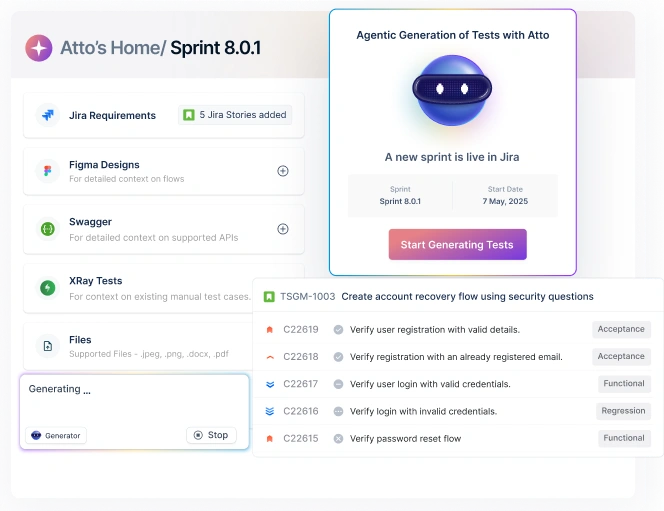
Testsigma is an agentic, no code automation and test management platform that spans web, mobile (iOS/Android), API, and packaged apps like Salesforce/SAP. AI agents (Atto, Copilot) help plan, generate, execute, heal, and report tests, while a cloud device lab and 3000+ browser/device combos accelerate coverage without custom infra.
Key Features
- AI agents for sprint planning, case generation, execution, self-healing, and bug reporting
- NLP/no-code authoring, recorder, and reusable steps; plain-English test creation
- Cross-platform automation: web, mobile, API, plus Salesforce/SAP support
- Parallel & scalable execution on cloud grids; live debugging with videos/logs/screens
- Built-in test management: requirements mapping, runs, analytics, and traceability
- Self-healing tests and proactive flaky/brittle test detection to cut maintenance
- 30+ native integrations (Jira, GitHub/GitLab, Jenkins, Azure DevOps, etc.)
- Enterprise posture: SSO/RBAC, audit trails, security/compliance and org controls
Testcomplete

TestComplete is a mature, cross-surface automation suite with standout Windows desktop coverage alongside web and mobile. Teams can mix record/playback with scripting, plug into Jenkins/GitHub Actions/Azure DevOps, and keep everything inside secure local networks. SmartBear’s Reflect brings AI-assisted, no-code web testing on top of the core platform.
Key Features
- It has broad automation with Desktop (Windows), Web, and Mobile (iOS/Android)
- Record/playback plus scripting (e.g., JS, Python, VBScript) for flexible authoring
- Integrations: Jenkins, Jira, Git/GitHub Actions, Azure DevOps and more
- AI assists for web flows via Reflect (no-code, visual/ML aids)
- Data-driven testing with built-in test data generation
- Secure, thick-client model: offline or inside locked-down networks
- Visual checks, object mapping, and tooling to handle complex UIs
Pros
- Best-in-class Windows desktop automation for complex/legacy clients.
- Choice of low-code and scripting fits mixed-skill teams.
- Enterprise security posture (local storage, offline/air-gapped workflows).
- Mature ecosystem, support, and customer proofs for large suites.
- Smooth CI hooks; easy to slot into existing delivery pipelines.
Cons
- License/concurrency costs can climb with heavy parallelization.
- Web locator upkeep can be non-trivial on fast-changing front-ends, plan for maintenance.
Playwright

Playwright is a code-first, cross-browser automation framework from Microsoft for reliable end-to-end web testing. It runs Chromium, Firefox, and WebKit on Windows, Linux, and macOS; supports TS/JS, Python, .NET, and Java; and shines in CI with fast parallelism, rich tracing, and flake-resistant APIs.
Key Features
- Cross-browser coverage (Chromium, Firefox, WebKit) with one API
- Cross-platform execution (Windows/Linux/macOS), headless or headed
- Cross-language bindings: TypeScript/JavaScript, Python, .NET, Java
- Mobile web emulation (Chrome for Android, Mobile Safari)
- Auto-wait + web-first assertions reduce flakiness
- Powerful tooling: Codegen, Inspector, Trace Viewer (videos, screenshots, DOM snapshots)
- Test isolation via browser contexts; easy auth state reuse
- CI-friendly parallel runs and robust artifacts for debugging
Pros
- Highly reliable web automation with minimal sleeps/timeouts.
- Excellent CI story: parallelism, containers, and rich traces out of the box.
- Polyglot support fits mixed dev stacks; easy to adopt in repos with TS/JS or Python.
- Great debugging via Inspector and Trace Viewer boosts developer velocity.
- Strong community and ecosystem (reporters, fixtures, cloud grid support).
Cons
- No native desktop or native mobile app automation (web/mobile-web only).
- Code-first: non-coders face a steeper learning curve vs. low-code tools.
Robot Framework

Robot Framework is an open-source automation framework for testing and RPA with a human-readable, keyword-driven syntax. It’s highly extensible through libraries (Python/Java/others), integrates well with CI, and benefits from a large community and foundation backing, without licensing fees.
Key Features
- Keyword-driven tests with readable syntax; supports data-driven patterns
- Extensive ecosystem: SeleniumLibrary, Browser (Playwright), AppiumLibrary, Requests/REST, DB, SSH, and hundreds more
- Cross-language libraries (Python, Java, etc.) and easy custom library creation
- Works across web, mobile (via Appium), API, and desktop via community libs
- Strong tooling: reports/logs, trace artifacts, and IDE/editor plug-ins
- CI/CD friendly via CLI runners; parallelization with add-ons
- Backed by Robot Framework Foundation; vibrant community, events, and docs
Pros
- Free & extensible: massive library ecosystem and no license costs.
- Readable tests enable collaboration across QA/dev/business.
- Polyglot: mix Python/Java libraries; easy to build custom keywords.
- Broad surface coverage (web/mobile/api/desktop via libs).
- Solid CI integration and rich logs for triage.
Cons
- Library sprawl & versioning can add maintenance overhead at scale.
- Performance/flake tuning often needed for very dynamic UIs; conventions matter.
Tricentis TOSCA

Tricentis Tosca is an enterprise-grade, codeless, model-based automation suite covering web, mobile, desktop, API, and packaged apps (e.g., SAP). Recent additions introduce Agentic AI for natural-language test creation and adaptation, while Vision AI, risk-based optimization, and tight platform integrations aim to reduce maintenance and accelerate end-to-end testing at scale, on cloud, on-prem, or hybrid.
Key Features
- Agentic AI and Vision AI for NL-driven test creation and resilient object/visual recognition
- Model-based automation across 160+ technologies; UI, API, integration, accessibility, and regression
- Risk-based test optimization and test data management; API simulation
- End-to-end coverage including SAP Fiori and complex enterprise workflows
- Integrates across DevOps toolchains; NeoLoad tie-in for performance testing
- Deployment flexibility: cloud (zero-footprint), on-prem, or hybrid with enterprise security controls
Pros
- Breadth & depth for large enterprises: web/mobile/desktop/SAP in one platform.
- Codeless + AI lowers authoring effort and speeds adaptation to UI changes.
- Governance-ready with strong reporting, traceability, and platform integrations.
- Flexible deployment options to meet security and residency requirements.
Cons
- Cost at scale can outpace lighter tools or OSS stacks, model licenses and concurrency early.
- Learning curve/admin: model-based workflows and platform breadth require onboarding and stewardship.
Gauge (by Thoughtworks)
Gauge is an open-source, code-first test automation framework from ThoughtWorks focused on maintainability and readability. Specs are written in Markdown with reusable, parameterized steps implemented in your language of choice (Java, JS/TS, C#, Python via community), making it a good fit for Git-native teams that prefer versioned, reviewable tests over heavy UI tools.
Key Features
- Markdown specifications with data tables and parameterized/reusable steps
- Language-agnostic step implementations (official: Java, JS/TS, C#; community: Python, etc.)
- Fast feedback: parallel execution, incremental test runs, and rich HTML reports
- Plugins for IDEs (VS Code/IntelliJ), reporters, screenshots, and CI integration
- First-class CI/CD via CLI; simple containerization and headless runs
- Works well with Selenium/WebDriver, Playwright, or API clients for surface coverage
Pros
- Developer-friendly: specs + code live in Git with PR reviews and branching.
- Maintainable at scale: step reuse and Markdown specs keep suites DRY and readable.
- Lightweight & flexible: choose your driver (Selenium/Playwright) and libraries.
- Free & extensible: OSS with a plugin ecosystem; easy to script in pipelines.
Cons
- No built-in recorder/low-code authoring, coding skills required.
- Ecosystem smaller than Selenium/Playwright alone; some plugins may be community-maintained.
Waldo
Waldo is a no-code, mobile-first automation platform that lets teams record real iOS/Android user flows once and replay them on every build. It focuses on product-speed feedback, CI-friendly runs, visual diffs, and crash/network logs, so engineers and PMs can catch regressions without writing code or maintaining device farms.
Key Features
- No-code flow recording on real app builds (iOS/Android) with reusable test suites
- Hosted device/cloud execution with parallel runs and per-commit verification
- Visual diffs, screenshots, videos, and step-by-step timelines for fast triage
- Stability aids: smart waits/retries to reduce flakiness; element re-targeting
- CI/CD integrations (CLI/API/GitHub Actions, etc.) and Slack/PR status updates
- Crash & network logs surfaced alongside failures for faster root cause
- Team features: permissions, run history, tagging, and scheduled suites
Pros
- Very low barrier to entry for mobile QA, useful for teams light on automation skills.
- Fast feedback on every build with rich artifacts (video, diffs, logs).
- Eliminates device maintenance; scales via hosted cloud and parallelism.
- Plays nicely with CI and developer workflows (status checks, notifications).
Cons
- Mobile-only focus; no native web/desktop coverage, requires another tool for full-stack E2E.
- No code-first extensibility: complex edge cases may be harder to express than in Appium/Playwright.
White Framework
White is a .NET UI automation framework for Windows desktop apps that wraps Microsoft UI Automation (UIA) to drive Win32, WinForms, WPF, Silverlight, and SWT UIs with an object-oriented API. It’s well known for legacy Windows testing, but the project is deprecated / no longer actively maintained; many teams consider FlaUI its modern successor.
Key Features
- High-level .NET API over UIA to interact with windows and controls
- Supports Win32, WinForms, WPF, Silverlight, and SWT application types
- NuGet distribution; works with MSTest/NUnit/xUnit in standard CI
- Plenty of historical examples and guides across the .NET community
Pros
- Simple API that hides raw UIA complexity, quick to script classic desktop flows.
- Familiar to .NET teams; easy to slot into existing pipelines.
- Large body of historical ‘how-to’ content for common UI patterns.
Cons
- Deprecated/unmaintained: lacks modern UIA3/.NET updates.
- Windows-only; no native web/mobile coverage.
How to Choose the Right Ranorex Alternative
Pick a tool that fits your surfaces today (web/mobile/desktop) and won’t choke when you parallelize in CI tomorrow. Use the points below as a fast checklist to pressure-test finalists with a real feature.
Scope of Testing
List the surfaces you must cover (Windows desktop, web, native mobile, API, SAP/Salesforce, etc.). Favor platforms that treat your primary surfaces as first-class (not plug-ins) and support data-driven tests, parameterization, and cross-app flows you actually ship.
CI/CD Compatibility
Verify containerized, headless runs in GitHub/GitLab/Jenkins/Azure; check parallelization, artifacts (videos, traces, logs), and exit codes that gate merges. Ensure APIs/webhooks exist for flaky retries, quarantines, and chat/PR status updates.
Learning Curve
Match authoring style to your team: low-code for mixed skills and speed, code-first for dev-heavy squads, or model-based for governed environments. Pilot onboarding with juniors and devs, if they can’t add a test in day one, expect adoption drag.
Pricing and Scalability
Model seats, runners, and concurrency. Include add-ons (storage, SSO, premium support) and consider bursty phases with contractors. Open source lowers license cost but may shift expense to grid time, maintenance, and custom tooling.
Maintenance Effort
Ask how the tool handles locator churn and app changes: self-healing, stable selectors, versioning/branching, and reusable steps. Run a week of UI tweaks in a sandbox and measure refactor time, flaky rates, and how fast failures turn into fixes.
Conclusion
Ranorex is still solid for Windows desktop, but the best fit depends on your surfaces, team skills, and CI ambitions. Shortlist two or three tools that match your stack (low-code, code-first, or model-based), run a one-sprint pilot with real scenarios, and measure authoring speed, flake rate, and pipeline throughput. The right choice will cut maintenance, speed feedback, and scale without surprise costs.
FAQs
For strong desktop automation, top alternatives include TestComplete, Tricentis Tosca, FlaUI (open-source successor to White), and WinAppDriver. TestComplete and Tosca offer the most enterprise-ready Windows coverage.
Yes. Testsigma provides faster, low-maintenance web automation with AI-driven authoring, self-healing locators, and parallel cloud execution, making it more suitable for modern CI/CD pipelines compared to Ranorex’s heavier desktop-oriented approach.
Playwright, Selenium, Robot Framework, and Testsigma all support automation on macOS. Ranorex is Windows-only, so these tools are preferred for cross-platform teams.
Often, yes. Cloud platforms like Testsigma, BrowserStack, and LambdaTest allow massive parallel execution, instant environment provisioning, and faster CI feedback, typically outperforming local, license-restricted Ranorex setups.
Yes. Most teams export test cases, scripts, or object repositories and rebuild key flows in tools like Testsigma, Playwright, or TestComplete. Some platforms also support assisted migration via importers or APIs.