

Puppeteer is great for fast, scriptable Chrome automation, but many 2025 teams need more: true cross-browser coverage, richer test workflows, or scraping stacks that survive anti-bot defenses at scale. If you’re running into brittle selectors, throttled pipelines, or Node-only constraints, it’s worth surveying tools that better fit your use case. This guide highlights eight solid alternatives across testing and scraping, ranging from code-first frameworks to low-code, AI-assisted platforms. We’ll compare strengths (reliability, parallelism, ecosystem fit), call out trade-offs, and help you shortlist two or three options to trial in CI. Whether you’re shipping web apps, crawling the public web, or building RPA flows, you’ll leave with a stack that’s faster to build, easier to maintain, and ready for scale.
Table Of Contents
Why Seek Puppeteer Alternatives?
Puppeteer is great for automating Chrome and Chromium browsers, but it has limits when teams need more flexibility. Many QA and development teams now work across multiple browsers and platforms, and Puppeteer’s Chromium-only support can be restrictive. It also lacks built-in tools for test management, reporting, and integrations with CI/CD systems, which means extra setup work.
For large-scale web testing or scraping, teams often face challenges like frequent website changes, flaky selectors, and anti-bot restrictions. Maintaining Puppeteer scripts can become time-consuming as the web application evolves. Alternatives like Playwright, Selenium, and Testsigma offer stronger cross-browser support, better reliability, and easier integrations with DevOps tools. These options help teams test or scrape more efficiently without constant script maintenance.
Common User Pain Points & Feedback
Users who rely on Puppeteer for testing or scraping often run into similar challenges as their projects grow. Below are the most common pain points shared by teams that eventually switch to other tools.
Limited Browser Support
Puppeteer works mainly with Chromium-based browsers. This means there’s no native support for Firefox, Safari, or Edge, making true cross-browser testing difficult without extra setups or plugins.
High Maintenance Effort
Frequent changes to web elements and DOM structures often break Puppeteer scripts. Teams spend a lot of time updating selectors and fixing flaky tests after UI updates.
Shallow Integration with CI/CD Pipelines
While Puppeteer can run in CI, it requires additional configuration and scripting to manage reports, retries, and parallel runs. Other tools offer smoother, built-in CI/CD integrations.
Steep learning curve for non-developers
Puppeteer is entirely code-driven, which limits accessibility for QA testers or product teams who lack programming skills. This can slow collaboration and test creation.
Weak Built-in Reporting and Analytics
Out of the box, Puppeteer doesn’t offer detailed dashboards, historical reports, or test insights. Teams often need third-party tools to monitor results, analyze trends, or share reports with stakeholders.
Comparison Table: Top 5 Alternatives
Here’s a quick comparison of five strong Puppeteer alternatives. This table gives a snapshot of where each tool excels, what it’s best suited for, and a few things to keep in mind before choosing one.
| Tool | Best Use Case | Strengths | Limitations |
| Testsigma | No code / hybrid automation and test-management across web, mobile, API | No-code or minimal-code options; supports web, mobile, API; good for mixed-skill teams; built-in CI/CD hooks and reporting/test management | Might be heavier than pure code frameworks; less flexibility for very custom or legacy apps |
| Playwright | Cross-browser web testing | Supports Chromium, Firefox, WebKit; cross-language APIs; built-in parallel & CI-friendly; good for modern web apps | Web-only (no native desktop/mobile apps) |
| Selenium | Broad automation: web and many languages & legacy support | Huge ecosystem, language and browser flexibility, broad driver support, widely adopted | Flakiness and slower feedback; more boilerplate vs newer frameworks |
| Cypress | Fast, modern web testing, especially JS-heavy SPAs | Good developer ergonomics, fast reloads, built-in waits/assertions, strong debugging tools | Limited to Chrome-family browsers; not ideal for cross-browser or non-web apps |
| Nightwatch.js | JS-based web automation with simpler syntax and legacy WebDriver support | JavaScript native, works with Selenium WebDriver, config simplicity, supports many browsers | Slower than newer tools; WebDriver-based limitations; might lag in modern browser feature support |
Top 8 Puppeteer Alternatives
Here are eight capable alternatives to Puppeteer that cover everything from full-fledged web automation and testing to large-scale scraping. Each offers a different balance of speed, flexibility, and ecosystem support, pick the one that best matches your workflow and technical stack.
Testsigma

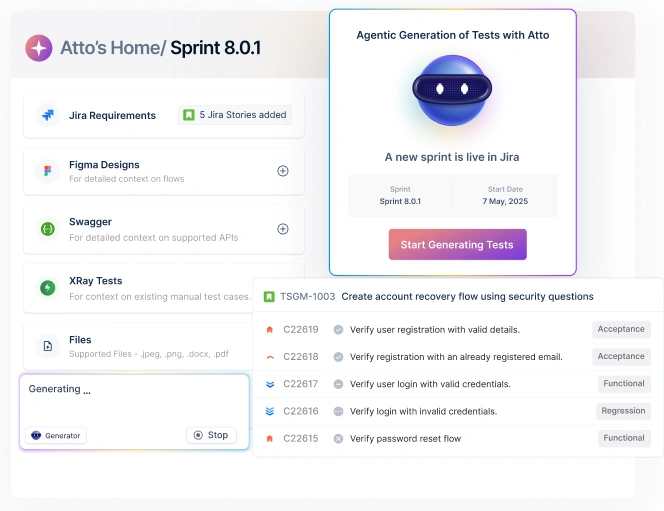
Testsigma is an agentic, AI-driven test automation platform that unifies web, mobile, API, and desktop testing under one cloud-based ecosystem. Designed for modern DevOps and agile teams, it combines natural language test authoring, AI agents for test generation and maintenance, and built-in test management to accelerate QA cycles. Its AI coworker, Atto, automates planning, authoring, execution, and reporting, making it possible for both technical and non-technical users to build reliable automation without writing code.
Key Features
- AI agent Atto deploys agents who handle sprint planning, test creation, execution, and bug reporting autonomously.
- Write tests in plain English using NLP or record user flows with the built-in recorder.
- Automate testing for web, mobile (Android & iOS), API, Salesforce, and SAP in one platform.
- Automatically detect and fix broken locators, reducing maintenance time.
- Run tests across 3000+ browsers, devices, and OS combinations on the cloud or your own grid.
- End-to-end visibility from requirements to execution with built-in reporting and analytics.
Pros
- AI-driven automation drastically reduces test creation and maintenance time.
- Plain English test authoring makes automation accessible for non-technical users.
- Single platform supports web, mobile, API, and ERP testing.
- Self-healing tests automatically fix broken locators and flaky steps.
- Cloud-based parallel testing enables faster execution across 3000+ devices and browsers.
- Integrates smoothly with CI/CD tools like Jenkins, GitHub, and Azure DevOps.
- Built-in analytics and dashboards simplify debugging and reporting.
- Enterprise-grade security with SSO, RBAC, and audit trails.
Cons
- Primarily cloud-based; limited offline or on-premise options.
- Less flexibility for advanced developers who prefer full coding control.
Playwright

Playwright is a modern, open-source end-to-end testing framework developed by Microsoft. It allows teams to automate browsers such as Chromium, Firefox, and WebKit using a single API. Known for its reliability and speed, Playwright eliminates flaky tests by automatically waiting for elements to be ready before performing actions. It’s also cross-platform and supports multiple languages, including JavaScript, TypeScript, Python, Java, and .NET, making it a flexible choice for engineering teams working across diverse tech stacks.
Key Features
- Cross-browser testing with support for Chromium, Firefox, and WebKit
- Works across Windows, macOS, and Linux with easy CI/CD integration
- Supports multiple languages: JavaScript, TypeScript, Python, Java, and .NET
- Auto-wait mechanism reduces flaky tests caused by timing issues
- Built-in parallel test execution for faster suite runs
- Trace Viewer and Codegen tools for recording, debugging, and inspecting test runs
- Mobile web emulation for responsive and device-specific testing
- Rich network interception and mocking capabilities for API and UI testing
- Works seamlessly with frameworks like Jest, Mocha, and Pytest
Pros
- Strong cross-browser and cross-platform capabilities.
- Auto-wait and retry logic ensure reliable, stable tests.
- Excellent debugging tools like Trace Viewer and Playwright Inspector.
- Supports multiple languages, making it easy for teams to adopt.
- Fast parallel execution improves test efficiency.
- Ideal for testing modern, dynamic web applications.
Cons
- Primarily focused on web and mobile web; no native mobile or desktop app automation.
- Requires programming skills, which may not suit non-technical testers.
Selenium

Selenium is an open-source framework for automating web browsers using the W3C WebDriver standard. It supports all major browsers and multiple languages, and with Selenium Grid you can run tests in parallel across machines and platforms. Its large community, mature ecosystem, and broad tooling make it a default choice for cross-browser UI testing at scale.
Key Features
- Cross-browser automation for Chrome, Edge, Firefox, and Safari
- Multi-language support including Java, Python, C#, JavaScript, and Ruby
- WebDriver standard APIs with strong vendor support
- Selenium Grid for distributed and parallel test execution
- Works on Windows, macOS, and Linux in headless or headed modes
- Rich ecosystem of drivers, runners, and cloud grids
- Integrates with popular test frameworks like JUnit, TestNG, Pytest, and NUnit
- Selenium IDE for quick recording and playback of simple flows
- Flexible CI/CD integration via CLI, Docker, and cloud providers
- Large community, docs, and examples for troubleshooting
Pros
- Broadest browser and language coverage for web UI automation.
- Mature ecosystem and community support reduce vendor lock-in.
- Grid enables large-scale parallel testing across environments.
- Works with any major unit or BDD framework.
- Easy to integrate with CI tools and cloud device/browser farms.
Cons
- More boilerplate and configuration than newer frameworks.
- Flakiness can occur without disciplined waits and locator strategies.
- No built-in reporting or test management features.
Cypress

Cypress is a modern, open-source end-to-end testing framework built specifically for front-end web applications. Unlike Selenium, which communicates with browsers externally, Cypress runs directly inside the browser, allowing it to operate natively within the same run-loop as the application. This unique architecture enables faster execution, real-time reloading, and deep visibility into how the app behaves under test. It’s built for developers and QA engineers who need quick, reliable feedback during development and CI/CD workflows. Cypress supports JavaScript and TypeScript, integrates smoothly with CI tools like GitHub Actions, Jenkins, and CircleCI, and is ideal for testing single-page and JavaScript-heavy applications.
Key Features
- Runs directly inside the browser for faster, more stable test execution
- Automatically waits for elements and assertions, reducing flaky test failures
- Real-time reloading with an interactive GUI for debugging
- Time-travel snapshots and detailed logs for easy troubleshooting
- Built-in support for network requests, API stubbing, and mocking
- Native integration with JavaScript and TypeScript frameworks
- Works seamlessly with CI/CD tools for automated test pipelines
- Supports component testing for frameworks like React, Vue, and Angular
- Built-in screenshots and video recording for visual reporting
- Simple configuration and quick local setup across Windows, macOS, and Linux
Pros
- Fast and reliable execution since tests run in the same environment as the app.
- Excellent developer experience with an interactive dashboard and real-time debugging.
- Automatic waits and retries reduce flakiness without custom code.
- Easy setup and minimal configuration make it beginner-friendly.
- Great for testing modern front-end frameworks like React, Vue, and Angular.
- Strong ecosystem and community support for plugins and integrations.
Cons
- Limited to web testing; does not support native mobile or desktop apps.
- Narrow browser coverage compared to Selenium and Playwright (mainly Chromium-based).
- Does not support multi-tab or multi-domain testing well.
Nightwatch.js

Nightwatch.js is an open-source, end-to-end testing framework built for web and mobile applications. Written entirely in JavaScript, it uses the W3C WebDriver protocol and supports running tests across multiple browsers and platforms. Nightwatch.js aims to make automation accessible through a clean, declarative syntax while providing full compatibility with Selenium, Appium, and Chrome DevTools. It’s known for its balance of simplicity and flexibility, allowing both quick setup for small teams and deep configuration for enterprise-scale CI/CD environments.
Key Features
- Supports cross-browser testing using the W3C WebDriver standard
- Built-in test runner with parallel execution and retry logic
- Works with Selenium, Appium, and Chrome DevTools Protocol (CDP)
- Written in JavaScript and runs on Node.js for easy integration with web projects
- Automatic waits for elements and DOM conditions
- Built-in support for BDD with Cucumber integration
- Easy CI/CD setup with Jenkins, GitHub Actions, and GitLab CI
- Command-line test management and flexible configuration options
- Rich built-in assertions, reports, and screenshot capture
- Works for both web and mobile (via Appium) automation
Pros
- JavaScript-based framework that integrates easily with modern web stacks.
- Simple and readable syntax, good for developers and QA engineers alike.
- Strong cross-browser and cross-platform support.
- Works with both Selenium Grid and cloud testing platforms.
- Built-in parallel testing for faster execution.
- Supports BDD for behavior-driven development workflows.
Cons
- Configuration can be complex for large-scale test environments.
- Slower than newer browser-native frameworks like Playwright or Cypress.
Scrapy
Scrapy is a fast, asynchronous Python framework for web crawling and scraping. It provides a full stack for building production-grade spiders—request scheduling, parsing with CSS/XPath, item pipelines for cleaning and storage, throttling, caching, retries, and middleware for headers, proxies, and cookies. Teams use it to extract structured data at scale, and extend it with headless browsers (via Playwright/Selenium or Splash) when pages require JavaScript rendering.
Key Features
- Asynchronous crawling engine (Twisted) with high concurrency and backpressure
- Spiders, items, pipelines, and middlewares for clean, modular architectures
- Powerful selectors (CSS/XPath), link extractors, and a live Scrapy shell for rapid testing
- AutoThrottle, caching, retries, and robots.txt handling for stable large runs
- Feed exports to JSON/CSV (and extensible to databases, data lakes, and queues)
- Middleware hooks for headers, sessions, proxy rotation, and anti-bot tactics
- Easy JS rendering via scrapy-playwright or scrapy-selenium when needed
- Pluggable schedulers/queues for distributed crawling and job orchestration
- Built-in logging, stats, and extensible signals for monitoring and alerts
Pros
- High-performance, production-ready crawling with robust concurrency controls.
- Clean separation of concerns with spiders, pipelines, and middlewares.
- Rich ecosystem and plugins for proxies, JS rendering, storage, and monitoring.
- Easy data export and integration with queues, databases, and cloud storage.
- Pythonic APIs make parsing and data cleanup straightforward.
- Scales well from small scrapes to large, distributed crawlers.
Cons
- Not a browser testing tool; built for scraping rather than end-to-end UI testing.
- JS-heavy sites require Playwright/Selenium integration, adding complexity and runtime cost.
Autoscraper
AutoScraper is a lightweight Python library for quick, rule-free web scraping. Instead of writing CSS/XPath selectors, you give it a sample page and the pieces of data you want; it learns patterns from that example and reuses them on similar pages. It’s handy for simple, static sites where you want fast results without building a full scraping pipeline.
Key Features
- Learns scraping rules from examples you provide (no CSS/XPath needed)
- Reuses the learned rules across similar pages or whole domains
- Simple API that works with plain requests/BeautifulSoup-style workflows
- Save and load trained rules to reuse later in scripts or notebooks
- Minimal setup; a few lines of code to get first results
- Works well for structured, repeatable page layouts and lists
Pros
- Very low code: great for quick prototypes and one-off scrapes.
- Removes selector guesswork by deriving patterns automatically.
- Easy to persist and reuse learned rules across runs.
- Lightweight dependency footprint compared to full frameworks.
Cons
- Best for static HTML; no built-in JavaScript rendering or anti-bot features.
- Patterns can break when page layout changes; limited resilience vs. Scrapy/Playwright.
- Lacks advanced scheduling, throttling, and distributed crawling out of the box.
Browsercat
BrowserCat is a cloud-based headless browser platform that allows developers and QA teams to automate web tasks, generate screenshots, render pages, and scrape data without maintaining their own browser infrastructure. It provides a scalable API interface to run Chromium instances on demand, making it ideal for teams that want automation capabilities without managing servers or complex browser setups. BrowserCat is often used for monitoring, testing, and data extraction in high-volume, production-grade environments.
Key Features
- Hosted headless browsers accessible via REST API or SDKs
- Supports screenshot capture, PDF generation, and page rendering
- Scalable infrastructure for parallel test or scrape execution
- Works seamlessly with CI/CD pipelines and cloud workflows
- Built-in support for custom headers, cookies, and session handling
- Automatic retries and queueing for large-scale workloads
- Compatible with Node.js, Python, and other common programming languages
Pros
- No need to maintain or update your own headless browser infrastructure.
- Highly scalable for parallel execution and heavy workloads.
- Simple API-first model, easy to integrate with any workflow.
- Ideal for web testing, monitoring, and scraping at scale.
- Offers quick setup and minimal maintenance overhead.
Cons
- Cloud-based setup introduces vendor dependency and data privacy considerations.
- Limited control over underlying browser configuration compared to local setups.
- Primarily focused on rendering and scraping, not full test automation.
How to Choose the Right Puppeteer Alternative
Pick a tool that fits what you do most: testing across browsers, large-scale scraping, or both. Use the points below to quickly pressure-test your shortlist against real work.
- Browser and platform support: Confirm true cross-browser coverage (Chromium, Firefox, WebKit) and OS support you need. If Safari parity or mobile web matters, rule out tools that are Chromium-only.
- Language and workflow fit: Match the tool to your team skills. Code-first frameworks suit developer-heavy teams; low-code or AI-assist tools help mixed-skill groups move faster.
- Testing vs scraping focus: Decide your primary job. For testing, look for auto-waits, reliable assertions, tracing, and CI artifacts. For scraping, prioritize concurrency, proxy rotation, request control, and structured export.
- CI/CD and scaling: Check headless runs in containers, parallel execution, retries, and clear exit codes. Make sure it plugs into your pipelines without custom glue.
- Resilience and maintenance: Ask how it handles UI change: stable locators, self-healing, or smart waits. For scraping, check how it deals with JS-heavy pages and anti-bot defenses.
- Reporting and governance: If stakeholders need visibility, look for built-in dashboards, history, and alerts. For larger teams, verify SSO, roles, and audit trails or plan an add-on.
- Cost and hosting: Model seats, usage, and infra. Decide if you want cloud, self-host, or a simple API service. Factor in proxy costs or device grids if you need them.
Conclusion
Puppeteer remains a strong choice for quick, browser-specific automation, but it’s no longer the only option for modern testing and scraping needs. Teams that need cross-browser support, CI scalability, or low-maintenance automation will benefit from exploring newer frameworks like Playwright or Testsigma, while developers focused on scraping or data extraction might prefer tools like Scrapy or BrowserCat. The best alternative depends on your workflow, choose one that matches your team’s technical skill, project scale, and long-term automation goals.
FAQs
Puppeteer is Chromium-focused, code-only, and lacks built-in test management, reporting, and CI/CD orchestration. At scale, teams struggle with cross-browser coverage, flaky selectors, maintenance overhead, and the extra work needed to bolt on dashboards and pipelines.
Playwright is like a next-gen evolution: it supports Chromium, Firefox, and WebKit, multiple languages (JS/TS, Python, Java, .NET), built-in parallelism, auto-waiting, and rich tracing/debugging tools. Puppeteer is mostly Chromium + Node.js, with a narrower feature set.
Testsigma goes beyond a browser library: it’s an agentic, low-code automation platform with AI-generated tests, self-healing locators, built-in test management, reporting, and CI/CD integrations. It supports web, mobile, API, and ERP apps, making it easier for mixed-skill teams to automate at scale.
Tools like Testsigma, Robot Framework, Selenium (with Appium), and Tricentis Tosca can automate web + mobile + API (and sometimes desktop/ERP as well). Puppeteer itself is mainly focused on browser automation.
Yes, but it’s not a drop-in swap. You’ll typically recreate or port your test scripts using Selenium or Playwright APIs, adjust locators, and update your CI setup. Many teams migrate gradually, starting with new flows in Playwright or Testsigma while phasing out older Puppeteer suites.