



Table Of Contents
- 1 Overview
- 2 Why we need AI Agents for Software Testing?
- 3 What Is an AI Agent for Software Testing?
- 4 What Are the 7 Types of AI Agents in Software Testing?
- 5 What Are the Key Features of AI Testing Agents?
- 6 What Is the Role of AI Agents in Software Testing?
- 7 How to Implement AI Testing Agents Using Testsigma
- 8 What Are the Benefits of AI Testing Agents?
- 9 What Are the Challenges of AI Testing Agents?
- 10 What Is the Future of AI Testing Agents?
- 11 Conclusion
- 12 FAQ’s
Overview
- Agentic AI testing uses autonomous agents that plan, generate, execute, and self-heal tests without step-by-step human instruction.
- Self-healing agents auto-fix broken scripts and UI drift, eliminating the maintenance burden that eats up most automation effort.
- There are 7 agent types, from simple reflex agents to multi-agent crews that parallelize across UI, API, and performance layers.
- AI agents map your feature tree, flag untested paths, and generate edge cases that human testers consistently miss.
- Teams using agentic AI testing ship more frequently with near-zero maintenance overhead and fewer escaped defects.
Why We Need AI Agents for Software Testing?
AI agents for software testing do the heavy lifting your QA team shouldn’t be doing manually anymore. They write test cases, run them, fix broken scripts when your app changes, and flag bugs, all on their own. No more spending days maintaining tests that break every sprint. No more guessing what you missed. This guide covers what AI testing agents are, how they work, the different types, and how to actually put them to use.
What is an AI Agent for Software Testing?
An AI testing agent is a smart system that handles your testing work automatically. It writes tests, runs them, checks results, and fixes broken scripts when your app changes, without you doing it manually.
Think of it as a tireless QA teammate. It takes care of the repetitive, boring stuff so your team can focus on the work that actually needs human thinking.
How Does an AI Testing Agent Work?
Every AI testing agent runs on four basic parts working together:
| Subsystem | What It Does |
| Perception Module | Look at your app’s current state: the UI, APIs, and code changes |
| Memory | Remembers past test runs, known bugs, and patterns |
| Planning Engine | Decides what to test next based on risk and what’s been missed |
| Execution System | Runs the tests, fixes broken scripts, and logs failures |
Here’s how it all comes together: the agent first studies your app and past test data. Then it reads your requirements, written in plain English, and turns them into actual test cases. As tests run, it spots failures, catches flaky tests, and updates scripts whenever your UI changes. Your test suite stays up to date without anyone touching it.
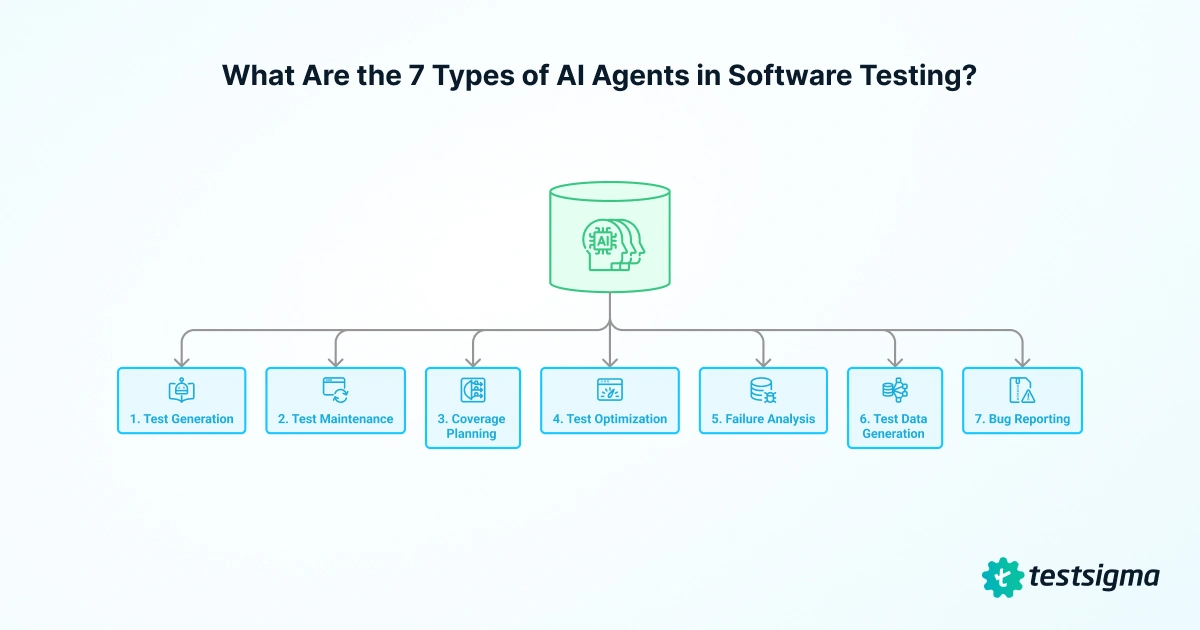
What Are the 7 Types of AI Agents in Software Testing?
Forget the textbook classifications. What matters is what these agents do for your team day to day.
| Agent Job | What It Does |
| Test Generation | Takes a requirement, user story, Figma design, or Jira ticket and writes test cases with steps, expected results, and edge cases. No scripting needed. |
| Test Maintenance | Detects when your app changes, selectors break, or UI shifts and updates the affected tests automatically. This is what “self-healing” means. |
| Coverage Planning | Maps your app’s features against existing tests, shows you exactly what’s not being tested, and suggests tests to fill the gaps. |
| Test Optimization | Look at recent code changes, risk areas, and past failures to decide which tests to run first so your CI pipeline isn’t wasting hours on everything. |
| Failure Analysis | Classifies failures, flags flaky tests, identifies root causes, and in some cases resolves issues on its own before your team even sees the report. |
| Test Data Generation | Creates realistic, diverse test data across scenarios so you’re not copy-pasting the same three inputs into every test run. |
| Bug Reporting | Captures screenshots, logs, and reproduction steps when something breaks, then packages it into a structured report ready for Jira, Linear, or your tracker of choice. |
What Are the Key Features of AI Testing Agents?
Not all AI testing tools are built the same. But the ones worth evaluating share these core capabilities:
1. Natural Language Processing (NLP)
Write test cases in plain English. NLP removes the coding barrier, making test automation accessible to business analysts and manual testers, not just developers.
2. AI-Powered Insights
Real-time analysis surfaces flaky tests, recurring failure patterns, and root causes, helping teams reduce mean-time-to-resolution (MTTR) across sprint cycles.
3. Adaptability and Self-Learning
Self-healing capabilities automatically detect UI and API changes, then update affected test scripts. This eliminates the maintenance overhead that breaks traditional automation suites.
4. Broader Test Coverage
Agents identify untested user flows and edge cases based on usage patterns and application structure, systematically closing coverage gaps that human testers miss.
5. Autonomous Bug Detection
When a test fails, the agent classifies severity, packages logs and screenshots, and creates a structured bug report ready to file directly into Jira, Linear, or your tracker of choice.
What is the Role of AI Agents in Software Testing?
AI agents don’t just run tests. They take over the entire testing workflow, from writing test cases to reporting bugs. Here’s what that looks like in practice:
- Test Case Generation: AI agents read user stories, Figma designs, Jira tickets, code commits, and past defect data, then generate test cases automatically. No manual scripting required.
- Smart Test Execution: Agents prioritize tests based on risk, recent code changes, and business impact, then run them on their own. High-priority paths always get tested first, even when your CI/CD pipeline is short on time.
- Self-Healing Scripts: When a UI element, selector, or API endpoint changes, the agent detects it and updates the test script on its own. Tests stop failing because of normal product updates, not actual bugs.
- Wider Test Coverage: Agents map your app’s components and compare them against past test runs. They spot under-tested paths and generate new scenarios to cover them, reaching coverage levels that would be impossible to hit manually.
- Faster Automation: Agents handle test creation, prioritization, execution, and reporting all at once. What used to take days now takes hours.
- Real-Time Reporting: Dashboards show failure trends, root causes, coverage gaps, and quality over time. Engineering and product leads get the signal they need to ship with confidence.
How to Implement AI Testing Agents Using Testsigma
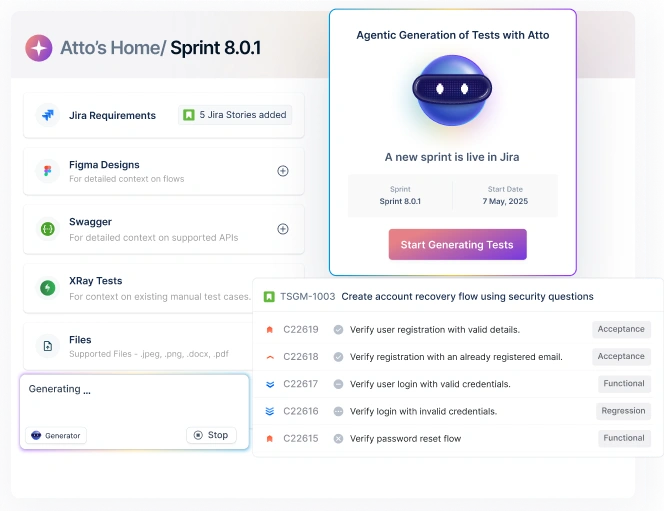
Testsigma comes with a built-in crew of AI agents that handle each stage of your testing workflow. Here’s how to go from requirements to automated bug reports in four steps.
Step 1: Generate Tests From Requirements
- Connect your sources. Link Testsigma to Jira, Figma, GitHub, or upload docs and videos directly.
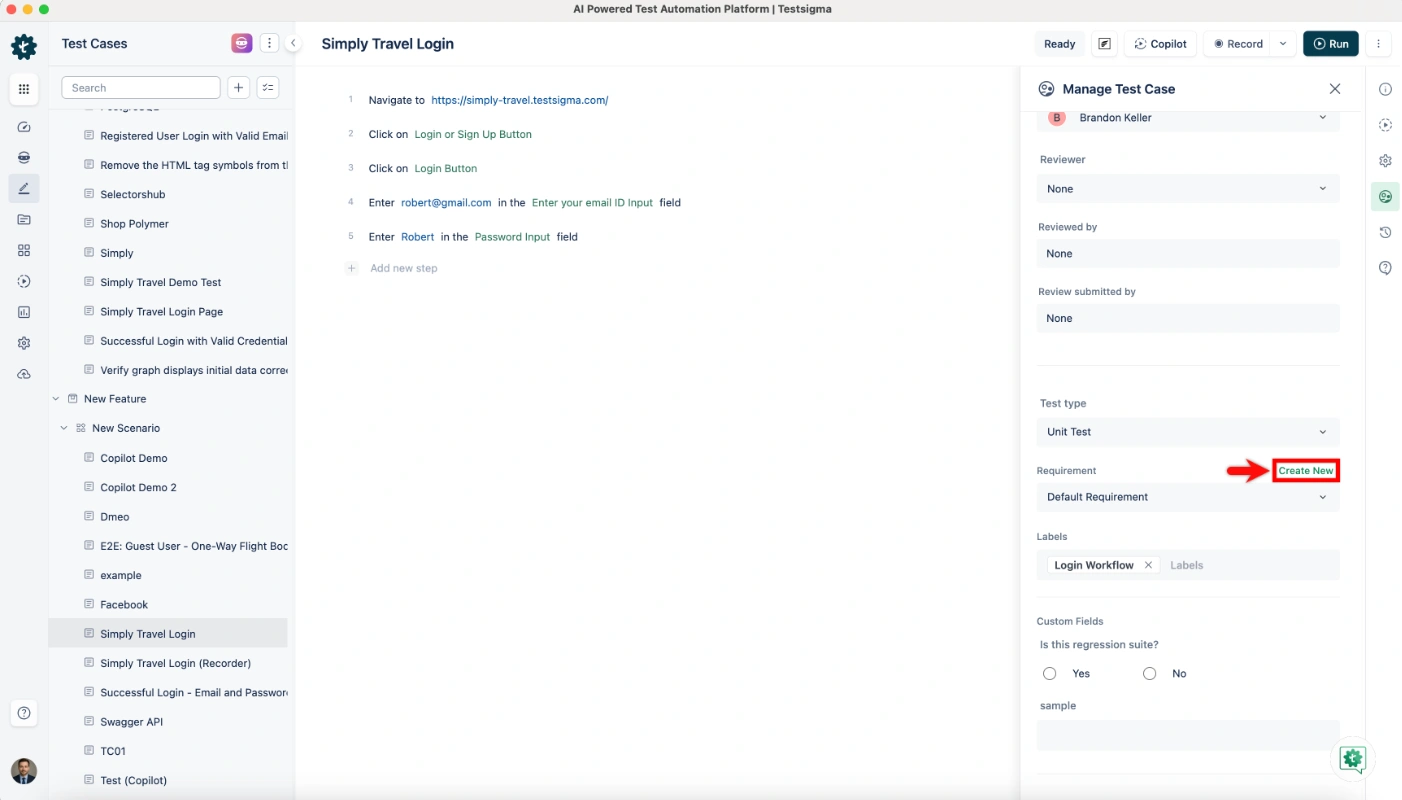
- Paste your requirement. Drop in a user story or acceptance criteria in plain English.
- Review what the Generator Agent creates. You get structured test cases with steps, expected results, and edge cases ready to go.
Step 2: Fill Coverage Gaps
- Run the Coverage Planner Agent. It maps your existing tests against your app’s feature tree.
- See what’s missing. The agent highlights untested flows and suggests new test scenarios.
- Accept and generate. One click adds the missing tests. No scripting required.
Step 3: Execute and Maintain Tests
1. Connect to your CI/CD pipeline. Testsigma works with GitHub Actions, Jenkins, Azure DevOps, CircleCI, and more.
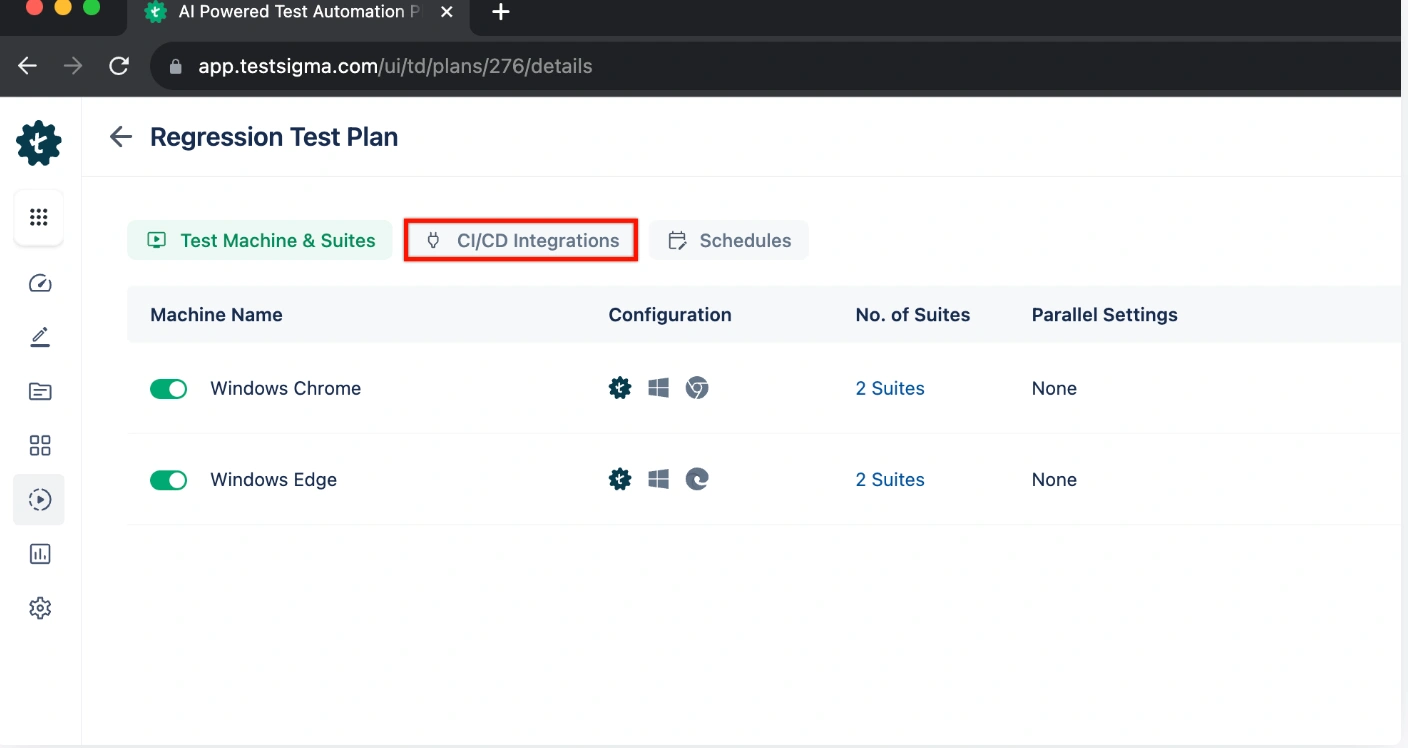
2. Let self-healing handle the breakages. The Maintenance Agent watches every run and fixes broken locators in real time.
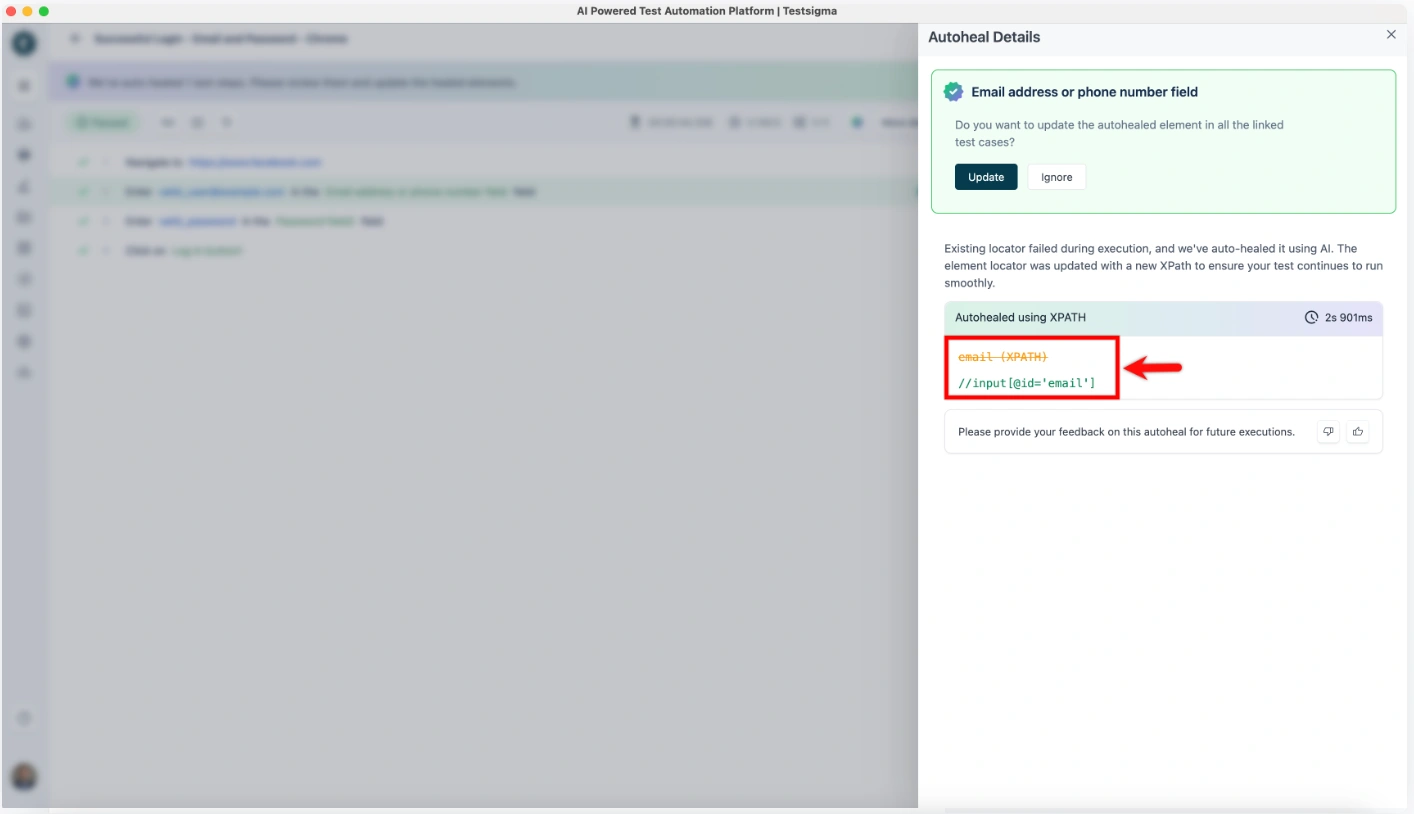
3. Check the Analyzer Agent’s report. It flags flaky tests, shows root causes, and lists what it already resolved on its own.
Step 4: Report Bugs Instantly
1. The Bug Reporter Agent kicks in on failure. It captures screenshots, logs, and reproduction steps automatically.
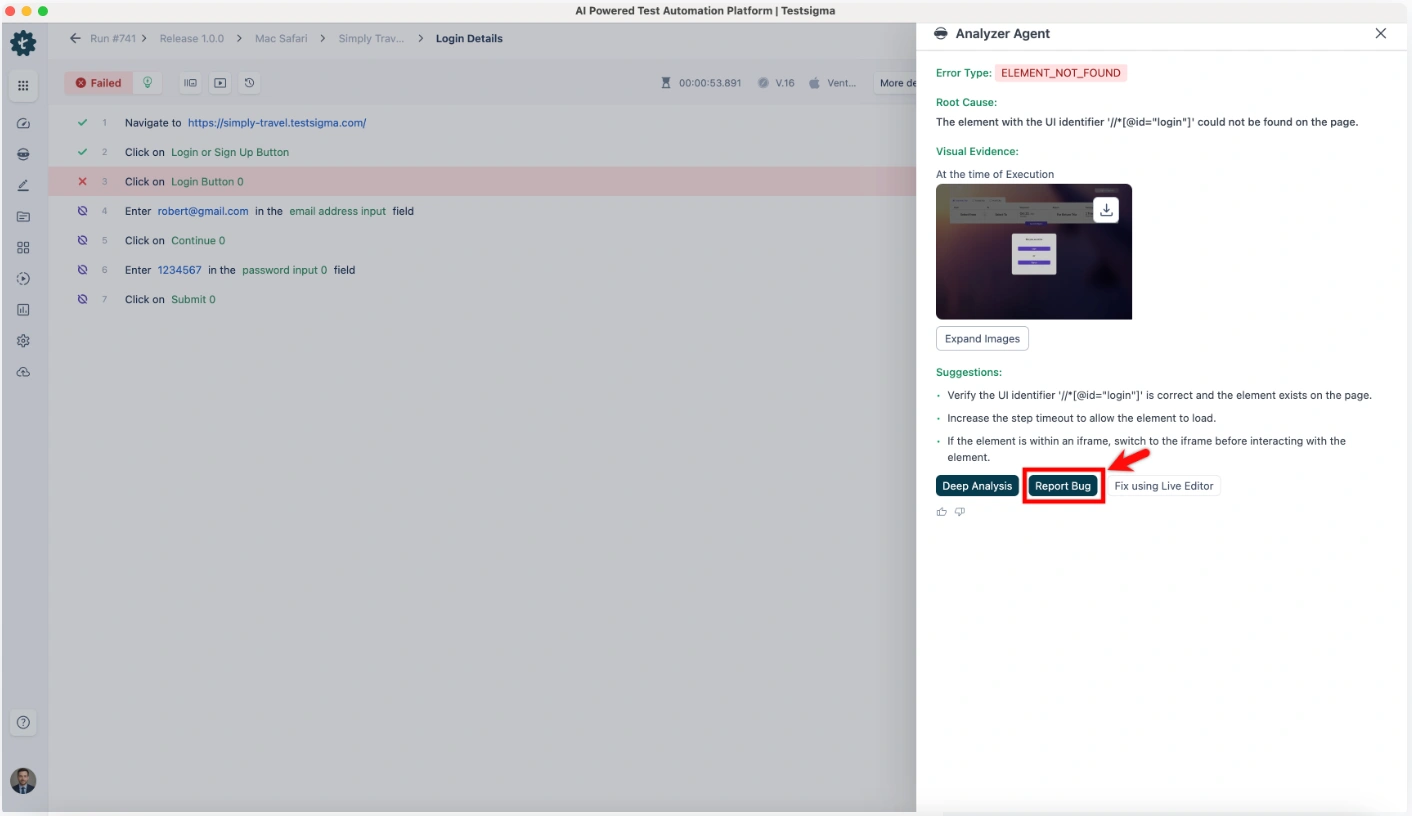
2. Push to your tracker. Testsigma connects to Jira, Linear, GitHub Issues, and 30+ other platforms.
Testsigma’s AI Agent Crew (Atto)
| Agent | What It Does | Key Integration |
| Generator Agent | Creates test cases from NL, Figma, JIRA, videos, and docs | JIRA, Figma, GitHub |
| Data Generator Agent | Auto-generates test data for diverse scenarios | Test Data Profiles |
| Coverage Planner Agent | Finds gaps and suggests new tests | Feature tree mapping |
| Optimizer Agent | Updates tests based on code, API, and behavior changes | CI/CD pipelines |
| Analyzer Agent | Flags flaky tests, performs root cause analysis, and auto-resolves | Slack, email alerts |
| Maintenance Agent | Auto-heals broken scripts when the app changes | Web + Mobile + API |
| Bug Reporter Agent | Packages logs, screenshots, and steps on failure | Jira, Linear, GitHub |
What Are the Benefits of AI Testing Agents?
AI testing agents don’t just save time. They change how your team operates across the entire testing cycle.
- Faster Test Cycles: Agents handle test creation, prioritization, and execution all at once. Teams using AI testing agents report up to 10x faster test development compared to manual scripting.
- Reduced Maintenance: Self-healing agents detect and fix broken tests on their own. No more burning hours every sprint updating scripts that broke because someone moved a button. Teams see up to 90% less manual script maintenance.
- Wider Coverage: Coverage planning agents map your app and flag untested paths and edge cases automatically. You stop finding out about gaps when users hit them in production.
- Smarter Prioritization: Agents order tests by risk, recent changes, and business impact. Critical bugs get caught earlier in the pipeline, not at the end of a 4-hour test run.
What Are the Challenges of AI Testing Agents?
AI testing agents aren’t magic. They come with real challenges you should know about before adopting them.
Data quality matters more than you think. AI agents learn from your existing test data. If that data is messy, inconsistent, or sparse, the agents will miss edge cases or generate useless tests. Before you roll out any AI testing tool, invest time in cleaning up your test data and naming conventions.
Garbage in, garbage out still applies.
Setup takes some effort upfront. Connecting AI agents to legacy CI/CD pipelines and existing test frameworks isn’t plug-and-play. Platforms like Testsigma make this easier with 30+ pre-built integrations and no-code setup, but enterprise teams should still plan for a 2 to 4 week onboarding window to get everything running smoothly.
What is the Future of AI Testing Agents?
AI testing agents are already useful today. But what’s coming next will change how QA teams operate even further.
Agents will work together as a team. Right now, most agents operate in silos. The next wave will feature agents that specialize in different areas like UI, performance, and security testing, then share findings with each other through a shared memory layer.
One agent’s insight will make every other agent smarter.
Exploratory testing will get a co-pilot. Instead of relying on gut feel, testers will have agents that dynamically point them toward high-risk and under-tested areas. Manual judgment stays in the loop, but it gets directed where it matters most.
Tests will mirror real user behavior. Future agents will pull from real usage analytics and session recordings to build test cases based on how people actually use your product, not just how your team thinks they use it. QA shifts from feature-driven to user-centric.
Conclusion
AI testing agents are production-ready today. They compress test cycles, eliminate maintenance overhead, and surface quality signals faster than any manual process can.
As release cycles get shorter and apps get more complex, the question isn’t whether to adopt AI testing. It’s which platform gets you there fastest.
Testsigma’s seven-agent crew gives QA teams a complete, codeless path from requirements to production-quality automation, without writing a single line of test code.
FAQ’s
AI agents can be used for various purposes in testing. Some of which are:
– Test case generation
– Self healing
– Automated bug reporting
– Adapting to code changes, etc.
2. What are the AI agent tools that automate QA testing?
Agentic AI test automation platforms like Testsigma use AI agents for software testing to automate test creation, execution, maintenance, and reporting. These AI testing agents help QA teams save time, reduce manual effort, and improve test coverage by intelligently handling repetitive and complex testing tasks.
3. What is the Difference Between an AI Agent and a Workflow?
The major difference between an AI agent and a Workflow is in decision-making and its ability to be autonomous.
AI Agent: It isan intelligent software system that learns and makes decisions
Workflow: It is a predefined sequence of steps or actions
Leading options include Testsigma’s Atto, mabl, testRigor, Functionize, and coding agents like Claude Code and Devin for code-level tests. Atto is a crew of specialized agents: Sprint Planner, Generator, Executor, Analyzer, Healer, and Bug Reporter. Together they plan tests when a sprint starts, write them from requirements, run them across 3000+ browsers and devices, fix broken tests, and log bugs with screenshots and logs, while testers stay in control of approvals.
An enterprise-ready testing agent needs human-in-the-loop controls, audit trails, broad platform coverage, and enterprise security. Testsigma’s Atto keeps testers in control by letting them pause, refine, or re-run anything an agent generates or executes, covers web, mobile, API, Salesforce, and desktop, and runs on a platform with SSO and public, private, or on-prem deployment options. Two-way Jira sync and CI/CD integrations let agents fit existing enterprise workflows instead of replacing them.
Start with an AI testing platform rather than building your own agent framework. With Testsigma, the Generator Agent writes E2E tests from your user stories, you pick browser and OS combinations from the cloud lab, and you trigger runs from Jenkins, GitHub, GitLab, Azure DevOps, or CircleCI on every build. The Executor runs tests in parallel, the Healer fixes locator changes, and results post back to the pipeline and to Slack or Teams.