
Table Of Contents
- 1 Key Takeaways
- 2 What Is Test Management?
- 3 What Are the 5 Components of Test Management?
- 4 How Do You Do Test Management? (Step-by-Step Process)
- 5 Who Owns Test Management?
- 6 What Are the Benefits of Test Management?
- 7 What Are the Challenges in Test Management?
- 8 Test Management vs Google Sheets: When Do Spreadsheets Stop Working?
- 9 What Should You Look For in a Test Management Tool?
- 10 How to Implement Test Management Using Testsigma
- 11 How Does Testsigma Go Beyond a Basic Test Management Tool?
- 12 Test Organization and Structure
- 13 Best Practices for Test Management
- 14 Conclusion
Key Takeaways
- Test management is the practice of planning, organizing, executing, and tracking software testing activities in one coordinated system.
- It covers five components: documentation, estimation, metrics, progress tracking, and lifecycle (STLC) tracking.
- The process runs in two phases: Planning (risk analysis, estimation, test planning, organization) and Execution (monitoring, controlling, issue management, reporting).
- Market signal: according to TestRail’s Software Testing & Quality Report, roughly 74% of QA teams still run functional testing manually — and manual testing is overwhelmingly where spreadsheet-based tracking lives, which is exactly where test management tools start replacing Excel/Google Sheets.
- Test Management by Testsigma unifies manual and automated testing, AI-assisted test creation, and reporting in one workspace — no separate tool for execution vs. reporting vs. defects.
What is Test Management?
Test management refers to organizing and controlling all test-related activities — test case creation, execution, defect tracking, and reporting — to ensure consistent, high-quality software delivery. It relies on a dedicated Test Management System (TMS) to manage both manual and automated tests defined by a test procedure.
A 2002 NIST study, The Economic Impacts of Inadequate Infrastructure for Software Testing, put the annual cost of inadequate software testing in the US at $22 billion to $59 billion — a figure that has almost certainly grown given how much more software-dependent business has become since. The global software testing market itself has grown to roughly $55.6 billion in 2024, with projections putting it near $145.84 billion by 2037, largely driven by shift-left testing practices that catch defects earlier.
Why it matters:
- On-time product delivery
- More consistent, predictable releases
- Higher customer satisfaction through fewer post-release defects
What Are the 5 Components of Test Management?
| Component | What It Covers |
| Test Documentation | Procedures, developments, metrics, and outcomes — the record of what was tested and how |
| Test Estimation | Predicting time and effort needed for each test activity, for accurate planning |
| Test Metrics | Defect density, test coverage, execution time — measurable quality and progress signals |
| Test Progress Measurement | Defects found, effort to fix them, undetected defects, unexecuted cases |
| STLC Metrics | Tracking the test plan, analysis, implementation, execution, and closure stages of the Software Testing Life Cycle |
How Do You Do Test Management? (step-by-step Process)
Test management runs in two phases: Planning and Execution.
Planning Phase
- Risk analysis: list what could hurt quality or timelines before work starts: unclear requirements, a compressed schedule, missing test environments, gaps in tester skill. Output: a risk register, ranked by likelihood and impact.
- Test estimation: estimate hours or person-days per test phase using past project data or a technique like three-point estimation. This is what your schedule and headcount get built on.
- Test planning: write down scope, strategy, objectives, exit criteria, staffing, and timelines in a test plan document. This is the reference everyone checks when a decision is disputed later.
- Test organization: assign a test lead, testers, and an environment owner, and set who reports to whom. Someone owns each test type (functional, regression, performance) by name, not by team.
Execution Phase
- Monitoring and control: compare actual progress to the plan: test cases run vs. planned, defects found, time spent vs. budgeted.
- Process monitoring: record what happened each day or sprint: who ran which tests, what passed, what failed, and why.
- Controlling: when actuals drift from the plan, act: reassign testers, cut scope, or push the deadline. Decide which lever to pull and document why.
- Issue management: log and triage unplanned problems, like a broken test environment or missing test data, before they turn into full risks.
- Test report and evaluation: summarize coverage percentage, defect count and severity, and pass rate, so stakeholders can make a go/no-go call on release readiness.
Who Owns Test Management?
Not every QA team needs a dedicated test manager, but someone has to own the role. The test lead or manager owns scope definition, team leadership, resource management, test metrics, and final execution oversight, and coordinates between developers and the rest of the testing team. In smaller teams this role gets shared across people, but the work itself (planning, monitoring, reporting) doesn’t disappear just because no one has the title.
What Are the Benefits of Test Management?
Test management reduces defects, indirectly but measurably. According to data compiled by ideyaLabs, teams using dedicated test case management report up to 40% improvement in testing efficiency, and 65% of testing professionals cite poor test organization as a major cause of quality issues in the first place. Structured test management fixes that root cause directly: Every test case gets a traceable owner, status, and history.
It also speeds up bug detection. Teams using modern test management tools identify critical bugs up to 30% faster than teams relying on manual, spreadsheet-based methods, per the same ideyaLabs analysis. The main reason: Defects are linked directly to the test case and run that found them, instead of tracked in a separate document.
Other benefits:
- Builds traceable product metrics over time, so you can compare release quality quarter over quarter.
- Surfaces weak spots in the testing process early, before they show up as production bugs.
- Confirms the software is fit for purpose before release, with evidence, not just a gut check.
What Are the Challenges in Test Management?

- Limited resources or time: Testers get pulled onto other work mid-cycle, and test cycles get compressed when deadlines slip elsewhere.
- Budget and schedule constraints: Tooling, environments, and headcount all compete with the rest of the project’s budget.
- Complex, evolving requirements: Test cases written against one version of a spec go stale the moment the spec changes.
- Missing or outdated test documentation: Without an owner keeping it current, test plans and case libraries drift from what the product actually does.
Test Management Vs Google Sheets: When Do Spreadsheets Stop Working?
A common early-stage setup is tracking test cases in Google Sheets or Excel. It works — until the team or suite grows. As a practical rule of thumb, spreadsheet-based test tracking starts to break down around 200–300 active test cases, or once 3+ people are testing in parallel.
| Factor | Google Sheets / Excel | Dedicated Test Management Tool |
| Test case organization | Manual rows/tabs; breaks down past ~200–300 cases or across multiple projects | Structured repository with folders, templates, and reuse |
| Defect linking | No native link between a test case and its bug — tracked separately, easy to lose sync | Bugs tied directly to the test case and run that found them |
| Execution history | Editing a cell overwrites the previous value — no record of who changed what or why | Full version history per test case, audit-ready |
| Real-time visibility | Can’t tell who is executing which test right now — just cells being updated manually | Live run status, pass/fail history, and coverage tracked automatically |
| Reporting | Manual pivot tables and charts, rebuilt from scratch every time | One-click dashboards for coverage, defect trends, execution velocity |
| Automation/CI integration | None — fully manual | Connects to CI/CD pipelines (Jenkins, CircleCI) and issue trackers (Jira, Linear) |
| Best fit | A solo tester or small team tracking a few dozen cases | Any team scaling test volume, running regression cycles, or needing traceability |
Bottom line: a spreadsheet isn’t a mistake — it’s a stage. It’s genuinely faster than any dedicated tool for a handful of test cases. The honest question isn’t “are spreadsheets bad,” it’s “have we outgrown ours” — and for most teams, that point arrives earlier than expected.
What Should You Look for in a Test Management Tool?
Before picking a tool, check whether it:
- Supports test plans, test cases, and user stories: So requirements, coverage, and execution stay linked instead of living in three separate places.
- Manages test runs and tracks progress in real time: You should see what’s running, what’s passed, and what’s blocked without asking someone for a status update.
- Generates test reports: Coverage, pass/fail rates, and defect trends, without you rebuilding a pivot table every cycle.
- Handles bug tracking natively: A failed test should create or link a bug directly, not send you to a separate tracker to re-enter the same details.
- Offers CSV import/export: So you can migrate existing test cases in or pull data out without being locked into the tool.
- Integrates with your CI/CD pipeline and issue tracker: Jenkins, Jira, or whatever your team already runs, so results sync automatically instead of getting copied by hand.
How to Implement Test Management Using Testsigma
Testsigma’s Test Management (TMS) module is built into its broader AI-powered test automation platform, so manual and automated testing live in one workspace instead of two disconnected tools.
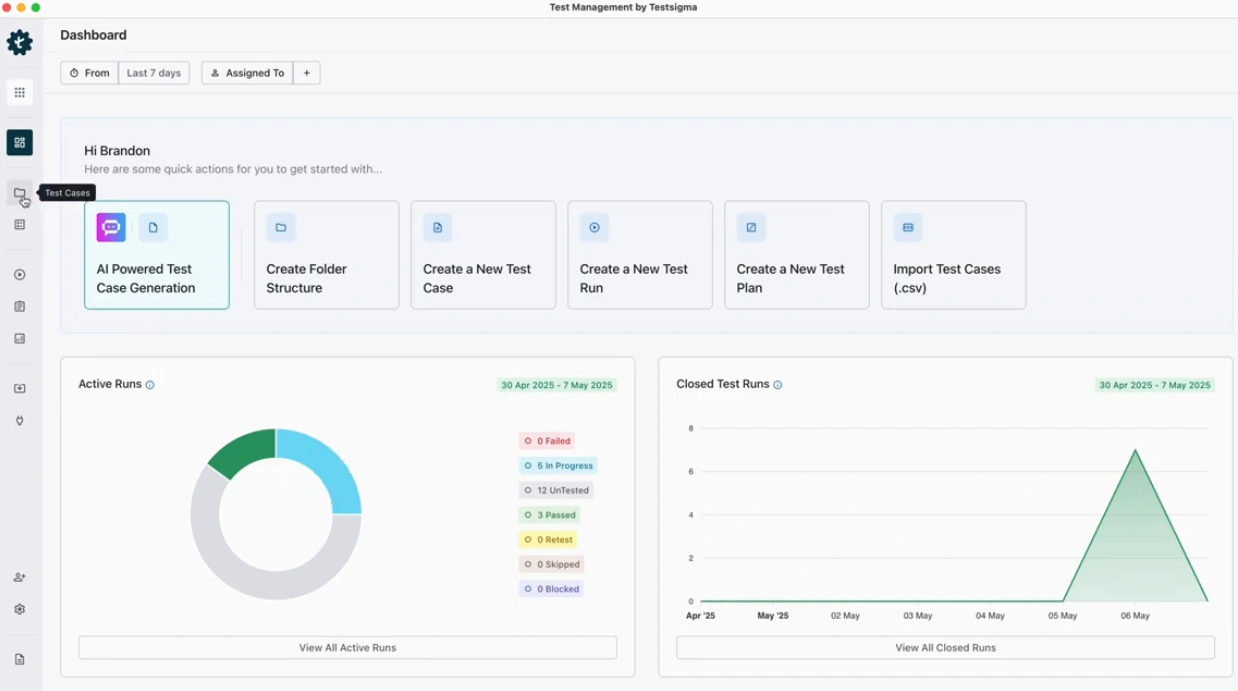
- Create a Project and folder structure to organize test cases by module or feature
- Build test cases — use pre-made templates or step-by-step creation; reuse steps across cases instead of duplicating them
- Import existing test cases from TestRail or BrowserStack via CSV if migrating from another tool
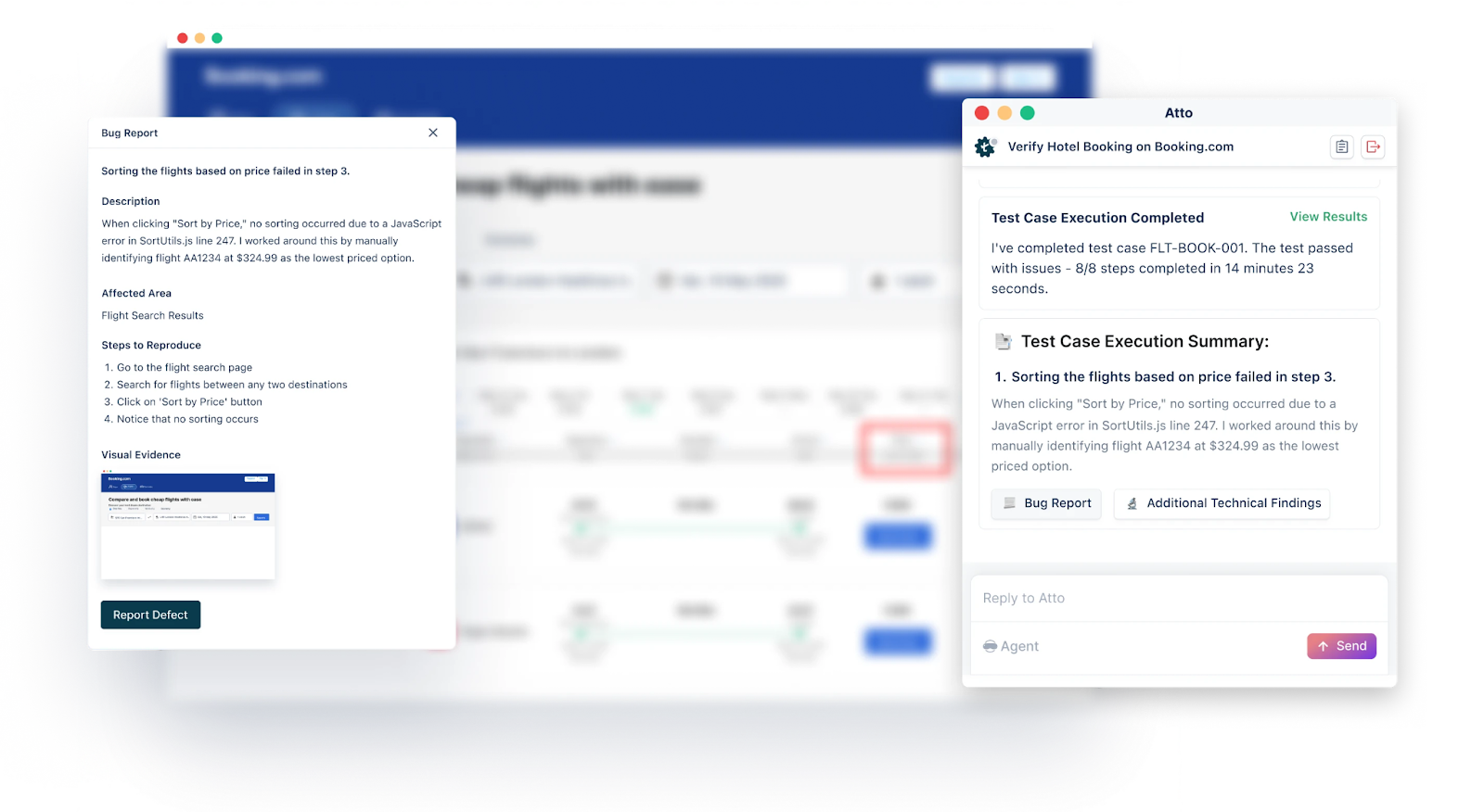
- Link defects directly from a failed test case, keeping the bug tied to the run and step that found it
- Run tests across devices/browsers and pull real-time status into dashboards
- Integrate with CI/CD and issue trackers (Jenkins, CircleCI, Jira, Linear) so results and defects sync automatically
Testsigma also layers AI-assisted test generation on top of this — generating test cases from Jira stories, Confluence pages, or Figma flows — which spreadsheets and most legacy TMS tools can’t do.
How Does Testsigma Go beyond a Basic Test Management Tool?
| Limitation of Spreadsheets / Legacy TMS | Testsigma Solution | Key Metric |
| No native defect linking | Bugs reported and linked directly from the failing test case/run | Zero manual cross-referencing |
| Manual, disconnected execution tracking | Real-time run dashboards across manual + automated tests | Single workspace, no tool-switching |
| Test creation requires manual scripting or data entry | AI-generated test cases from Jira stories, Figma flows, PRDs, or session videos | No-code test authoring |
| Fragmented CI/CD setup per tool | Native integrations with Jenkins, CircleCI, Jira, Linear, ClickUp | 30+ native integrations, more via Azure DevOps (coming) |
| Pay for a full platform regardless of use | Pay-as-you-go — core TMS free, premium AI features metered | Premium plans start at $14/user/month |
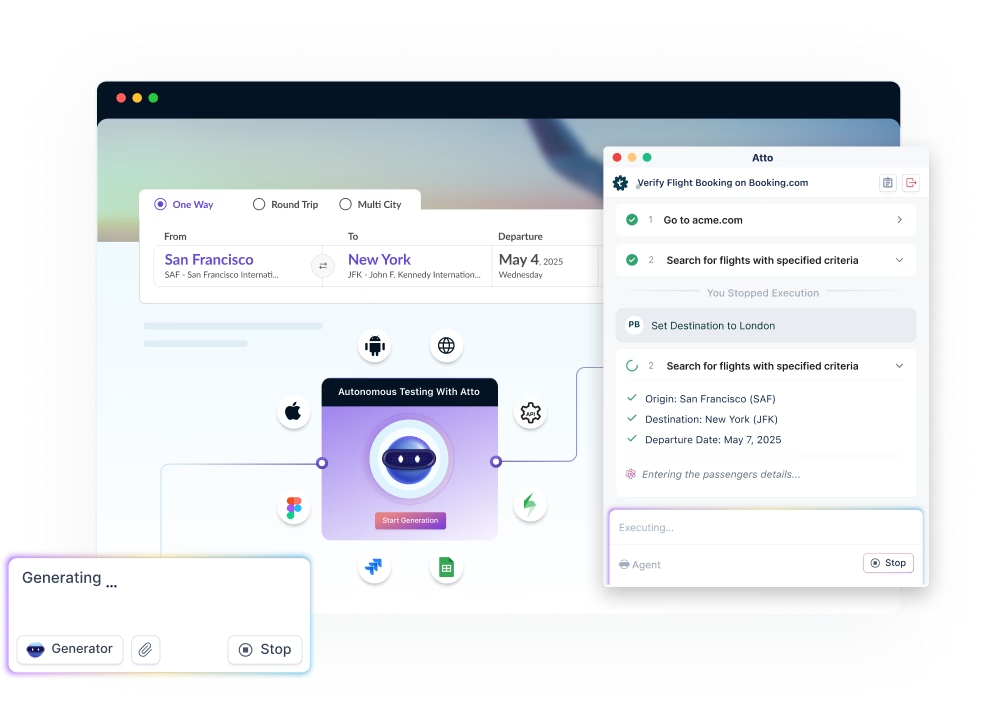
| No AI assistance in planning or bug reporting | Atto AI agents handle sprint planning, test generation, execution, and context-aware bug reporting | World’s first agentic AI-powered TMS |
Test Organization and Structure
Company size changes how test management should be structured. Smaller companies often use a matrix structure, where testers get shared flexibly across projects as demand shifts. Larger companies typically use a functional structure, with dedicated testing teams tied to specific products or modules. That gives clearer accountability, but adds coordination overhead when a feature spans multiple teams.
Neither structure is universally right. The choice depends on team size, company goals, and the resources you actually have to work with.
Best Practices for Test Management
- Use iterative testing: Build test assets incrementally instead of front-loading everything before execution starts.
- Start testing early in the SDLC: A bug caught in requirements review costs far less to fix than one caught after release.
- Track time efficiency, not just coverage: A 95% pass rate that took 3 extra weeks to hit isn’t a win. Watch both numbers.
- Reuse test assets: Cases, procedures, and steps should get reused across cycles, not rebuilt from scratch each time.
- Coordinate testers working on the same feature: Two people testing the same module without visibility into each other’s work end up duplicating cases or missing gaps.
- Base your test strategy on actual requirements: A generic template misses the edge cases specific to what you’re actually shipping.
- Adopt DevOps practices: Shorter dev-test feedback loops mean defects get caught and fixed while the context is still fresh.
- Keep the process flexible per project: A strategy built for a 2-week sprint won’t fit a 6-month enterprise release, and shouldn’t be forced to.
- Communicate status and blockers clearly: Stakeholders shouldn’t have to ask where things stand or what’s holding up sign-off.
- Automate where it compounds: Regression suites, CI triggers, and reporting pay off every cycle. One-off manual tests usually don’t need it.
Conclusion
Test management is what turns testing from a scattered, spreadsheet-tracked activity into a coordinated, auditable process — one with clear ownership, traceable defects, and real-time visibility into release readiness.
Spreadsheets are a reasonable starting point, but most teams outgrow them well before they expect to: around 200–300 test cases, or the moment more than a couple of people start testing the same feature in parallel.
Platforms like Test Management by Testsigma close that gap without forcing a switch to a separate automation tool later — manual testing, automated testing, AI-assisted test generation, and defect tracking all live in the same place.