

Automated AI-Powered Cross-Device Testing
Powered by agents, driven by you.
Ensure your applications work seamlessly across browsers, devices, and operating systems without managing complex infrastructure. With Testsigma, cross-device testing stays simple, scalable, and maintenance-free with AI Agents and unified automation.
Run cross-device tests across Chrome, Firefox, Safari, Edge, and more on Windows, macOS, and Linux with unlimited browser and device configurations
Validate native iOS and Android apps using mobile automation, advanced element inspection, OTP handling, and parallel executions
Execute tests across cloud infrastructure, local devices, or real devices, giving teams the flexibility to test anywhere


Get started with Testsigma
By signing up, you agree to our Privacy Policy.
















Scale Cross-Device Testing with
Agentic AI and No-Code
![[object Object]](https://website-static.testsigma.com/website-next/nextjs/d59bce/images/industry/finance/icons/i-desktop-mobile.webp?format=webp&w=128&q=75 "[object Object]")
Identify Critical Device &
Browser Coverages
Use AI Agents to identify high-risk device, browser, and OS combinations based on your application usage. Convert these insights into a focused cross-device testing strategy that ensures real user environments are covered.
![[object Object]](https://website-static.testsigma.com/website-next/nextjs/d59bce/images/industry/finance/icons/i-file-clock.webp?format=webp&w=128&q=75 "[object Object]")
Create Tests Without
Coding
Build cross-device automated tests using the Generator Agent, NLP steps, Record, and data-driven inputs without writing scripts. AI assistance accelerates test creation while keeping tests easy to update as your application evolves.
![[object Object]](https://website-static.testsigma.com/website-next/nextjs/d59bce/images/industry/finance/icons/i-check-list.webp?format=webp&w=128&q=75 "[object Object]")
Validate Mobile and Web
Experiences
Test web and native mobile apps across browsers, operating systems, and device configurations. Use Mobile Inspector, OTP handling, and emulator or simulator environments to validate real user journeys.
![[object Object]](https://website-static.testsigma.com/website-next/nextjs/d59bce/images/industry/finance/icons/i-ai-star.webp?format=webp&w=128&q=75 "[object Object]")
Run Tests in Parallel Across
Devices
Scale cross-device testing with parallel executions across browsers, mobile devices, and platforms. Testsigma supports large-scale testing across thousands of devices and browser combinations without slowing release cycles.
![[object Object]](https://website-static.testsigma.com/website-next/nextjs/d59bce/images/industry/finance/icons/i-ai.webp?format=webp&w=128&q=75 "[object Object]")
Keep Tests Stable with
Auto-Healing
Reduce maintenance with AI-powered auto-healing that adapts to UI changes automatically. This keeps cross-device tests stable across browsers and devices, even as your application evolves.
Testsigma vs Top Players
Cross-Device Testing
Best for
Test creation
Adoption
Maintenance
Execution
Strength

End-to-end cross-device testing in one platform
Agentic AI, NLP, record & playback, reusable steps
Easy for QA teams, even without coding
Self-healing reduces test upkeep
Real devices, browsers, cloud, and local testing
One platform for creation, execution, and maintenance

Device cloud for existing frameworks
Script-based
Best for teams with existing frameworks
Framework maintenance stays with the team
Large device cloud
Broad device infrastructure

Cloud-based browser and device testing
Framework-led
Better for framework-based teams
Depends on framework setup
Scalable cloud execution
Flexible cloud testing

Enterprise-scale test execution
Script-based
Better for mature automation teams
Depends on framework setup
Large-scale cloud execution
Enterprise infrastructure
How to Automate Cross-Device Testing
Identify Priority Devices and Browsers
Start with the browsers, devices, and operating systems your users rely on most.
![[object Object]](https://website-static.testsigma.com/website-next/nextjs/d59bce/images/industry/finance/icons/i-workflow.webp?format=webp&w=128&q=75 "[object Object]")
Define Test Scenarios and Coverage
Choose the core workflows that must work across environments, such as login, checkout, onboarding, or payments.
![[object Object]](https://website-static.testsigma.com/website-next/nextjs/d59bce/images/industry/finance/icons/i-automated-integration.webp?format=webp&w=128&q=75 "[object Object]")
Create Cross-Device Tests
Build automated tests using no-code steps, NLP, record and playback, or AI-assisted test creation.
![[object Object]](https://website-static.testsigma.com/website-next/nextjs/d59bce/images/industry/finance/icons/i-sync-saved.webp?format=webp&w=128&q=75 "[object Object]")
Run Across Devices and Browsers
Execute tests across desktop and mobile environments using cloud, local, or real-device infrastructure.
![[object Object]](https://website-static.testsigma.com/website-next/nextjs/d59bce/images/industry/finance/icons/i-recursion-handle.webp?format=webp&w=128&q=75 "[object Object]")
Add Validations for UI and Functionality
Check user actions, page behavior, responsiveness, and visual consistency across environments.
![[object Object]](https://website-static.testsigma.com/website-next/nextjs/d59bce/images/industry/finance/icons/i-maintenance.webp?format=webp&w=128&q=75 "[object Object]")
Monitor, Maintain, and Expand Coverage
Review failures, improve unstable flows, and gradually increase coverage across more devices and browsers.

and Earning Industry Recognition



Users love us



Enterprise-grade security

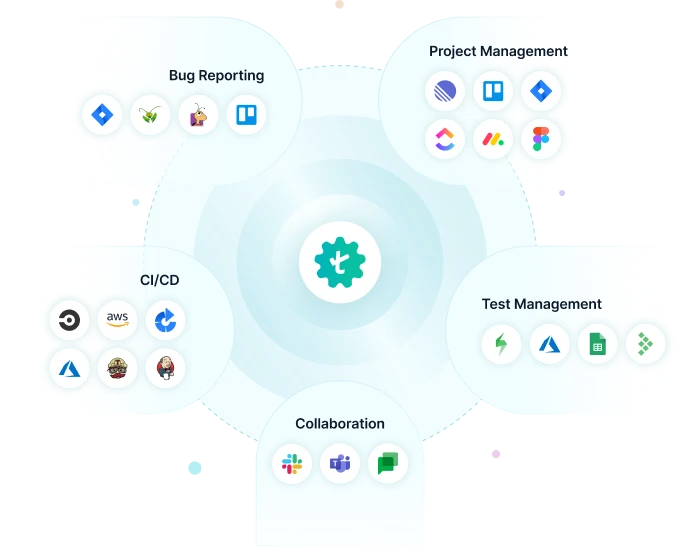
Seamless Integrations for Your AI-Powered Test Automation
Testsigma integrates with all your favourite tools, including JIRA, Jenkins, Azure DevOps, GitHub, and Bamboo to achieve continuous testing and feedback at DevOps speed. Ultimately, accelerate your release cycles and reduce time-to-market.
Frequently Asked Questions

Ship Better Experiences with Agentic AI
Cross-Device Testing