
Self-Healing Test Automation Software. Built to Survive Every UI Change
- Zero disruption when the UI changes. Testsigma catches the broken locator before it wrecks your test.
- Say goodbye to manual fixes. The AI finds the right element and updates the script on its own.
- Stop hunting through the DOM. Your team spends that time on real bugs, not broken selectors.
- Keep your suite reliable, sprint after sprint. Tests run without a maintenance backlog piling up.
Get started now for FREE
By submitting the form, you would be accepting the Privacy Policy.























Key features of Testsigma’s self-healing engine
No-Code AI Locator Detection
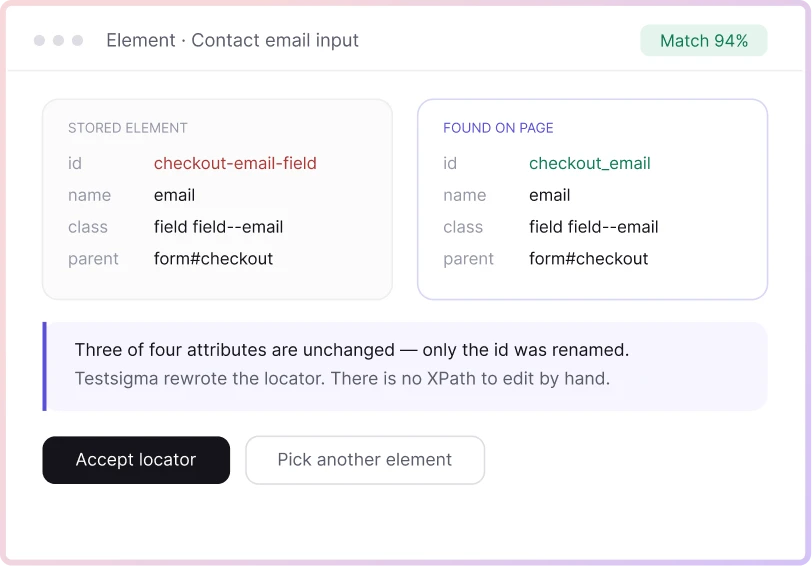
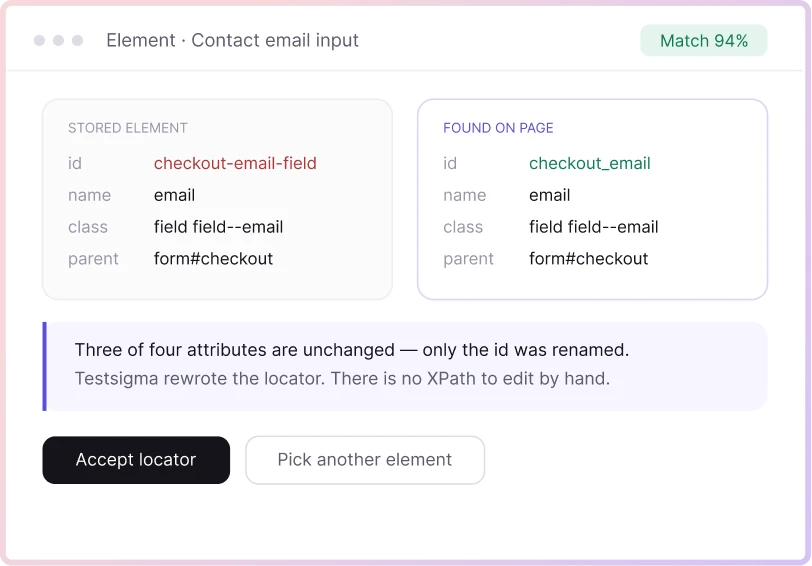
When a locator breaks, Testsigma’s auto-healing detects it and updates the locator itself. No script edits, no XPath rewrites. A tester works in the same low-code interface used to build the test and never touches the underlying code.
Real-Time Healing During Execution
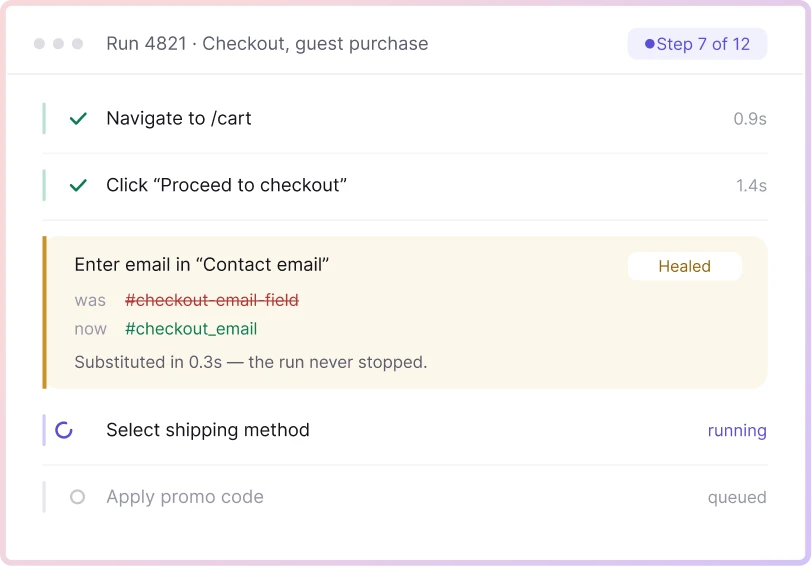
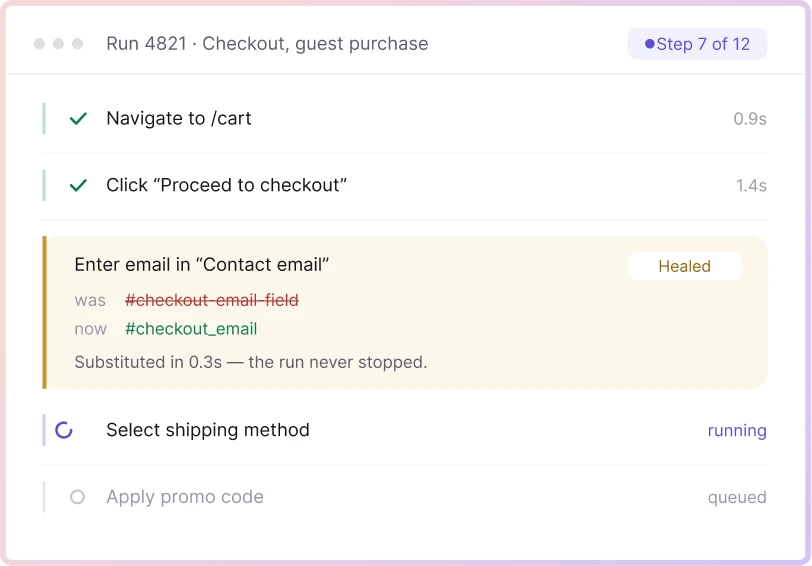
Auto-healing runs during test execution itself, not as a separate cleanup step afterward. The moment a locator fails to match, Testsigma compares it against the previous version, finds the closest match, and substitutes it so the test keeps running in that same run.
Auto-Heal Insights & Human Review
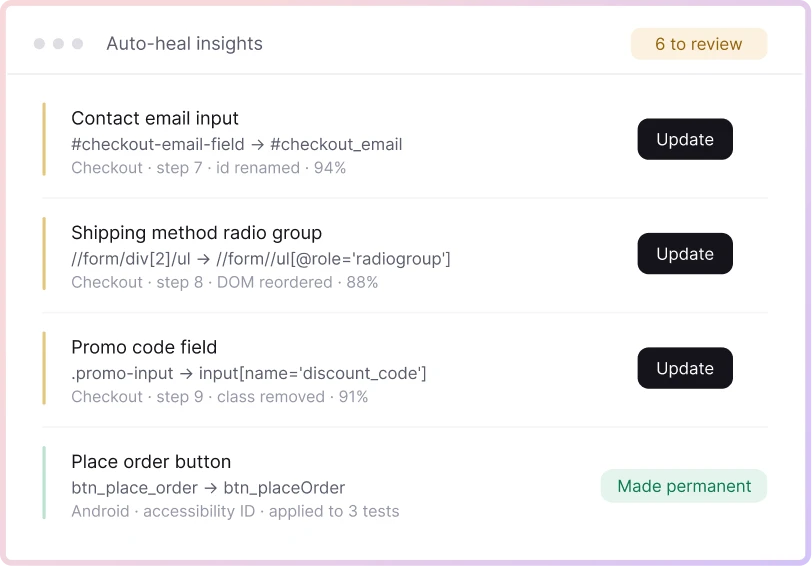
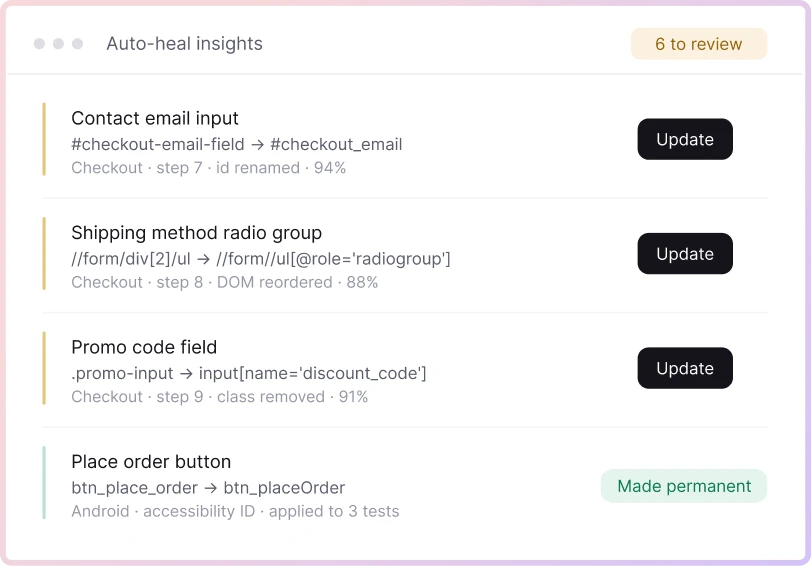
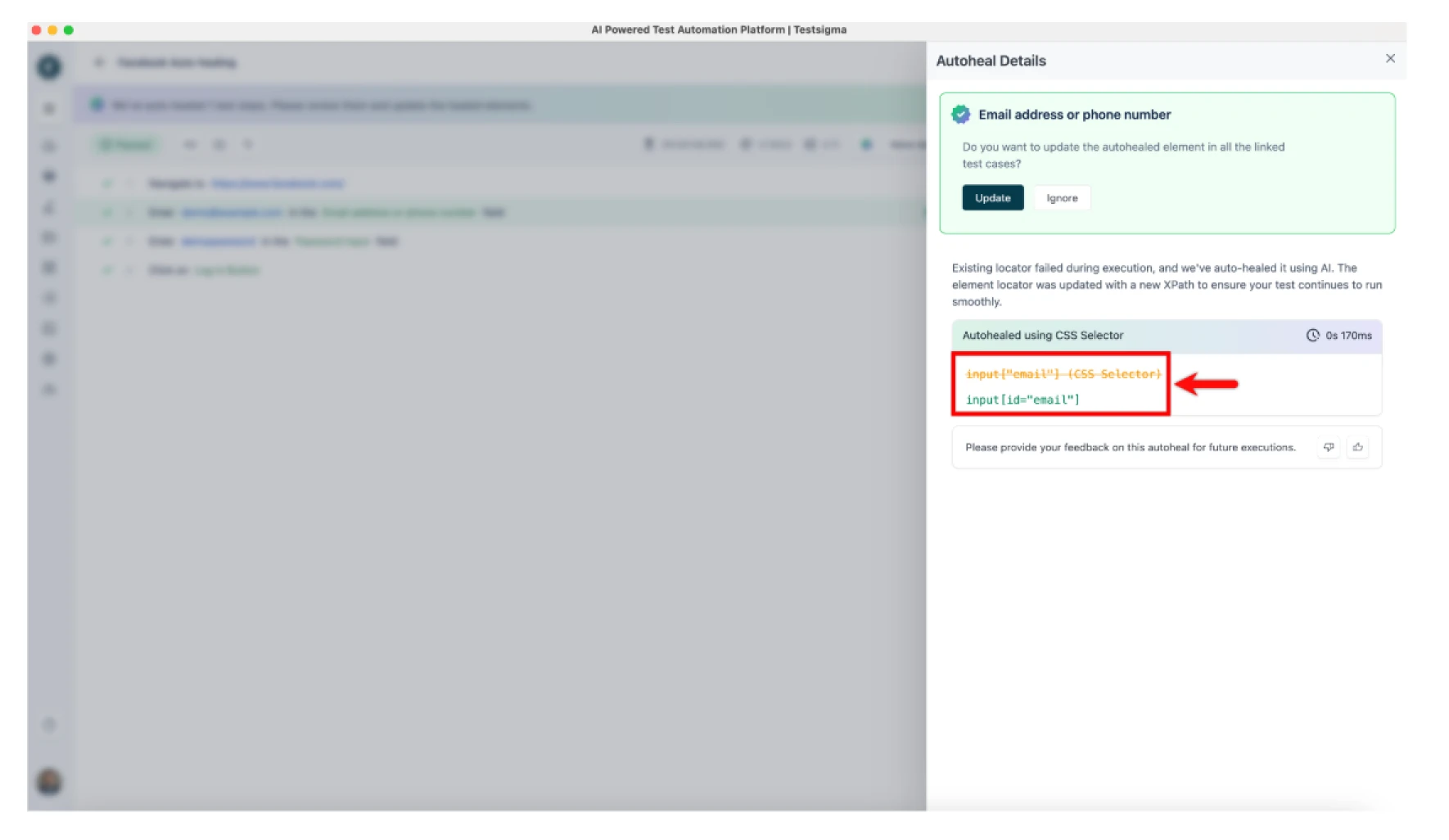
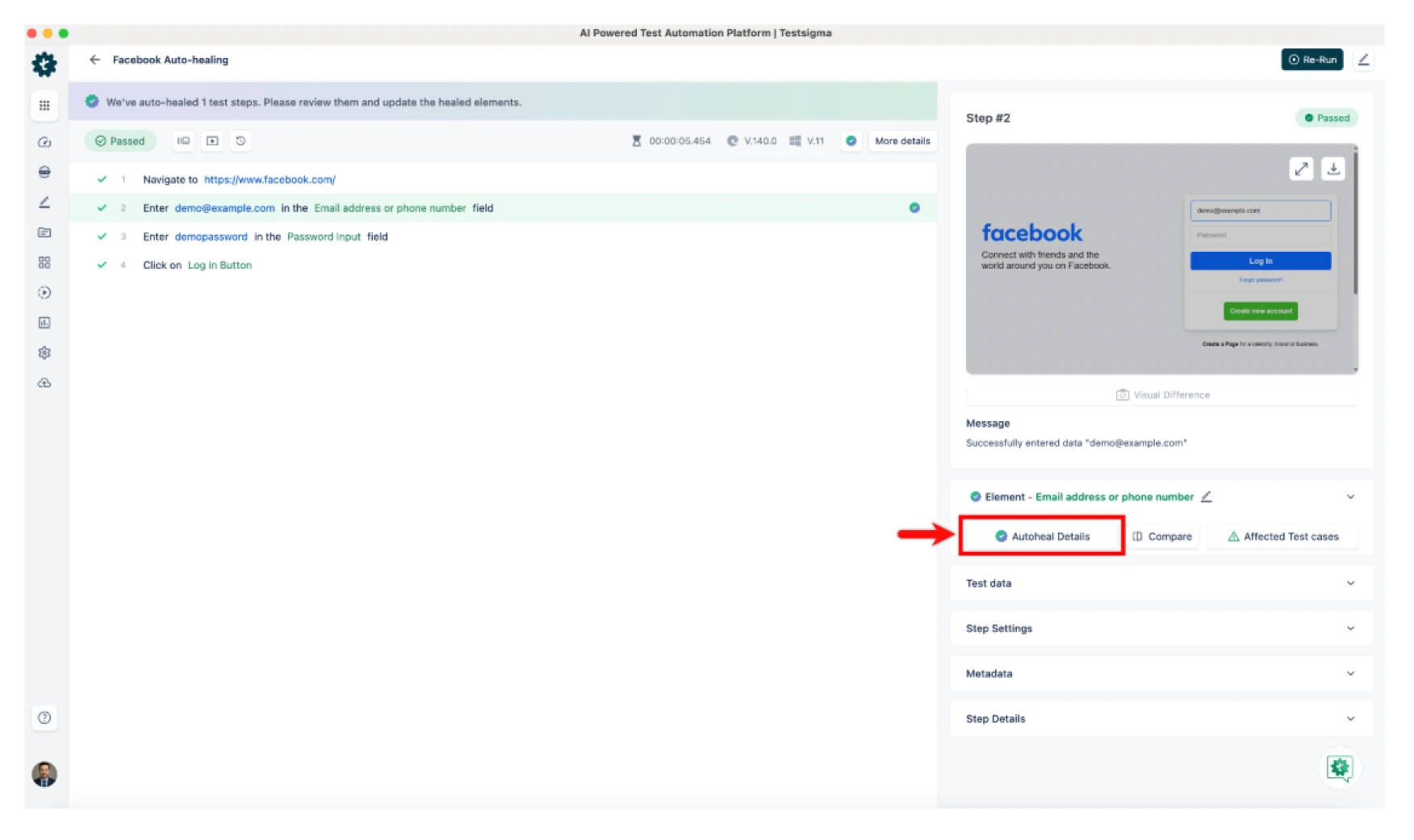
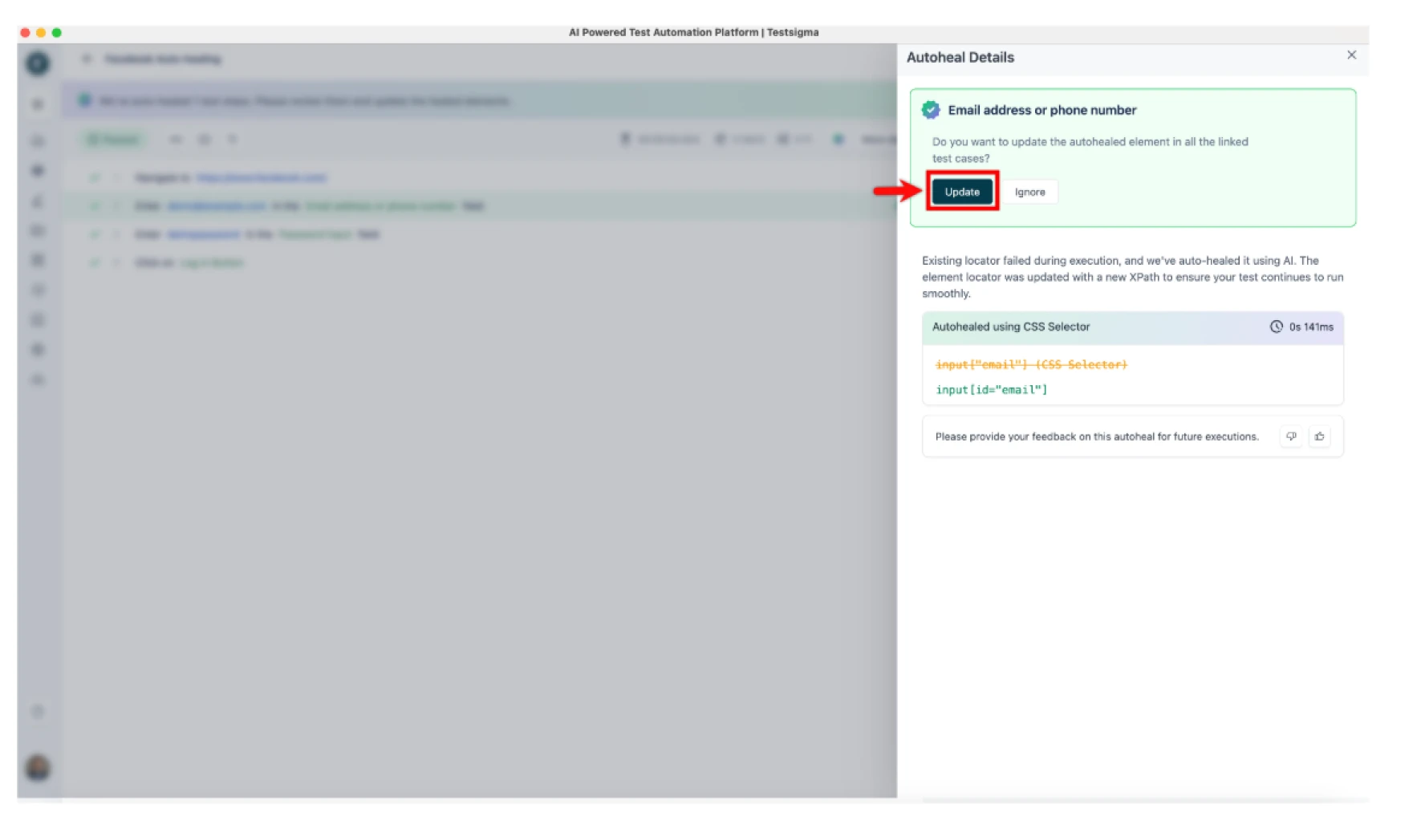
Every healed step shows up in Auto-Heal Insights: which element changed, and how the locator was updated. A tester reviews the change and clicks Update to make it permanent, or leaves it as a one-time fix. Nothing gets overwritten without someone seeing it first.
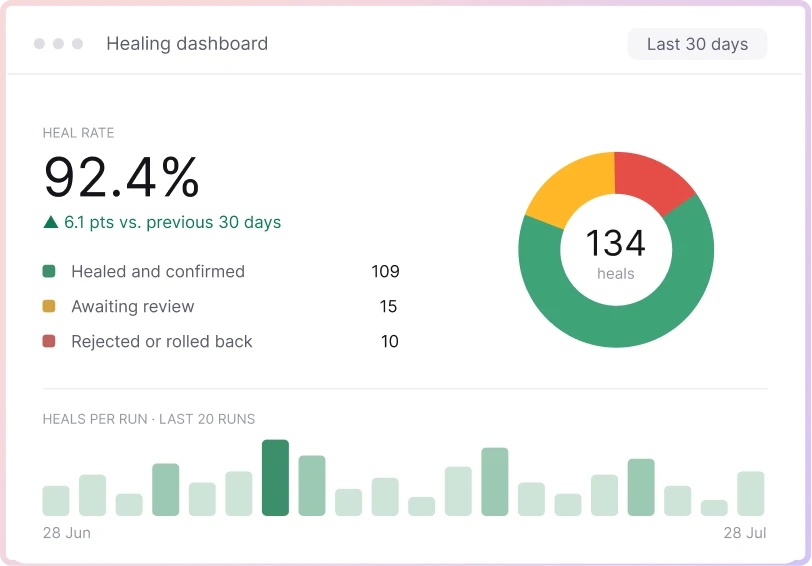
Healing Dashboards & Audit Logs
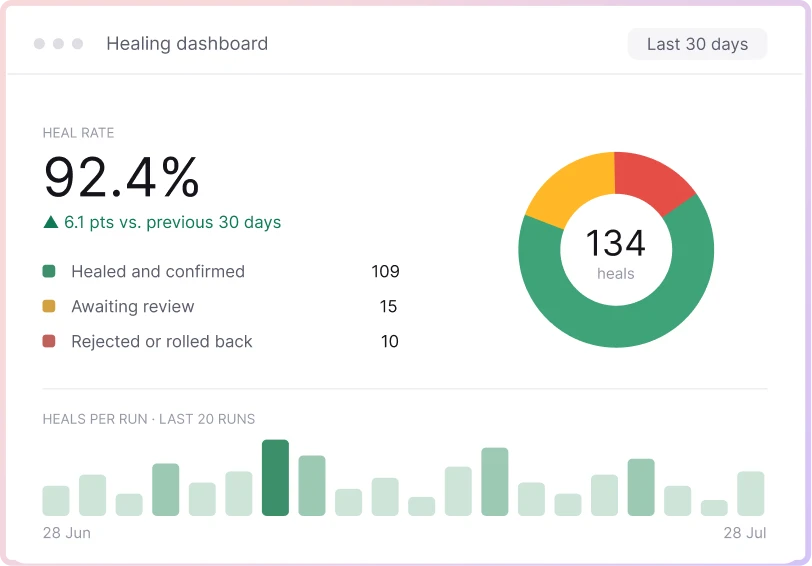
Auto-Heal Insights sits alongside Testsigma's Activity Monitoring, which logs test and system activity with a traceable history. Between the two, a team can see what healed, when, and roll back a bad update.
Analyzer Agent: Investigating Failures
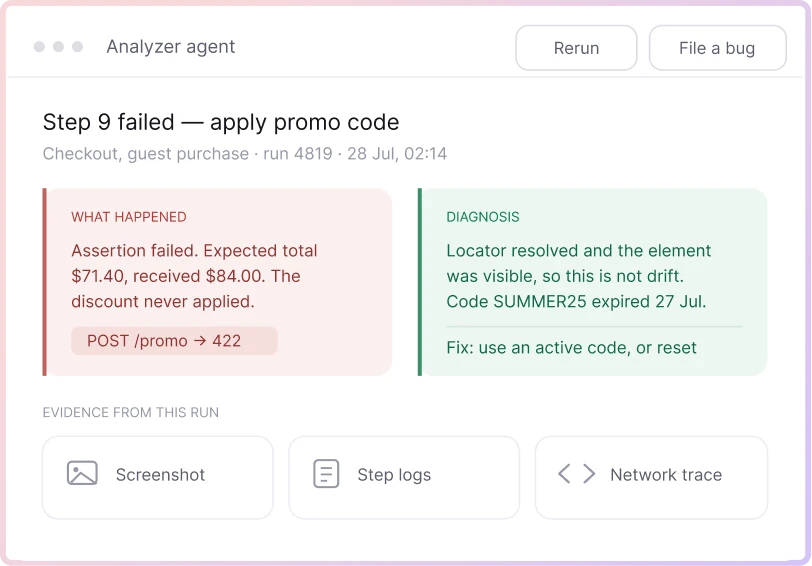
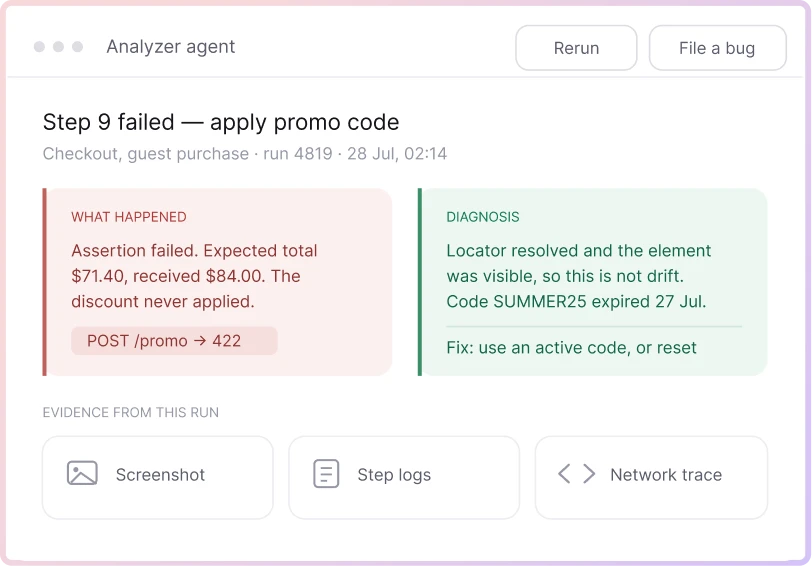
Not every red test is a UI change. The Analyzer Agent reviews a failed step and reports the error type, the likely root cause, screenshots from the run, and a suggested fix, so a tester can tell a real regression from routine drift before deciding what to do next.
Supported Locators
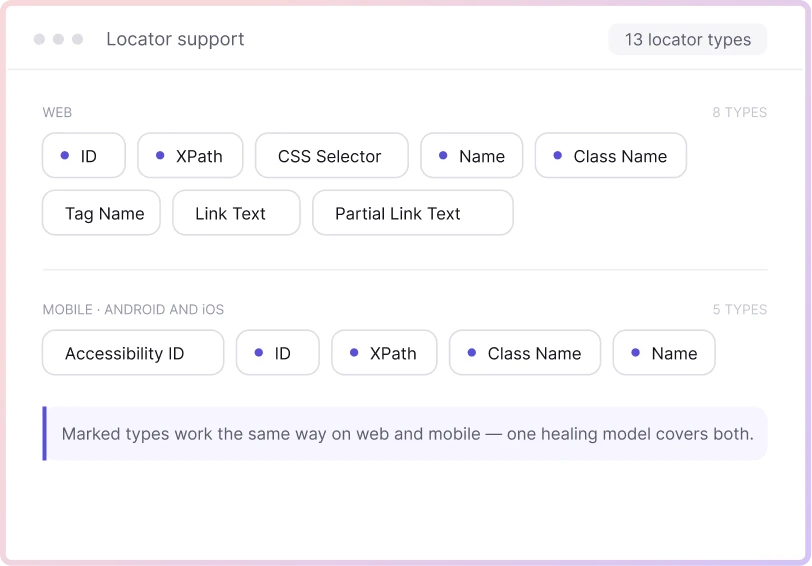
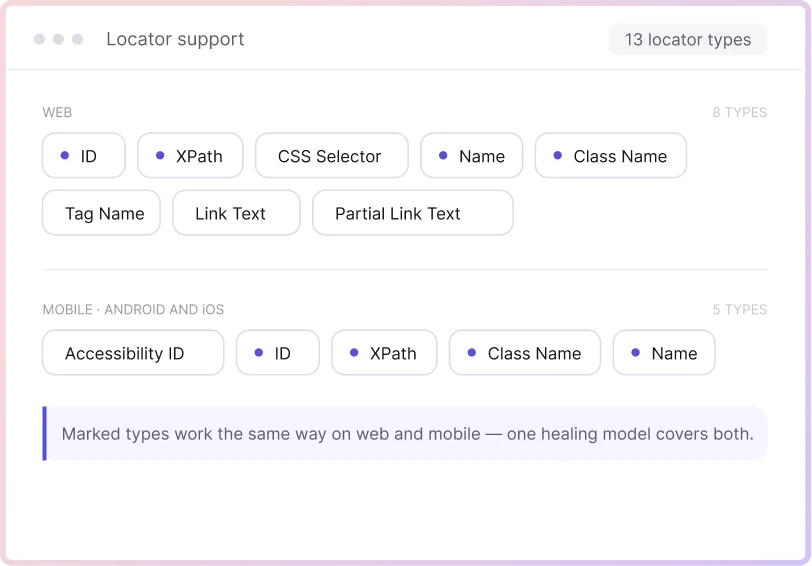
Web: ID, XPath, CSS Selector, Name, Class Name, Tag Name, Link/Partial Link Text.
Mobile (Android/iOS): Accessibility ID, ID, XPath, Class Name, Name.
What is self-healing
test automation?
AI Test Automation is the practice of using artificial intelligence to design, execute, and maintain software tests more efficiently. It enables tools to learn from previous test runs, predict failures, self-heal broken test scripts, and automatically adapt to UI or logic changes. By reducing manual effort and improving accuracy, AI-powered test automation helps teams accelerate releases while ensuring consistent software quality across web, mobile, and API applications.
How self-healing
works in Testsigma
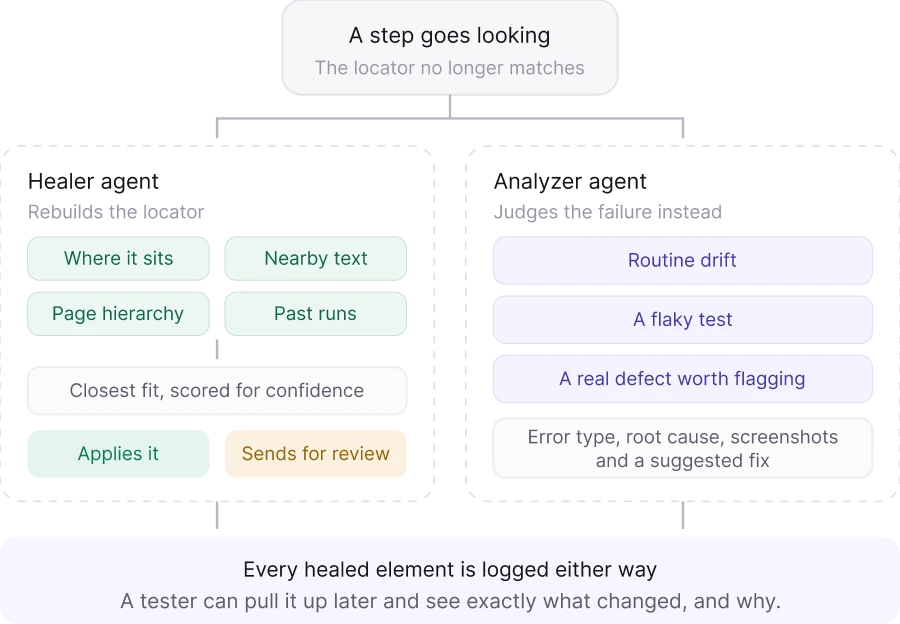
Testsigma splits this job across two AI agents. The Healer Agent does the actual fixing: when a step can’t find its original locator, whether that’s an ID, XPath, CSS, Name, or Class, it checks whatever else it has to work with. Where the element sits. What text is near it. Its place in the page hierarchy. How it’s matched in past runs.
It proposes the closest fit, scores its own confidence in that guess, and either applies the fix or sends it to a human, depending on how the settings are configured. The Analyzer Agent runs alongside it, and its job is different: instead of fixing locators, it looks at the failure itself and decides whether it’s routine drift, a flaky test, or an actual defect worth flagging. Every healed element gets logged either way, so a tester can pull up that log later and see exactly what changed and why.
How Testsigma Compares to Other Jira
Test Management Tools
| Traditional maintenance | Self-healing | |
|---|---|---|
| Locator updates | Manual, one script at a time | Automatic, AI-matched |
| Time to fix | Hours to days per release | Seconds, during the run |
| Finding the cause | Digging through logs | Dashboard and audit log |
Types of self-healing Testsigma supports

Locator-based healing
(ID, XPath, CSS, Name, Class)
Code changes tend to hit these attributes first. When an ID, XPath, CSS selector, Name, or Class stops resolving, the Healer Agent re-maps the step to the correct element on its own, and nobody has to go rewrite the original locator by hand. This is the most common healing scenario, since it covers the everyday case of a developer renaming an ID or restructuring a class list during a normal sprint.

Visual and AI-based element
matching
Attributes alone don't always cut it. If the DOM gets restructured, say a redesign moves a form from one container to another, Testsigma's AI falls back on visual and contextual signals instead: where the element sits, the text around it, how it behaved in past runs. This is a fallback layer, not the default path, and it's what lets healing survive changes that go beyond a single renamed attribute.

Cross-platform healing (web,
mobile, Salesforce)
Not a web-only feature. The same healing logic runs against mobile app locators, including identifiers comparable to Accessibility ID, and against Salesforce’s UI, which changes constantly because it’s metadata-driven. Teams testing all three get the same maintenance relief in each one, not a weaker version on two of them. That matters more than it sounds: a lot of self-healing marketing quietly means "web only," and testers find that out after they’ve already built mobile or Salesforce suites on the assumption that healing would follow them there.
Manual test maintenance vs. self-healing
automation
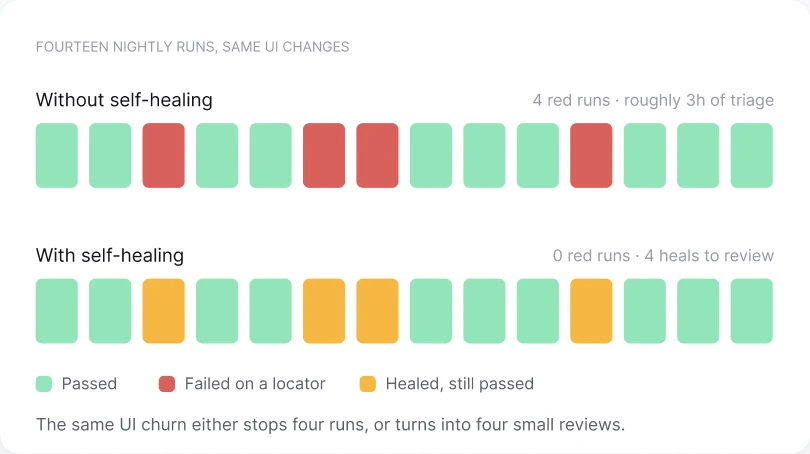
Manual maintenance gets worse as the suite grows and the app changes more often. Every broken locator turns into a ticket somebody has to pick up. Self-healing breaks that link between how fast you release and how much maintenance it costs.
| Manual maintenance | Self-healing automation | |
|---|---|---|
| Speed and scale | Slows down as the suite grows | Stays flat no matter the suite size |
| Test coverage | Shrinks under time pressure | Grows without adding headcount |
| Cost over time | Climbs with each release | Drops after setup |
| Maintenance effort | High, reactive | Low, automatic |
| When you still need manual review | Always | Low-confidence matches, critical flows |
Benefits of self-healing test automation

90% Less Test Maintenance
Testsigma's own platform data shows teams cutting test maintenance effort by up to 90% after turning on auto-healing. That's most of the locator-chasing gone.

10X Faster Test Development
Paired with no-code test creation, teams build and maintain suites up to 10X faster than writing and fixing scripts by hand. Faster authoring plus less maintenance means the gap between a manual-heavy team and a Testsigma team widens every sprint.

Fewer Broken CI/CD Builds
Healing happens in the same run as the failure, so a UI change that would normally red a pipeline gets resolved instead. Fewer broken builds means fewer pings asking why the nightly run failed again.

Broader Test Coverage
Nagra DTV automated 2,500 test cases in under 8 months and increased test case creation speed by 400% after moving off its in-house WebDriver IO framework, without hiring more automation engineers.

QA Cycle Times Cut in Half
A sweeping UI overhaul broke Nokia's Selenium-Python framework outright in 2022. The team rebuilt on Testsigma, automated roughly 70% of regression testing, and cut QA cycle times in half.

400% Automation Speed Increase
Nagra's Sr. Engineering Manager put it plainly: moving off their in-house framework increased test case creation speed by 400% and eliminated manual testing across all 2,500 automated cases.
How to enable self-healing in Testsigma
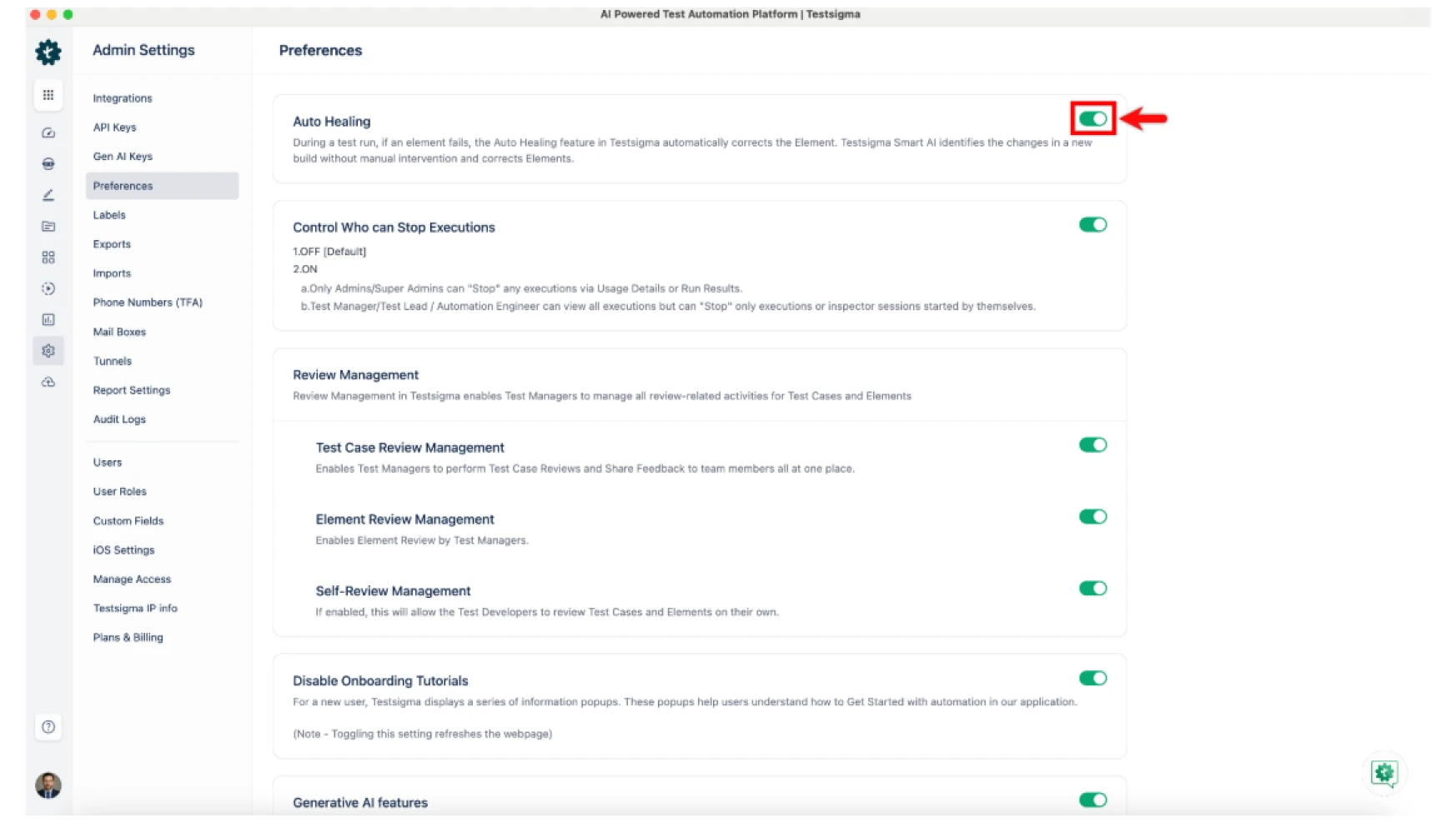
Go to Settings > Preferences and switch on the Auto Healing toggle. For deeper matching, turn on Generative AI healing in the same panel.
Is self-healing test
automation reliable?
For the job it's built to do, yes. Fixing routine, cosmetic locator breaks caused by normal UI changes is exactly what this is good at. It's not a replacement for judgment on every failure, and it was never meant to be, which is the whole reason confidence scoring and audit logs exist.
When self-healing can
mask real bugs
The real concern is when a button stops working because the feature is broken—not because the UI changed. If AI relies only on visual matching, it could click the wrong element and falsely mark the test as passed. That's why self-healing must tell the difference between a UI change and a genuine defect.
How Testsigma's Analyzer Agent prevents over-healing
That's where the Analyzer Agent comes in. Before any fix is applied, it checks whether a failure is just a UI change or a real product issue, sending uncertain cases to a human for review. The Healer Agent only updates locators—it never decides whether a broken feature is acceptable.
Testament of the Value Delivered
25M+
TestExecuted
10K+
QATeams
70%
ReducedTesting Effort

We run 5000+ test cases overnight, wake up to the results, and fix issues swiftly. The productivity boost and resource optimization achieved with Testsigma are truly commendable.


Automated Test Coverage


The clean UI and intuitive workflows make automation effortless. Instead of writing test cases from scratch, I can generate accurate AI-driven cases in minutes for any type of testing.

Reduced Test Creation Time
We run 5000+ test cases overnight, wake up to the results, and fix issues swiftly. The productivity boost and resource optimization achieved with Testsigma are truly commendable.
Automated Test Coverage
The clean UI and intuitive workflows make automation effortless. Instead of writing test cases from scratch, I can generate accurate AI-driven cases in minutes for any type of testing.
Reduced Test Creation Time